Kubernetes OrbStack Mac: Zero to 9 Services
Three days ago, I couldn't tell you the difference between a Pod and a Deployment. Not honestly. I'd read about Kubernetes maybe a dozen times, nodded along to architecture diagrams, and quietly closed the tab every time a tutorial hit the kubectl apply section. It felt like infrastructure knowledge meant for someone else — platform engineers, DevOps specialists, people who dream in YAML.
Then I needed to ship InfraWhisper.
InfraWhisper is a monitoring and analytics platform I've been building — dashboard, API server, AI engine, data collector, stream processor, plus the databases and message brokers that hold it all together. Nine services total. Running them with docker-compose up worked fine on my laptop. But the moment I started thinking about production — about what happens when the API server crashes at 3 AM, about scaling the stream processor during traffic spikes, about deploying updates without taking down the dashboard — Docker Compose started feeling like a bicycle on a highway.
So I sat down with Kubernetes. And OrbStack. And three days of stubborn persistence.
What came out the other side was a fully orchestrated local cluster with all nine InfraWhisper services running, self-healing, and reachable through a single ingress endpoint. This post is everything I learned doing that — the mental models that actually clicked, the commands that matter, and the mistakes that cost me hours so they don't cost you the same.
Why I Stopped Treating Kubernetes Like It Was Optional
Here's what finally pushed me over the edge. I had InfraWhisper running in Docker Compose on a staging server. Five services, four databases, everything talking through a Docker network. It worked. Then the Kafka container ran out of memory and died.
Nothing restarted it. The stream processor, which depends on Kafka, started throwing connection errors. The collector, which pushes events into Kafka, began silently dropping data. The dashboard still loaded — everything looked fine — but the entire analytics pipeline was dead. I didn't notice for six hours.
With Docker alone, a crashed container stays crashed. You need external tools — systemd, supervisord, custom health check scripts — to bolt on the reliability that should be built in. You're assembling a Frankenstein of bash scripts and praying they cover every failure mode.
Kubernetes handles this natively. A container dies, Kubernetes restarts it. A node goes down, Kubernetes reschedules pods to healthy nodes. You push a broken update, you run one command and you're back to the previous version. This isn't theoretical resilience — it's how production infrastructure actually works at companies running real workloads.
The gap between "I understand why Kubernetes matters" and "I can actually deploy to Kubernetes" felt enormous from the outside. It wasn't. And OrbStack made that gap even smaller.
But before I get into the setup, you need the mental model. Because Kubernetes commands make zero sense until you understand the six concepts they operate on.
The Six Kubernetes Concepts That Actually Matter
I've read Kubernetes documentation that introduces forty concepts in the first chapter. That's overwhelming and, honestly, counterproductive. When I was learning, only six concepts mattered for getting a real application deployed. Everything else is optimization you can learn later.
Container. Docker packages your application code, dependencies, and runtime into a single portable unit. You build it once, and it runs identically on your laptop, a CI server, or a cloud VM. If you've ever used Docker at all, you already know this one. The container is the atom.
Pod. Kubernetes doesn't run containers directly. It wraps them in a Pod — the smallest deployable unit in K8s. A Pod is usually one container, sometimes two if you need a sidecar (like a log forwarder running alongside your app). Think of the Pod as a container with a postal address.
Deployment. This is where Kubernetes starts earning its complexity. A Deployment defines how many copies (replicas) of a Pod should be running at any time. If you say "I want 3 replicas of the API server" and one crashes, Kubernetes notices the gap and spins up a replacement automatically. You declare the desired state. Kubernetes makes reality match.
Service. Pods get random IP addresses that change every time they restart. A Service gives your Pod a stable DNS name — so the dashboard can reach the API server at api-server:8080 instead of hunting for whatever IP the Pod got this time. Services are the internal phone book of your cluster.
Ingress. Services handle traffic inside the cluster. Ingress handles traffic coming from outside — browser requests, API calls, webhooks. It's the front door, routing app.local/api to the API server service and app.local/dashboard to the dashboard service.
Namespace. A logical boundary that groups related resources. All nine InfraWhisper services live in the infrawhisper namespace. This keeps them isolated from system services and anything else running on the cluster. It's also why almost every kubectl command I'll show you ends with -n infrawhisper.
That's it. Container goes into a Pod. Deployment manages how many Pods run. Service gives them stable names. Ingress routes external traffic in. Namespace keeps everything organized.
With that mental model loaded, the commands start making intuitive sense. And speaking of commands — let me tell you about the tool that made running all of this locally feel almost effortless.
Why OrbStack Changed My Entire Experience
I'd tried Docker Desktop before. It worked, but "worked" is doing heavy lifting in that sentence. The memory usage was brutal — 4 to 6 GB just sitting idle. The Kubernetes integration felt bolted on, often lagging behind or behaving differently from real clusters. Starting it up took long enough that I'd open Twitter while waiting, which is how you lose twenty minutes before writing a single line of code.
OrbStack is different in ways that genuinely matter for learning Kubernetes.
It's lightweight. Starting up takes seconds, not minutes. Memory usage stays sane — hovering around 1.5 to 2 GB even with a full Kubernetes cluster running. On an M-series Mac, it feels native in a way Docker Desktop never did.
The Kubernetes integration is built-in and just works. One toggle in the settings, and you've got a single-node cluster running locally. No minikube. No kind. No configuring VM drivers. OrbStack gives you a real Kubernetes cluster backed by containerd, accessible through the standard kubectl and helm commands. Your kubeconfig gets updated automatically.
But the feature that saved me the most time — and I didn't expect this — is the visual interface. OrbStack shows you your running containers, pods, resource usage, and logs in a clean GUI. When you're learning Kubernetes and a pod keeps crash-looping, being able to see what's happening across all nine services simultaneously is worth more than any terminal output. I'd have the OrbStack dashboard on one monitor and my terminal on the other, watching pods come up in real time as I applied configurations.
I want to be clear: OrbStack isn't a toy or a shortcut. The cluster it runs behaves like a real Kubernetes cluster. Everything I learned and deployed locally transferred directly when I later pointed kubectl at a remote cluster. OrbStack just removed the friction that wasn't teaching me anything useful.
Getting it running took about five minutes. Install OrbStack from orbstack.dev, open it, enable Kubernetes in settings, and verify with:
kubectl cluster-info
kubectl get nodes
If both commands return clean output, you have a working cluster. Time to deploy something real.
How Does Kubernetes Architecture Actually Work Under the Hood?
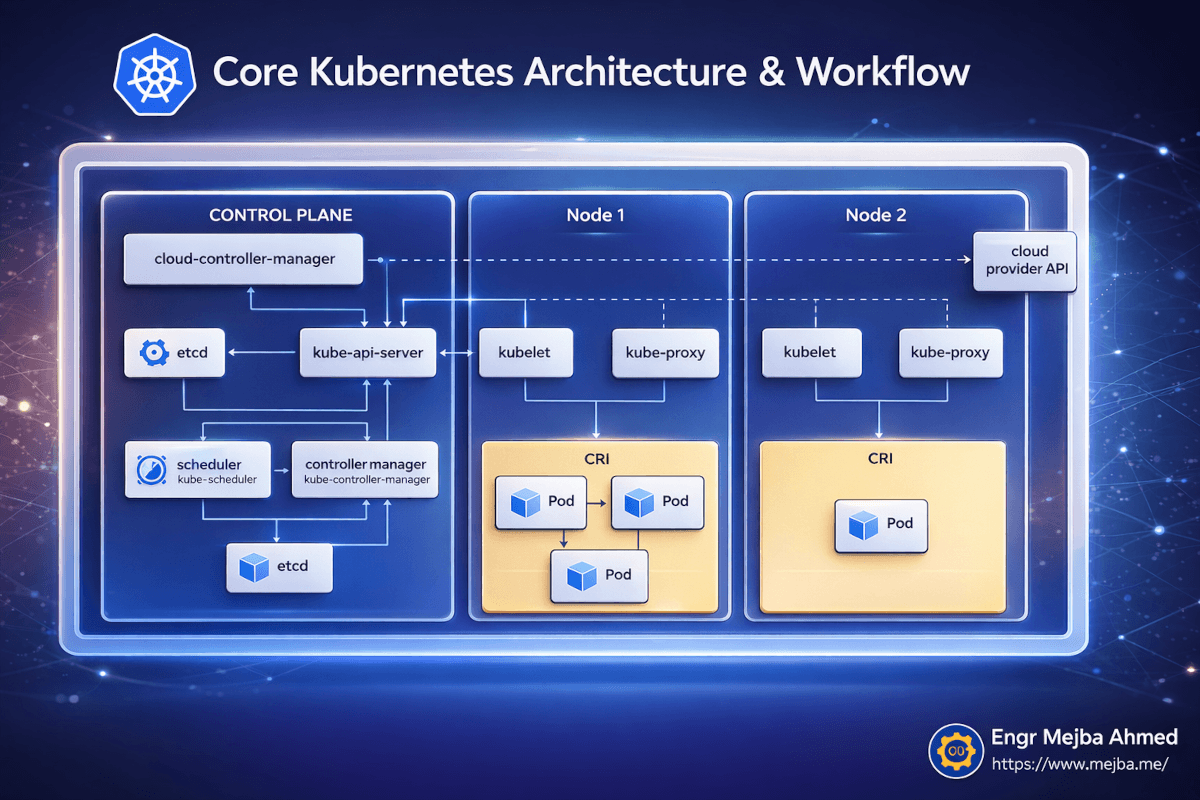
Before I started deploying services, I spent an hour understanding what was actually running on my machine. This paid off enormously when things broke later, because I could reason about where in the system the problem was.
Kubernetes follows a control plane and worker node architecture. Even on a single-node local cluster like OrbStack provides, both roles run on the same machine.
The Control Plane is the brain. It has five components that matter:
The kube-api-server is the front door to everything. Every kubectl command you run talks to this API server. It validates your requests, updates the cluster state, and tells nodes what to do. When I run kubectl apply -f deployment.yaml, I'm sending that YAML to the API server, which stores the desired state and orchestrates making it real.
etcd is the database that stores all cluster state. Every deployment, every service, every pod status — it's all in etcd. I never touched it directly, but knowing it exists explains why Kubernetes can recover from almost anything. The desired state is always persisted.
The scheduler decides which node should run each new pod. On a multi-node cluster, this is where bin-packing and resource optimization happen. On my single-node OrbStack setup, every pod goes to the same node — but the scheduler still runs, and understanding it helped when I moved to multi-node later.
The controller manager runs the reconciliation loops that make Kubernetes self-healing. It constantly compares "what should be running" (the desired state in etcd) against "what is actually running" (the current state from node reports). When there's a mismatch, it takes action. Pod crashed? The controller manager notices and tells the scheduler to create a replacement.
The cloud-controller-manager handles integrations with cloud providers — load balancers, storage volumes, node lifecycle. On a local OrbStack cluster, this is mostly dormant, but it's good to know it exists for when you deploy to AWS or GCP.
On the Node side, three things run:
kubelet is the agent on each node that receives instructions from the API server and manages pods on that node. It pulls container images, starts containers, reports health back to the control plane.
kube-proxy handles network routing within the node, making sure traffic directed at a Service reaches the right Pod.
CRI (Container Runtime Interface) is the actual container runtime — containerd in OrbStack's case — that runs your containers.
Here's why this architecture overview isn't just academic: when my API server pod kept crash-looping, I knew to check kubectl describe pod (which queries the API server for pod events) rather than just staring at logs. The describe output told me the container was being OOM-killed — a resource limit problem, not a code problem. Without the mental model of how Kubernetes components interact, I would have wasted hours debugging application code that was actually fine.
Now — let me walk you through deploying all nine InfraWhisper services. This is where theory becomes practice.
Deploying InfraWhisper: 9 Services, One Cluster, Zero Prayers
The InfraWhisper stack has nine services that need to come up in a specific order and talk to each other reliably:
Infrastructure layer: Postgres (primary database), Redis (caching and sessions), Kafka (event streaming), ClickHouse (analytics database)
Application layer: API Server (REST endpoints), AI Engine (ML inference), Collector (event ingestion), Stream Processor (real-time data pipeline), Dashboard (frontend UI)
In Docker Compose, I'd define all nine in one file with depends_on directives and hope for the best. In Kubernetes, each service gets its own Deployment and Service definition, and the orchestration is handled properly.
Step 1: Create the namespace.
Everything InfraWhisper lives in its own namespace. This is the first thing I created:
kubectl create namespace infrawhisper
One command, and now I have an isolated space for the entire application. Every command from here forward uses -n infrawhisper to target this namespace.
Step 2: Deploy the infrastructure services first.
Databases and message brokers need to be running before the application services that depend on them. I wrote Kubernetes manifests (YAML files) for each one — a Deployment defining the container image and resource limits, and a Service defining how other pods can reach it.
Here's a simplified example for Postgres:
# deploy/k8s/postgres-deployment.yaml
apiVersion: apps/v1
kind: Deployment
metadata:
  name: postgres
  namespace: infrawhisper
spec:
  replicas: 1
  selector:
    matchLabels:
      app: postgres
  template:
    metadata:
      labels:
        app: postgres
    spec:
      containers:
      - name: postgres
        image: postgres:16.2
        ports:
        - containerPort: 5432
        env:
        - name: POSTGRES_DB
          value: "infrawhisper"
        - name: POSTGRES_USER
          valueFrom:
            secretKeyRef:
              name: db-credentials
              key: username
        - name: POSTGRES_PASSWORD
          valueFrom:
            secretKeyRef:
              name: db-credentials
              key: password
        resources:
          requests:
            memory: "256Mi"
            cpu: "250m"
          limits:
            memory: "512Mi"
            cpu: "500m"
        volumeMounts:
        - name: postgres-storage
          mountPath: /var/lib/postgresql/data
      volumes:
      - name: postgres-storage
        persistentVolumeClaim:
          claimName: postgres-pvc
---
apiVersion: v1
kind: Service
metadata:
  name: postgres
  namespace: infrawhisper
spec:
  selector:
    app: postgres
  ports:
  - port: 5432
    targetPort: 5432
Notice a few things. The resources block sets memory and CPU limits — this is what prevents one service from starving the others. The secretKeyRef pulls credentials from a Kubernetes Secret instead of hardcoding them in the YAML. The PersistentVolumeClaim ensures data survives pod restarts.
I created similar manifests for Redis, Kafka, and ClickHouse. Then deployed them all at once:
kubectl apply -f ./deploy/k8s/
This command reads every YAML file in the directory and applies them to the cluster. Within thirty seconds, OrbStack's visual interface showed four pods spinning up — I watched the status go from ContainerCreating to Running one by one.
Step 3: Verify infrastructure is healthy before deploying apps.
kubectl get pods -n infrawhisper
Output looked something like:
NAME                          READY   STATUS    RESTARTS   AGE
postgres-7d4f8b6c9-x2k1p     1/1     Running   0          45s
redis-5c8f9d7b2-m9n3q         1/1     Running   0          44s
kafka-6b2e8c4d1-k7p2r         1/1     Running   0          43s
clickhouse-8a1d3f5e6-j4w8t    1/1     Running   0          42s
All Running, all 1/1 ready. If any pod showed CrashLoopBackOff — and trust me, several did during my earlier attempts — I'd use:
kubectl describe pod postgres-7d4f8b6c9-x2k1p -n infrawhisper
kubectl logs -n infrawhisper deployment/postgres
The describe command shows events — image pull failures, OOM kills, mount errors. The logs command shows the container's stdout. Between these two, I diagnosed every issue I hit.
Step 4: Deploy the application services.
With infrastructure running, I deployed the five application services — API Server, AI Engine, Collector, Stream Processor, and Dashboard. Same pattern: Deployment + Service manifests, applied with kubectl apply.
The API Server needed to know how to reach Postgres and Redis. In Docker Compose, you'd use the service name from the compose file. In Kubernetes, you use the Service name — which I'd set to postgres and redis. So the connection strings looked like:
DATABASE_URL=postgresql://user:pass@postgres:5432/infrawhisper
REDIS_URL=redis://redis:6379
KAFKA_BROKERS=kafka:9092
Same concept, different orchestrator. The Service abstraction means my application code didn't care whether it was running in Docker Compose or Kubernetes. It just connected to postgres:5432 either way.
Step 5: Set up Ingress for external access.
With all nine services running inside the cluster, I needed a way to reach the dashboard and API server from my browser. That's Ingress:
apiVersion: networking.k8s.io/v1
kind: Ingress
metadata:
  name: infrawhisper-ingress
  namespace: infrawhisper
spec:
  rules:
  - host: infrawhisper.local
    http:
      paths:
      - path: /api
        pathType: Prefix
        backend:
          service:
            name: api-server
            port:
              number: 8080
      - path: /
        pathType: Prefix
        backend:
          service:
            name: dashboard
            port:
              number: 3000
After applying this, infrawhisper.local/api routed to the API server and infrawhisper.local loaded the dashboard. OrbStack handles the DNS resolution for .local domains automatically on Mac — no /etc/hosts editing needed.
I sat there staring at the dashboard loading from a Kubernetes cluster running on my laptop. Nine services. All healthy. All talking to each other. I'd gone from "I don't really understand Pods" to this in three days.
But the deploy was just the beginning. The real power showed up when I needed to update, debug, and scale services without downtime.
The Deploy-Update-Rollback Workflow That Made Me Trust Kubernetes
Here's the workflow that now runs on repeat whenever I push changes to any InfraWhisper service:
1. Write the code change.
2. Build a new Docker image with a version tag:
docker build -t api-server:v2 .
3. Push it to a container registry:
docker push ghcr.io/yourname/api-server:v2
4. Deploy via Helm (or update the image directly):
Using Helm — which manages all the Kubernetes manifests as a single package:
helm upgrade --install infrawhisper ./deploy/helm/infrawhisper -n infrawhisper
Or update just one service's image:
kubectl set image deployment/api-server api-server=ghcr.io/yourname/api-server:v2 -n infrawhisper
5. Watch the rollout happen in real time:
kubectl rollout status deployment/api-server -n infrawhisper
This command blocks until the new pods are running and the old ones are terminated. You see output like:
Waiting for deployment "api-server" rollout to finish: 1 old replicas are pending termination...
deployment "api-server" successfully rolled out
6. If something breaks — roll back instantly:
kubectl rollout undo deployment/api-server -n infrawhisper
One command. The previous version is running again within seconds. No downtime. No panic. No SSH-ing into a server and running git revert and praying.
You can even check rollout history to see all previous versions:
kubectl rollout history deployment/api-server -n infrawhisper
This workflow is what converted me. The safety net of instant rollback changed how I think about deployments. I'm more willing to ship small, frequent updates because the cost of a bad deploy dropped from "scramble for thirty minutes" to "run one command."
That said, I hit plenty of problems along the way. Here's what broke and how I fixed it.
What Went Wrong (And the Commands That Saved Me)
Kubernetes has a reputation for being complex. Honestly? The complexity isn't in the concepts — it's in the debugging. When something doesn't work, the error messages can be cryptic, and knowing which command to run in which situation takes practice.
Here are the debugging patterns I actually used, organized by the type of problem.
When pods won't start — check events first, logs second.
kubectl describe pod api-server-7f9c8d5b6-x2k9p -n infrawhisper
The Events section at the bottom of describe output tells you why a pod isn't starting. Common culprits I hit:
ImagePullBackOff— the image tag didn't exist in the registry. Usually a typo in the version tag.CrashLoopBackOff— the container starts but immediately crashes. Time to check logs.Pendingwith no events — usually a resource problem. The scheduler can't find a node with enough CPU or memory.
Once I knew the pod was starting but crashing, logs were the next stop:
kubectl logs -n infrawhisper deployment/api-server
For a crash that already happened (the pod restarted and the logs are from the new instance):
kubectl logs -n infrawhisper deployment/api-server --previous
That --previous flag saved me at least twice. The current instance's logs said "healthy startup." The previous instance's logs showed the actual segfault. Without --previous, I'd have been chasing ghosts.
When you need to watch logs in real time:
kubectl logs -n infrawhisper deployment/api-server -f
The -f flag streams logs live. I kept this running in a terminal while testing the stream processor's connection to Kafka. Watching the connection handshake succeed in real time felt like watching a rocket launch.
When you want a broader view of everything in the namespace:
kubectl get all -n infrawhisper
This shows all deployments, services, pods, and replica sets at once. It's my "what's the state of the world" command. I probably ran it a hundred times over three days.
For a specific deployment with extra detail:
kubectl get deployment api-server -n infrawhisper -o wide
The -o wide flag shows the container image and node information — useful for confirming that the right version is actually running.
When you need to watch pod status changes live:
kubectl get pods -n infrawhisper -w
The -w flag watches for changes. When I deployed an update, I'd run this in one terminal and kubectl rollout status in another, watching old pods terminate and new ones come up.
When you need to force-restart a service:
Sometimes a service gets into a weird state. Rather than deleting and recreating the deployment, a rollout restart bounces the pods gracefully:
kubectl rollout restart deployment/api-server -n infrawhisper
This creates new pods before terminating old ones, so there's no downtime. If you need to kill a specific pod (maybe it's stuck and you want Kubernetes to recreate it):
kubectl delete pod api-server-7f9c8d5b6-x2k9p -n infrawhisper
The Deployment controller immediately notices the missing pod and creates a replacement. Self-healing in action.
When you need to scale under load:
kubectl scale deployment/api-server --replicas=3 -n infrawhisper
Three instances of the API server, load-balanced automatically through the Service. I tested this by running a load generator against the API and watching OrbStack show three pods sharing the traffic evenly. Scaling back down is the same command with --replicas=1.
Every one of these commands became muscle memory by the end of day three. The first day, I was googling every flag. By the third day, I was chaining them together without thinking.
The Honest Parts Nobody Writes About
Here's where I break from the typical "I learned Kubernetes and it was magical" narrative. Because some of it wasn't magical. Some of it was frustrating in ways that made me question whether this was worth the investment.
YAML is painful. There's no getting around it. Kubernetes manifests are verbose, indentation-sensitive, and easy to misconfigure silently. I spent forty-five minutes debugging a deployment that wouldn't create pods because I'd put containerPort at the wrong nesting level. YAML linters help — I started running kubeval on every manifest before applying — but the developer experience of writing Kubernetes YAML is the weakest link in the entire ecosystem.
Helm helps but adds its own complexity. Helm charts package your Kubernetes manifests into reusable, parameterized templates. For InfraWhisper, I created a Helm chart that let me deploy the entire stack with one command:
helm upgrade --install infrawhisper ./deploy/helm/infrawhisper -n infrawhisper
Huge improvement over applying fifteen YAML files individually. But Helm templates use Go templating syntax, which is its own learning curve. I now had three layers to debug: my application code, my Kubernetes manifests, and my Helm templates wrapping those manifests. On two occasions, a rendering error in a Helm template produced valid YAML that configured the wrong thing. Fun times.
Resource limits are a guessing game at first. How much memory does a Kafka broker need? How much CPU should the AI engine get? I had no idea. My first attempt gave every service the same limits — 256Mi memory, 250m CPU — and the AI engine immediately got OOM-killed because ML inference needs more than 256 megabytes of RAM. Obviously.
I ended up profiling each service in Docker first, noting peak memory and CPU usage, and setting limits at roughly 2x peak with some headroom. Not scientific, but it worked. Kubernetes gives you kubectl top pods -n infrawhisper to monitor actual usage once things are running, and I adjusted limits over a couple of days based on real data.
Learning curve is front-loaded. Day one was brutal. Day two was productive. Day three was fast. The concepts aren't inherently difficult — they're just unfamiliar. Once the mental model clicks (and I hope the one I laid out earlier helps), the commands become logical extensions of what you're trying to do. "I want three replicas" maps directly to kubectl scale. "I want to see logs" maps to kubectl logs. The command names are the concepts.
If I had to do this over, I'd change one thing: I'd start with two or three services instead of nine. Deploying everything at once meant that when something broke, the failure could be in any of nine places. Starting small, verifying the workflow with a simple app and a database, then adding services incrementally — that's the approach I'd recommend.
This is also one of those situations where Kubernetes isn't always the right answer. If your application is a single container with a database, Docker Compose is probably fine. The overhead of Kubernetes only pays off when you have multiple services that need independent scaling, self-healing, and zero-downtime deployments. For InfraWhisper's nine services, that threshold was clearly met. For a two-container side project, it might not be.
The InfraWhisper kubectl Cheat Sheet
After three days of deploying, debugging, updating, and occasionally swearing at YAML files, these are the commands I reach for constantly. I keep this list pinned in my terminal notes.
Before deploying — verify your cluster is ready:
kubectl cluster-info
kubectl get nodes
kubectl get all -n infrawhisper
Deploy and apply configurations:
kubectl apply -f deployment.yaml
kubectl apply -f ./deploy/k8s/
helm upgrade --install infrawhisper ./deploy/helm/infrawhisper -n infrawhisper
Update a service image:
kubectl set image deployment/api-server api-server=ghcr.io/yourname/api-server:v2 -n infrawhisper
kubectl rollout status deployment/api-server -n infrawhisper
Check what's running:
kubectl get pods -n infrawhisper
kubectl get pods -n infrawhisper -w
kubectl describe pod api-server-7f9c8d5b6-x2k9p -n infrawhisper
kubectl get deployment api-server -n infrawhisper -o wide
Read logs and debug:
kubectl logs -n infrawhisper deployment/api-server
kubectl logs -n infrawhisper deployment/api-server -f
kubectl logs -n infrawhisper deployment/api-server --previous
Rollback when things go wrong:
kubectl rollout undo deployment/api-server -n infrawhisper
kubectl rollout history deployment/api-server -n infrawhisper
Scale up or down:
kubectl scale deployment/api-server --replicas=3 -n infrawhisper
Restart or delete:
kubectl rollout restart deployment/api-server -n infrawhisper
kubectl delete pod api-server-7f9c8d5b6-x2k9p -n infrawhisper
The full build-to-deploy cycle:
docker build -t api-server:v2 .
docker push ghcr.io/yourname/api-server:v2
helm upgrade infrawhisper ./deploy/helm/infrawhisper -n infrawhisper
kubectl get pods -n infrawhisper
kubectl logs -n infrawhisper deployment/api-server -f
kubectl rollout undo deployment/api-server -n infrawhisper  # if needed
Print this. Pin it. You'll use every single one of these within your first week.
What This Changes Going Forward
Three days ago, the idea of running nine services in an orchestrated cluster felt like something that required months of DevOps training and a team of infrastructure engineers.
It doesn't. It requires a Mac, OrbStack, some YAML files, and the willingness to push through about eight hours of confusion before things start clicking. The tools have gotten good enough that a software engineer — not a DevOps specialist, a software engineer — can go from zero to a production-grade local cluster in a long weekend.
What I'm carrying forward isn't just a working Kubernetes setup. It's a mental shift. I think about applications differently now. I think in services and pods and deployments. I think about what happens when things fail, not just when they work. I think about scaling as a slider I can adjust, not a crisis I have to engineer my way out of.
The InfraWhisper deployment is still running on my local OrbStack cluster as I write this. Nine pods, all green, all healthy. Kafka processing events, ClickHouse storing analytics, the dashboard rendering data in real time. And if any of them crash right now — Kubernetes will bring them back before I finish this sentence.
If you've been putting off Kubernetes the way I was — treating it like infrastructure knowledge meant for someone else — here's your sign. Install OrbStack tonight. Deploy one service tomorrow. Add a second the day after. By day three, you'll wonder why you waited this long.
What's the one service in your stack that keeps crashing and nobody restarts it? Start there.
Kubernetes OrbStack Mac: Common Questions
Can I run Kubernetes locally on Mac without Docker Desktop?
Yes. OrbStack provides a full Kubernetes cluster on Mac without Docker Desktop. It includes both Docker and Kubernetes, uses significantly less memory (around 1.5-2 GB versus 4-6 GB), and starts in seconds. Install from orbstack.dev and enable Kubernetes in settings.
How many services can OrbStack handle on a local Kubernetes cluster?
OrbStack comfortably handles 10-15 services on an M-series Mac with 16 GB RAM. I ran 9 services including Postgres, Redis, Kafka, and ClickHouse simultaneously without performance issues. Resource limits on each deployment prevent any single service from starving the others.
What is the difference between kubectl apply and helm upgrade?
kubectl apply -f deploys individual YAML manifest files directly. helm upgrade --install deploys a Helm chart — a package of templated manifests with configurable values. Helm is better for complex multi-service applications; raw kubectl works fine for simple deployments. See the Implementation section above for both approaches.
How do I debug a pod stuck in CrashLoopBackOff?
Run kubectl describe pod [pod-name] -n [namespace] to check Events for the crash reason, then kubectl logs -n [namespace] deployment/[name] --previous to see logs from the crashed instance. The --previous flag is critical — it shows the last container's output, not the current restart attempt.
Is Kubernetes overkill for small projects?
For a single container with a database, yes — Docker Compose is simpler and sufficient. Kubernetes pays off when you run 3+ services that need independent scaling, self-healing restarts, and zero-downtime deployments. The break-even point is roughly where docker-compose starts requiring external tools for reliability.
Whether Local Kubernetes Fits Your Setup
OrbStack takes you from zero to nine services on Kubernetes on a Mac without the usual pain — a real local loop for learning and testing before production. My Argo CD local setup and agentic OS architecture go deeper.
If you want a local Kubernetes and GitOps setup built for you, that's something I do through Ramlit.