Open Swarm: The Multi-Agent System I Now Run Daily
The prompt was twelve words long. "Build me a complete investor pitch deck for an AI brand monitor SaaS."
I hit enter inside a black terminal window, walked to the kitchen, made coffee, came back. Fifteen-ish minutes later there was a fully designed PDF sitting in my output folder. Cover slide. Problem statement. Market size with a real TAM/SAM/SOM chart that pulled actual numbers from a competitor analysis. A product overview with mockups. A go-to-market slide. Pricing tiers. A founder section. A closing ask. Eighteen slides, designed — not "here's a markdown bullet list, you can paste this into Google Slides yourself." A finished thing.
The first time I ran the same prompt on a single Claude Code agent six months ago, what I got back was a markdown outline. A good outline. But an outline. The mental gap between "I will write you the deck content" and "here is a deck" is the gap I'd been waiting for somebody to close in the open-source world for two years.
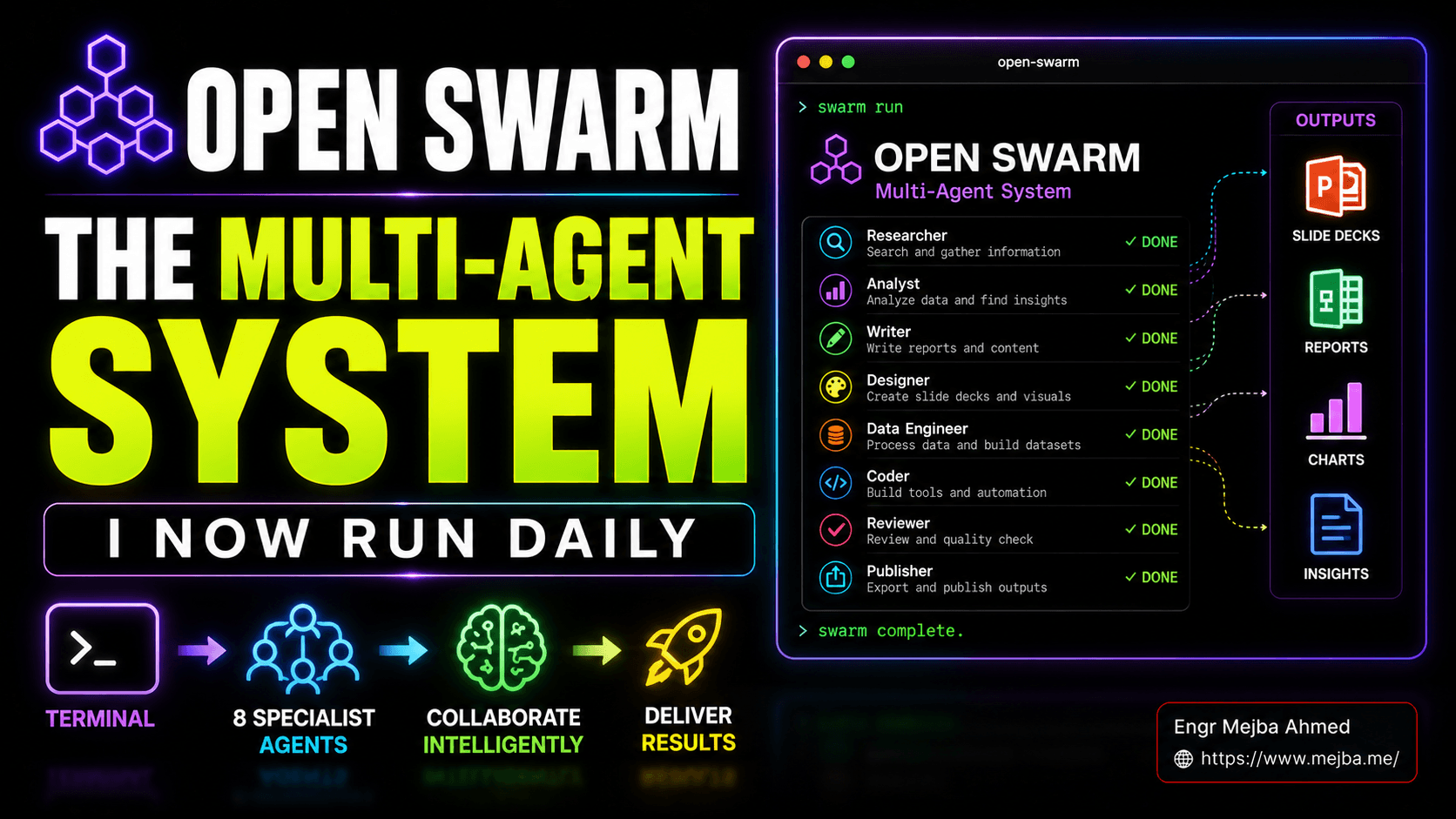
The thing that closed it for me is called Open Swarm. It's an open-source multi-agent system from VRSEN — the same team behind Agency Swarm — that lives in your terminal, runs eight specialist agents under one orchestrator, and produces real deliverables (slide decks, research reports, charts, docs, images, video) from a single prompt. The repo's tagline says "Claude Code for everything except coding." That's accurate. It's also slightly underselling what's actually happening here.
I've now been running it inside my daily content pipeline for the better part of two weeks. Let me tell you what works, what doesn't, and why I think this is the most interesting thing happening in the open-source agent space right now.
What Open Swarm Actually Is
Strip away the marketing language and Open Swarm is three things stacked on top of each other.
At the bottom is OpenCode — the open-source terminal AI coding agent that has roughly 150,000 GitHub stars, 850-plus contributors, and an installed base of millions of developers. OpenCode itself is a TUI written on top of Bubble Tea, multi-provider, model-agnostic. If you've used Claude Code, OpenCode looks and feels like its sibling. Same keyboard-first vibe, same persistent session, same "your project lives in the current directory" philosophy.
In the middle is Agency Swarm, also from VRSEN — a multi-agent orchestration framework that extends the OpenAI Agents SDK to give you reliable communication flows, structured handoffs between specialists, and provider-flexible execution (Anthropic, OpenAI, Gemini, Grok, anything LiteLLM-routable). Agency Swarm has been in production with VRSEN's clients for a while; it's the engine that keeps the agents from talking past each other.
On top of those two sits Open Swarm itself: a curated set of eight specialist agents, opinionated prompt files, and a first-run setup wizard that gets you from git clone to a working swarm in under a minute on a clean machine. The eight specialists, as configured out of the box:
- Orchestrator — the boss. Receives your prompt, decomposes it into sub-tasks, assigns work to specialists, retries on failures, hands the assembled output back to you.
- General agent — the catch-all problem-solver for tasks that don't fit a specialist. Web access, lightweight reasoning, glue work.
- Slides agent — designs and renders presentation decks. The headline feature. Charts, layouts, brand consistency, exports to PDF.
- Deep research agent — the long-context reader. Pulls competitive analyses, market reports, multi-source syntheses. Spends real tokens chasing primary sources.
- Data analysis agent — the spreadsheet brain. Takes raw numbers or research output, produces charts, tables, summaries.
- Docs agent — writes structured documents. Reports, briefs, one-pagers, contracts, internal memos. Markdown- and PDF-aware.
- Video agent — generates short-form video output. Still early, but functional for product mockups and pitch animations.
- Image agent — generates images for slides, mockups, brand assets. Hooks into image-gen providers.
That's the standard distribution. None of it is hardcoded. Every specialist is just a prompt file plus a tool list plus a model assignment, and you can edit, fork, or replace any of them — which is the part I want to talk about properly later in this post, because it's where Open Swarm starts to look less like a product and more like a platform.
The repo is at github.com/VRSEN/OpenSwarm. The setup wizard handles authentication, dependencies, and configuration. Clone, run the wizard, drop in your API keys, you're up.
Why Specialization Beats One Big Agent
I've spent two years watching people try to make a single generalist agent do everything. I've built versions of that myself. The pattern fails the same way every time, and it fails for reasons that are structural, not fixable with a smarter prompt.
A single agent doing research, analysis, writing, design, and rendering accumulates context across all five jobs in one window. By the time it's writing slide three, it's carrying around the raw scraped HTML from the research step, the failed chart attempts from the data step, the half-edited Markdown from the docs step. Context windows are finite. Even with 1M-token Opus, you don't actually want a million tokens of stale junk in scope when you're asking the model to make a tight visual decision about a chart axis. Hallucinations rise with context noise. Output quality degrades.
Specialists fix this by enforcing scope. The research agent gets a clean window that contains only the research task. When it finishes, it hands a clean summary up to the orchestrator and dies. The data analyst gets a clean window that contains only the summary plus its own tools. By the time the slides agent picks up the result, it's working with a tight, curated context — not a soup of seven previous tasks.
That's the thing the agent swarm architecture post I wrote in March was getting at, and it's the exact pattern that Anthropic's own forked sub-agents in Claude Code implemented at the platform level. Open Swarm is the same idea generalized to non-coding work.
There's a second benefit that matters more than people realize: each specialist has its own toolset. The research agent has web search, web browsing, RSS readers, document fetchers. The data analyst has code execution and chart libraries. The slides agent has rendering tools. A single generalist has to juggle every tool in one prompt — which means more decisions about which tool to use, which means more tool-selection mistakes, which means slower runs and worse output. Specialists make tool choice an architectural decision, not a runtime one.
The third benefit is dumb but real: you can run them in parallel. Research and image generation don't depend on each other, so the orchestrator can fire them off concurrently. On a multi-deliverable task, parallelism cuts wall-clock time by a meaningful chunk.
The Head-To-Head: Open Swarm vs Claude Code vs Open Claw
I gave the same prompt to three different setups and looked at what came back. The prompt: "Build me a complete investor pitch deck for an AI brand monitor SaaS targeting agencies. Include market size, competitor analysis, product overview, pricing tiers, GTM, and a 12-month roadmap." Same model selection where possible (Sonnet 4.6 across the board for the worker agents, Opus 4.7 for any orchestration step that supported it).
Claude Code, single-agent. Output: a 4,400-word markdown document. Excellent content — Anthropic's models are unbeatable on long-form structured writing — but it's a document, not a deck. Sections labeled "Slide 1: Cover," "Slide 2: Problem," etc. To turn this into something I'd actually show an investor, I'd need to spend 90+ minutes in Figma or Slides moving content around, designing layouts, building charts. Time saved versus writing from scratch: maybe 60-70%. Time to a finished, presentable deliverable: still more than two hours.
Open Claw (the agent automation platform I covered in my Open Claw vs Claude Code comparison). Output: a Google Slides deck via browser automation. Real slides, real layouts, but the design quality was the kind of generic blue-and-white template you'd recognize from any "AI generated this for me" demo. Charts were placeholder bars. The content was about 80% as good as Claude Code's because the workflow involved more agent hops and more chances for context drift. Time to a finished deck: about 40 minutes, mostly automated.
Open Swarm. Output: a 18-slide PDF, designed, with real charts populated from real research data, brand-consistent typography, hand-tuned layouts per slide. Plus — and this surprised me — a separate one-page executive summary doc generated by the docs agent in parallel with the deck, plus mockup images from the image agent that the slides agent had embedded into the product overview slide. Time elapsed: 17 minutes. Token cost: roughly $4.20 worth of Sonnet/Opus calls across all eight agents. Quality of finished output: the closest to "I would show this to an investor without re-touching it" I've seen out of any open agent system.
The interesting part isn't that Open Swarm won. The interesting part is how it won. It didn't win because the underlying model was smarter — same models. It won because the architecture put each model call in a context where it could do its best work, then assembled the pieces. That's an engineering result, not a model result. And engineering results compound.
A Real Run, Step By Step
Let me walk you through what actually happens when you fire a prompt at Open Swarm. I'm using the investor pitch deck run from above as the example because the trace is the most illustrative.
T+0s — prompt arrives at the orchestrator. The orchestrator agent reads the prompt and decomposes it. Internally it generates a task graph: research the AI brand monitoring market, identify 4-6 competitors, build a TAM/SAM/SOM model, draft product positioning, design 18 slides with consistent branding, produce a one-page exec summary, generate one product mockup image. The task graph is held in the orchestrator's working memory, not written to disk — though you can flip a flag to dump it for debugging.
T+30s — research agent fires. Deep research agent gets the competitive analysis sub-task. It runs multi-step web searches, pulls pages from G2, Crunchbase, ProductHunt, the competitors' own marketing sites. It writes a structured competitive grid in markdown — name, positioning, pricing, target segment, weaknesses. About 90 seconds of wall-clock, roughly 200K tokens of model time. The output gets handed back to the orchestrator as a clean summary; the orchestrator strips the raw scraped HTML before passing anything downstream.
T+2m — research and image agents run in parallel. The orchestrator fires the deep research agent again on a separate task (TAM/SAM/SOM market sizing) at the same time as the image agent (product mockup of a dashboard). Parallelism is the cheap-but-real time saver here — these two tasks don't share context.
T+4m — data analysis agent picks up the research output. The market sizing research comes back as raw industry numbers and methodology notes. The data agent ingests it, runs Python in a sandboxed code interpreter, generates a TAM/SAM/SOM chart with proper axes and labels, plus a competitor pricing comparison chart. The charts are saved to a temp directory the slides agent will read from.
T+7m — slides agent starts the design pass. This is the agent doing the heaviest single chunk of work. It reads the research summaries, the charts, the brand requirements (it asks the orchestrator if it needs anything ambiguous). It generates a deck specification — 18 slides, each with a layout type, content, image references, chart references. Then it renders. Out the other side: a real PDF.
T+12m — docs agent writes the one-pager in parallel with the slides render. Pulls the same research, condenses to a 600-word executive summary, exports to PDF. Independent of the slides agent because the input data is the same and the outputs don't need to coordinate.
T+17m — orchestrator assembles, validates, returns. Final check: do all the deliverables exist, are the file sizes reasonable, did any agent log a critical error, did the run complete inside its retry budget. Then control returns to the terminal and you see the file paths in your output folder.
What you don't see during this run is the orchestrator's retry loop. The first competitive analysis attempt failed — one of the competitor sites returned a Cloudflare challenge that broke the scraper. The orchestrator caught the failure, retried with a different scraping strategy, and never bothered the human (me) about it. That's a small thing that matters a lot. A single-agent setup either fails in front of you or hides the failure entirely. A swarm with a real orchestrator handles failure as a routing problem.
Customizing Your Own Swarm
This is the part of Open Swarm that I think is undersold in most coverage I've seen. The default eight-agent distribution is a starting point, not a ceiling. Every specialist is a prompt file, a tool list, and a model assignment. You can fork the repo and change all of it.
Concretely, the structure looks like this. Each agent lives as a directory with a prompt.md (system prompt), a tools.yaml (the tool list with permissions), and a config block in agents.md (model selection, temperature, retry policy, parent orchestrator binding). Adding a new agent is genuinely a copy-paste-edit job, not a "go learn the framework first" job. If you've ever written a Claude Code subagent definition, this is the same mental model with a different filename.
Here's the one I built that I think makes the case best. I forked Open Swarm and turned it into an SEO swarm — a different specialist mix optimized for the kind of work I do every week. The default eight became:
- Orchestrator — unchanged, still the boss.
- Keyword planner — replaced "general agent." Pulls Search Console queries, runs intent classification, builds keyword clusters. Tool list: GSC API client, a small custom Python tool for cluster scoring.
- Brief writer — replaced "slides agent." Takes a target keyword cluster and produces a structured content brief: SERP analysis, competitor angle map, recommended outline, target word count, internal link suggestions.
- Deep research agent — kept, but with a smaller tool set and a tighter prompt focused on industry research over general research.
- Data agent — replaced with a GA4/GSC analytics specialist. Pulls performance data, builds dashboards, flags decaying pages.
- Docs agent — kept. Now writes the actual blog post once the brief is approved.
- Crawler agent — replaced "video agent." Runs a lightweight technical SEO crawl on a target domain — Schema markup checks, internal link integrity, status code sweep.
- Image agent — kept, used for blog hero images.
The forking process took an afternoon. The biggest single-day productivity jump my pipeline has had in months. The headline you should take from that anecdote isn't that I built an SEO swarm. It's that the customization surface is shallow enough that "build me a swarm for my exact job" is a Saturday project, not a quarter of engineering work. Anyone whose work involves multiple discrete sub-tasks that a generalist gets wrong can do this.
The other piece worth flagging: VRSEN has hinted at an "agent builder agent" — an agent that takes a natural-language description of a workflow ("I want a swarm that does competitor monitoring for SaaS startups") and spins up the specialist mix for you. That's still in development at the time I'm writing this. When it lands, the customization barrier drops from "Saturday project" to "five minutes." That changes the math on who can use this.
Where It Fits In My Workflow Alongside Claude Code
I want to be honest about this part because the "X kills Y" framing is lazy and usually wrong. Open Swarm hasn't replaced Claude Code in my stack. It runs next to it.
Claude Code is still where my coding work happens. Refactoring, building agents, debugging, infrastructure work — it's the right tool for "the deliverable is a code change." Anthropic's models have an edge on long-form code reasoning that nothing in the open ecosystem has matched yet. Claude Code's forked sub-agents and the recent doubling of rate limits after the SpaceX compute deal make it more useful than ever for production engineering work.
Open Swarm is the right tool for "the deliverable is something other than code." Decks. Reports. Mockups. Charts. Briefs. The kind of work that used to be a chain of "Claude wrote me an outline, then I designed it in Figma, then I made charts in Numbers, then I exported to PDF" and now collapses into one prompt and one terminal session.
The rest of the stack: I still use Open Claw for visual workflows where the human supervision pattern matters — kanban-style board, human approval gates between stages, stakeholder visibility. That's the wrong fit for a heads-down deliverable run; it's the right fit for a multi-day cross-functional project. And Codex sits in the corner for the few specific tasks where GPT's reasoning style beats Claude's.
Three terminal-first tools, one mental model, three deliberate choices about which one fires for which job. The shared thread is that all three are local-files, terminal-first, and tolerant of multi-hour autonomous runs. None of them are SaaS dashboards I have to babysit. That terminal-first orientation is what I keep coming back to as the underrated thing. If you've used a UI-driven agent platform recently, you know what I mean — there's a dragging friction in the constant context switching between your editor and the agent's web interface. Open Swarm and its peers eliminate that. The agent runs where I already live.
What's Coming
A few things on the Open Swarm roadmap are worth flagging because they change what you can do with it before the year is out.
Tighter integrations with adjacent terminal agents. Open Swarm + Codex + Claude Code as a coordinated trio is being talked about in VRSEN's community channels — the idea being that Open Swarm orchestrates non-coding work, hands coding tasks down to Codex or Claude Code, and reassembles the output. That's the missing piece for "I want a single prompt to design and ship a small SaaS feature." Today you do that as two prompts in two terminals. Tomorrow it might be one.
Open Claw integration. "All your agents in one place" is the language VRSEN has used. Practically, this would mean Open Swarm's terminal-native architecture wired into Open Claw's visual approval workflow — terminal speed for the heavy execution, visual oversight for the human-gate moments. The right blend if it actually ships.
The agent builder agent. I mentioned it above. The single biggest accelerant for adoption, if it lands well. The bar is high — most "build me an agent from natural language" demos I've seen produce agents that are technically correct and practically useless. If VRSEN can ship one that produces working swarms, the customization barrier collapses.
Better video and image specialists. This is the part of the default distribution that's clearly the youngest. Slides, docs, research, data — those agents are mature. The video agent works but produces output that looks like a 2024 generative video tool, not a 2026 one. The image agent is fine but not Higgsfield-fine. I'd expect both to mature aggressively over the next two quarters as VRSEN ships better tool integrations.
Memory and learning across runs. Right now each run is mostly fresh. The infrastructure exists in Agency Swarm for embeddings-based long-term memory, and there are signals it's coming to Open Swarm. The version of this where my SEO swarm remembers which keyword clusters performed and adjusts future briefs accordingly is the version I'd pay real money for.
Honest Limitations
I'm going to do this part the way I'd want somebody to do it for me — straight, no hedging.
"No coding required" isn't strictly true. The promise is that you don't write code to run Open Swarm. That's accurate. The promise is not that you never touch a file. To customize the swarm meaningfully, you edit prompt files. To add a tool, you edit a YAML file. To debug a misbehaving specialist, you read its prompt and figure out where the instructions are wrong. If the phrase "edit a YAML config" gives you anxiety, the customization layer of Open Swarm is going to feel like coding even though it isn't.
Output quality scales with model choice. This sounds obvious. It matters more than it sounds. Run Open Swarm on cheap models and you get cheap output. Run it on Sonnet 4.6 across the worker agents and Opus 4.7 on the orchestrator and you get the results I've described above. The swarm architecture amplifies whatever quality the underlying models give you — for better or worse. Don't expect $0.30-per-run output from $0.30-per-run models.
Multi-hour autonomous runs cost real tokens. The investor pitch run I described cost about $4.20. That's fine for one-off deliverables. If you queue twenty of those a day, that's $84/day, $2,500-ish a month, just for the agent runs. That's still cheaper than hiring a designer or analyst, but it's not free, and it can sneak up on you. Set a per-run cost ceiling in the config from day one. The swarm respects it.
The slides agent is the headline. Image and video are still early. I keep coming back to this because it matters for expectation setting. If you're sold on Open Swarm because of the deck output, you're going to get exactly what you signed up for. If you're sold on it because of the video output, temper the expectation by a notch. The video agent works — I've used it for product mockup animations — but it's the part of the default distribution that needs the most work. Six months from now I'd expect a different report on this.
Provider lock-in is a risk you should think about. Open Swarm runs on top of LiteLLM, which means provider-flexibility is technically available. In practice, the prompt files are tuned for the specific quirks of Sonnet/Opus, and switching to a different provider degrades output quality. If your concern is "what if Anthropic raises prices or pulls features," Open Swarm doesn't fully insulate you from that. It gives you migration optionality, not migration parity.
Long runs can hide problems. When a specialist makes a quiet mistake in step three of a fifteen-minute run, the orchestrator usually doesn't catch it. You see the final output, it looks plausible, you ship it. A week later you realize the competitive analysis listed a competitor that doesn't exist because the research agent hallucinated and nothing downstream caught it. This is true of all multi-agent systems and Open Swarm is no worse than its peers, but the wall-clock distance between "I started the run" and "I see the output" makes verification slacker than it should be. Build a habit of spot-checking citations in any deliverable you're going to send to a real human.
Who Should Try This Weekend
If you're a founder who's been writing investor decks by hand and you have $50 of API credit lying around, install Open Swarm tonight. Run the investor pitch prompt against your own company. The first deck you get back will not be your final deck — but the second draft, after you've fed it your real numbers and tightened the positioning, will be ninety percent of the way there in a fraction of the time it'd take to do it longhand.
If you're a researcher who builds reports for clients, the deep-research-plus-docs combination is the use case the swarm was built for. A good rule: any deliverable that currently takes you a full day of "research, then chart, then write, then format" is a candidate for a Saturday afternoon experiment.
If you're a marketer or SEO operator like me, the right move is to fork the default distribution and build your own swarm. The eight default specialists are aimed at general-purpose business work. Specialize them for your job and the productivity jump is the kind that changes what you can charge clients.
If you're a developer who's been comfortable with Claude Code's agent teams and wants to extend the same model to non-coding work — this is exactly that. The mental model is identical. The friction is low.
And if you're somebody who's been frustrated with single-agent ceilings — runs that hit context limits, hallucinate at length three, lose the thread on multi-step tasks — this is the architecture you've been waiting for somebody to ship as a clean open-source primitive. The orchestrator-plus-specialists pattern isn't novel as a concept. The pattern shipped as a thing you can clone and run in 60 seconds is novel.
The one-line install is a git clone of github.com/VRSEN/OpenSwarm followed by the setup wizard. A clean machine to working swarm: under five minutes. The cost of trying it: low. The upside if it sticks: a permanent change in how much of your work you can hand to a machine.
I sat on the Claude Code rate limit doubling for two weeks before I wrote about it because I wanted to know whether it actually changed anything. I'm writing about Open Swarm three weeks after first install because the answer landed sooner. It's the first piece of open-source agent infrastructure I've installed in 2026 that's earned a permanent slot in my workflow without me having to convince myself it deserves one. The deliverables it produces are real. The architecture is right. The customization story is shallow enough that you can make it yours over a weekend.
The terminal already won the AI agent UX war. Open Swarm is the most interesting thing happening inside that terminal that isn't about writing code.
FAQ
Frequently Asked Questions
Everything you need to know about this topic
Open Swarm itself is free and open-source under VRSEN's repo at github.com/VRSEN/OpenSwarm. You bring your own model API keys — Anthropic, OpenAI, Gemini, or any LiteLLM-compatible provider — and pay those providers directly for token usage. A typical full-deliverable run costs a few dollars in model calls.
Agency Swarm is the underlying multi-agent orchestration framework — the engine. Open Swarm is a curated, ready-to-run distribution built on top of it: eight pre-configured specialist agents, a setup wizard, opinionated prompts, terminal-first UX. If Agency Swarm is the framework, Open Swarm is the batteries-included starter kit.
You don't need to write code to run the default swarm — clone, setup wizard, prompt, done. To customize specialists or build your own swarm, you'll edit prompt files (markdown) and tool config (YAML). That's text editing, not coding, but if "edit a YAML file" feels like coding to you, expect a small learning curve at the customization layer.
Claude Code's subagents are the same architectural pattern (orchestrator plus specialists with separate context windows) applied to coding work. Open Swarm applies it to everything except coding — slide decks, research reports, charts, docs, images. They're complementary tools you'd reasonably run side by side rather than competitors.
In my testing, Sonnet 4.6 on the worker agents and Opus 4.7 on the orchestrator produced the highest-quality output. The framework is provider-agnostic via LiteLLM, but the default prompt files are tuned against Anthropic's models, so switching providers tends to degrade quality unless you also tune the prompts.
Let's Work Together
Looking to build AI systems, automate workflows, or scale your tech infrastructure? I'd love to help.
- Fiverr (custom builds & integrations): fiverr.com/s/EgxYmWD
- Portfolio: mejba.me
- Ramlit Limited (enterprise solutions): ramlit.com
- ColorPark (design & branding): colorpark.io
- xCyberSecurity (security services): xcybersecurity.io