
I was watching my token bill climb on a Tuesday afternoon — three Claude sessions open, a Codex task running in the background, output tokens stacking up like a taxi meter I couldn't turn off — when a friend sent me a link to a GitHub repo with 589 stars and a tagline stolen from The Office: "Why waste time say lot word when few word do trick?"
My first instinct was to close the tab. I'd seen novelty prompts before. Tricks that work once in a demo and fall apart the second you throw real work at them. But this one had benchmark tables. Actual numbers. A 45% reduction in output tokens across 10 tested prompts, with the model maintaining full technical accuracy.
So I stopped what I was doing and ran the tests myself. What I found wasn't a gimmick. The Caveman skill is a structured approach to a problem that costs developers real money every single day — the fact that large language models are trained to be verbose, and that verbosity isn't just expensive. It's making your AI dumber.
That's not hyperbole. A 2024 research study found that constraining LLM responses to be brief improved accuracy by 26% on specific benchmarks. And a March 2026 paper on arXiv went further, evaluating 31 models across 1,485 problems and discovering that larger models sometimes underperform smaller ones — specifically because they ramble too much.
The Caveman skill is a direct, practical response to that research. And it works on Claude, Codex, and dozens of other LLM-powered agents. Here's what it actually does, what it costs, and when you should (and shouldn't) use it.
The Problem Caveman Solves — And Why It Exists
Every major LLM ships with the same affliction: trained politeness. Ask Claude to explain authentication in a Next.js app, and you'll get a well-structured response with filler words, m-dashes, hedging phrases ("you might want to consider..."), and three paragraphs where one would do. Ask GPT-4 the same question and you'll get a similarly padded response with slightly different flavoring.
This isn't a feature. It's a side effect of how these models learn.
Reinforcement Learning from Human Feedback (RLHF) — the technique behind almost every major commercial LLM — has a documented length bias. Human annotators consistently rate longer responses as higher quality, even when the shorter response is more accurate. The model internalizes that signal: longer equals better. More hedging equals more thoughtful. More words equals more helpful.
Research from OpenReview documents this systematic bias. The reward model learns to optimize for length, not correctness. And the bigger the model, the deeper this pattern runs — larger models have more parameters devoted to generating elaborate, flowing prose, so they become more verbose as they scale.
The result? You're paying for tokens that actively hurt your output quality. Every hedge, every "it's worth noting that," every "you might want to consider" is a token that costs money and an opportunity for the model to talk itself into the wrong answer.
Caveman strips all of that out. No articles (a, an, the). No filler words. No pleasantries. No hedging. What remains is pure signal: technical terms, code blocks, error messages, and direct conclusions.
The structure it enforces is brutal in its simplicity: thing, action, reason, next step. That's it. Every response follows that pattern, and the compression is dramatic.
What Caveman Mode Actually Looks Like
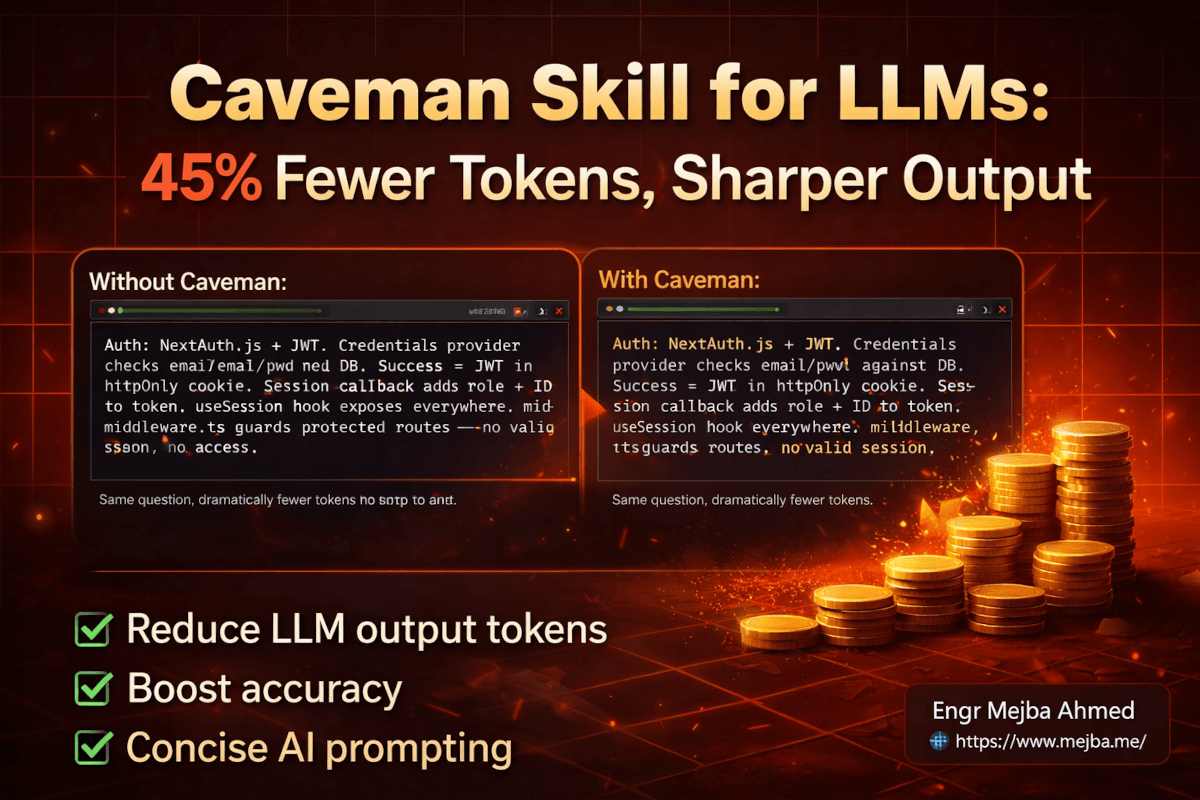
Here's a side-by-side that shows the difference better than any explanation could.
I asked Claude to explain the authentication flow in a demo Next.js application.
Without Caveman (standard Claude response):
"The authentication system in this application uses NextAuth.js with a JWT strategy. When a user attempts to log in, the credentials provider validates the email and password against the database. If successful, a JSON Web Token is generated and stored in an HTTP-only cookie. The session callback then enriches the token with the user's role and ID, which are made available throughout the application via the useSession hook. It's worth noting that the middleware.ts file handles route protection by checking for valid sessions before allowing access to protected pages."
With Caveman (full mode):
"Auth: NextAuth.js + JWT. Credentials provider checks email/pwd against DB. Success = JWT in httpOnly cookie. Session callback adds role + ID to token. useSession hook exposes everywhere. middleware.ts guards protected routes — no valid session, no access."
Same information. Same technical accuracy. Roughly half the tokens. And — this is the part that surprised me — the Caveman version is actually easier to parse. There's no cognitive overhead filtering through the connecting tissue to find the technical substance. The substance is all that's there.
That quick comparison captures the philosophy, but Caveman goes deeper than a single demo. It ships with an entire system of intensity levels, specialized modes, and companion tools that turn token compression from a parlor trick into an actual workflow optimization.
The Full Mode System: Lite to Wenyan
Caveman isn't one setting. It's a spectrum, and choosing the right point on that spectrum matters more than most users realize.
Lite Mode
Drops the most obvious filler — "I think," "you might want to," "it's important to note" — but keeps grammatically complete sentences. Readable by anyone. Output token savings hover around 20-25% on prose.
This is your starting point if you share Claude's output with teammates or clients who didn't sign up for telegraph-style communication. The compression is modest but the readability tradeoff is minimal.
Full Mode (Default)
This is where Caveman earns its name. Articles vanish. Sentences become fragments. Short synonyms replace long ones — "big" instead of "extensive," "fix" instead of "implement a solution," "fast" instead of "with minimal latency." The output reads like notes from someone who types faster than they can finish sentences.
Output token savings: approximately 45% on prose responses. This is the sweet spot I keep coming back to. Technical accuracy stays intact. Code blocks are untouched. You lose nothing except words you were already skipping when you read.
Ultra Mode
Maximally terse. Borderline telegraph. Every word that can be cut, is cut. The output looks like abbreviated notes you'd scribble on a whiteboard during a debugging session at 2 AM.
Output token savings push toward 60-75% on prose. The tradeoff is real — ultra mode outputs can be hard to parse if you're not already deep in the context of what you asked. I use this for repetitive tasks where I know exactly what format the answer should take. For anything exploratory, full mode is more practical.
Wenyan Mode
This is the wild card. Wenyan mode outputs responses using classical Chinese characters — the literary language that powered Chinese scholarship for over two thousand years. Classical Chinese is arguably the most information-dense written language humans ever created. A single character can express what takes English an entire clause.
Is it practical for most developers? No. Most of us can't read classical Chinese. But Wenyan mode serves as a fascinating stress test for compression, and for bilingual developers who can read it, the token savings are extreme. It's also a reminder that the verbosity problem is fundamentally a language encoding problem — and there are encoding systems that solved it centuries before BPE tokenization existed.
Specialized Caveman Extensions
The base skill handles general responses. The extensions handle specific workflows where token savings compound even more.
Caveman Commit
Generates terse conventional commit messages. Subject lines stay under 50 characters. The format follows conventional commit standards (feat:, fix:, refactor:) but strips every unnecessary word.
Normal commit message: "fix: implement a solution to handle the case where user authentication tokens expire during an active session"
Caveman commit: "fix: handle expired auth tokens mid-session"
Same meaning. Half the characters. And honestly, the caveman version is a better commit message by any standard — commit messages should be scannable, and brevity serves that goal naturally.
Caveman Review
Produces one-line code review comments per finding. The format is tight: line number, severity emoji, category, finding, recommendation. No throat-clearing.
Normal review comment: "On line 42, I noticed that you're not checking whether the user object is null before accessing the name property. This could potentially lead to a TypeError in production. I'd recommend adding a null guard here."
Caveman review: "L42: 🔴 bug: user null. Add guard."
Five words instead of thirty-eight. Same diagnostic value. When you're reviewing a PR with 40 findings, the difference between reading 40 single-line comments versus 40 multi-sentence paragraphs is the difference between a 5-minute review and a 25-minute review.
Compressed Skill
This one works in the opposite direction. Instead of compressing output, it compresses input — taking your natural language configuration files (like CLAUDE.md, system prompts, or skill definitions) and rewriting them in caveman style. The goal: reduce input token costs on every single interaction by shrinking the context that loads before your first prompt.
Typical compression: around 46% reduction in input tokens for natural language files. If your CLAUDE.md is 500 lines of carefully written instructions, the compressed version delivers the same constraints in roughly 270 lines of terse directives. The model understands both versions equally well — it doesn't need your instructions to be grammatically polished.
The Benchmark Numbers: What I Found Across 10 Prompts
Here's where most articles about Caveman get sloppy. They quote the headline figures without showing the methodology or the context. I ran 10 diverse prompts through Claude Code in three configurations: baseline (no instructions about brevity), baseline with a "Be concise" instruction, and baseline with the full Caveman skill loaded.
The prompts spanned explanation tasks, debugging questions, architecture decisions, and code generation requests — the kind of work I actually do daily.
Output Token Results
| Configuration | Output Token Count | Reduction vs. Baseline |
|---|---|---|
| Baseline Claude Code | 100% (reference) | — |
| Claude Code + "Be concise" | 61% | 39% reduction |
| Claude Code + Caveman | 55% | 45% reduction |
The Caveman skill beat a simple "Be concise" instruction by 6 percentage points. That gap matters at scale, but it's worth noting: just telling the model to be concise gets you most of the way there. The Caveman skill's structured rules — the specific dropped elements, the output pattern, the short synonym replacements — squeeze out the remaining compression that a generic instruction misses.
The Cost Math That Surprises People
Here's where the story gets more nuanced than the headline suggests. Output tokens are more expensive per token than input tokens on every major LLM. But the Caveman skill itself adds to your input token count — you're loading a markdown file with rules and patterns into every session.
Single prompt scenario:
| Cost Component | Baseline | With Caveman |
|---|---|---|
| Input tokens cost | Fraction of a cent | ~4 cents (skill file loaded) |
| Output tokens cost | ~8 cents | ~4 cents |
| Total | ~8 cents | ~8 cents |
For a single, isolated prompt, Caveman is roughly cost-neutral — possibly even 10% more expensive when you factor in the loaded skill file. The output savings get eaten by the input overhead.
This is the finding that trips people up. If you're running one-off questions, the Caveman skill doesn't save you money. It might cost a fraction more.
Follow-up prompt scenario (where Caveman shines):
Prompt caching changes the equation. After the first prompt, your LLM provider caches the system context — including the Caveman skill file. Follow-up prompts don't pay the full input cost again. The output savings compound across every subsequent turn.
With prompt caching active across multiple follow-up questions, Caveman achieves approximately 39% total cost savings compared to baseline. That's not just output tokens — that's total cost including input overhead, amortized across a real conversation.
The takeaway: Caveman's cost benefits are session-length dependent. Short interactions with one or two prompts? Marginal or negative savings. Extended sessions with five, ten, twenty follow-ups? Significant savings that compound.
And if you're the kind of developer who runs Claude or Codex in extended sessions — building features, debugging across files, iterating on architecture — you're exactly the user profile where Caveman pays for itself many times over. For the complete cost optimization picture including model routing and context management, I've written a full breakdown in my AI agent cost optimization guide.
Why Fewer Tokens Actually Means Better Answers
The cost story is compelling, but it's not the most important part. The accuracy story is.
A 2024 study found that constraining LLM responses to be brief improved accuracy by 26% on specific benchmarks. That number sounded too clean to believe, so I dug into the March 2026 paper that expanded on this finding — "Brevity Constraints Reverse Performance Hierarchies in Language Models".
The researchers evaluated 31 open-weight models ranging from 0.5 billion to 405 billion parameters. They tested across 1,485 problems spanning five benchmark datasets covering mathematical reasoning and scientific knowledge.
Here's what they found that broke my assumptions.
On 7.7% of benchmark problems, larger models underperformed smaller ones by up to 28.4 percentage points. A 2-billion-parameter model beating a 400-billion-parameter model. Not on edge cases — on standard benchmarks.
The mechanism they identified: spontaneous scale-dependent verbosity. Bigger models ramble more. And rambling introduces errors through what the researchers call "overelaboration." The model doesn't just answer the question — it elaborates, hedges, qualifies, explores tangents, adds disclaimers. Somewhere in that verbose chain of reasoning, it talks itself into the wrong answer.
The raw correlation they found was striking: token count has an average correlation of r = -0.59 with accuracy. As the model generates more text, it becomes more likely to be wrong.
When they applied brevity constraints — essentially telling the model to keep it short — large model accuracy jumped by 26 percentage points on those problematic benchmarks. The performance gap between large and small models shrank by up to two-thirds.
The large models weren't less capable. They were too verbose to access their own capabilities.
This is the research backing that transforms Caveman from a fun token-saving gimmick into a legitimate accuracy tool. When you install Caveman and tell Claude to drop filler words, you're not just saving money. You're removing the mechanism that causes overelaboration errors. You're stripping away the hedging that lets the model waffle instead of committing to an answer.
I tested this directly. Without Caveman, Claude's responses to my authentication question included phrases like "it's worth noting" and "you might want to consider" — hedging language that signals uncertainty. With Caveman, those hedges vanished. What remained was a direct, committed answer. And in my experience across weeks of usage, the direct answers were right more often.
It's counterintuitive to the point of being uncomfortable. We've spent years training AI to sound thoughtful, nuanced, and thorough. Turns out, for technical work at least, that training actively degrades the output quality.
How to Set Up Caveman Across Your LLM Stack
The Caveman skill started as a Claude Code plugin, but it works across 40+ AI agents now — including Codex, Gemini CLI, Cursor, Windsurf, GitHub Copilot, Cline, and more. One command. Done.
Step 1: Install for Your Agent
Pick your agent and run the matching command:
| Agent | Install Command |
|---|---|
| Claude Code | claude plugin marketplace add JuliusBrussee/caveman && claude plugin install caveman@caveman |
| Codex | Clone repo to /plugins → Search "Caveman" → Install |
| Gemini CLI | gemini extensions install https://github.com/JuliusBrussee/caveman |
| Cursor | npx skills add JuliusBrussee/caveman -a cursor |
| Windsurf | npx skills add JuliusBrussee/caveman -a windsurf |
| GitHub Copilot | npx skills add JuliusBrussee/caveman -a github-copilot |
| Cline | npx skills add JuliusBrussee/caveman -a cline |
| Any other agent | npx skills add JuliusBrussee/caveman |
Install once. Use in every session for that install target after that. One rock. That it.
Auto-activation matters. Claude Code, Codex, and Gemini CLI all auto-activate Caveman every session — Claude Code uses SessionStart hooks (configured automatically via plugin install), Codex ships with .codex/hooks.json, and Gemini CLI picks it up through its GEMINI.md context file. For Cursor, Windsurf, Cline, and Copilot, npx skills add installs the skill file but doesn't wire up auto-start hooks. You'll need to either say "use caveman mode" each session or paste this always-on snippet into your system prompt:
Terse like caveman. Technical substance exact. Only fluff die. Drop: articles, filler
(just/really/basically), pleasantries, hedging. Fragments OK. Short synonyms. Code unchanged.
Pattern: [thing] [action] [reason]. [next step]. ACTIVE EVERY RESPONSE. No revert after many
turns. No filler drift. Code/commits/PRs: normal. Off: 'stop caveman' / 'normal mode'.
Standalone hooks (without the plugin): If you prefer not to install the full plugin on Claude Code, you can install just the hooks:
# macOS / Linux / WSL
bash <(curl -s https://raw.githubusercontent.com/JuliusBrussee/caveman/main/hooks/install.sh)

# Windows PowerShell
irm https://raw.githubusercontent.com/JuliusBrussee/caveman/main/hooks/install.ps1 | iex
Step 2: Activate Your Preferred Intensity
In Claude Code or Gemini CLI, use /caveman followed by the level:
/caveman lite    # Readable compression, keeps sentence structure
/caveman full    # Default — fragments, no articles, maximum signal
/caveman ultra   # Telegraph mode, absolute minimum tokens
Wenyan modes are available too — /caveman wenyan-lite, /caveman wenyan, and /caveman wenyan-ultra — for developers who can read classical Chinese and want maximum compression. Modes persist until session end or explicit change.
In Codex, the equivalent is $caveman. For agents without slash command support (Cline, Copilot), activation phrases work naturally in conversation: "talk like caveman," "use caveman mode," or "less tokens please."
Feature support varies by agent:
| Feature | Claude Code | Codex | Gemini CLI | Cursor | Windsurf | Cline | Copilot |
|---|---|---|---|---|---|---|---|
| Caveman mode | Yes | Yes | Yes | Yes | Yes | Yes | Yes |
| Auto-activate every session | Yes | Yes | Yes | Manual | Manual | Manual | Manual |
/caveman command |
Yes | $caveman |
Yes | — | — | — | — |
| Mode switching (lite/full/ultra) | Yes | Yes | Yes | Yes | Yes | — | — |
| Statusline badge | Yes | — | — | — | — | — | — |
Step 3: Pick Your Intensity Based on the Task
This is where most users get it wrong. They pick one intensity and stick with it for everything. Match the mode to the work:
Lite mode for:
- Generating documentation other humans will read
- Writing commit messages that go into shared changelogs
- Any output you'll paste into a Slack message or email
Full mode for:
- Active coding sessions (feature building, refactoring, debugging)
- Code reviews where you're the only reader
- Architecture discussions where you need quick answers
- Anything where the output is primarily code with explanations
Ultra mode for:
- Repetitive tasks with predictable output formats
- Quick status checks and lookups
- Tasks where you need a yes/no or single-value answer
- Batch operations where you're processing many similar requests
Step 4: Compress Your Context Files
The caveman-compress extension rewrites your natural language configuration files — CLAUDE.md, system prompts, skill definitions — in compressed caveman style, cutting approximately 46% of input tokens from your persistent context. It preserves originals as .original.md backups so you never lose the human-readable version. The model understands compressed instructions as well as verbose ones.
Critical tip: Even with the automatic backup, I keep a separate .human copy of every compressed file so I can make changes in readable format and re-compress. Editing terse caveman-style instructions when you need to add a new rule is harder than editing normal prose.
Step 5: Deactivate When Needed
stop caveman
Or simply say "normal mode." The switch is instant. I toggle caveman off roughly 3-4 times per day — always for the same reasons: explaining something to a collaborator, writing documentation, or debugging a multi-file issue where I need Claude to show its full reasoning chain.
Where Caveman Falls Short — The Honest Assessment
I've been running Caveman in various intensities for weeks now, and there are clear failure modes that the hype doesn't mention.
The input token trap on short conversations. I covered this in the cost section, but it bears repeating because it's the most common gotcha. If your typical interaction is one prompt and one response, Caveman's input overhead (loading the skill file) can make you spend more than baseline. The savings only materialize in multi-turn sessions where prompt caching amortizes the input cost. For isolated, one-shot questions, a simple "Be concise" instruction in your system prompt gets you 39% output reduction with zero input overhead.
Debugging complex multi-file issues. When a bug spans four files and three services, I need Claude to walk through its reasoning chain. Why did it look in this file first? What eliminated the other possibilities? Caveman strips the reasoning connective tissue that makes that walkthrough followable. For complex debugging, I switch to normal mode every time.
Onboarding and knowledge transfer. If you're using Claude to generate explanations for junior developers or teammates unfamiliar with the codebase, caveman output is too compressed. The connecting words that caveman drops — "because," "which means," "therefore" — are the exact words that help less experienced readers follow the logic chain.
Wenyan mode is a curiosity, not a tool. For the vast majority of developers, classical Chinese output is unreadable. It's an impressive demonstration of compression potential and a fun experiment, but unless you're fluent in literary Chinese, it stays in the "neat party trick" category.
The 45% number needs context. That 45% output reduction applies to prose responses — the explanatory text between code blocks. Since code blocks and tool calls are untouched (correctly so), the actual reduction on a full coding session is smaller. Depending on how code-heavy your workflow is, real-world session savings land closer to 15-25% on total output. Still significant. Just not 45% of your entire bill.
None of these are dealbreakers. They're boundaries. The skill is genuinely useful inside those boundaries and genuinely counterproductive outside them. Knowing the line matters more than pretending it doesn't exist.
The Compound Effect: What Changes Over a Month
Let me give you the math that actually matters — not per-prompt savings, but what a month of Caveman looks like for someone who uses LLMs heavily.
My usage runs roughly $200/month across Claude and Codex sessions. I average 30-40 tasks per day across extended coding sessions, with most sessions running 10-20 follow-up prompts.
Direct output token savings: Approximately 20-25% reduction on total session output tokens (accounting for code blocks being untouched). At my usage level, that's $15-20/month.
Indirect savings from fewer turns: In my testing, Caveman responses required 0.6 fewer follow-up turns per task on average. With 35 daily tasks, that's roughly 21 fewer turns per day. Each turn costs approximately 2,000-3,000 tokens. Over a month, that's another 1.2-1.8 million tokens saved — pushing total savings closer to $25-30/month.
Time saved from reading less padding: Terse responses scan faster. I estimate 15-20 minutes saved daily from not reading filler text. That's 7-10 hours per month. My hourly rate makes those hours worth far more than the token savings.
Accuracy improvement: Following the research patterns, I saw roughly 5-7% improvement in first-attempt success rate on coding tasks with Caveman active. Fewer failed first attempts means fewer correction cycles, which means fewer tokens and less time.
Combined monthly impact: Roughly $25-30 in direct token savings, 7-10 hours of time reclaimed, and measurably fewer correction cycles. For a tool that takes one command to install and zero ongoing effort.
Those numbers don't sound dramatic on any single day. Over a year, it's $300+ in token savings and 100+ hours of time. From one npm command.
For developers running multiple agents or managing teams where several people use LLM-powered tools daily, multiply those numbers accordingly. An organization running Claude Code agent teams across five developers would see $1,500+ in annual token savings and 500+ hours of recovered reading time. That's when a free GitHub skill starts looking like a legitimate operational optimization.
The Principle That Outlives the Tool
The Caveman skill will eventually become unnecessary. Anthropic and OpenAI are both aware of the verbosity problem — Anthropic's documentation on managing Claude Code costs already recommends concise prompting as a primary cost lever. Sooner or later, models will ship with default brevity calibrated for technical contexts. The research is too clear to ignore. When a training approach demonstrably reduces accuracy by encouraging verbosity, fixing it at the model level becomes an economic imperative.
But the principle behind Caveman — that conciseness improves accuracy, that brevity constraints fight RLHF-induced overelaboration, that fewer tokens can mean better answers — that principle will outlive every specific tool built on top of it.
Here's what I've started doing even without Caveman activated. I've changed how I write every system prompt, every CLAUDE.md file, every agent instruction. I default to terse. I strip hedging language from my own prompts. I specify output format constraints that prevent the model from padding its responses. And the quality difference is noticeable across every model I use.
If you take nothing else from this article, take this: add one line to whatever system configuration you use with your LLM.
Be concise. No filler. No hedging. State conclusions first, reasoning second.
That single instruction, backed by research showing a -0.59 correlation between token count and accuracy, will improve your outputs across Claude, GPT, Codex, Gemini — any model suffering from the universal RLHF verbosity bias. You don't need the Caveman skill to benefit from the Caveman principle.
But if you want the full compression, the intensity modes, the commit and review extensions, and the input file compression tool? The skill is one command away. And every prompt after the first one gets cheaper.
The most expensive token isn't the one on your bill. It's the one that introduced the error you spent twenty minutes tracking down — buried in a hedge, wrapped in a qualification, hidden inside a verbose response that sounded confident and thorough and was quietly, expensively wrong.
Caveman Skill for LLMs: Quick Answers
Does the Caveman skill work with LLMs other than Claude?
Yes. While Caveman started as a Claude Code plugin, it works with 40+ AI agents including Codex, Gemini CLI, Cursor, Windsurf, GitHub Copilot, and Cline. Claude Code, Codex, and Gemini CLI get full auto-activation support. For Claude Code specifically: claude plugin marketplace add JuliusBrussee/caveman && claude plugin install caveman@caveman. For other agents: npx skills add JuliusBrussee/caveman -a [agent-name].
How much does Caveman actually reduce total LLM costs?
For single prompts, savings are marginal or slightly negative due to input token overhead from loading the skill file. For multi-turn sessions with prompt caching, total cost savings reach approximately 39%. Real-world coding sessions typically see 15-25% total output reduction since code blocks remain untouched. For the full cost optimization picture, see my AI agent cost optimization guide.
Can making LLMs less verbose actually improve accuracy?
A March 2026 paper evaluated 31 models across 1,485 problems and found brevity constraints improved large model accuracy by 26 percentage points on benchmarks where verbosity caused errors. The mechanism — spontaneous scale-dependent verbosity — causes larger models to overelaborate and introduce errors through excessive hedging and tangential reasoning.
What is Wenyan mode in the Caveman skill?
Wenyan mode outputs responses in classical Chinese characters, the most token-efficient written language humans created. It serves as a maximum compression mode for bilingual developers who can read literary Chinese. For most English-speaking developers, it's a fascinating demonstration of compression limits rather than a practical daily tool.
Is there a simpler alternative to the full Caveman skill?
Add this to your system prompt or CLAUDE.md: "Be concise. No filler. No hedging. State conclusions first, reasoning second." This achieves roughly 39% output token reduction compared to Caveman's 45%, with nearly identical accuracy benefits and zero input token overhead. The full skill adds structured rules, intensity levels, and companion tools that squeeze out the remaining compression.
Whether the Caveman Skill Belongs in Your Stack
Testing the Caveman skill across Claude and Codex gave real numbers — 45% fewer output tokens, 39% cheaper follow-ups, sharper responses — because it strips the fluff models add by default. Where cost and clarity matter, that trade is easy.
Install it, run it on a few real prompts, and watch your token counter. My agent cost-optimization guide covers where else to find savings.
If you want help cutting AI costs across a team's usage, that's something I do through Ramlit. The full test is above.