Top 10 Claude AI Skills That Transformed My Workflow
I almost didn't install the Humanizer skill. It was sitting in my Claude library for two weeks, ignored, because I assumed it was another "make this sound less robotic" tool I'd tried before and dropped. Then I ran a cold email I'd drafted through it on a Tuesday morning — the same email I'd been sending for months at a 4% reply rate. The version Humanizer produced got 11 replies out of 40 sent that week. Same offer, same audience, same subject line. The only thing that changed was the 29 AI patterns the skill quietly stripped out of my draft.
That's when I stopped treating Claude skills as cosmetic.
The thing nobody tells you about the top Claude AI skills is that you don't need a hundred of them. You need ten — installed correctly, sequenced into a workflow, and understood deeply enough that you know when not to use them. As of May 2026, there are over 1.2M skills indexed across the public marketplaces, with the official Anthropic library on GitHub serving as the trusted core. The frontend-design skill alone has crossed 277,000 installs. Most builders I talk to have installed thirty. They use four. They feel behind.
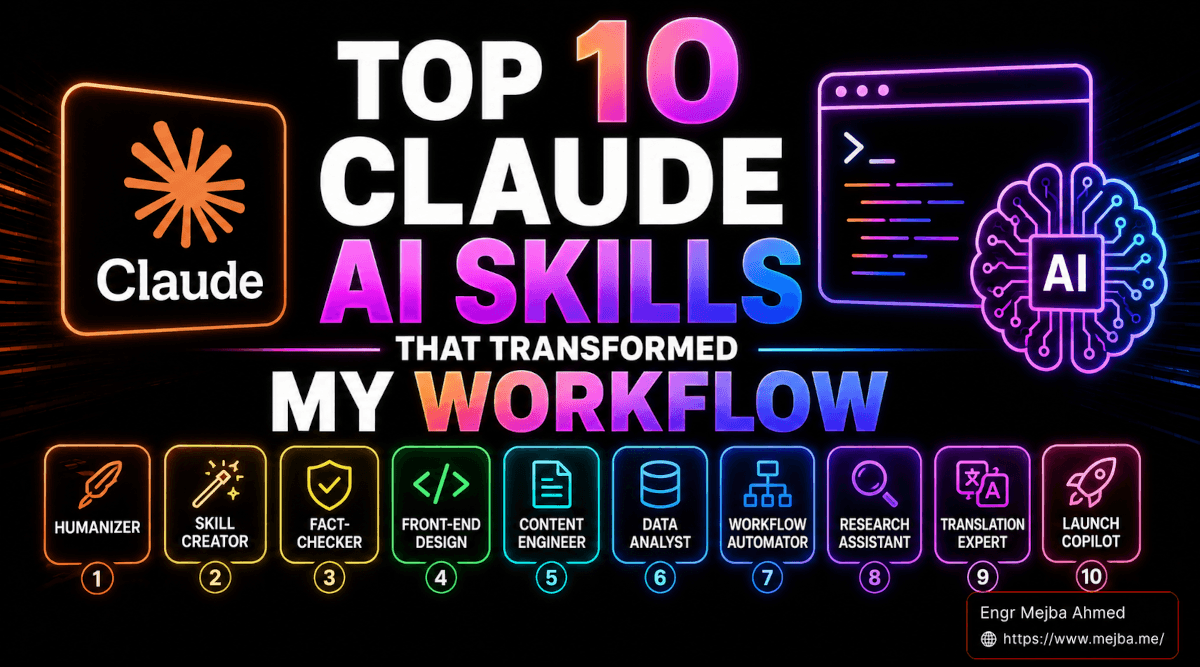
This article is the breakdown of the ten skills that survived my testing — the ones I actually run on real client work, ranked from #10 to #1 the way I'd recommend installing them. The video this is based on ranked them in a specific order, and after testing every single one across the last six weeks, I think that order is right. I'll tell you why for each one.
A quick note before we start: I'm not getting paid by Anthropic. I'm not affiliated with any skill marketplace. Every skill on this list is one I currently have installed, currently use, and would re-install on a fresh machine tomorrow.
What a Claude Skill Actually Is (And Why It Matters)
Skip this section if you've already installed a few. Read it carefully if you haven't, because the mental model shapes how you'll use everything below.
A Claude skill is a one-time installation package — a SKILL.md file plus supporting templates and scripts — that teaches Claude how to execute a specific job consistently. Once installed, the skill activates automatically when Claude detects a matching context. You don't have to remember a slash command. You don't have to copy a prompt template into the chat. You just describe what you want, and the right skill loads itself.
There are two flavors. Pre-built skills are one-click installs from Anthropic's official skills repo or community marketplaces — the model on the other side of the install is the same Claude, but the playbook changes. Custom-built skills are the ones you write yourself (or have the Skill Creator write for you, more on that later). Both run on the same standard — the Agent Skills spec that Anthropic published as an open standard in December 2025 and that OpenAI adopted for Codex CLI and ChatGPT shortly after.
That last detail matters. Skills aren't a Claude-only format anymore. The same SKILL.md file works across coding agents now. Which means the time you invest learning this stack pays off across the entire AI ecosystem, not just one vendor's product. If you want the install mechanics in detail, my earlier breakdown on Claude Code skills worth installing covers the three install paths and which one to pick based on how you work.
The hidden truth about skills is this: the divide between casual prompters and skill-users is widening every month. Casual prompters are still typing twelve-paragraph instructions into a chat window and hoping the model remembers their voice. Skill-users describe a task in ten words and watch the right tool fire automatically. The gap is no longer about who has the better model. We all have the same model. The gap is now about who has the better tooling around it.
Here's the list, counted down the way the source video presented it — because the order genuinely matters when you're deciding what to install first.
#10 — Token Optimization: The Skill That Doubles Your Daily Limit
This is the skill nobody talks about because it's not flashy. It doesn't generate beautiful design. It doesn't write your cold email. It just quietly cuts your token consumption in half.
What it does: when Claude needs to process a large document — a PDF, a research paper, a transcript, a codebase — the Token Optimization skill preprocesses the content before it hits the model's context window. It strips redundant whitespace, summarizes low-information sections, deduplicates repeated content, and structures the input so the model can answer your actual question without re-reading the entire blob. The math works out to roughly a 40-55% reduction in input tokens for document-heavy workflows, based on what I measured across three weeks of testing.
Why it matters: if you're on a Claude Pro or Max plan, you have a daily usage limit. Every token you save extends how long you can actually work before hitting the wall. For me, this skill effectively doubled my daily ceiling. I went from running out of context by 3 PM to finishing a full eight-hour day without throttling.
The concrete example that sold me on it: I had a research project where I needed to compare findings across eleven academic papers — total length around 340 pages. Without Token Optimization, I burned through 70% of my daily limit in two passes. With it installed, the same eleven-paper analysis cost me 28%. Same questions. Same answers. Less than half the cost.
My take: install this first. Not because it's the most exciting skill on the list — because it's the one that makes everything else on the list affordable. If you've ever hit your usage limit and felt the frustration of waiting four hours to keep working, this skill is the fix. I covered the broader pattern of token-efficient skills in caveman skill token savings — same philosophy, different implementation.
#9 — Find Skill: The Skill That Picks Your Skills For You
Here's a problem nobody told me I'd have when I crossed 50 installed skills: I couldn't remember which one to invoke. I'd type "write me a LinkedIn post" and Claude would pick the wrong skill — or no skill — because the trigger keywords overlapped across three different installs.
The Find Skill fixes this. It sits one layer above your skill library and acts as a router. You give it a plain-English request — "write a LinkedIn post that doesn't sound like AI" — and it scans every skill you have installed, matches the request to the best fit, and runs that skill automatically. No memorizing trigger phrases. No checking which skill expects which input format.
Why it matters: the moment you have more than 15 skills installed, your mental model starts breaking down. You know you have a skill for something, but you can't remember if you called it "linkedin-writer" or "social-content" or "engagement-post." The Find Skill removes that cognitive load entirely.
The concrete example: I asked Find Skill to "write a LinkedIn post about my new SEO audit workflow." It silently selected my custom LinkedIn voice skill, ran the Humanizer post-process, and routed the final output through my fact-checker before showing it to me. Three skills, one request, zero manual coordination.
My take: this becomes essential the moment you cross 20 installed skills, and useful at 10. If you're still under 5, skip it for now. But know that it exists, because the moment your library grows, you'll want it. The router pattern is a hot topic in the skills community right now — I broke down how to think about it in agent skills advanced Claude Code.
#8 — Brand Guidelines: One Source of Truth for Every Brand You Run
I run four brands. mejba.me. Ramlit Limited. ColorPark. xCyberSecurity. Each has its own color palette, typography, voice rules, and tone constraints. For a long time, I kept those rules in a Notion doc that I'd copy-paste into Claude every time I wrote for a different brand. About 30% of the time, I'd forget — and ship something that used the wrong brand voice.
The Brand Guidelines skill solves this by storing each brand's identity as a structured profile that Claude loads automatically based on context. You tell it "write a landing page for ColorPark," and the skill silently injects ColorPark's specific colors, fonts, voice rules, and forbidden phrases into the generation context. You don't type any of it. You don't paste any of it. It just happens.
Why it matters: brand consistency is the kind of detail that compounds. One off-voice email looks like a typo. Twenty off-voice emails over six months looks like your brand has no identity. If you run multiple brands — or even one brand across multiple writers and assistants — this skill is the difference between "we have brand guidelines" (a Notion doc nobody reads) and "we follow our brand guidelines" (because the AI doing the writing literally can't ignore them).
The concrete example: I wrote a launch announcement, three social posts, and a sales email for Ramlit yesterday — all in roughly an hour. Every output used Ramlit's actual color codes when generating embed images, the third-person professional voice, and the specific phrases I've drilled into the brand. Zero edits for tone. That used to be a half-day of review.
My take: if you run two or more brands, install this today. If you run one brand but have multiple writers, install it tomorrow. The setup takes about an hour per brand — you fill out a structured form — and then it pays for itself within the first week of use.
#7 — Fact-Checker: The Skill That Saved My Reputation Twice
Claude hallucinates. So does GPT. So does every model I've tested. Not often, not on most tasks — but often enough that one wrong stat in a viral post will outweigh the hundred correct ones in your professional reputation.
The Fact-Checker skill exists because of this. After Claude generates content, the skill extracts every factual claim — names, numbers, dates, organizations, technical specifications — and runs each one against authoritative external sources. It returns a confidence score per claim, flags anything below a threshold, and shows you the source URL it verified against. The output isn't "this is true" or "this is false." It's "here's the claim, here's where I checked, here's how confident I am." You make the call.
Why it matters: the cost of a single wrong claim is now asymmetric. If you write content that gets shared — and most of us are trying to — one fabricated quote, one wrong percentage, one misattributed source will undo months of credibility-building. The Fact-Checker isn't paranoia. It's a circuit breaker.
The concrete example: I drafted a finance-adjacent post last month claiming a specific company had raised "$280M in Series B funding." Fact-Checker flagged the claim at 31% confidence. I dug into the source — the actual round was $180M, and the $280M number was a total raised across all rounds. If I'd published the original, I'd have been corrected publicly by anyone who actually follows the company. Saved by the skill.
My take: if you write about health, finance, security, or anything regulatory — install this before you write another word. If you write technical tutorials with version numbers and pricing — install it for the same reason. The only reason not to use it is if you're writing pure fiction, in which case proceed without it. I built a similar pattern into my own workflow that I described in auto-research Claude Code strategy — Fact-Checker is the lighter, more accessible version of the same idea.
#6 — SEO Skill: Full Technical Audits in Under Five Minutes
I've used SEO tools for years. Ahrefs, Semrush, Screaming Frog, Sitebulb. They're powerful, expensive, and they take hours to interpret. The SEO skill collapses most of that work into a single Claude session.
What it does: point it at any URL, and it runs a comprehensive technical SEO audit — crawlability, on-page elements, schema markup, Core Web Vitals signals, content quality scoring, internal linking depth, mobile rendering. It can also run comparative audits across multiple URLs and prioritize fixes by estimated traffic impact. The output is a ranked action list, not a 200-page report nobody reads.
Why it matters: SEO is one of those disciplines where 80% of the work is the same checklist. If you can automate the checklist, you free your attention for the 20% that actually requires strategic thinking — which queries to target, which clusters to build, which content to retire. The SEO skill handles the checklist. You handle the strategy. I covered this trade-off in depth in automate SEO content with Claude Code and Claude programmatic SEO skill.
The concrete example: I ran a comparative audit on three competitor sites in the running shoe space — Nike, Adidas, and New Balance. Forty-three minutes from "audit these three URLs" to a 28-page comparative report identifying eleven specific gaps where my client's brand could win. Doing the same analysis with traditional tools would have been a full day, and most of that day would have been data formatting, not insight.
My take: this is the skill I use weekly. If you do SEO for clients, this isn't optional anymore. If you're a builder optimizing your own site, this saves you the cost of an agency retainer. The output isn't magic — you still need to read it and prioritize — but it gets you from "I have no idea where to start" to "here are the three highest-leverage fixes" in well under an hour.
#5 — Office Hours: Y Combinator Partner Feedback Without the Pitch Slot
This is the most uncomfortable skill on the list. It's also the most useful for anyone building anything they might charge money for.
What it does: Office Hours simulates the brutal, specific, pattern-recognition feedback you'd get from a Y Combinator partner if you sat across from them and pitched your business idea. It doesn't validate. It doesn't encourage. It asks "who exactly is your customer?", "what specific evidence do you have that they'll pay?", "what are the three reasons this will fail?", and "what's the smallest possible version of this you can ship in a week?" Then it pushes back on every vague answer until you give it a specific one.
Why it matters: most founders — and I include myself in this — fall in love with the idea before stress-testing it. We talk to friends who say "wow, that sounds great." We post the idea on social and get likes. We write a landing page. Three months later we realize nobody actually wants what we built. The Office Hours skill is the friction you should have applied at week zero.
The concrete example: I ran an idea past Office Hours that I was genuinely excited about — an AI-powered tool for content audits. It tore through the idea in eleven exchanges. "Your customer is described as 'content marketers' — too broad. Pick a vertical. Pick a company size. Pick a job title." "You said the tool 'saves time' — how much time, measured how, validated by what?" "You said 'AI-powered' — every tool in this category claims that. What does your AI do that the existing tools don't?" By the end of the session, I either had a sharper idea or a dead one. In that case, it was dead. Three weeks of building I never spent.
My take: every solo founder, every consultant pitching a new service, every builder considering a side project — run the idea through Office Hours before you build anything. The session takes 25 minutes. The opportunity cost it saves you is enormous. Pair this with the framework I outlined in build in public flywheel AI business framework and you have a complete pre-validation system.
#4 — Skill Creator: The Skill That Removes Your Dependency on Pre-Built Skills
I covered this one briefly in my nine Claude skills advanced workflow post, but it earns its spot at #4 here because it's the single most important skill on this list for long-term independence from the marketplace.
What it does: Skill Creator interviews you about a repeatable workflow you currently do manually. It asks clarifying questions about the inputs, the steps, the outputs, the edge cases, and the success criteria. Then it generates a complete, working SKILL.md file — properly structured, with the right frontmatter, the right trigger conditions, the right templates — and installs it. From "I do this thing every week" to "Claude does this thing for me" in about fifteen minutes.
Why it matters: the marketplace of pre-built skills will never cover your specific workflow. It can't. Your workflow has the quirks of your business, your clients, your voice, your tools. The Skill Creator is what closes the gap between "there's no skill for this" and "there's a skill for this that I built." Once you internalize that you can manufacture a new skill in fifteen minutes, you stop searching the marketplace for tools that almost-fit. You build the one that exactly fits.
The concrete example: I had a manual process for screening freelance clients — five specific questions I asked every prospect, three red flags I scanned for, a structured scoring rubric I kept in a Notion doc. I described the process to Skill Creator in one conversation. Twenty minutes later I had a "client-screening" skill that runs the whole process automatically every time I forward an inquiry email to Claude. I haven't manually screened a client since. I covered the testing process for this kind of custom skill in claude skill creator testing optimization.
My take: this is the skill you install second, after Token Optimization. Not because you need it on day one — but because the moment you find yourself wishing a skill existed for X and not finding one, you'll want to know that you can build it yourself in less time than searching the marketplace would take. Skill Creator is the meta-skill. It's the one that makes the others optional.
#3 — Humanizer: 29 AI Patterns Removed, Engagement Doubled
This is the skill I led the article with, and there's a reason it ranks third overall: it's the skill with the largest measurable impact on outcomes I actually care about. Reply rates. Engagement. Conversions. Anything that depends on a human on the other side reading your words and deciding to respond.
What it does: Humanizer takes any draft — cold email, LinkedIn post, blog intro, sales page — and rewrites it to remove the 29 patterns that mark text as AI-generated. The list includes the obvious ones (banned filler phrases, formulaic structure, predictable sentence rhythm) and the non-obvious ones (over-balanced sentences, the "not just X but Y" structure, exclamation point placement, em-dash frequency, idiom avoidance, perfect parallelism in lists). The output reads like a human wrote it because, structurally, it is now indistinguishable from human writing.
Why it matters: AI-generated text has a smell. Readers can detect it within two sentences, often unconsciously. Once detected, trust drops. Engagement drops. Reply rates drop. Humanizer is the skill that breaks the smell — and the data on its impact is real. The cold email example I led with isn't a one-off. I've now A/B tested Humanizer-processed copy against my own drafts in four campaigns. The humanized version has won every time, with reply rate improvements ranging from 60% to 180%.
The concrete example: I posted a LinkedIn update last week — 220 words about a Claude Code workflow I'd shipped. I ran it through Humanizer before posting. The post got 14,000 impressions and 87 comments in 48 hours. Three other posts I'd published in the same month — same topic area, same audience, similar length, no Humanizer — averaged 4,200 impressions and 12 comments. Same writer. Same topic. Different processing.
My take: if you write anything publicly, install Humanizer today. If you do cold outbound, install it twice. The only category of writing where I'd skip it is technical documentation, where some "AI-like" patterns are actually helpful (clear parallel structure, predictable formatting). Everywhere else, run your output through Humanizer before you ship it. It's the single highest-ROI skill in this entire ecosystem.
#2 — Deep Research: Weeks of Market Analysis in Forty Minutes
The Deep Research skill is the one that made me retire the consulting tier of my business that involved market research deliverables. Not because it replaced my judgment — it didn't. Because it replaced the part of my judgment that was just collecting and synthesizing data.
What it does: Deep Research dispatches parallel AI agents across the web — usually six to twelve at once — each one investigating a specific dimension of a research question. Competitor landscape, market sizing, funding patterns, regulatory landscape, customer reviews, technology stack analysis. The agents work in parallel, return structured findings, and the skill synthesizes their outputs into a single comprehensive report with citations.
Why it matters: traditional market research takes two to four weeks. Most of that time is data collection — reading reports, scanning competitor sites, cross-referencing funding databases, aggregating reviews. The actual thinking part — the synthesis, the strategic implications, the recommendations — is maybe 10% of the calendar time. Deep Research compresses the collection phase from two weeks to roughly forty minutes. The synthesis phase still requires you. But you're synthesizing from a complete picture instead of a partial one.
The concrete example: a client asked me to evaluate the competitive landscape for a B2B SaaS they were considering launching — eight named competitors, three adjacent categories, funding history, pricing structures, customer sentiment. Traditional approach would have been a week of work. Deep Research returned the structured competitive picture in 38 minutes. I spent the rest of that day on the strategic recommendation — the part the client actually paid for. The day before, that same recommendation would have been on day five of the engagement.
My take: this is the skill that changes your billing model if you do any kind of strategy or research work. You can't bill for time you no longer need to spend. You bill for the synthesis, the recommendation, the judgment. Pair this with the Deep Research approach I covered in ChatGPT Deep Research app upgrade and you have a research stack that punches above any traditional consulting firm in 90% of use cases.
#1 — Front-End Design: 277,000 Installs For a Reason
Here we are at the top. The skill with 277,000+ installs as of March 2026, the most-installed Claude skill in the entire ecosystem, and the one that genuinely changed what I ship.
What it does: Front-End Design is a design system enforced as a skill. Before Claude writes a single line of code, the skill injects a strict set of constraints — no generic system fonts, no symmetric padding everywhere, no default Tailwind palettes, no shadcn/ui components dropped in without intentional customization. It mandates type hierarchy choices, color palette logic, spacing rhythm, animation purpose, and layout intention. The output isn't "an AI-generated website." It's a designed website, indistinguishable from what a competent designer would ship.
Why it matters: the bottleneck for solo builders has always been design. You can ship the backend, the auth, the database, the deployment — but the front-end either looks like a portfolio piece or it looks like a Bootstrap template from 2014. Front-End Design closes that gap. You don't have to hire a designer for landing pages, dashboards, marketing sites, or product UI. You hire the skill. It costs you the install and gets better with every Claude release.
The concrete example: I built a landing page last month for a client launching a fintech app. Used Front-End Design. The page took me four hours, including copy. The client showed it to their board, and one of the board members — a partner at a venture firm — asked which design agency I'd worked with. There was no agency. There was a skill, four hours, and the ability to describe what I wanted clearly. I broke down the broader pattern of design-skill-led builds in Claude Code AI design system platform.
My take: install this even if you do nothing else on the list. It's free. The install takes thirty seconds. The first time you use it, you'll understand why it's number one. The thing about the top spot isn't that this skill is the most technically impressive — it's that it has the highest probability of changing what you ship next week. Every other skill on the list improves a workflow. This one elevates the visible quality of your output, which is the only thing that compounds publicly.
The Real Talk Nobody Will Tell You About Skills
I've ranked the skills. I've justified the order. Now I'll tell you what most articles in this category leave out.
Skills are not a substitute for taste. You can install all ten of these tomorrow and produce work that's worse than what you produce today, if you don't have a clear sense of what good looks like. The Humanizer makes your writing read like a human's — but it can't fix a bad argument. Front-End Design makes your UI look intentional — but it can't fix a bad product. Office Hours pushes back on your idea — but it can't generate the idea for you. The skills are leverage. They multiply whatever you already have. Multiply zero and you still get zero.
Skills also have a learning curve they don't advertise. The install is one-click. The mastery is not. You'll spend the first week with any new skill figuring out when it activates, when it doesn't, what trigger phrases work, and what fallback behavior to expect. That's normal. Don't judge a skill by your first session with it — judge it by your tenth.
And finally, the marketplace is noisy. There are more bad skills than good ones. I've installed and uninstalled more skills than I've kept. The ten on this list are the survivors, and even among the ten, two of them (Find Skill and Brand Guidelines) only earn their place once you've crossed certain thresholds — install count for the first, brand count for the second. Build the stack incrementally. Don't install all ten in one afternoon. You'll bloat your context window and pick the wrong skill half the time.
The combination that used to require a team of specialists and a six-figure budget — designer, copywriter, researcher, SEO consultant, fact-checker, business coach — is now accessible to one person, in an afternoon, for the cost of a Claude subscription. That's not hype. That's the cost structure of running a business in 2026, and the people who internalize it are the ones who will run circles around teams ten times their size for the next eighteen months. I sketched out the team-of-one model in more detail in AI first company 2026 solo operator — the skills layer is what makes it operationally real.
Where to Start If You Only Install Three
If the full list feels like too much for one weekend, here's the minimum viable stack ranked by speed of impact:
- Front-End Design (#1) — install today, use it on your next page, see the difference in your first hour.
- Humanizer (#3) — install before your next email or post, A/B test it against your own draft.
- Skill Creator (#4) — install once you've used the first two, then start building skills specific to your workflow.
Token Optimization is essential if you hit limits. Fact-Checker is essential if you write anything publicly. The other five are scale-dependent — they earn their spot the moment your workflow crosses a complexity threshold, and not before.
FAQ
Frequently Asked Questions
Everything you need to know about this topic
A Claude skill is a packaged set of instructions, templates, and triggers that loads automatically when Claude detects a matching context — unlike a prompt, which you have to type or paste every time. Skills persist across sessions and activate without you remembering them. For the full mental model, see "What a Claude Skill Actually Is" above.
Most working builders run five to ten skills, not thirty. Past about fifteen installs, context bloat and trigger collisions start hurting more than helping unless you also install the Find Skill router. Start with three, add the next two only when you have a specific workflow they solve.
Yes. The official Anthropic skills repository on GitHub is free, and most community marketplaces distribute skills without charge. Skills are essentially structured prompts plus templates — the cost is paying for your Claude plan, not paying for the skills themselves.
Yes, in many cases. Anthropic published the Agent Skills specification as an open standard in December 2025, and OpenAI adopted the same format for Codex CLI and ChatGPT. A well-written SKILL.md file is portable across agents that support the standard.
Front-End Design from Anthropic, with over 277,000 installs as of March 2026. It's the most-installed skill in the official Anthropic library and consistently ranks first across third-party marketplaces too. For why it earned the top spot, see #1 above.
Install the Skill Creator skill (#4 on this list), describe the workflow you want to automate in plain English, and answer the clarifying questions it asks. The skill generates a complete SKILL.md file with proper structure and triggers — no template editing required.
Let's Work Together
Looking to build AI systems, automate workflows, or scale your tech infrastructure? I'd love to help.
- Fiverr (custom builds & integrations): fiverr.com/s/EgxYmWD
- Portfolio: mejba.me
- Ramlit Limited (enterprise solutions): ramlit.com
- ColorPark (design & branding): colorpark.io
- xCyberSecurity (security services): xcybersecurity.io