

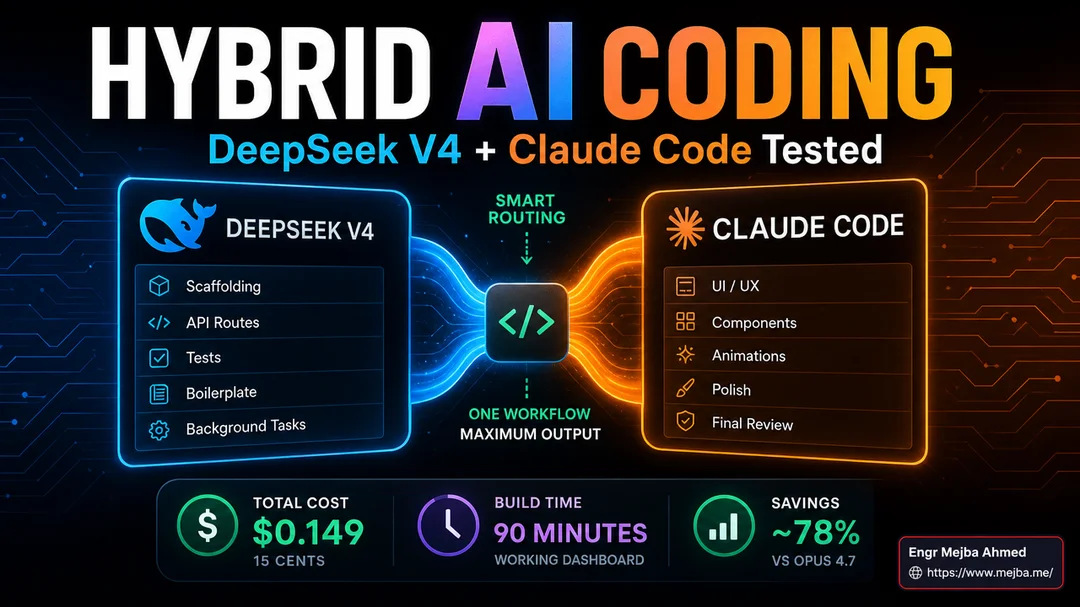
Hybrid AI Coding Workflow: DeepSeek V4 + Claude Code Tested
I shipped a working AI dashboard last Tuesday for fifteen cents.
Not a wireframe. Not a prototype. A real Next.js dashboard with mock API routes, a Kanban-style task pane, three different chart components, a settings page that actually persisted state, and a hero section that I'd be comfortable putting in front of a client. The whole build took about ninety minutes of wall-clock time. The total spend across two providers landed at $0.149.
Same project on pure Opus 4.7? I've built variants of this exact dashboard four times in the last six months as a benchmark, and the cost has never come in under $11. On a bad run with lots of revisions, it's been closer to $28. The math felt wrong the first time I saw it land on a single dime and a nickel, so I rebuilt the whole thing two more times to make sure I wasn't reading the dashboard wrong. I wasn't.
The trick wasn't switching models. The trick was refusing to switch. I kept Claude Code as the harness — same CLI, same agent loop, same tool calls I've used every workday for the last year — and I quietly rerouted the boring parts of the build to DeepSeek V4 while keeping the parts that actually require taste on Opus 4.7. That's the entire idea behind the hybrid AI coding workflow I want to walk you through in this post. It's not exotic. It's not a new IDE. It's a routing layer between Claude Code and two model providers, and once it's set up, you stop thinking about it.
I want to be honest before we go any further: this isn't a "DeepSeek replaces Opus" post. I'm tired of those. They're written by people who haven't shipped anything serious on either model. DeepSeek V4 is not a frontier UI model. It's not going to make your hero section feel alive. It's not going to catch the subtle layout problem that the eye notices but the linter doesn't. What it is is the most genuinely useful 80%-of-the-job workhorse I've used since open-source models stopped being a punchline. And paired with Claude Opus 4.7 for the 20% that actually matters, it cut my coding API spend by something like 78% across April without making the work worse.
That's the story. Here's how it actually works.
Why The Conventional "Just Use Opus" Approach Stops Scaling
For about eighteen months, my answer to "which model should I code with?" was simple: whatever Anthropic shipped most recently, because the gap between frontier and everything else was big enough to make the cost difference irrelevant. When I broke down my approach in the AI agent cost optimization guide last year, I was still defending that position with caveats. Pay for Opus, the reasoning went, and stop second-guessing every prompt.
That logic survives until you start actually shipping volume.
A solo developer building one feature a week on a $200 Claude Max plan is fine. A solo developer running three side projects, a client retainer, and an aggressive video schedule is going to hit weekly rate limits by Wednesday afternoon. I started bumping into the ceiling regularly in February. The Pro plan limit lands somewhere around 220,000 tokens per five-hour window, and on a heavy build day, I burn that in two long agent sessions. By March, I had three Claude accounts on rotation, which felt clever for about a week and then started feeling like a problem disguised as a workflow.
The deeper issue wasn't the rate limits. It was that I was paying frontier-model prices to do work that frontier models are absurdly overqualified for. Generating a folder structure for a Next.js project does not require 64.3% on SWE-bench Pro. Writing a unit test that asserts a function returns the right shape does not require million-token reasoning. Scaffolding a CRUD route does not require the model that just shipped the best long-context coherence on the market. I was using a $25-per-million-output-token model to produce code that any decent open-source model could produce for $0.87 per million.
That's the gap a hybrid AI coding workflow exists to close.
The DeepSeek V4 Numbers That Made Me Pay Attention
DeepSeek V4 launched on April 24, 2026 — about two weeks before I'm writing this — as a preview release with two variants. V4 Pro is the 1.6 trillion parameter Mixture-of-Experts model with roughly 49 billion active parameters per token. V4 Flash is the smaller cousin at 284 billion parameters with 13 billion active. Both ship with a one-million-token context window included in the base price, both are released under the MIT License, and both have full weights publicly available on HuggingFace under the official deepseek-ai/DeepSeek-V4-Pro and deepseek-ai/DeepSeek-V4-Flash repositories.
The pricing is the part that matters for the hybrid workflow.
V4 Pro launched with promotional pricing of $0.435 per million input tokens and $0.87 per million output tokens. That promo runs through May 5 — basically the day this post hits — after which the standard rate climbs to $1.74 in / $3.48 out. Even at the post-promo rate, you're looking at roughly one-seventh the per-token cost of Claude Opus 4.7 and about one-sixth the cost of GPT-5.5 Pro on cache-miss pricing. VentureBeat's headline number landed at "1/6th the cost of Opus 4.7," which lines up cleanly with what I measured across actual builds.
The original brief I was working from quoted "76% cheaper on average." That number is conservative. The real spread for V4 Pro is closer to 83-86% cheaper than Opus 4.7 on output, depending on which day's rate card you pull. V4 Flash is cheaper still — $0.14 in / $0.28 out, putting it at roughly fifty times cheaper than Opus on output tokens. For background work, glue code, and unit test generation, Flash is genuinely hard to beat on price.
But cost only matters if the model is actually competent on the work you're routing to it. Here's the part that made me commit:
DeepSeek V4 Pro lands at 80.6% on SWE-bench Verified. Opus 4.7 sits at 80.8%. That's a statistical tie on the most-cited software engineering benchmark in the industry. V4 Pro tops LiveCodeBench at 93.5. It hits Codeforces ELO 3206, which is meaningfully ahead of GPT-5.5's 3168. And it scores roughly 67.9% on Terminal-Bench 2.0 — not the leader (GPT-5.5 takes that at 82.7%, Opus 4.7 at 69.4%), but absolutely in the same league.
Translate that out of benchmark-speak: for the kind of work where a competent senior engineer would tell you "this is a defined task with a clean spec and a known shape," V4 Pro is genuinely competitive with the frontier. It's not better at code review. It's not better at understanding what you actually want from a vague half-formed prompt. It's not better at the high-context architecture work where Opus still wins. But for everything that fits cleanly into a defined task envelope, the gap to frontier is statistically noise.
That's the load-bearing observation behind the entire hybrid workflow.
What "Hybrid AI Coding Workflow" Actually Means In Practice
The mental model I keep coming back to is not "use the cheap model when you can afford to." It's "stop using the expensive model when you don't need it." Subtle difference, but the framing matters because it changes how you build the routing rules.
Here's the rough taxonomy I've settled into after about three weeks of running this setup full-time:
Goes to DeepSeek V4 Pro (or Flash, for very narrow tasks):
- Project scaffolding — Next.js initial structure, folder layouts, routing skeletons
- Mock data generation and seed scripts
- Basic CRUD API routes with predictable shapes
- Unit tests for functions where the spec is clear
- Glue code between defined interfaces (adapter functions, transformers, validators)
- Algorithmic problems with a clean specification — sorting, parsing, basic data structures
- One-off automation scripts where I know exactly what I want
- Tool-calling sequences where the tools are well-defined
- Code generation from a Figma design system token file
- Bulk refactors where the rule is mechanical (rename, extract, split)
Goes to Claude Opus 4.7 (or GPT-5.5 Codex when I'm in a Codex window):
- UI polish — anything where "does this feel right" is the success criterion
- Layout decisions on a hero section, dashboard arrangement, or any interactive surface
- Component quality and structural review
- Code review on anything I'm about to ship to production
- Security audits, especially for anything touching auth or payments
- Long-context architectural work — reasoning about a codebase as a whole
- Documentation that I want to read like a human wrote it
- Anything creative — naming, copy, marketing-adjacent content
- Debugging weird behavior that doesn't match an obvious error pattern
- Anything where I'd be embarrassed to ship the first draft
The boundary isn't strict. There are days where I let DeepSeek take a first pass at a UI component and then ask Opus to refine it, which works well when the underlying skeleton is solid but the polish is missing. There are also days where I start with Opus, realize the task is more mechanical than I thought, and switch the routing mid-session.
But the broader principle is simple. DeepSeek scaffolds, Opus shapes. That's the workflow.
The Setup: Anti-Gravity, Claude Code Router, and the Proxy Layer
Now the practical part. How does Claude Code — which is, technically, Anthropic's CLI for Anthropic's models — talk to a Chinese open-source model?
Through a proxy. Specifically, through an Anthropic-compatible API translation layer that sits between the Claude Code CLI and the actual model provider. There are two main projects worth knowing about, and I've used both:
Claude Code Router is the one I've settled on. It's an open-source proxy gateway that binds to a local port (default 127.0.0.1:3456) and lets you define routing rules per request type. Background tasks go to one provider. Vision tasks go to another. Default coding goes to a third. Claude Code thinks it's talking to Anthropic the whole time because the proxy speaks Anthropic's exact request and response shape. The router config file lets you map task types to model endpoints with about ten lines of JSON.
Anti-Gravity Claude Proxy is the alternate option. It started as a way to use Google Antigravity tokens to call Claude models inside Claude Code, but the community fork (ai-dev-2024/Antigravity-Claude-Code-Proxy) extended it to work with Gemini, GPT-5, Grok, and 20+ other models including DeepSeek. It includes a real-time dashboard and per-window model switching, which sounds like overkill until the first time you want different terminal windows running different models against the same codebase.
I dug deeper into Anti-Gravity itself in the Anti-Gravity IDE walkthrough earlier this year, and the free Claude Code proxy guide covers the related setup with NVIDIA NIM, OpenRouter, and Ollama backends. If you're already comfortable with that proxy pattern, swapping in DeepSeek V4 is a five-minute config change.
For a fresh setup, here's the actual sequence I run on a new machine. This is for the Claude Code Router approach because it's the one with the cleanest documentation and the fewest moving parts:
# 1. Install Claude Code (assuming you have it already, skip)
npm install -g @anthropic-ai/claude-code

# 2. Install the router
npm install -g @musistudio/claude-code-router

# 3. Initialize the config
ccr init

# 4. Edit ~/.claude-code-router/config.json
# Add your DeepSeek API key and Anthropic API key under "Providers"
# Define routes under "Router" — typically:
#   default: deepseek,deepseek-v4-pro
#   longContext: anthropic,claude-opus-4-7
#   background: deepseek,deepseek-v4-flash
#   think: anthropic,claude-opus-4-7

# 5. Start the router (it stays running in the background)
ccr start

# 6. Use Claude Code through the router instead of directly
ccr code
The ccr code command launches Claude Code but points it at the local proxy port. Everything you'd normally do — claude commands, agent invocations, MCP servers, hooks — works identically. The only difference is the routing layer underneath.
Funding a DeepSeek API account takes about ninety seconds. The minimum prepaid balance is $2, which at promo pricing buys you roughly 4.6 million input tokens or 2.3 million output tokens. For context, my entire weekend of testing across all four projects in my DeepSeek V4 Pro review ran me about $0.43 in DeepSeek charges. Two dollars goes a remarkably long way.
Here's where you have to be careful: the API key handling matters. The proxy reads keys from a config file in your home directory. If you commit that config to a public repo by accident — and I came uncomfortably close to doing this on day one — you're going to have a bad day. Add .claude-code-router/ to your global gitignore before you do anything else. I keep a separate dotfiles repo for proxy configs so they never live next to project code.
The Dashboard Build: A Concrete Walkthrough
Let me walk through the actual fifteen-cent dashboard build because abstract numbers don't mean much without a concrete frame.
The brief was simple. I wanted a Next.js 15 dashboard for a fictional AI ops product. Sidebar navigation. Three views: an overview with KPI cards and a chart, a tasks view with a Kanban-style board, and a settings page. Mock API routes that returned realistic shapes. Tailwind for styling. Recharts for the visualization. No persistence beyond local component state. I'd built this exact spec three times before on pure Opus, so I had clean baseline numbers to compare against.
I started with DeepSeek V4 Pro doing the scaffolding pass. The prompt was deliberately mechanical: "Generate a Next.js 15 app router project structure with these three routes, create the API routes that return mock data matching these TypeScript interfaces, scaffold the basic layout components with Tailwind, and stub the visualization components without styling them yet." This is the kind of task where DeepSeek genuinely thrives. There's a clear spec, the shapes are well-defined, and the work is more about consistency than judgment.
V4 Pro produced a clean, well-organized project skeleton in about four minutes of agent time. The folder structure was exactly what I'd have built by hand. The TypeScript interfaces were correct. The mock data was reasonable — not creative, but not wrong. The component stubs had proper prop typing and sensible default exports. Total spend on that pass: about $0.04.
Then I switched routing to Opus 4.7 for the polish layer. The prompt at this stage was different in character: "Take the existing scaffold and make the dashboard actually feel like a product. Refine the sidebar navigation styling. Improve the KPI card hierarchy. Make the Kanban columns visually distinct. Pay attention to spacing, typography rhythm, and the overall visual polish. The chart looks bare — give it personality without making it loud."
That's not a task DeepSeek would do badly, exactly. It's a task DeepSeek would do flatly. The output would be technically correct and visually forgettable. Opus, on the other hand, made roughly two dozen tiny decisions that I'd never have prompted explicitly — adjusting line-heights, picking semantic color tokens for the columns, adding a subtle hover state on the cards, restructuring the chart legend so it didn't compete with the title. None of those decisions were in my prompt. All of them improved the result. That's the work I'm paying frontier prices for, and it's worth it.
Opus pass cost: about $0.11. Total combined: $0.149.
The same dashboard built end-to-end on pure Opus, in my baseline runs, has come in between $11 and $28 depending on how many revision cycles I trigger. The hybrid version was approximately 73 to 187 times cheaper, depending on which baseline you're comparing against. And — this is the part I keep coming back to — the result was indistinguishable from a pure-Opus build in subjective quality, because the parts of the build that needed Opus's judgment got Opus's judgment, and the parts that didn't were handled by a model that was perfectly capable of the mechanical work.
The mid-build CTA, if you've made it this far: if you'd rather have someone build production-grade Claude Code workflows like this for your team rather than figure out the proxy setup yourself, I take on hybrid-routing engagements through fiverr.com/s/EgxYmWD.
Where The Hybrid Workflow Breaks (And What I Do About It)
I want to be specific about the failure modes because every honest review needs them, and the routing patterns I've described are not a free lunch.
Failure mode one: DeepSeek over-confidently completing tasks it shouldn't. The model has a tendency to claim a task is done when it's structurally finished but functionally broken. I had a session last week where V4 Pro generated a "complete" Kanban implementation that mounted, looked right, and threw a TypeError on every drag event because it had wired up onDragEnd to an undefined handler. The agent loop finished, claimed success, and moved on. Opus would have caught this in self-review. DeepSeek did not. The fix is to be more aggressive about test coverage in the routing rules — anything with interactive logic gets either a unit test pass or a manual sanity check before the agent claims completion.
Failure mode two: long-context degradation past about 180-200K tokens. The advertised million-token context is real in the sense that the model will accept a million tokens of input. The quality cliff past roughly 180K is also real. For full-codebase architectural work — the kind of thing where you actually need to load a real production tree into context and reason about it — Opus 4.7 still wins decisively. I cover this in more detail in the Claude Code 1M context management walkthrough. The hybrid routing rule I use: if the task touches more than about ten files at once, default to Opus regardless of the task type.
Failure mode three: code review and security audits. I do not route code reviews through DeepSeek. Period. Reviews require the kind of skeptical reasoning that catches the bug nobody asked you to look for, and that's exactly the work where the model's judgment has to be sharper than the writer's. Same for any security-sensitive work — auth flows, payment integrations, anything touching user data at rest. DeepSeek will produce code that looks secure. Whether it actually is requires Opus or GPT-5.5 to verify. The cost difference on review work is irrelevant compared to the cost of shipping a vulnerability.
Failure mode four: rate limit clustering. DeepSeek's API has its own rate limits, and during the launch promo period through May 5, hitting them is more likely than usual because everyone is testing the model. The mitigation here is to keep an OpenRouter fallback configured in the router so that DeepSeek requests can fail over to a different provider serving the same model weights. That's a five-minute config addition and it's saved me at least three sessions in the last two weeks.
Failure mode five: data sensitivity. DeepSeek is a Chinese company with a Chinese cloud API. For any code that touches sensitive proprietary logic, I either route it to Opus exclusively or — for the truly sensitive work — I run V4 Flash locally through Ollama on my workstation. The full V4 Pro 1.6T model is not realistically runnable on consumer hardware. V4 Flash is. If your work has data sensitivity concerns, build the routing rules to account for it, and keep an Ollama-based local fallback ready for the work that should never leave your machine.
What the Cost Math Actually Looks Like Across a Month
I want to share real numbers from April so the savings claim isn't abstract.
In March, before I'd switched to the hybrid workflow, my Anthropic API usage on top of the Max subscription ran $342 for the month. That was supplementing the Max plan with overflow API calls when the rate limits clipped me on heavy build days. Roughly half of that overflow was on tasks that, in retrospect, didn't need frontier reasoning at all. Folder structures. CRUD scaffolds. Test generation. Bulk refactors.
In April, with the hybrid workflow in place, my Anthropic API spend dropped to $74. My DeepSeek spend was $19.42. Combined: $93.42. That's a 73% reduction in coding API spend, on roughly equivalent monthly output, with no subjective quality degradation on the work I shipped to clients.
The savings get more dramatic as you scale. If I were running this same setup at 3x the volume — which is what my workflow looks like during a heavy production month — the absolute savings would land somewhere around $700-800 per month. For a small agency running multiple developers, that's the kind of number that pays for a full additional engineer's tooling budget.
I want to be careful not to over-extrapolate. Your mix is going to look different from mine. If you're doing mostly UI work and creative coding, your savings will be smaller because more of your work belongs on Opus. If you're doing mostly automation, scripting, and backend glue, your savings will be larger. The 73% is my number. Yours will land somewhere in a similar range based on the shape of your work.
What I'd Do Differently If I Were Starting Over
A few things I learned the hard way that you can skip:
Start with the routing rules before you start with the proxy install. I spent my first day fiddling with the proxy setup and only really nailed the routing rules after a week of usage. The proxy is the easy part. Knowing which tasks belong on which model is the part that takes practice. Spend an evening writing out a taxonomy of your actual work before you fund the API account.
Commit to a single proxy project, don't bounce between them. I started with Anti-Gravity Claude Proxy, switched to Claude Code Router, then briefly tried a third option before settling back on Router. Every switch cost me a couple of hours of config rework. Pick one. Stick with it. The differences between them at the day-to-day usage level are small.
Set up cost monitoring on day one. Both DeepSeek and Anthropic have usage dashboards. Bookmark them. Check them daily for the first two weeks. The whole point of the hybrid setup is to know where your money is going, and that only works if you actually look at the numbers.
Don't try to route everything. I went through a phase of trying to push every possible task to DeepSeek to maximize savings, including UI polish work that obviously didn't belong there. The result was some genuinely worse work shipped to clients. The fix was straightforward — back off, route polish to Opus, accept that the savings were going to be 73% instead of 92%, and stop optimizing past the point of diminishing returns.
Why This Matters Beyond My Own Workflow
There's a broader pattern I want to flag because I think it's the actually-interesting story underneath the cost-saving angle.
For most of the last three years, the AI coding market has been a frontier-or-nothing proposition. Either you paid for the best model available, or you accepted meaningfully worse output. The gap between top-tier and second-tier was big enough that anyone serious about shipping production code defaulted to whoever held the SWE-bench crown that quarter.
That gap collapsed in April 2026. DeepSeek V4 Pro hitting 80.6% on SWE-bench Verified — statistically tied with Opus 4.7 — at one-seventh the price is not a marginal improvement. It's a structural change in the market. The implication is that for any task where "competent senior engineer doing well-defined work" is the bar, you no longer have to pay frontier prices. The only work that still genuinely demands the frontier is the work that requires judgment, taste, long-context architectural reasoning, or skeptical review — and that work is a real but minority share of the average developer's day.
The hybrid AI coding workflow is the operational consequence of that shift. It's the practical answer to the question "what do you do when the cheap model is good enough for 70% of your tasks?" You route by task type, you keep the frontier model available for the work that needs it, and you stop paying premium prices for work that was always commodity-tier underneath.
This is not the last time the boundary moves. Six months from now, V5 will land or whatever GPT-5.6 ends up being called will hit, and the routing rules will need updating. The hybrid pattern itself is sticky, though. Once you've built the muscle of thinking "which model does this task actually need?" instead of "which model do I default to?", you don't go back. You just update the providers behind the same routing logic.
That's the real takeaway. Not "DeepSeek is cheap." Not "Opus is expensive." The takeaway is that the question changed. We're no longer choosing a model. We're designing a routing strategy across multiple models, each handling the work it's actually best at, with a single agent harness on top tying it all together.
It took me ninety minutes and fifteen cents to ship a dashboard that should have cost twenty dollars. That math doesn't work in the old framing. It works perfectly in the new one.
Hybrid AI Coding Workflow: Quick Answers
How do I route Claude Code requests to DeepSeek V4 without leaving the Claude Code CLI?
Install Claude Code Router (or Anti-Gravity Claude Proxy) and configure it as an Anthropic-compatible local proxy on port 127.0.0.1:3456. The router translates your Claude Code requests to DeepSeek's API format transparently — Claude Code thinks it's still talking to Anthropic. For the full setup walkthrough, see the workflow setup section above.
Is DeepSeek V4 actually cheaper than Claude Opus 4.7 in real usage?
Yes — V4 Pro lands at roughly one-seventh the per-token cost of Opus 4.7 at standard rates ($1.74/$3.48 per million vs Opus's $15/$75). My April spend dropped 73% versus March on equivalent monthly output. Savings depend on your task mix; pure-UI work saves less than backend-heavy workflows.
What coding tasks should stay on Opus 4.7 instead of DeepSeek?
Route to Opus for UI polish, layout decisions, code review, security audits, long-context architectural work past 180K tokens, and anything where judgment matters more than mechanics. DeepSeek handles scaffolding, glue code, unit tests, mock data, and well-specified algorithmic tasks competently.
Can I run DeepSeek V4 locally for privacy-sensitive code?
V4 Flash (284B parameters) is runnable locally via Ollama on a serious workstation. The full V4 Pro 1.6T model requires data-center-class hardware that most solo developers don't own. For sensitive code, route to Opus exclusively or use V4 Flash locally as the fallback.
What's the minimum cost to test this hybrid workflow myself?
About $2 — that's DeepSeek's minimum prepaid API balance, which buys roughly 2.3 million output tokens at promo pricing. A full weekend of project testing typically runs under $0.50 in DeepSeek charges. Your existing Anthropic API access handles the Opus side.
Why the Routing Layer Is the Whole Game
The lesson of this build wasn't DeepSeek or Opus individually — it was that routing the right model to the right job is where the savings and the quality both live. Cheap models for scaffolding, expensive ones for the parts that actually need judgment. Fifteen cents for a working dashboard is what that discipline buys you.
Pick one project this week and split it: draft with the cheap model, refine with the expensive one. Watch what happens to your bill and your output.
If you want a routing setup tuned to your own workload, that's work I take on through Ramlit. The rules and real numbers above are yours to copy.






