Quadratic AI Spreadsheet: The One That Runs Python For You
My weekly reporting ritual used to look like this: export a CSV from one place, paste it into Excel, fight with date formats for twenty minutes, write a VLOOKUP I'd forget by next week, build three charts by hand, screenshot them, drop them into Google Slides, then open ChatGPT in a separate tab to ask "what does this data actually mean?" and copy the answer back. Four tools. One report. Every single week.
So when a friend sent me a clip of the Quadratic AI spreadsheet cleaning a messy dataset in under twenty seconds from a single plain-English prompt — and then showing me the Python it wrote to do it — I closed the four tabs and opened it. This isn't another ChatGPT plugin bolted onto a grid. It writes and runs code inside the cells, live, and updates the grid in front of you. That distinction turned out to matter more than I expected.
This is what I found after putting it through the exact workflows I actually do — messy client data, founder dashboards, live stock pulls — not the polished demo data.
What Quadratic actually is (and what it isn't)
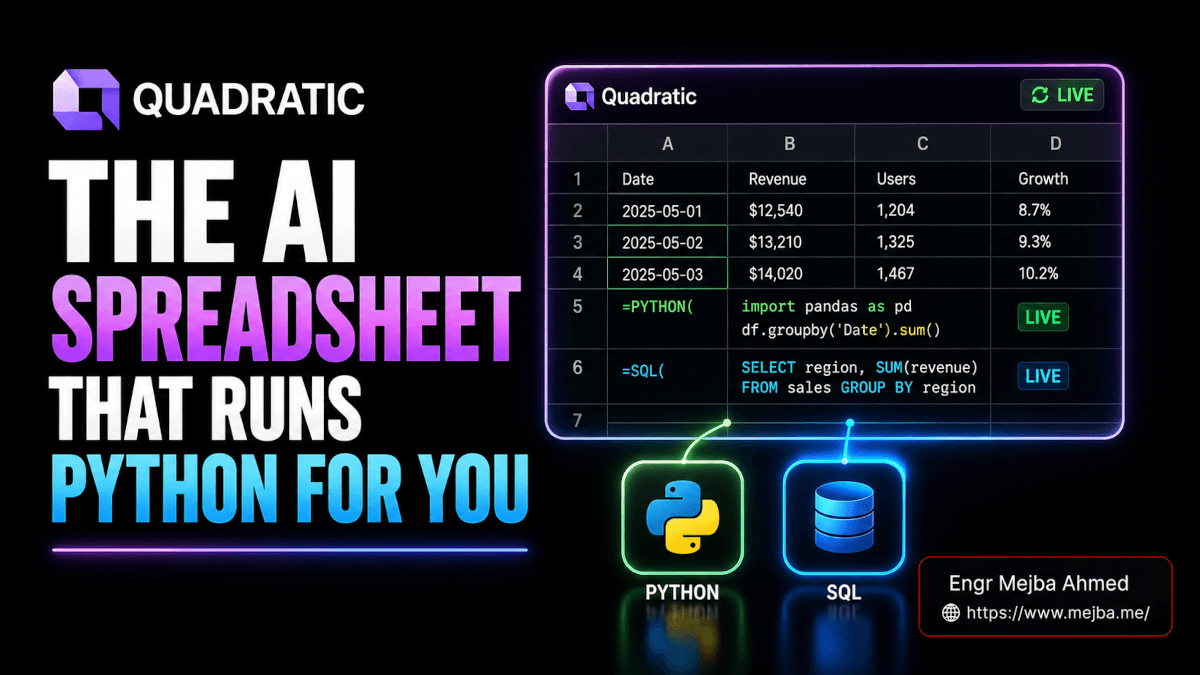
Quadratic is a spreadsheet that looks and feels like Excel or Google Sheets but has Python, SQL, and JavaScript execution baked directly into the cells, with an AI layer that writes that code for you from natural language. You type a request the way you'd ask a junior analyst, and instead of suggesting an answer, it generates code, runs it, and writes the result back into the grid.
Here's the part most reviews skip. There's a meaningful difference between a tool that talks about your data and a tool that operates on it. ChatGPT can describe what a deduplication should look like. Quadratic runs pandas on your actual rows and hands you the cleaned table plus the script that produced it. One is advice. The other is a finished job you can audit.
That single design decision — code that executes in the grid, not chat that lives beside it — is the whole reason this tool exists. Every feature below is a consequence of it.
Who it's for, honestly: data analysts tired of context-switching, freelancers and agency owners building client reports, solo founders tracking SaaS metrics, and creators who want insights without learning pivot tables. Who it's not for: someone who needs a pixel-perfect financial model with 40 linked tabs and decades of Excel muscle memory — that person isn't switching, and shouldn't.
A quick credibility note before I go further. Everything below comes from hands-on testing on the free tier at quadratichq.com, plus the official docs and pricing page to verify limits and integrations. Where I'm describing behavior I personally triggered, I'll say so. Where I'm reasoning about a use case from how the engine works, I'll say that too. No invented metrics.
The cleaning demo is where I stopped being skeptical, so I'll start there.
How Quadratic cleans messy data in one prompt
The test I always run first on any "AI data" tool is a deliberately ugly dataset, because clean demo CSVs lie. Mine had dates in four different formats, duplicate rows, a revenue column mixing ₹ symbols with raw numbers, an ad-spend column with stray text, and a handful of rows missing values entirely.
I gave Quadratic one instruction in plain English: clean this — standardize the dates, kill duplicates, convert the financial columns to clean numbers, and flag anything incomplete.
Under twenty seconds later, the grid had changed. Dates were uniform MM-DD-YYYY. Duplicate rows gone. The revenue and ad-spend columns were proper numeric types with the currency junk stripped. And the rows with missing or invalid data were flagged, not silently deleted — which is the correct behavior, because silently dropping data is how you ship a wrong report and never know.
The part that earned my trust: it didn't just hand me a clean table and ask me to take it on faith. The code editor opened and showed every transformation it ran — the dedup logic, the string sanitization, the type conversions, the flagging rules. Real Python I could read, edit, and rerun.
That transparency is the whole game for me. I've been burned by black-box "magic clean" buttons that quietly mangle a column you weren't watching. With Quadratic, if the AI guessed wrong on a conversion, I can see exactly where, change the line, and re-execute — no starting over. It blends AI speed with the inspectability of writing the script yourself, minus the part where I write the script myself.
There's a subtle thing worth naming: the AI isn't replacing the code, it's generating it, and the code stays yours. That's a fundamentally different trust model than a chat assistant that hides its work. If you've ever used Claude Code as a real development workflow, the mental model is identical — AI writes, you stay in the loop and own the output.
Cleaning is table stakes, though. The tool became genuinely useful when I stopped giving commands and started asking questions.
Asking your spreadsheet questions like it's a live analyst
Once my data was clean, I asked Quadratic the kind of open-ended question I'd normally spend an afternoon answering with pivot tables. Roughly: "Analyze monthly revenue, ad spend, customers, leads, channel performance, product category, and conversion efficiency. Give me five useful business insights and recommendations."
It came back like an analyst who'd actually read the numbers. The highest-revenue month, called out specifically. Newsletter as the most cost-efficient channel. Consulting as the top-performing product category. The combination of newsletter plus consulting as the strongest conversion pairing. And a structural observation I hadn't asked for directly — ad spend was staying consistently below 50% of revenue, which is a margin signal worth knowing.
Then I pushed on it, the way you'd push on a real analyst. Which channels deserve more budget? Which product categories have the best return on ad spend? Where am I spending a lot and converting poorly? Each follow-up got a grounded answer pulled from my numbers, not generic marketing advice.
No formulas. No pivot tables. No SUMIFS I'd have to debug. I asked, it analyzed, it answered.
Why this beats a ChatGPT tab: when I ask ChatGPT to analyze a CSV I've pasted in, I'm trusting its summary of a static snapshot. Quadratic runs the analysis as live code against the live grid. Change a number, re-ask, and the answer updates against current data. One is a frozen photograph; the other is a window.
That said — and this is the honest caveat — the quality of insight is bounded by the quality of your question and your data. Ask a vague question, get a vague answer. Garbage in, confident-sounding garbage out. The tool removes the mechanical work of analysis; it does not remove the need to think about what you're actually asking. Treat its output as a sharp first draft from a fast junior, not gospel from a CFO.
If you're new to working with AI tools rather than just chatting at them, my breakdown of the AI tools that actually replaced my workflow covers the same "operator, not oracle" principle across a wider stack.
So it cleans and it analyzes. Next I made it do the part of reporting I hate most: building the charts.
Building dashboards from a sentence
Chart-building is where my old workflow leaked the most hours. Select the range, pick the chart type, fix the axis labels, recolor, repeat six times, then arrange everything into something presentable.
In Quadratic I described the dashboard I wanted — revenue trend over time, channel performance, product-category breakdown, ad-spend efficiency, customer growth, and conversion rates — and asked it to build them.
It created a brand-new sheet literally named "dashboard" and auto-populated it with the visuals. Line charts for the trends, bar graphs for the category breakdowns, compiled into something that looked like a deck slide rather than a raw Excel chart. When I asked it to add an ad-spend efficiency view, a conversion funnel, and a customer-growth chart on top, it dropped them in without me touching a single chart wizard.
The work that used to eat an hour or two of clicking collapsed into a couple of sentences and a few seconds of compute.
I'll be straight about the ceiling here, because no review should oversell this. These are clean, presentable, good-enough-to-send visuals — not the output of a dedicated BI tool with deep drill-downs and custom interactivity. For a weekly client report or a founder snapshot, they clear the bar comfortably. For an executive board deck where someone will interrogate every axis, you'll still want to refine. Knowing which tier of polish a job needs is the skill; Quadratic just makes the good-enough tier almost free.
Charts from your own data are useful. Charts from data that doesn't even live in your spreadsheet yet is where it got more interesting.
Pulling live data without touching an API key
Most "API integration" features mean: go get a key, read the auth docs, paste credentials into a config, debug a 401. I've lost whole evenings to that dance.
Quadratic has native integrations that skip the manual key setup for several sources. To test it, I asked it to pull stock-market data for the big AI names — Nvidia, Microsoft, Google, Amazon, Meta.
It returned current price, market cap, one-year performance, and P/E ratio for each, with short contextual notes on each company's AI relevance. Then I asked for a visual comparison: a market-cap bar chart and a performance-trend view, plus a written summary of who's leading on the AI front. All of it generated inside the sheet, no external tab, no key wrangling.
For someone who tracks markets, competitor metrics, or any live numerical feed, pulling fresh data into the same grid where you analyze it removes an entire category of busywork.
The connection ecosystem is broader than the stock demo suggests. Quadratic connects to databases like PostgreSQL, MySQL, and Snowflake directly, so you can run live SQL against production data without leaving the sheet. The official docs also point to connections spanning dozens of additional data sources. And here's a detail the casual demos miss: because Quadratic speaks SQL natively in cells, your spreadsheet effectively becomes a lightweight, AI-assisted SQL client — query a database, get rows in the grid, chart them, all in one place.
There's one capability I have to call out separately, because for the audience reading this it might be the most important: Quadratic supports MCP (the Model Context Protocol). You can point Claude, Cursor, ChatGPT, or any MCP-enabled agent at a Quadratic file and give it a live spreadsheet to read, write, and verify work in — Quadratic runs a remote MCP server for exactly this. If you're building agentic workflows, a grid that an agent can both compute in and be inspected through is a genuinely useful primitive — and it slots neatly into the kind of agent-native setups I've been building all year.
Enough feature tour. Here are the two workflows where this tool stops being a toy and starts replacing actual paid work.
Two real workflows: the agency report and the founder dashboard
Demos use demo data. Here's where I stress-tested it against the work people actually get paid for.
The agency weekly client report
If you run an agency or freelance for multiple clients, you know the Sunday-night grind: pull each client's numbers, summarize spend and revenue, calculate ROAS, count leads and conversions, and call out what's working and what's bleeding money — then format it so a non-technical client can read it over coffee.
I imported a client-data CSV and gave one instruction: create a weekly client report summarizing spend, revenue, ROAS, leads, and conversions, and identify the top and worst-performing channels.
It produced a client-friendly summary — readable prose plus the supporting numbers — that was genuinely close to send-ready. Not "paste raw metrics" close. "Light edit and email" close. For an agency running this across a dozen clients, the math on time saved is obvious, and it scales linearly: same prompt, swap the CSV.
If you're thinking about productizing exactly this kind of reporting into a recurring deliverable, I wrote a full piece on the AI automations businesses actually pay for — automated client reporting is squarely on that list, and Quadratic is one of the cleaner ways to deliver it.
The founder SaaS health dashboard
The second test hit closer to home. I uploaded monthly revenue, customer-acquisition cost, and active-customer counts, then asked for the founder's vital signs: MRR growth month-over-month, churn, burn rate, runway, active-customer growth, key risks, and a dashboard summarizing overall business health with recommendations.
It built the dashboard — MoM MRR growth, churn trend, burn rate and runway, active customers, and ARPA (average revenue per account). Crucially, it exposed the formulas and metrics behind each number rather than hiding them. That transparency isn't a nice-to-have for financial reporting; it's the whole point. I could audit how runway was calculated, adjust an assumption, customize a metric, and trust the output because I could see the work.
Burn rate and runway are exactly the numbers you do not want a black box to guess at. Being able to read and edit the calculation is the difference between a dashboard you'd show an investor and a dashboard you'd quietly never trust.
These two workflows are the proof. The feature that changes the nature of reporting — from a chore you repeat to a thing that maintains itself — is next.
When your dashboard refreshes itself
Every report I've ever built died the moment I saved it. A dashboard is a photograph of a number that's already changed by the time anyone looks at it.
Quadratic breaks that. After building the stock dashboard, I told it: refresh this using the latest available data — update the charts, the summary, and the recommendations. It pulled new prices, new market caps, new financials, and rewrote every visual and the written analysis in seconds. The static report became a living one with a single sentence.
It also goes one step further, and this is the feature I'd actually pay for. You can schedule automatic refreshes so the data re-pulls, charts redraw, and summaries regenerate on their own. Set it once and your Monday-morning report builds itself overnight.
Think about what that removes. The entire ritual I described in the opening — export, clean, chart, summarize, repeat weekly — becomes a thing that happens without me. Reporting stops being a task on my list and becomes infrastructure that runs in the background. That's not a productivity tweak. That's the chore disappearing.
Now the honest part, because a review that only gushes is a sales page.
Where Quadratic falls short
I'd be doing you a disservice if I pretended this tool has no edges. Here's where I hit friction or where I'd hesitate before recommending it.
Large, heavy datasets strain it. Quadratic shines on the kind of data most of us actually work with — thousands to tens of thousands of rows. Push into very large datasets while running multiple simultaneous scripts and performance can degrade. This is a focused analysis-and-reporting tool, not a replacement for a warehouse-scale BI pipeline. Match the tool to the data size.
The free tier is for evaluating, not living in. The Personal plan is genuinely free and great for testing — it's how I ran everything above — but it caps AI usage, sharing, files, and connections. As of mid-2026, the official pricing is Personal (free), Pro at $18/user/month billed annually (which includes $20 of monthly AI credits and access to additional models), and Business at $36/user/month with double the AI credits plus on-demand usage. Enterprise is custom, with SSO, self-hosting, and dedicated support. If Quadratic becomes a core part of your reporting, you're on a paid plan — budget for it, and verify current numbers on their pricing page since AI-credit terms shift.
The AI is only as good as your prompt and your data. I said it earlier and I'll repeat it because it's the most common way people get disappointed: this tool removes the mechanical labor of analysis, not the judgment. A lazy question gets a confident, lazy answer. You still have to know what you're asking and sanity-check what comes back.
There's a learning curve hiding under the friendly UI. The spreadsheet feels familiar, but to get the real value you have to learn to think in prompts and occasionally read the Python it generates. Non-technical users can get a long way on natural language alone, but the moment something needs fixing, you're looking at code. That's a feature for me and a wall for someone who never wanted to see a script.
On security, for anyone evaluating this for client or company data: Quadratic states it is SOC 2 (Type II) and HIPAA compliant, encrypts data in transit and at rest, and supports role-based access control. Confirm the current compliance posture against your own requirements before loading sensitive data — don't take a blog's word for it, including mine.
None of these are dealbreakers for the use cases I tested. They're boundaries. Know them and you won't be surprised.
So who should actually switch?
After all of it, here's my straight read.
If you build recurring reports — agency client summaries, founder dashboards, marketing analyses — and you're currently bouncing between Excel, a BI tool, Slides, and a chat assistant to do it, Quadratic genuinely collapses that into one surface. The cleaning, the analysis, the charts, the live data, and the auto-refresh aren't separate tools stapled together; they're one workflow. That consolidation is real, and it's the strongest reason to try it.
If you're a developer or someone building agentic systems, the Python/SQL/JavaScript-in-cells model plus MCP support makes it a useful, inspectable data primitive that an agent can operate inside.
If you live in giant, complex financial models or need warehouse-scale data crunching, this isn't your tool — and that's fine, it isn't trying to be.
The honest test costs nothing: take your single ugliest CSV, the one with the broken dates and the duplicate rows you've been avoiding, drop it into the free tier at quadratichq.com, and give it one plain-English cleaning command. Watch what it does in twenty seconds — and then open the code editor and read the Python it wrote to do it.
That second part, reading the code it generated, is the moment I stopped seeing Quadratic as a gimmick and started seeing it as the way I'd want every spreadsheet to work. The AI did the work. But it showed me exactly how. That's the combination I've been waiting for — and it's why my four tabs are now one.
FAQ
Frequently Asked Questions
Everything you need to know about this topic
Quadratic is an AI-native spreadsheet that writes and runs Python, SQL, and JavaScript inside the cells, generated from plain-English prompts. Unlike Excel or Google Sheets, the AI doesn't just suggest answers — it executes code that updates the grid live, blending a familiar spreadsheet UI with real data-engineering power. See the cleaning and analysis sections above for what that looks like in practice.
Yes, Quadratic offers a genuinely free Personal plan at quadratichq.com with limited AI usage, sharing, files, and connections — enough to test every core feature. Paid plans start at Pro for $18/user/month (billed annually, including $20 in monthly AI credits), with Business at $36/user/month for heavier AI usage.
Yes — running Python, SQL, and JavaScript directly inside spreadsheet cells is Quadratic's defining feature. The AI generates that code from natural language, but every line stays visible, editable, and rerunnable in the code editor, so you can audit and customize exactly what it did. This is what separates it from a ChatGPT plugin that only describes changes.
Yes, Quadratic offers native integrations that pull live data — including market data, plus direct connections to databases like PostgreSQL, MySQL, and Snowflake — often without manual API-key setup. You can also schedule automatic refreshes so charts and summaries regenerate on their own, and connect AI agents to your files over MCP.
Partly — non-technical users can clean data, ask analytical questions, and build dashboards using plain English alone, no formulas required. The catch is that fixing or customizing results means reading the Python it generates, so there's a learning curve once you go beyond the happy path. It's most powerful for people comfortable seeing code, even if they don't write it themselves.
Where I landed
Quadratic is the first spreadsheet that let me delete the four-tab ritual without giving up the auditability I refuse to lose — the AI writes the code, but the code stays mine to read and fix. If you want help turning recurring reporting like this into a productized, self-refreshing deliverable, that's the kind of build I take on as freelance work.