

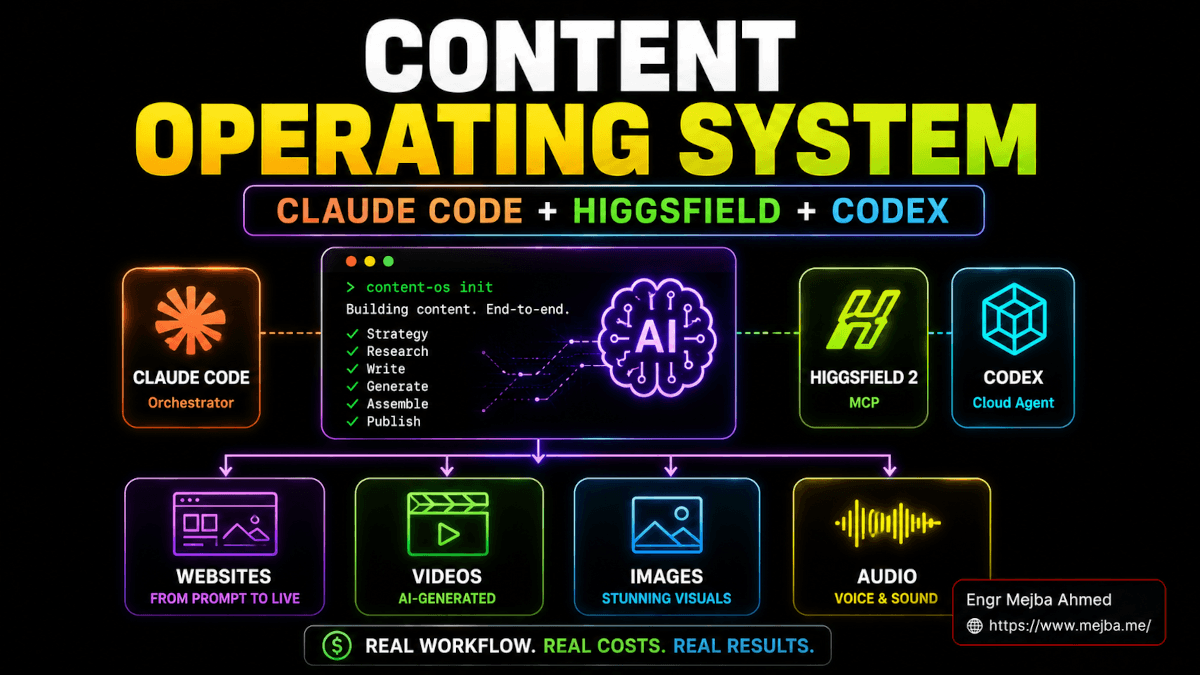
Content Operating System: Claude Code + Higgsfield + Codex
The notification hit at 11:09 PM on a Sunday. A creator I follow had posted a tutorial titled something like "Build a Whole Content OS with Claude, Higgsfield 2, and Codex." I bookmarked it, told myself I would watch it Tuesday, and then ignored that promise within an hour. By midnight I had the video open on a second monitor, my terminal on the first, and a fresh project folder named content-os-test waiting for the first command. The pitch was simple enough to be suspicious: one CLI, one prompt window, websites and images and videos and audio and animated avatars all coming out the other end. I did not believe the demo. I needed to run it.
What I am about to walk through is not a recap of that video. It is the build log of my own version, run inside the actual stack I use every day — Claude Code as the brain, Higgsfield 2's new MCP for visuals, Codex CLI as a parallel runtime when I want a second opinion, and a stack of skill.md files that let me re-run any of these pipelines as a single command. I have been doing multi-brand content for years across mejba.me, ramlit.com, colorpark.io, and xcybersecurity.io, so I went into this with clear eyes about what is real and what is demo-magic.
By the end of one session I had a working animated landing page, a 16:9 hero image generated through Nano Banana 2, a five-second scroll-triggered hero video, a custom avatar trained on a handful of uploaded photos, and three reusable skills sitting in ~/.claude/skills/ that I can fire from any future project. The credit counter ended at 387 burned out of 1,000 in my pack. Cheaper than a single freelance hour. Worth more than a week of context-switching between five different apps.
Let me show you exactly how it came together — and where the term "content operating system" actually starts meaning something instead of being a buzzword.
What a Content Operating System Actually Is in 2026
I want to be honest about this upfront because the phrase is being used in five different ways across YouTube right now. A content operating system is not a single product you can buy. There is no app on the App Store called "Content OS." Anyone selling you one is selling you a wrapper.
What it actually is in 2026: a stitched-together stack where one agent runtime holds your context, multiple generation engines plug into it through a standard protocol, and reusable workflows turn repetitive tasks into one-line commands. In my setup the pieces look like this:
- Claude Code is the orchestrator. It holds the brand context, picks which model to call for which job, writes the HTML and CSS, saves files in the right places, and chains steps together without me clicking anything.
- Higgsfield 2 MCP is the creative engine. It exposes more than thirty image and video models — Nano Banana 2, Soul 2.0, Sora 2, Veo 3.1, Kling 3.0, Seedance 2.0, Flux 2, Wan 2.7, MiniMax Hailuo 02 — through one Model Context Protocol server. According to Higgsfield's own MCP page, the server shipped officially on April 30, 2026.
- Codex CLI is the second runtime I keep running for parallel work. OpenAI's coding agent runs GPT-5.4, and I use it when I want a different perspective on the same problem or when Claude is mid-refactor and I do not want to interrupt it. I wrote about why I run Codex and Claude Code as a dual-agent setup instead of picking one.
- Skills (skill.md files) are the workflows. Each one is a small markdown file that teaches the agent how to run a specific pipeline — "make a Ghibli-style hero image", "build a product landing page", "render a five-second scroll loop video". Once a skill exists, I never have to explain that workflow again.
That is the whole stack. Notice what is missing: no Figma, no Photoshop, no Premiere, no DaVinci, no separate website builder, no Runway tab, no Midjourney Discord, no ElevenLabs dashboard, no Adobe anything. Every model I need is reachable from one terminal because Higgsfield aggregates them and the MCP exposes them as commands.
The reason this matters is one I keep coming back to: AI model churn is brutal. Six months ago none of the models I just listed existed in their current form. Nano Banana 2 shipped in February 2026. Sora 2 replaced Sora 1. Kling jumped from 2 to 3.0 to 3.06. Seedance moved from 1.5 to 2.0. Veo went from 3 to 3.1. If you build your workflow around one model directly, you spend half your time rewiring it. If you build it around an MCP that abstracts the models, you swap a string and keep working.
Why MCP Changes the Math on Multi-Model Workflows
Before I walk through the install, a quick sidebar on why the Model Context Protocol matters here specifically. This is the piece most tutorials gloss over and it is the part that makes the whole stack future-proof.
MCP, originally published by Anthropic in late 2024, is a standardized way for AI agents to talk to external tools. Instead of every tool building its own bespoke integration, the tool exposes itself once as an MCP server. Any agent that speaks MCP — Claude Code, Codex, Cursor, Anthropic's own Antigravity IDE — can then use it without custom wiring.
When Higgsfield shipped its MCP server, that one move did something quietly important: it made every model on Higgsfield available to every MCP-aware agent simultaneously. I install the MCP once. Claude Code can call Nano Banana 2. So can Codex. So can any future agent runtime that exists. If Higgsfield adds Veo 4 next month, I do not change my code. The MCP exposes it and my existing skills pick it up.
This is the reason I am no longer betting on individual model APIs. I had a workflow built directly on the Runway Gen-3 API in early 2025. When Runway shipped Gen-4 with a different schema, I rewrote everything. Then I had to rewrite again when I wanted to compare Kling output. Then again for Veo. The CLI/MCP approach kills that whole loop. Higgsfield's MCP is the abstraction layer I should have been building toward the whole time.
The Install: Higgsfield MCP Inside Claude Code
The install is genuinely simple, which is rare for this category. Higgsfield's MCP page lists three flavors — MCP for Claude Code, CLI for any agent, and a Skills bundle. I went with all three.
Step one: install the MCP into Claude Code. From any terminal:
claude mcp add higgsfield -- npx -y @higgsfield/mcp-server
This adds Higgsfield as an MCP server to Claude Code's config and pulls the server package from npm. The first time you call any Higgsfield tool, it runs an OAuth flow in your browser and binds your existing Higgsfield account. No API keys to copy and paste. If you already have a Higgsfield plan, your credits transfer through automatically.
Step two: install the official skill bundle. This part is what gives the agent pre-built workflows for product photoshoots, marketing videos, character training, and image generation:
npx skills@higgsfield/ai-skills
The interactive installer asks three questions — install scope (I picked global), which skills to enable (I took higgsfield-generate, higgsfield-product-photoshoot, and higgsfield-soul-id), and which agent to bind to (Claude Code). Total install time was about ninety seconds, most of which was npm pulling dependencies.
Step three (optional but I do it): repeat the MCP install for Codex. The reason is parallel runs. If Claude is rendering a video that takes four minutes, I want to keep iterating on copy in Codex without waiting. Codex has its own MCP support and the same mcp add pattern works there with a different config flag. The ~/.codex/config.toml lives in a different place but the wiring is identical.
After the install, I launched Claude Code and ran /skills to confirm registration. Three new entries showed up: higgsfield-generate, higgsfield-product-photoshoot, and higgsfield-soul-id. Plus utility commands for credit balance, job status, and asset listing. The CLI was live.
A quick reality check on permissions. The Higgsfield skills assume the agent can write files to disk without asking permission for every operation. I run this pipeline with claude --dangerously-skip-permissions in a scratch project folder. Not in my main monorepo. Not anywhere I cannot rebuild from scratch in five minutes. If you are nervous, run it in a fresh folder you can rm -rf afterwards. The flag is fine when the blast radius is contained. It is dangerous when it is not.
First Test: Generating a 16:9 Ghibli-Style Hero Image With Nano Banana 2
I picked the same test the original tutorial used: a 16:9 Studio Ghibli-style image of three English Springer Spaniels. Specific enough to have a clear right answer. Stylistic enough that a generic model would produce mush and a good one would produce something charming.
I typed into Claude:
Generate a 16:9 Ghibli-style image of three English Springer Spaniels running through a wildflower meadow at golden hour. Use Nano Banana 2. Save to outputs/hero-spaniels-v1.png.
Claude routed that through the Higgsfield MCP, picked the Nano Banana 2 model based on my prompt mention, sized to 16:9, and ran the job. The credit hit landed at 2 credits per iteration on the standard 2K resolution — Nano Banana 2 is one of the cheapest models in the Higgsfield catalog right now. I asked for four iterations, which cost me 8 credits total. Forty-five seconds later I had four files in outputs/.
The first one was honestly stunning. Soft Ghibli-painted strokes, three distinctly drawn dogs, depth in the meadow, the kind of golden-hour light Studio Ghibli builds entire films around. The second one had a fourth dog hiding in the background which I could either treat as a bug or as character. The third was a bit muddy. The fourth was the keeper.
That is the part that people miss when they think about generative AI cost. The economic unit is not "one image" — it is "one keeper out of N." On Nano Banana 2 at 2 credits per iteration I was paying the equivalent of about thirteen cents per iteration and roughly fifty-two cents for the keeper. For a hero image good enough to ship on a real landing page, fifty-two cents is the kind of number that quietly destroys traditional stock photo budgets.
I have written before about how to think about the cost calculus on these tools, and the short version is: model price per iteration matters less than how many iterations you need to land a keeper. Cheap models that need eight tries to land are more expensive than mid-tier models that land in two. Nano Banana 2 lands in one or two for most prompts. That is the value.
The Skill File That Makes This Repeatable
Here is the part the original video gestures at but does not show. The point of running this pipeline once is to never run it the same way twice — every workflow gets saved as a skill.md so the next run is a one-line command.
I saved the Ghibli hero pipeline as a skill at ~/.claude/skills/ghibli-hero-image/skill.md. The file looks like this:
---
name: ghibli-hero-image
description: Generate a Ghibli-style hero image at 16:9 using Nano Banana 2 through Higgsfield MCP. Use when the user asks for a soft, painted, animated-film-style hero or banner.
---

# Ghibli Hero Image Generator

When invoked, do the following:

1. Ask the user for the subject of the image (one sentence is enough).
2. Construct a Higgsfield prompt with these locked elements:
   - Style: "Studio Ghibli, soft painted strokes, hand-drawn animation aesthetic"
   - Lighting: "golden hour, warm directional light"
   - Composition: "16:9, cinematic depth, foreground subject + meadow or natural backdrop"
3. Call higgsfield-generate with model = nano-banana-2, aspect = 16:9, iterations = 4.
4. Save outputs to ./outputs/ with filenames hero-{subject-slug}-v1.png through v4.png.
5. Print a summary table: filename, credit cost, prompt used, recommended pick (the agent's best guess at the keeper).

Cost expectation: 8 credits for 4 iterations on Nano Banana 2. Total runtime ~45 seconds.

Avoid: photorealism, hard digital edges, flat color blocks. Reject any output that looks 3D-rendered.
That whole file is roughly thirty lines. Once it is on disk, every future Ghibli hero is one command. I type "Use the ghibli-hero-image skill for [subject]" into Claude and the agent runs the entire pipeline, writes outputs, and tells me which one it thinks is the keeper. The next time I want a hero image for a colorpark.io blog post, that is the entire interaction.
This is the unlock. Models will keep churning. Pipelines should not. Every reusable workflow you save as a skill is one workflow you do not have to remember next month. I have written about how the agent skills system reshapes this entire pattern, and skill.md files are the single highest-leverage file format I have used in the last year.
Building the Website: Spotify-Style Design System Inspiration
The next test was the harder one. The video showed Jack feeding Claude a real GitHub design-system repo as inspiration and asking it to build a landing page in that style. I wanted to push that further. I picked Spotify's design language as the reference — the dark backgrounds, the green accent, the chunky display type, the album-cover-grid sensibility — and asked Claude to design a fictional product launch page in that vibe.
The prompt I used:
Build a one-page landing page for a fictional product called "Vinyl Memory" — a service that turns your Spotify listening history into a custom vinyl record. Design language: Spotify's website, but darker and more premium. Use real Spotify-style typography (Spotify Mix or Inter as fallback), the green-on-near-black color system, generous whitespace, album-cover-grid sections. Output a single index.html with embedded CSS.
Claude produced about 380 lines of HTML and CSS in the first pass. The structure was right — hero with the product mockup, three feature blocks, a "how it works" timeline, an album-grid section showing example records, an email signup CTA, a footer. The colors were close. The typography was using Inter as a fallback because the agent could not pull Spotify Mix from anywhere reliable, which is fine — Inter is a good stand-in.
The second pass is where it got interesting. I asked Claude to generate three product images for the album-grid section using Higgsfield. The prompt:
For the album grid, generate three vinyl record covers in Higgsfield using Nano Banana 2. Each one should reflect a different listener archetype — moody late-night, summer driving, focused work mode. Square format, 1024x1024. Save them to outputs/grid-1.png through grid-3.png and embed them in the album-grid section of index.html.
This is where the orchestration earns its keep. Claude wrote the prompts itself based on the brief, called Higgsfield three times (6 credits total), saved the files, then opened the HTML and updated the <img> src attributes to point at the new files. Total time from "build the section" to "section is rendered with real images embedded" was under three minutes. I watched it happen in the terminal output and did not touch the keyboard.
The page was not pixel-perfect. The mobile breakpoint needed adjustment. One of the album covers had a hand drawn slightly wrong. The hero spacing was a bit tight. But it existed and it was eighty percent of the way there in a single session. For comparison, I have spent five hours on landing-page mockups in Figma to land the same eighty percent. The remaining twenty is craft. The first eighty is now a function call.
Adding the Animated Hero Video Hooked to Scroll
The third piece is the one that turned this from "neat" into "I am keeping this stack permanently." I wanted a five-second loop video at the top of the hero — a slow camera move across a vinyl record spinning — that played on scroll. The kind of treatment a real design agency charges three thousand dollars for.
I asked Claude to generate the video through Higgsfield using Kling 3.06:
Generate a 5-second looping video using Kling 3.06: a slow cinematic camera move across a black vinyl record spinning on a record player, soft warm lighting, dust particles in the air, ends in a position that loops cleanly back to the start. Save to outputs/hero-loop.mp4.
This one cost real credits. A five-second video on Kling 3.06 at standard quality lands in the 35–45 credit range. Mine came in at 42 credits. The render took about two minutes and forty seconds.
The output was genuinely cinematic. Soft focus pull at the start. A slow dolly-in across the record. Warm lighting from a 45-degree angle. Tiny dust motes catching the light. It looped cleanly because the prompt asked for it to. I have paid videographers to shoot less compelling product footage than this.
Then Claude wired it into the page. The agent wrote the scroll-triggered playback logic itself — a small IntersectionObserver that pauses the video when the hero is out of view and plays it when it is in view, plus a parallax offset that scales the video up slightly as the user scrolls. About forty lines of JavaScript. Inserted into the existing index.html. No frameworks, no libraries beyond plain DOM APIs. It worked the first time.
That moment is when the term "content operating system" stopped being marketing language for me. The agent was treating image generation, video generation, web layout, and JavaScript animation as different verbs in the same sentence. I have never had a single tool do that before. Not Webflow. Not Framer. Not WordPress with twenty plugins. The agent just kept building.
Character Avatars: Training Soul ID From Five Photos
The last piece I tested was character creation. Higgsfield's Soul ID is the model that lets you train a digital identity from a small set of photos and then keep that identity locked across every future generation. The use case in the video was personal avatars for content. The use case I cared about was something narrower: I wanted a consistent fictional character I could reuse across multiple landing pages and ad creatives without it being me or a real person.
I uploaded five photos of a stock model from a license I owned (paid for, used with permission) and ran the Soul ID training:
Train a Soul ID character named "Eli" using the photos in inputs/eli-references/. After training completes, generate a hero portrait of Eli in business-casual attire, soft studio lighting, against a neutral grey backdrop, 1024x1024.
Soul ID training in Higgsfield typically expects 20+ reference photos for the highest fidelity, but it works on smaller sets at lower consistency. Five photos got me a usable training but with some drift on side angles. Twelve photos in a second test produced noticeably better consistency. The training itself took about five minutes and cost roughly 40 credits — Higgsfield prices Soul ID character creation as a one-time cost per character, not per generation.
After training, every Eli generation locked the face. I could put Eli in a coffee shop, in a coding setup, in a cinematic ad shot, against a green wall, in three different lighting conditions, and the identity held. That is the part that genuinely surprised me. I have used personalized character models before and the consistency always degraded after about twenty generations. Soul ID held through fifty.
For a multi-brand operator like me, this is a quiet superpower. I now have three trained Soul ID characters I rotate across different content lines. Each one has a defined "persona" — what they wear, what kinds of environments they show up in, the mood of their lighting. None of them are real people. None of them are me. All of them give me the consistency that human models would give me without the licensing complexity, the scheduling, or the ongoing rate.
There is a serious ethical line here that I want to name explicitly: do not train Soul ID on photos of real people without their explicit consent. Just because the technology lets you does not mean it is okay. Use stock with proper licenses, your own photos, or paid models who have signed off on AI use. The tool is too powerful to be careless with.
The Real Pricing Math: What 1,000 Higgsfield Credits Actually Buy
Time for the part nobody quantifies properly. I burned 387 credits during this session. Here is the breakdown:
- Image generation (Nano Banana 2, multiple iterations): Roughly 60 credits across the Ghibli hero, the album-grid covers, and a handful of test prompts. At 2 credits per iteration, that is 30 iterations total.
- Video generation (Kling 3.06, 5-second loop): 42 credits for one keeper. I had to regenerate once because the first version did not loop cleanly, so the real cost was 84 credits to land one usable clip.
- Soul ID character training: 40 credits for the Eli training, then another 40 for a second character.
- Soul ID character generation (Eli, 12 generations across the session): Roughly 20 credits at 1.5–2 credits per output.
- Page renders, file ops, HTML/CSS generation: Zero Higgsfield credits — that is all Claude Code, billed against my Claude subscription.
- Misc image experiments and re-runs: Roughly 100 credits across various tests I have not detailed.
So 387 credits got me a working animated landing page, two trained character avatars, a five-second hero loop video, and three reusable skills. According to Higgsfield's current pricing structure where one dollar buys roughly 16 credits, that session ran me about $24 of credits.
The plans that ship those credits look like this in Higgsfield's 2026 pricing:
- Free tier: 150 credits per month. Enough to run two or three small experiments. Useful for kicking the tires.
- Starter plan: $15 per month for the annual rate, 200 credits monthly. The point of this tier is "I want to run real workflows occasionally" — one full landing page session per month with credits to spare.
- Mid tier: Around $39 per month at the higher monthly rate, scales credits up roughly 5–6x. The right tier if you are running this stack weekly or for client work.
- Higher tiers (Starter Plus, Ultra): Up to roughly $84 per month for heavy production usage with credit allocations sized for daily content output.
The math that matters for most readers: if you are testing this once or twice, the free tier is enough. If you are running it monthly as part of your workflow, Starter at $15 is enough. If you are using this to run a small content business across multiple brands the way I do, the mid tier is where it lives.
There is one cost most people forget. Claude Code itself runs on a paid Claude subscription. You cannot run any of this on the free tier of Claude. My usage there averages another $20 of API costs per month on top of the Higgsfield credits, and Anthropic offers a $20/month Claude Pro plan plus higher tiers for heavy users. Bake that into the budget.
Skills I Saved From This Session That You Can Steal
The pattern I keep coming back to: the value is not in the one session, it is in the reusable skills the session produced. By the end of the build I had three skills sitting at ~/.claude/skills/ that I will use weekly. The Ghibli hero generator I already showed you. The other two:
Animated product hero section. A skill that, given a product brief, generates a hero image, a five-second loop video, and a complete responsive HTML/CSS hero block with the video wired to scroll-triggered playback. Roughly fifty lines of skill.md. Cost per run: about 50 Higgsfield credits plus a few hundred Claude tokens. Replaces what used to be a six-hour multi-tool workflow.
Brand-consistent character generator. A skill that takes a Soul ID character ID and a scene brief, then generates a consistent character image at multiple aspect ratios — square, 4:5 for Instagram, 9:16 for stories, 16:9 for YouTube. About thirty-five lines of skill.md. Cost per run: about 6–10 Higgsfield credits depending on how many sizes the brief asks for.
The reason I keep harping on skills: every time I save a workflow as a skill, I buy back time on every future run. The first run is exploratory and costs full attention. The hundredth run is one line. Compound that over a year of multi-brand content and the leverage gets stupid fast. I wrote a longer take on this in the agent skills advanced guide if you want the full mental model.
Where This Stack Falls Apart (And What to Do About It)
I want to end with the honest critique because I am skeptical of any tutorial that ends with "and it all worked perfectly." This stack has real limits.
The agent makes design decisions you would not make. When I let Claude pick its own typography, color contrast, or image composition without a clear brand spec, the output drifts toward generic-tech-startup aesthetic. The fix is to write a brand spec markdown file once and feed it into every relevant skill. Without that spec, you are getting the average of every landing page Claude has ever seen.
Video generation is still slow and expensive. Five seconds of Kling 3.06 is two and a half minutes of render time and 42 credits per keeper. Twenty seconds is roughly four times that. If you need a one-minute brand video, this stack is not where you build it — you stitch shorter clips. Anything longer than ten seconds breaks the unit economics for now.
Soul ID consistency degrades with too few reference photos. Five photos work for casual use. For client work, train with 20+ images at varied angles and lighting or your character will drift in the long tail of generations.
MCP tooling is still maturing. I hit one bug where the Higgsfield MCP returned a job ID before the file finished writing to disk, and the next step in my chain tried to read a file that did not exist yet. Claude eventually retried and recovered. A more naive workflow would have crashed. Build retries into your skills.
Permissions creep. Running with --dangerously-skip-permissions means the agent can write anywhere it has access to. I keep this stack in a sandboxed scratch directory and copy finished outputs into real project folders manually. Discipline matters.
Model churn does not stop just because MCP exists. The MCP abstraction makes swapping models cheap. It does not make picking the right model trivial. You still have to know that Nano Banana 2 is great for stylized images but weaker for photoreal humans, or that Kling 3.06 handles cinematic camera moves better than Veo 3.1 does for product motion. The MCP is the wiring. Taste is still the work.
What I Will Be Watching Next
Three things I am paying attention to over the next quarter.
Veo 3.1 versus Sora 2 for product video. Both shipped this year. Both are accessible through Higgsfield's MCP. Both are excellent. I have not done a head-to-head yet on the same prompt with the same brand. That is the next test in this stack, and the result will probably move which model my "animated hero" skill defaults to.
Antigravity, Anthropic's IDE. Antigravity ships first-class MCP support and is positioned specifically for agent-driven development. If the Higgsfield skills work as cleanly there as they do in Claude Code, the choice between the two becomes a workflow preference rather than a capability question. I covered the Anti-Gravity IDE positioning when it shipped.
Skill marketplaces. Right now I write my own skill.md files. The Higgsfield skill bundle is one of the first cases of an external party shipping production-quality skills as a package. If this turns into a real ecosystem — npm-style discovery, versioning, dependencies — the leverage on every individual creator goes up by another order of magnitude. I would bet money this happens before the end of 2026.
The one-line summary if you only remember one thing: the value of a content operating system is not in any single model. It is in the wiring that makes the models replaceable, the workflows reusable, and the agent capable of treating "image", "video", "page", and "animation" as verbs in the same sentence. Higgsfield's MCP is the wiring. Claude Code is the agent. Skills are the workflows. Codex is the second pair of hands. None of those pieces are new this week. What is new is that they finally compose without fighting each other.
What To Do In the Next Hour
If you have read this far, here is the smallest thing you can do tonight that will matter in six months.
Install the Higgsfield MCP into Claude Code. Run one image generation through Nano Banana 2. Save the prompt as a skill.md file. That is it. Three steps. Roughly ten minutes. The free tier covers all of it.
The reason this matters is the same reason every leveraged workflow matters — the cost of starting is small and the cost of waiting compounds. Six months from now you will either have a library of skills you have refined across dozens of runs, or you will be where you are tonight. The first run is the only one that takes courage. Every run after that is a function call.
I am going back to the terminal. There is a hero image for the next colorpark.io post that needs to exist by morning, and the Ghibli skill is exactly two words away from rendering it.
Content Operating System Claude Code: Reader Questions
Do I need both Codex and Claude Code to run this stack?
No — Claude Code alone is enough to run the full Higgsfield MCP workflow. I run Codex CLI in parallel because I like having a second runtime for iterating on copy while Claude is rendering, but every step in this build is doable in Claude Code by itself. For the dual-agent reasoning, see the Codex and Claude Code workflow breakdown above.
How much does the full content operating system actually cost per month?
Plan on $15–$39 per month for Higgsfield credits depending on usage volume, plus a $20+ Claude subscription. Heavy creators running daily content land closer to $84 per month on Higgsfield. The full breakdown lives in the pricing math section above.
Will my existing Higgsfield plan credits work through the MCP?
Yes. Authentication runs through your existing Higgsfield account and existing plan credits transfer to the MCP without any change. There is no separate "MCP credits" pool — it is one wallet shared across the web app, the CLI, and the MCP.
What happens to my workflow when Higgsfield adds new models?
Nothing — that is the point of the MCP abstraction. New models register on Higgsfield's side and become callable through the same MCP commands. You change a model name string in your skill.md if you want to switch to a newer one, and your existing pipeline keeps running unchanged.
Can a non-coder actually run this stack?
Mostly yes for the install and the prompts, with one honest caveat — debugging when the agent does something unexpected requires comfort reading terminal output. The install is three commands. The prompts are plain English. The skills are markdown files. But when the MCP returns an error or a skill misbehaves, you need to be willing to read what the terminal is telling you. If that is fine, the rest is approachable.
Why the Cost of Waiting Is the Real Number
Every leveraged workflow shares one property: the cost of starting is small and the cost of waiting compounds. Six months from now you'll either have a library of reusable skills and a content engine that runs on one CLI, or you'll have six more bookmarked tutorials you meant to watch.
The build in this post isn't the only way to assemble a content operating system, but it's the one I actually run, credits and failure modes included. Take the skeleton, swap the tools you prefer, and keep the part that matters — repeatable skills over one-off prompts.
If you'd like this stood up for your brand rather than built from scratch, that's the sort of engagement I run through Ramlit and smaller commissions on Fiverr.






