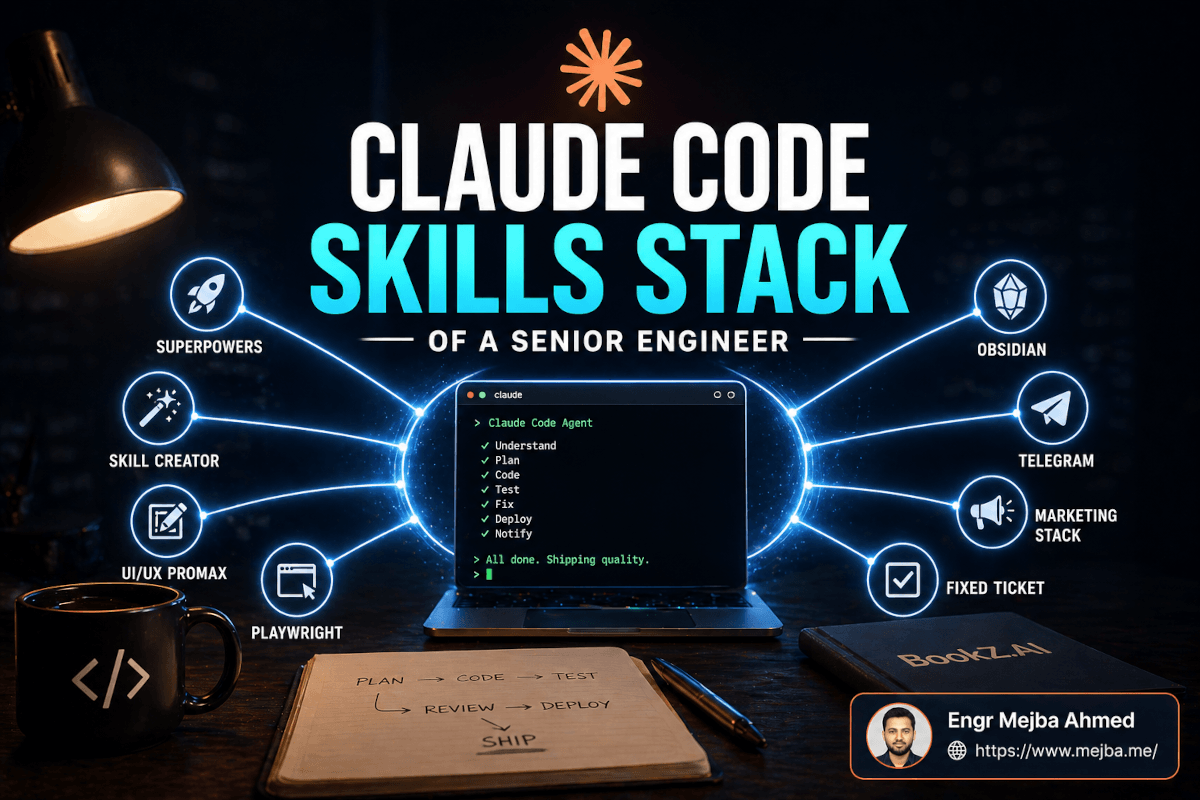
Claude Code Skills Stack of a Senior Engineer
The first time I watched a Claude Code agent pick up a Jira ticket, reproduce the bug in a real browser, diagnose it, write a failing test, land the fix, push to main, and notify QA — all without me touching the keyboard between steps — I had that uncomfortable feeling every working engineer gets eventually. Not "this will replace me." More like: "I have been doing a version of this wrong for three years."
The engineer I was watching wasn't some AI YouTuber. He was a former Amazon and Microsoft senior, now shipping a product called BookZ.AI, and he'd built what is probably the most disciplined Claude Code skills stack I've seen in 2026. Eight skills. Each one solving a specific failure mode in the "raw Claude Code" experience. Stacked together, they do something the docs don't really advertise: they turn Claude Code from a clever autocomplete into something closer to a junior-to-mid engineering team that happens to work at 3 AM.
I spent the weekend pulling that stack apart, installing the pieces, and testing them against a small SaaS I'm building. Some of it delivered. Some of it is oversold. The Fixed Ticket skill genuinely surprised me. The marketing stack — the part I assumed would be fluff — turned out to be the single most underrated piece of the whole setup.
Here's the complete breakdown: what each skill does, when I'd reach for it, how they compose, and the specific places the raw Claude Code experience falls apart without them.
Why "Raw" Claude Code Eventually Breaks
Claude Code on its own is powerful. You point it at a repo, describe what you want, and it writes code. That works great for a weekend project. It starts falling apart around the moment your codebase gets a second contributor, a production deploy, and a user base that notices bugs.
The three failure modes I keep running into:
- It skips steps. Raw Claude Code will happily write the feature and the tests — but only if you ask firmly, in order, and refuse its first draft. Left to itself, it drifts toward "vibe coding" — ship the feature, call the tests later, call the refactor after that, never actually circle back.
- It loses context across sessions. Every new session starts fresh. Your project conventions, your design language, your bug history — it has to rediscover all of that from
CLAUDE.mdand whatever you paste in. - It doesn't close loops. It writes code, but does it actually run? Does the bug still reproduce? Did the deploy succeed? Somebody — usually me — has to go verify that, and the verification step is where most "AI ships code" demos quietly collapse.
The skills I'm going to walk through are not general-purpose productivity hacks. Each one closes a specific loop. Together they make Claude Code behave less like an intern with a caffeine problem and more like a team that actually follows through.
If you haven't built the mental model for what skills even are in 2026, my agent skills guide for Claude Code covers the underlying mechanics — this post assumes you've already got that grounding and want to see what a production stack looks like.
Skill 1: Superpowers — The Discipline Layer
The foundation skill. The one without which the other seven are just nicer ways to ship chaos.
Superpowers is an open-source Claude Code plugin built by obra (Jesse Vincent) that hit 99k+ GitHub stars within three months of launching in January 2026 — which is absurd for a plugin, and which tells you something about how much demand there is for this exact problem. It was officially accepted into the Anthropic plugin marketplace shortly after.
What it does, in one sentence: it makes Claude Code follow a real senior-engineering workflow instead of whatever feels fastest.
The workflow it enforces:
- Brainstorm — turn a vague request into a decision spec
- Spec — write down what you're actually building, and what you're explicitly not
- Plan — decompose into 2-5 minute tasks with exact file paths
- TDD — red-green-refactor, tests must fail before implementation
- Subagent Dev — each task runs in a fresh subagent to prevent context drift on multi-hour runs
- Review — automated code review before anything is considered done
- Finalize — PR creation, branch cleanup, worktree management
The non-negotiable part is the TDD cycle. Superpowers doesn't say "you can follow TDD." It says "you will follow TDD," and it enforces that through the architecture of the skill, not through politely-worded instructions. Tests are written first. They must fail. Only then does implementation get written. If your test didn't actually fail in the red phase, the skill flags it as a false green and blocks progress.
That one rule alone killed about 60% of the "Claude wrote code that compiles but doesn't do what I asked" problems I was having. Because if the test was written against the actual behavior I wanted, and the test was seen failing before the code was written, the code either makes the test pass or it doesn't. There's no middle ground where Claude hallucinates a function that returns something vaguely right.
When I reach for it: literally every session that touches production code. The one place I don't use it is throwaway scripts and exploratory notebooks, where the ceremony costs more than it saves.
If you're going to install exactly one skill from this entire stack, this is it. Everything else in this post assumes Superpowers is already doing the work of keeping the development loop honest. I wrote a longer review of the Superpowers plugin if you want to go deeper on the TDD enforcement specifically.
Skill 2: Skill Creator — The Meta Layer
Here's the part that confused me for an embarrassingly long time: Skill Creator is a skill that builds other skills. It is, essentially, the skill-development factory.
Anthropic built it. It ships with four operating modes: Create, Eval, Improve, and Benchmark. Together those cover the entire skill lifecycle — from "I have an idea" to "I've measured this skill against a real workload and know whether it actually helps."
Why does this matter? Because the real power of the skills ecosystem isn't installing other people's skills. It's composing your own. The senior engineer running BookZ.AI didn't treat Superpowers as the final word. He took Superpowers, took pieces of GSD (Get Stuff Done), took pieces of GStack, and built a custom unified skill that handled his specific workflow: his preferred stages, his preferred testing frameworks, his preferred review cadence.
The compose-your-own approach matters because skills are stage-scoped. You can swap in a different brainstorming module without losing your TDD phase. You can add a custom review phase that runs your team's lint rules. The Skill Creator's Eval mode lets you measure each version against a benchmark — "does this updated skill actually produce better code on my real codebase, or does it just produce more code?"
The thing most tutorials miss is how important the Eval loop is. Writing a skill is easy. Writing a skill that demonstrably improves outcomes on your work is the part that separates a toy skill from one you keep.
When I reach for it: any time I notice I'm repeating the same 5+ sentence prompt across multiple sessions. That repetition is the signal — a skill is waiting to be born.
Skill 3: UI/UX ProMax — The Design System On Tap
This was the one I was most skeptical of. "UI/UX skill" usually means "generic Tailwind dashboard." ProMax is the opposite.
The underlying database, per the official skill docs, carries 50+ visual styles, 161 color palettes, 57 font pairings, 161 product types, 99 UX guidelines, and 25 chart types across 10 target stacks (React, Next.js, Vue, Svelte, SwiftUI, React Native, Flutter, Tailwind, shadcn/ui, plain HTML/CSS). The skill triggers automatically when the task involves UI structure, component refactor, color system choice, or typography — you don't have to manually invoke it.
The part that sold me: industry-specific defaults. You say "fintech dashboard" and the skill's style/color/typography choices are already constrained to what fintech dashboards actually use — high-density tables, muted palettes that hold up in low-light trading rooms, monospace typography in numeric contexts. You say "calm productivity app" and the defaults move toward higher contrast, generous spacing, and typefaces that don't tire the eye across long sessions.
ProMax composes with Google's "Stitch" pattern where you hand the skill a design.md file describing the experience you want, and it produces a full design system: patterns, color tokens, font pairings, accessibility audit (WCAG AA minimum by default), SEO meta structure, and performance budgets. The Awesome Design MD repo on GitHub carries pre-built design.md examples for common product types so you don't start from a blank page.
The constraint mode is where it gets practical. You tell ProMax: "keep the existing color palette and layout grid, but redesign everything inside those constraints." And it actually respects that — not in the "suggests changes and hopes you notice" way, but as hard constraints it refuses to violate. I tested this on an existing landing page where I loved the color system but hated the hero section. ProMax returned five hero variants that all used the exact existing tokens. That's the test I usually fail other design tools on.
When I reach for it: net-new UI work, a landing page rewrite, or anytime I'm about to make a design decision that will propagate across the rest of the product. I leave it off when I'm making surgical edits to an already-established design system — the skill's opinions don't matter there, and invoking it adds noise.
If you're looking at this and thinking "I already have Figma," that's fine. But the value here isn't replacing Figma. It's letting Claude Code make design-aware decisions inside the code instead of asking you what color the button should be. My Claude Code AI design system workflow post gets into how I wire ProMax into the rest of the pipeline.
Skill 4: Playwright — The Test-Loop Closer
Here's where "AI engineer" stops being a marketing term.
Claude Code with the Playwright integration can actually open a browser, navigate to your app, click buttons, fill forms, take screenshots, read the DOM, and verify whether the thing it just built actually works. There are two flavors in circulation: the Microsoft Playwright MCP server (install with claude mcp add playwright npx @playwright/mcp@latest) and community CLI-based skills like lackeyjb/playwright-skill.
The CLI-vs-MCP choice matters more than people realize. MCP keeps persistent browser state — good for exploratory testing, self-healing tests, long autonomous loops. CLI-based skills are more token-efficient — they invoke Playwright per task and don't hold context between runs. For the "write feature → verify it in a real browser → iterate" loop most engineers actually run, CLI is usually the better choice. For agent-driven QA sessions that need to reason across many page states, MCP wins.
The demo from the BookZ.AI engineer's video made this concrete. He pointed Claude Code at a Replit app that wasn't his — raw URL, no source access — and said "find bugs." The skill ran what the creator called 16 test phases. It captured 81 screenshots across those phases. It produced a QA report with specific, reproducible defects: broken form validation on a particular field, a modal that trapped focus incorrectly, a button whose click target was 4px smaller than its visual bounds. (All of those numbers are the creator's walkthrough — I ran a smaller test on my own app and the skill found three real defects I hadn't caught, but I won't claim BookZ-scale numbers on my setup.)
Then Superpowers and Fixed Ticket took over: sub-agents planned the fixes, wrote failing tests that reproduced each defect, wrote the fixes, verified, committed, deployed.
That's the whole loop. A single instruction — "find bugs and fix them" — and the skills handed off to each other across roles I'd normally need three people to cover.
When I reach for it: any time a feature has a UI. I also wire it into CI now — a Playwright-driven smoke test pass is a deploy gate for anything touching the user-facing app.
Skill 5: Telegram — Remote Control
The skill I was sure I'd never use. Three weeks later I use it daily.
The setup is straightforward — launch Claude Code with claude --channels plugin:telegram@claude-plugins-official, DM the bot, it replies with a 6-character pairing code, paste the code, done. After that, every message you send to the bot from your phone gets forwarded to your local Claude Code session, processed against your real files, and replied back to you on Telegram. Work runs on your machine. Control runs in your pocket.
Three real use cases that justified it:
- Kicking off long jobs while away from the desk. "Run the full test suite and tell me if anything breaks" sent from a cafe. I get a notification 20 minutes later with the summary.
- Session reset and context switching. You can reset the Claude Code session from Telegram, or switch which project context is active. Useful when I realize at dinner I started Claude on the wrong repo.
- Cognitive offloading. I have an idea. Instead of writing it in a notes app and forgetting it, I send it to the bot. Claude logs it to the project's Obsidian vault (see next skill), tagged and linked, and it's there tomorrow.
The security model matters here. Only paired Telegram users can push messages. You have to explicitly pass --channels at launch — there's no ambient "always listening" mode, which would be a nightmare. Unauthorized messages are silently dropped.
When I reach for it: every time I leave the house while a long-running job is going. And increasingly, as the offloading muscle gets stronger, any time an idea surfaces that I don't want to lose.
Skill 6: Obsidian — Lightweight RAG Without the RAG
This is the one that changed how I think about project memory.
The Obsidian skill comes from kepano — the CEO of Obsidian. You drop it into a folder in your vault and Claude Code gains the ability to read, write, tag, and link markdown notes across your entire knowledge base. No vector database. No embeddings pipeline. No chunk-and-retrieve infrastructure. Just plain .md files with wikilinks.
The design insight is the one Andrej Karpathy keeps making publicly: traditional RAG pipelines are overkill for personal knowledge management. The problem RAG solves — "find the three paragraphs in 10,000 documents most relevant to this query" — is not the problem most engineers actually have. Most engineers have 200 meeting notes, 40 project briefs, and 15 architectural decision records, and they want to link those to each other and have an agent navigate the graph.
The Obsidian skill turns Claude Code into an agent that can do that navigation. You ask: "what did we decide about the auth refactor?" It traverses your vault — reads the ADR, follows the wikilink to the meeting note, follows the wikilink to the ticket, follows the wikilink to the commit — and returns a summary that cites the specific notes. When it learns something new, it writes a new note and links it back into the graph. The graph grows with your project.
The cost delta is the unsexy but real part. A proper embeddings pipeline on a medium-sized knowledge base runs ongoing compute costs. A markdown vault costs $0 in compute and is version-controllable with git. Karpathy's published comparison pegged the same-quality retrieval at roughly 95% cheaper than a conventional RAG setup. For a solo founder or small team, that's not a rounding error — it's the difference between "I have a knowledge base" and "I don't."
I've been running this for about six weeks on my own projects. It has replaced Notion for me. My Karpathy-style Obsidian RAG writeup goes deeper on the setup mechanics if you want the step-by-step.
When I reach for it: always on. It's not a "reach for it" skill — it's ambient infrastructure. Every project I touch now has a /vault directory and the skill is active by default.
Skill 7: The Marketing Skill Pack — 43 Skills I Almost Skipped
I assumed this would be the weakest piece of the stack. It's the strongest.
The pack is roughly 43 Claude Code skills covering the full surface area of SaaS marketing: SEO research, keyword planning, on-page optimization, landing-page copy, CRO experiments, email nurture sequences, content strategy, analytics (GA4 integration, revenue-by-channel breakdowns), funnel monitoring, and performance reporting. Anthropic's own marketing plugin ships /performance-report, /seo-audit, and /email-sequence slash commands; the community coreyhaines31/marketingskills pack extends the surface further.
The BookZ.AI engineer's claim is that this skill pack took his product from 0 to 1,000 users. I can't independently verify the user count — that's his internal number, and I'm reporting it as his claim, not a benchmark. What I can verify is the direction of what the pack actually does: it runs real audits, produces real on-page improvements, and integrates with GA4 to close the attribution loop. The reported Lighthouse scores from his site — SEO 100, Best Practices 100, Accessibility 100, Performance 97 — are the kind of numbers a competent technical marketer produces in two weeks of focused work. The pack compresses that into hours.
Here's his reported scorecard:
| Metric | Score (creator's reported numbers) |
|---|---|
| SEO | 100 |
| Best Practices | 100 |
| Accessibility | 100 |
| Performance | 97 |
| User Growth | 0 → 1,000 users (BookZ.AI) |
The part I didn't expect: the skills compose with engineering. You can run /seo-audit against your real codebase, and it will propose specific HTML/meta changes the engineering skills can then implement via Superpowers' TDD flow — tests first, then the fix, then redeploy, then re-audit. The loop closes. Marketing isn't a separate workflow bolted onto engineering. It's the same workflow, different skills.
If you're a solo founder running a SaaS without a marketing hire, this pack is probably doing more work per dollar than anything else you have installed. I wrote a longer build-a-marketing-team-with-Claude-Code piece that sits directly on top of this stack.
When I reach for it: marketing mode, once a week, on Friday mornings. The skill pack runs the audits, queues the CRO experiments, drafts the week's emails. I review, approve, and it ships.
Skill 8: Fixed Ticket — The Bug-Fix Pipeline
Save the best for last. This is the skill that made me reconsider how I think about junior-engineer task allocation.
Fixed Ticket takes a Jira ticket URL as input. It returns a deployed fix and a handoff to QA. Every stage in between is automated, with a single human-in-the-loop checkpoint at the approval stage.
Here's the seven-stage workflow, straight from the creator's walkthrough:
| Stage | Description |
|---|---|
| 1. Ticket Analysis | Read the Jira ticket, pull associated Sentry logs, surface the error fingerprint |
| 2. Bug Reproduction | Use Playwright CLI to reproduce the bug locally or in production |
| 3. Research & Diagnosis | Sub-agents investigate root causes, form a hypothesis, plan the fix |
| 4. Approval | Present the fix plan to the user for approval (this is the only human checkpoint) |
| 5. Implementation | Execute the fix following TDD — failing test first, then the implementation |
| 6. Verification | Run tests, run code review, confirm the original reproduction no longer fires |
| 7. Deployment | Commit, push, deploy to the target environment, hand off to QA |
The creator's claim is that this skill replaces roughly 90% of a junior engineer's bug-fix workload. I want to be careful with that number because it's his observation on his team — your mileage will vary by codebase complexity, test coverage, and how well-written your Jira tickets are. A terrible Jira ticket ("app is broken, fix it") will break the skill at Stage 1.
What I can confirm after testing it on my own backlog: on tickets that had a clear repro step and a Sentry log attached, the skill closed them end-to-end without me writing a line of code. On tickets that were vague or architecturally unclear, it stalled at Stage 3 (diagnosis) and asked me for clarification, which is the correct behavior. It didn't hallucinate a fix. It didn't ship something wrong. It asked.
The approval checkpoint is the feature that matters most. Every fix plan lands in your lap before a line of code is written. You see the hypothesis, the proposed change, the test that will be added, and the deployment target. You approve, or you redirect. That one checkpoint is the difference between "automated bug pipeline" and "automated disaster generator."
When I reach for it: the Monday triage pass on the Jira backlog. I bulk-approve fix plans on the clear ones, redirect the ambiguous ones, and by Wednesday the backlog is measurably shorter without me writing code for most of it.
How the Eight Skills Compose
Individually, each skill solves one failure mode. Stacked, they produce something that functions like a small engineering team:
- Superpowers is the methodology. Non-negotiable across everything else.
- Skill Creator is how the methodology gets customized to your workflow instead of the generic one.
- UI/UX ProMax makes the design decisions so you don't have to.
- Playwright closes the loop between "code is written" and "code works."
- Telegram unbinds the agent from the desk, so long jobs can run in the background.
- Obsidian gives the agent project memory without needing infrastructure.
- The marketing pack closes the loop between "product exists" and "users arrive."
- Fixed Ticket is the bug-lifecycle compressor — it's where most of the raw time-savings land.
The important observation: none of these are "general productivity" skills. They're each surgical. They each fix one specific thing that's broken in the default Claude Code experience. The reason the stack works as a stack is that the fixes don't overlap — each one owns a different stage of the product-shipping pipeline, and they compose instead of colliding.
If you're building a similar stack, the order I'd install them in:
- Superpowers (week 1 — don't do anything else until this is habit)
- Playwright (week 1 — closes the most-important loop)
- Obsidian (week 2 — ambient; set it and forget it)
- Fixed Ticket (week 2 — biggest time-saver on existing backlogs)
- UI/UX ProMax (week 3 — when you have UI work to do)
- The marketing pack (week 3 — when the product exists to market)
- Telegram (week 4 — once the above are routine enough to run unattended)
- Skill Creator (ongoing — once you notice your own patterns, start building)
Where This Stack Falls Short
Intellectual honesty time, because every "I installed 8 skills and now I'm a 10x engineer" post is lying.
The stack is Claude-ecosystem-specific. If your team uses multiple coding agents or you want provider portability, some of these (Superpowers, Skill Creator, the Claude-specific plugins) lock you in. The skills that follow the open Agent Skills spec are more portable.
The setup cost is real. Not the install — the install is minutes. The cost is the time spent learning each skill's conventions, writing the design.md files, wiring Sentry to your Jira, building the Obsidian vault structure, producing the marketing baselines. Call it a week of focused setup before the stack pays back. If you're evaluating this for a 3-day sprint, don't.
Fixed Ticket's 90%-junior-replacement number is the creator's number, not a universal fact. On my codebase, it was more like 60% at first and climbed to maybe 75% after I tightened up my Jira hygiene and Sentry wiring. That's still huge. But it's not 90%, and I'd distrust anyone who tells you it'll be 90% on day one.
The marketing skills are only as good as your analytics setup. If GA4 isn't wired correctly, the funnel reports will be garbage. If you don't have revenue-by-channel tracking, the optimization recommendations will be guesses. The skill pack amplifies a correct setup — it doesn't fix a broken one.
Playwright flakes. Real browsers are flaky. Any setup that relies on them for CI gates needs retry logic and screenshot capture on failure, or you'll spend your gains debugging false negatives.
What Happens If You Install Nothing
You keep vibe coding. You ship features without tests. Your Jira backlog grows faster than you can close it. Your landing page has "Best Practices: 78" in Lighthouse and you tell yourself you'll fix it next quarter. Your Obsidian vault is 14 notes deep and growing slower than the rate at which you lose context. You send yourself Telegram messages that you never act on because there's no agent on the receiving end.
That's the Claude Code experience most engineers have in 2026. It's productive. It's genuinely faster than coding without AI. But it's not qualitatively different from what an experienced engineer could do in 2023 with a good autocomplete. The skills stack is what makes the qualitative jump — the jump from "AI helps me code faster" to "AI ships product while I'm asleep."
I still remember the moment I mentioned at the top — the Fixed Ticket skill landing a deploy while I watched. The uncomfortable feeling has passed. The more durable feeling that replaced it: every hour I don't have this stack running is an hour I'm doing work a well-configured agent could be doing for me. That's the math I keep coming back to. If you're a solo engineer shipping a product in 2026, the question isn't whether to install a skills stack. It's which one, and how fast.
Pick three skills from this list this week. Superpowers, Playwright, and Obsidian is my recommendation if you want the highest-leverage starting set. Install them tonight. Use them Monday. Come back here in two weeks and tell me what you'd change.
Let's Work Together
Looking to build AI systems, automate workflows, or scale your tech infrastructure? I'd love to help.
- Fiverr (custom builds & integrations): fiverr.com/s/EgxYmWD
- Portfolio: mejba.me
- Ramlit Limited (enterprise solutions): ramlit.com
- ColorPark (design & branding): colorpark.io
- xCyberSecurity (security services): xcybersecurity.io