📝 RAG System

Karpathy's Obsidian RAG Killed My Vector Database

Andrej Karpathy's Obsidian RAG system skips vector databases entirely. Here's how his markdown-first LLM knowledge base works and how I rebuilt it.

23 min

Read time

4,500

Words

Apr 04, 2026

Published

Engr Mejba Ahmed

Written by

Engr Mejba Ahmed

Share Article

Karpathy's Obsidian RAG Killed My Vector Database

Karpathy's Obsidian RAG Killed My Vector Database

I was knee-deep in a traditional RAG pipeline when Andrej Karpathy posted something on X that made me question every architectural decision I'd made in the last six months.

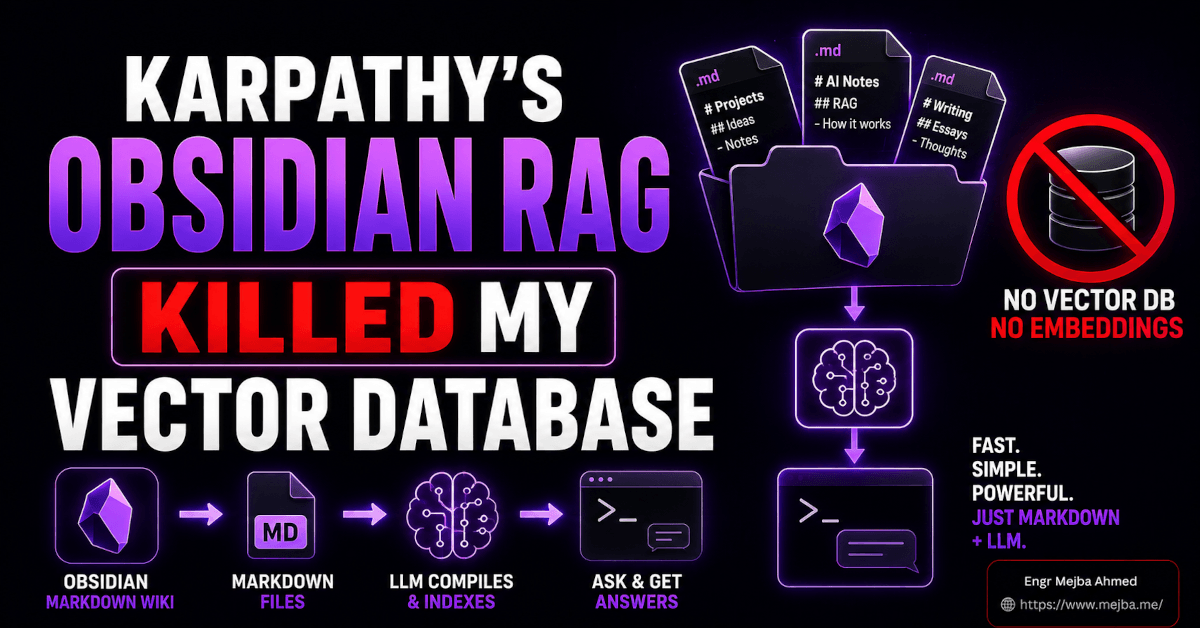
No vector database. No embeddings. No chunking strategy. No similarity thresholds to tune. Just markdown files, a folder structure, and an LLM that acts as both librarian and author.

My first reaction was skepticism. I've built RAG systems. I've debugged the retrieval failures, fought with chunk overlap settings, watched perfectly relevant documents get buried by cosine similarity scores that made no sense. The idea that you could skip all of that infrastructure and get better results for a personal knowledge base felt like someone saying you could outrun a car by walking -- in the right direction.

Then I built it. And the walking-in-the-right-direction metaphor turned out to be uncomfortably accurate.

Karpathy's system -- which he calls "LLM Knowledge Bases" -- works because it exploits something most RAG architects overlook: for datasets under about 400,000 words (roughly 100 substantial articles), a well-organized markdown structure with summaries and index files gives the LLM more useful context than vector search ever could. The model doesn't retrieve fragments. It navigates a knowledge graph it built itself, following links it created, reading summaries it wrote.

That distinction -- the LLM as author of the knowledge structure, not just a consumer of retrieved chunks -- changes everything about how the system performs. And it's the part most coverage of Karpathy's approach buries under the headline.

Why Traditional RAG Fails at the Scale Most People Actually Work At

Here's a thing nobody in the RAG ecosystem wants to admit: for 90% of individual developers and small teams, traditional RAG is overkill that actively makes results worse.

I'm not talking about enterprise search across millions of documents. That's a different problem with different constraints. I'm talking about the developer who has 50-200 articles bookmarked, a handful of research papers, some repo documentation, and a growing pile of notes they want an LLM to reason over.

For that use case -- which describes most of us -- the traditional RAG pipeline introduces three problems that markdown-first systems simply don't have.

The chunking problem. Every RAG system splits documents into chunks. The chunk size is a compromise: too small and you lose context, too large and you waste tokens on irrelevant text. There's no universally correct chunk size, and the wrong choice silently degrades every query. I've spent entire afternoons tuning chunk overlap percentages, and the honest truth is that it always felt like I was negotiating with the system rather than configuring it.

The retrieval noise problem. Vector similarity search returns the most mathematically similar chunks, not the most useful ones. I've had queries where the top-5 retrieved chunks were all from the same section of the same document -- five slightly different paragraphs saying nearly the same thing -- while the actually relevant insight from a different document sat at position 47 in the results. Relevance and similarity are not the same thing, and vector search optimizes for the wrong one.

The black box problem. With a vector database, you can't easily see what's in it. You can't browse your knowledge base the way you browse a folder. You can't manually check if a document was indexed correctly. You can't spot gaps in your coverage by scanning a list. The data disappears into embeddings, and you interact with it only through queries that may or may not surface what you need.

Karpathy's system sidesteps all three. No chunking -- the LLM reads structured summaries and follows links to full documents when needed. No vector similarity -- the LLM navigates an index it built and understands. No black box -- every piece of knowledge lives in a readable markdown file you can open in any text editor.

The trade-off? It doesn't scale to millions of documents. But if your knowledge base is measured in hundreds of articles rather than millions, that trade-off is one of the best deals in AI right now.

How Karpathy's LLM Knowledge Base Actually Works

On April 3, 2026, Karpathy published a GitHub gist called llm-wiki that lays out the full architecture. The system has three layers, and understanding how they interact is the key to making it work.

Layer 1: The Raw Vault

Everything starts in a raw/ folder inside an Obsidian vault. This is the staging area -- a dumping ground for anything you want the LLM to eventually know about. Articles clipped from the web. PDF research papers. Repository documentation. Screenshots. Code snippets. Podcast transcripts.

The raw folder has one rule: nothing in it needs to be organized. You throw things in, and the LLM organizes them later. This matters more than it sounds. Most knowledge management systems fail because the ingestion friction is too high -- you have to tag things, categorize things, file things in the right place. With Karpathy's approach, ingestion is as simple as dragging a file into a folder.

For web articles, Karpathy uses the Obsidian Web Clipper -- a Chrome extension that converts any webpage into a markdown file and drops it directly into your raw folder. One click. The article is in your system, images and all.

Speaking of images: Obsidian doesn't handle inline images from clipped web pages automatically. You need the "Local Images Plus" community plugin, which downloads remote images and stores them locally inside the vault. Without this plugin, your clipped articles will have broken image links once you go offline -- and the LLM won't be able to reference visual content through its vision capabilities.

Layer 2: The Compiled Wiki

This is where Karpathy's system diverges from every other knowledge management approach I've seen.

Instead of indexing the raw documents for retrieval, the LLM reads them and writes new documents. It compiles the raw material into a structured wiki -- encyclopedia-style articles about core concepts, summaries of source documents, and explicit backlinks between related ideas.

The wiki lives in a wiki/ folder, parallel to raw/. Inside, you'll find:

  • A master index (index.md) -- a single markdown file listing every wiki that's been created, with brief descriptions and links. This is the LLM's starting point for any query. It reads the master index, identifies which wiki is relevant, then navigates into that wiki's own index and articles.

  • Sub-wiki folders -- each topic gets its own folder with its own index.md and a set of compiled articles. A wiki about "transformer architectures" might contain articles on attention mechanisms, positional encoding, and scaling laws, all interlinked.

  • Backlinks and cross-references -- the LLM creates [[wiki-style links]] between related concepts across different wikis. These aren't decorative. They're the navigation structure the LLM uses when answering queries that span multiple topics.

The compilation step is where the LLM earns its keep. It's not copying text from raw documents into wiki articles. It's synthesizing -- identifying the core concepts, writing clear explanations, noting contradictions between sources, and building a web of connections that no vector database could replicate.

Here's what a compilation prompt looks like in practice. You point your LLM agent (Karpathy uses Claude Code) at the raw folder and say something like:

Read through the files in raw/ that relate to [topic].
Create a new wiki in wiki/[topic-name]/ with:
1. An index.md listing all articles in this wiki
2. Individual articles for each major concept
3. Backlinks to related wikis where relevant
4. Update the master wiki/index.md to include this new wiki

The LLM does the research, writes the articles, builds the links, and updates the indexes. You review the output in Obsidian's UI -- clean, navigable, human-readable.

Layer 3: The Query Interface

When you ask the LLM a question about your knowledge base, it doesn't search through raw documents. It follows a structured path:

  1. Reads the master wiki/index.md to identify relevant wikis
  2. Opens the relevant wiki's index.md to find specific articles
  3. Reads those articles (which contain synthesized knowledge plus source references)
  4. Follows backlinks to related concepts if the question spans topics
  5. Returns an answer grounded in the compiled wiki, citing specific articles

This is closer to how a human researcher works than anything vector search offers. A researcher doesn't scan every document in a library for keyword matches. They check the index, find the right section, read the relevant articles, and follow references to related material.

The performance difference is real. For Karpathy's dataset of roughly 100 articles and 400,000 words, the wiki-navigation approach gave more coherent, better-sourced answers than a traditional RAG pipeline would -- because the LLM was reasoning over structured knowledge it had already synthesized, not trying to make sense of retrieved chunks in real time.

Setting This Up From Scratch: The Full Walkthrough

I rebuilt Karpathy's system on my own machine in under an hour. Here's every step, including the ones most guides skip.

Step 1: Install Obsidian and create the vault structure.

Download Obsidian from obsidian.md. It's free for personal use. Create a new vault -- Obsidian will ask you to pick a folder. I named mine vault and put it in my home directory, but the location doesn't matter.

Inside the vault, create two folders:

vault/
  raw/
  wiki/

That's the entire file structure to start. The wiki folder will get populated as you compile.

Step 2: Install the Web Clipper.

Go to obsidian.md/clipper and install the Chrome extension. In the clipper settings, set the default save location to your raw/ folder. Now any web article is one click away from being in your knowledge base.

Test it immediately. Clip an article you've been meaning to read. Open Obsidian and confirm the markdown file appeared in raw/. If images aren't showing, you need step 3.

Step 3: Install Local Images Plus.

In Obsidian, go to Settings > Community Plugins > Browse. Search for "Local Images Plus" and install it. Enable the plugin, then configure it to download images to a subfolder within your vault (I use vault/assets/images/).

After enabling this plugin, re-clip a web article. The images should now download locally and display correctly in Obsidian's preview mode. This is especially critical if you're clipping technical articles with diagrams, architecture charts, or code screenshots -- the visual context matters, and modern LLMs with vision capabilities can actually read these images.

Step 4: Populate your raw folder.

This is the fun part. Start dumping content into raw/. Some sources that work well:

  • Technical blog posts you've bookmarked (use the Web Clipper)
  • Research papers (save as PDF or convert to markdown)
  • GitHub repo READMEs (copy the markdown directly)
  • Your own notes, outlines, and project documentation
  • Conference talk transcripts
  • Newsletter issues you've saved

Don't organize them. Don't rename them. Don't tag them. Just get them into the folder. The LLM handles organization in the next step.

I started with 63 articles about AI agent architectures -- a mix of blog posts, papers, and my own project notes. The total came to about 180,000 words of raw material.

Step 5: Create your first wiki compilation.

This is where you bring in your LLM agent. If you're using Claude Code (which I recommend for this workflow because it handles file operations natively), navigate to your vault directory and run a compilation prompt.

Here's the prompt I used for my first wiki:

Look through the files in raw/ that discuss AI agent architectures,
multi-agent systems, or agent orchestration patterns.

Create a wiki at wiki/ai-agent-architectures/ with:
- An index.md that lists every article in the wiki with a one-line description
- Individual articles for major concepts (at least: orchestration patterns,
  tool use patterns, memory architectures, multi-agent communication)
- Each article should synthesize information from multiple raw sources
- Include [[backlinks]] to related concepts within the wiki
- At the end of each article, list the raw source files it drew from
- Create wiki/index.md (the master index) if it doesn't exist,
  and add this wiki to it

Claude Code read through the relevant raw files, identified the key concepts, and generated a wiki with 11 articles, a comprehensive index, and cross-references between them. The whole process took about four minutes.

The output quality surprised me. It wasn't just summarization -- it was genuine synthesis. An article on "Memory Architectures for AI Agents" pulled insights from seven different raw sources, organized them into a coherent framework, and noted where two of the sources contradicted each other on the question of long-term memory persistence.

Step 6: Set up the master index.

After your first compilation, wiki/index.md should exist. Open it in Obsidian and verify it looks right. As you create more wikis, this file becomes your LLM's entry point -- the table of contents for your entire knowledge base.

A healthy master index looks something like this:

# Knowledge Base Index

## Wikis

### AI Agent Architectures
Orchestration patterns, tool use, memory systems, and multi-agent
communication frameworks.
→ [[ai-agent-architectures/index]]

### Transformer Scaling Laws
Training compute, parameter counts, data requirements, and
emergent capabilities across model sizes.
→ [[transformer-scaling/index]]

Step 7: Query your knowledge base.

Now comes the payoff. When you want to ask your knowledge base a question, you tell Claude Code to start from the master index:

Read wiki/index.md to orient yourself on what's available in my
knowledge base. Then answer this question using the relevant wiki
articles: [your question here]

The LLM reads the index, identifies the relevant wiki, navigates to the specific articles, and gives you an answer grounded in your compiled knowledge -- with references to specific articles you can verify.

Pro tip: add a changelog.md to your vault root. Every time you compile a new wiki or update an existing one, log the date and what changed. Karpathy recommends a consistent prefix format like ## [2026-04-05] ingest | Article Title so the log becomes parseable with standard unix tools. This gives you (and the LLM) a timeline of how the knowledge base has evolved.

What This Gets Right That Traditional RAG Gets Wrong

After running both systems in parallel for a week -- my old vector-based RAG pipeline on the same dataset alongside the Karpathy-style wiki -- I noticed three specific advantages that aren't obvious until you've used both.

The synthesis advantage. When I asked my vector RAG system "What are the trade-offs between centralized and decentralized agent orchestration?", it returned five chunks from three different documents. The chunks were relevant, but I had to mentally synthesize them myself. The wiki system had already done that synthesis during compilation. The article on orchestration patterns laid out the trade-offs in a structured comparison, drawing from the same source documents but presenting them as a coherent argument rather than fragments.

The discovery advantage. The wiki's backlink structure surfaces connections you didn't ask about. When I queried the wiki system about memory architectures, the answer referenced a backlink to a concept in the "tool use patterns" wiki that I hadn't connected mentally. The backlink existed because the LLM, during compilation, noticed that the memory persistence problem in agents is structurally similar to the state management problem in tool chains. Vector search doesn't find these connections because they're not lexically similar -- they're conceptually related at a level that requires understanding, not matching.

The transparency advantage. When the wiki system gives me an answer, I can open the source articles in Obsidian and read them myself. I can see what the LLM synthesized from, I can check if the synthesis is accurate, I can correct it if it's wrong. With vector RAG, I get chunks and similarity scores. Debugging why the system gave a bad answer means digging through embeddings and retrieval logs. With the wiki system, I open a markdown file and read it. The debugging surface is human-readable text.

If you'd rather have someone build out a full LLM knowledge base system customized for your specific research workflow, I take on exactly these kinds of AI infrastructure projects. You can see what I've built at fiverr.com/s/EgxYmWD.

The Honest Limitations -- Where This Approach Breaks Down

I'd be doing you a disservice if I didn't lay out the boundaries clearly. Karpathy's system is brilliant for its intended use case, but it has real constraints that matter.

Scale ceiling. This approach works for roughly 100-400 articles (up to about 400,000 words of raw material). Beyond that, the LLM starts struggling to maintain coherent indexes and the compilation time grows substantially. If you're dealing with thousands of documents, you need traditional RAG or a hybrid approach. The break-even point depends on your LLM's context window -- with Opus 4.6's 1M token context, you can push further than Karpathy's original estimates, but there's still a practical ceiling.

Compilation cost. Every time you add significant new material, you need to recompile the affected wiki. That means LLM calls, which means tokens, which means money. For a hobby project, this is negligible. For a continuously-updating knowledge base with daily ingestion, the compilation costs add up. I've found that batching -- accumulating raw material for a week and then compiling once -- keeps costs reasonable.

No real-time retrieval. The wiki is a snapshot. If you clipped an article ten minutes ago but haven't recompiled the relevant wiki, the LLM won't know about it during a query. You can point it at the raw folder directly for recent additions, but that's a manual step. Traditional RAG systems index new documents within seconds of ingestion.

Single-user design. This is fundamentally a personal knowledge management system. There's no multi-user access control, no concurrent editing safeguards, no version history beyond what git provides. For teams, you'd need to layer collaboration infrastructure on top -- at which point you might be better served by a purpose-built RAG system.

LLM dependency. The quality of your wiki is directly tied to the quality of the LLM doing the compilation. I've tested this with smaller models and the results are noticeably weaker -- the synthesis is shallower, the cross-references are less insightful, and the index organization is less intuitive. You want a frontier model for the compilation step. For queries, a smaller model can often work fine because it's just navigating a well-structured wiki.

These aren't dealbreakers. They're design boundaries. Karpathy built this system for a specific profile -- an individual researcher or developer managing a personal knowledge base of moderate size -- and within those boundaries, it works better than anything else I've tried.

What I'd Do Differently After a Week of Running This

My first wiki compilation was sloppy. Not because the LLM did a bad job, but because I gave it too much raw material at once without a clear topic boundary. I pointed Claude Code at 63 articles and said "make a wiki about AI agents." The result was sprawling -- 11 articles covering everything from prompt engineering to multi-agent coordination to tool calling, with backlinks connecting concepts that were related only in the loosest sense.

The second time, I was more surgical. I grouped my raw files into rough topic clusters before compilation: 18 articles about orchestration patterns in one batch, 12 about memory architectures in another, 15 about tool use in a third. Each became its own wiki with its own focused index. The cross-references between wikis were more meaningful because each wiki had a clear scope.

That's my biggest practical lesson: compile narrow, link wide. Each wiki should cover a tight topic. The connections between wikis emerge naturally through backlinks, and those connections are more valuable when they bridge genuinely distinct domains rather than linking adjacent paragraphs in the same sprawling topic.

Second lesson: review the first compilation of each wiki manually. The LLM occasionally makes structural choices you wouldn't make -- grouping concepts differently than you'd expect, or creating articles at a granularity that doesn't match how you think about the topic. A 10-minute review and restructuring pass after the first compilation saves you from compounding structural issues as the wiki grows.

Third lesson: your raw folder will get messy, and that's fine. I started trying to organize raw files into subfolders by source type. It was wasted effort. The LLM doesn't care if your raw files are organized. It reads them all, extracts what's relevant, and ignores the rest. Let the wiki be your organized layer. Let raw be your junk drawer.

I've been building personal knowledge management systems with Obsidian for a while now -- if you've read my walkthrough on turning Obsidian and Claude Code into a second brain, you'll recognize some of these patterns. But Karpathy's compilation approach takes it further. My original setup used Obsidian primarily as a context source -- point the LLM at markdown files and let it read them. Karpathy's insight is that the LLM should also write the knowledge structure, not just consume it.

Where This Fits in the RAG Landscape of 2026

The timing of Karpathy's post wasn't accidental. We're at an inflection point where the tools for building knowledge systems have bifurcated into two camps.

Camp one: heavyweight RAG platforms with vector databases, embedding pipelines, reranking models, and complex retrieval strategies. These are purpose-built for enterprise scale -- millions of documents, thousands of concurrent queries, strict latency requirements. They work. But they're expensive to build, expensive to maintain, and overkill for anyone whose document collection fits in a folder.

Camp two: what Karpathy calls "LLM Knowledge Bases." Markdown files, structured indexes, LLM-compiled wikis. Zero infrastructure beyond a text editor and an LLM API. These are purpose-built for individual researchers, developers, and small teams whose knowledge base is measured in hundreds of articles, not millions.

The mistake most people make is using camp one tools for camp two problems. I've seen solo developers spin up Pinecone instances to manage 40 documents. That's not engineering, that's resume-driven architecture. The right tool for a 40-document knowledge base is a folder of markdown files and a smart LLM.

If your needs grow beyond what the markdown-first approach handles, you can always migrate. The raw files are plain text. The wikis are plain text. There's no proprietary format, no vendor lock-in, no migration nightmare. You pick up your markdown files and feed them into whatever system you graduate to.

That's maybe the most underappreciated aspect of Karpathy's design: it optimizes for the exit path, not just the entry path. Every piece of knowledge in the system is stored in the most portable format possible. If Obsidian disappears tomorrow, your files still work in VS Code, Notion, Bear, or any other markdown editor. If you outgrow the system, your content moves with you.

If you're already using Obsidian with Claude Code for persistent memory -- something I covered in depth in my post on why Obsidian fixed Claude Code's biggest weakness -- Karpathy's wiki compilation approach is the natural next step. You're already storing context in markdown. Now let the LLM organize that context into something it can navigate intelligently.

The Shift That Matters More Than the Technical Details

I keep coming back to a single distinction that makes Karpathy's approach feel fundamentally different from traditional RAG.

In a traditional RAG system, the LLM is a consumer. It receives chunks, reads them, and generates an answer. The knowledge structure -- the embeddings, the index, the retrieval logic -- is built by engineering infrastructure, not by the model itself.

In Karpathy's system, the LLM is both architect and resident. It builds the knowledge structure during compilation. It writes the summaries, creates the links, organizes the index. Then, during queries, it navigates a house it designed. It knows where things are because it put them there.

That's not a minor engineering distinction. It's a different paradigm for how we think about LLMs and knowledge.

Most of the AI community in 2026 is focused on making retrieval smarter -- better embeddings, better reranking, better chunk selection. Karpathy is asking a different question entirely: what if we stop treating the LLM as a search engine and start treating it as a research librarian? Not one who finds books on request, but one who has already read every book in the collection, written summaries of each, created a cross-referenced catalog, and can walk you directly to the shelf you need.

That question is going to matter more as context windows keep growing. With Opus 4.6 handling 1 million tokens, the amount of knowledge an LLM can navigate through structured indexes -- without any vector search -- is already practical for most personal and small-team use cases. And context windows are only getting larger.

My vector database isn't going anywhere. I still need it for the production RAG system I built for a client's 2-million-document archive. But for my personal knowledge base? For the research I'm doing on AI agents, the articles I'm reading, the ideas I'm collecting? The vector database is unplugged. The Obsidian vault is open. And for the first time, my knowledge base feels like something I can actually browse, not just query.

Start with 20 articles about a topic you're actively researching. Clip them into raw. Run a compilation. Ask the wiki a question. See what it connects. The setup takes an hour. The moment when it surfaces a connection between two ideas you hadn't linked yourself -- that's when you'll understand why Karpathy built this instead of reaching for another vector database.

FAQ

Frequently Asked Questions

Everything you need to know about this topic

Minimal coding is needed. The system uses Obsidian (free, graphical) for the interface and an LLM agent like Claude Code for wiki compilation. You write natural-language prompts, not code. Basic command-line comfort helps but isn't strictly required.

Karpathy's approach works well for approximately 100-400 articles totaling up to 400,000 words. Beyond that, compilation times grow and index coherence degrades. For larger collections, a hybrid approach or traditional RAG pipeline is more appropriate.

Yes. Karpathy's GitHub gist explicitly mentions compatibility with OpenAI Codex, Claude Code, and other LLM agents. The quality of compilation depends on the model's reasoning ability -- frontier models produce notably better synthesis and cross-referencing than smaller models.

Nothing breaks. Every file in the system is plain markdown stored locally on your machine. You can open the entire knowledge base in VS Code, Notion, Bear, or any text editor. There is zero vendor lock-in by design.

The critical difference is the compilation step. Raw files dumped into a chat give the LLM unstructured context. Karpathy's system has the LLM compile those files into structured wiki articles with indexes, summaries, and cross-references -- creating a navigable knowledge structure rather than a pile of documents.

Let's Work Together

Looking to build AI systems, automate workflows, or scale your tech infrastructure? I'd love to help.

Coffee cup

Enjoyed this article?

Your support helps me create more in-depth technical content, open-source tools, and free resources for the developer community.

Related Topics

Engr Mejba Ahmed

About the Author

Engr Mejba Ahmed

Engr. Mejba Ahmed builds AI-powered applications and secure cloud systems for businesses worldwide. With 10+ years shipping production software in Laravel, Python, and AWS, he's helped companies automate workflows, reduce infrastructure costs, and scale without security headaches. He writes about practical AI integration, cloud architecture, and developer productivity.

Discussion

Comments

0

No comments yet

Be the first to share your thoughts

Leave a Comment

Your email won't be published

2  x  4  =  ?

Comments

Leave a Comment

Comments are moderated before appearing.

Learning Resources

Expand Your Knowledge

Accelerate your growth with structured courses, verified certificates, interactive flashcards, and production-ready AI agent skills.

Sample Certificate of Completion

Sample certificate — complete any course to earn yours

Engr Mejba Ahmed

Engr Mejba Ahmed

Claude Code Expert · Online

👋

Hey there!

Quick Actions

WhatsApp Instant reply

Chat on WhatsApp

+880 1723 741224 · Instant reply

Popular Questions

Engr Mejba Ahmed is connected
Engr Mejba Ahmed is typing...
Engr Mejba Ahmed avatar

✉ Want me to follow up? Drop your email

Engr Mejba Ahmed avatar

📞 Connect Directly

Choose how you'd like to reach me

WhatsApp

+880 1723 741224

Email

[email protected]

✓ Details sent! I'll get back to you shortly.

Powered by OpenAI

335+

Blog Posts

25

AI Courses

63

Projects

Services & Expertise

Pricing & Process

Learning & Resources

Connect & Support