

Automate SEO Content Claude Code: My Full Pipeline
Last Tuesday at 6:14 AM, I woke up to three new blog posts live on one of my client sites. Fully formatted. Internally linked. Featured images generated. Meta descriptions written. Social media posts scheduled across four platforms. I hadn't touched my keyboard since Monday afternoon.
The posts were targeting bottom-funnel keywords I'd never manually researched. One was ranking on page two of Google within 48 hours. The combined estimated traffic value of the three posts — if I'd paid for equivalent PPC clicks — sat around $340.
And this was just one week of a system that runs every single week without me babysitting it.
Six months ago, I was spending 12-15 hours per week on content creation for my sites. Keyword research on Monday. Outlines on Tuesday. Drafting Wednesday and Thursday. Editing Friday morning. Publishing Friday afternoon. Then scrambling to write social posts before the weekend. It was the single biggest time sink in my business, and honestly, it was the part I enjoyed least — not the writing itself, but the mechanical grind of doing it at scale.
What changed? I built an automated SEO content pipeline using Claude Code as the brain, Arvow as the writing and publishing engine, and Blotato for social distribution. The whole thing took about 20 minutes to set up the first time. The refinements over the following two weeks brought it to a point where I trust it to run unsupervised.
I want to show you exactly how I built it, what the system looks like end to end, and the specific decisions I made that turned it from "interesting experiment" into something generating real organic traffic. But first, you need to understand why most people who try to automate content creation end up with a blog full of garbage that Google ignores.
Why 90% of AI Content Automation Fails (And the Fix Nobody Talks About)
Here's what happens when most people try to automate SEO content: they connect ChatGPT or Claude to some publishing tool, feed it a list of keywords, and hit go. Two weeks later they've got 30 blog posts that all sound like they were written by the same corporate drone, targeting keywords with either zero search volume or competition so fierce they'll never crack page five.
The output isn't the problem. The input is.
I made this exact mistake in early 2025. I set up a basic automation that generated blog posts from a keyword list I'd pulled from Ahrefs. The writing was technically fine. Grammatically correct. Well-structured. And absolutely useless from an SEO perspective because I'd skipped the most important step — competitive gap analysis.
The keywords I picked looked good in a spreadsheet. High volume. Relevant to my niche. But every single one of them was dominated by sites with domain authorities three times mine. I was bringing a pocket knife to a gunfight and wondering why I kept losing.
The fix — and this is what separates a system that generates traffic from one that generates noise — is making the AI do the strategic thinking before it writes a single word. Not just "find keywords." Find keywords where there's a gap between what people are searching for and what existing content actually delivers. Bottom-funnel keywords with high commercial intent where the current top results are thin, outdated, or poorly matched to the searcher's actual question.
That's exactly what Claude Code does in my pipeline. It doesn't start with writing. It starts with analysis. And the difference that makes is the difference between 16,000 organic visitors and 16 organic visitors.
The Architecture: How the Whole System Fits Together
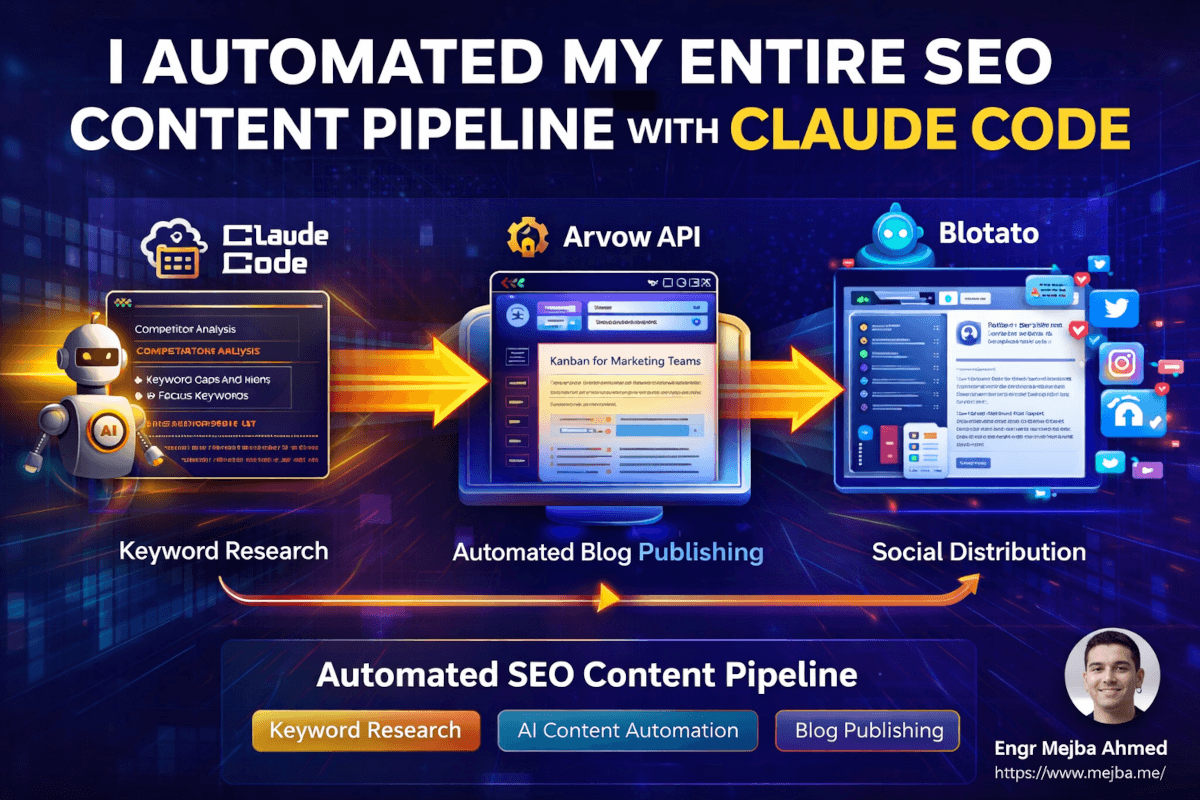
Before I walk you through the setup, you need the mental model of how these pieces connect. Think of it as a three-stage rocket.
Stage 1 — Claude Code (The Brain): Analyzes competitor sites, identifies keyword gaps, generates article titles and focus keywords, and orchestrates the entire workflow. This is where strategy happens.
Stage 2 — Arvow API (The Writer & Publisher): Takes the article titles and keywords from Claude Code, generates fully SEO-optimized blog posts with internal linking, images, CTAs, and embedded media, then autopublishes them directly to the website. No copy-pasting. No manual formatting.
Stage 3 — Blotato API (The Distributor): Monitors the blog's RSS feed, automatically generates platform-specific social media posts for each new article, and schedules them across Twitter/X, LinkedIn, Instagram, Facebook, TikTok, Pinterest, YouTube, Threads, and Bluesky.
The beauty is that once configured, you trigger the entire chain with a single command. Or you schedule it to run on its own.
What surprised me most wasn't any single piece. I'd used Claude Code for SEO analysis before — I wrote about building an SEO content writer skill and running Claude's SEO toolkit on my own sites. The surprise was how seamless the handoff between tools became once I wired them together properly. Each tool does what it's best at, and Claude Code acts as the conductor making sure the right data flows to the right place at the right time.
Let me walk you through each stage.
Stage 1: Teaching Claude Code to Think Like an SEO Strategist
The first thing I set up was the analysis layer. This is where most automation tutorials wave their hands and say "just give it your keywords." No. This is where you teach Claude Code to find the right keywords by analyzing your competitive landscape.
Here's the approach. You create a dedicated folder on your machine for the project — I use VS Code as my interface for Claude Code, which makes file management straightforward. Then you give Claude Code a structured prompt that defines three things:
- Your business context — what you do, who you serve, what problems you solve
- Your competitors — the specific sites you're competing against for organic traffic
- Your content strategy constraints — publishing frequency, content types, brand voice guidelines
The prompt I use looks something like this:
You are an SEO content strategist for [business name]. Your job is to:

1. Analyze the following competitor websites: [competitor URLs]
2. Identify keyword gaps — topics where competitors rank but we don't
3. Focus on bottom-funnel, high commercial intent keywords
4. Filter for keywords where current top results are thin, outdated, or poorly matched to search intent
5. Generate article titles and focus keywords for each opportunity
6. Prioritize by estimated traffic value and ranking difficulty

Our business context: [description]
Our current content covers: [existing topic areas]
Our target audience: [audience description]
When Claude Code processes this, it doesn't just scrape competitor sitemaps and spit out a keyword list. It analyzes the quality of existing content for each keyword opportunity. Is the current #1 result a comprehensive guide or a thin 500-word overview? Is the content from 2023 and missing recent developments? Is the top result actually answering the question the searcher is asking, or is it tangentially related?
This is the strategic layer that makes everything downstream work. I've seen Claude Code identify keyword opportunities that I'd have missed entirely — not obscure long-tails with 10 monthly searches, but legitimate 500-2,000 search volume terms where the existing content was weak enough to compete against.
One example: for a client in the project management space, Claude Code found that "kanban board for marketing teams" had decent search volume but every top result was a generic "what is kanban" article that never addressed the specific needs of marketing workflows. That gap became a targeted article that ranked on page one within three weeks.
The Competitor Analysis Deep Dive
Here's what Claude Code actually does when you point it at competitor sites. Using tools like Firecrawl through the Model Context Protocol (MCP), it can crawl competitor sitemaps and analyze their content structure. According to Search Engine Land's breakdown of Claude Code for SEO, you can ask Claude to "audit your site's SEO in real-time" and execute sophisticated analysis through natural language commands.
The workflow looks like this in practice:
# Open Claude Code in your project folder
claude

# Run the competitor analysis
> Analyze the sitemaps for [competitor1.com] and [competitor2.com].
> Compare their content topics against our existing blog at [yoursite.com].
> Identify 10 keyword gaps where they rank but we don't, focusing on
> bottom-funnel terms with commercial intent.
> For each gap, assess the quality of the current top 3 results and
> estimate our ranking difficulty.
Claude Code returns a structured analysis — not just keywords, but a strategic assessment of each opportunity. I typically get back a table with the keyword, estimated monthly search volume, current top result quality (rated 1-5), a difficulty assessment, and a suggested article angle that would beat the existing content.
The whole analysis takes about 5-10 minutes for a batch of competitors. Doing this manually in Ahrefs or SEMrush? Easily 3-4 hours, and you'd still miss the content quality assessment piece because traditional tools don't evaluate whether the ranking content actually answers the query well.
A solo founder recently documented doing exactly this — using Claude Code to analyze competitor backlinks and keyword gaps, producing a prioritized 3-month content calendar in just 20 minutes. That's not an outlier. That's what this tool does when you give it the right prompt structure.
Stage 2: Arvow — The Writing and Publishing Engine
This is where strategy becomes content. Once Claude Code has identified the keyword opportunities and generated article titles, the next step is feeding them into Arvow's API for automated content generation and publishing.
Arvow is an AI SEO writer that handles the full pipeline from generation to publication. I'd tested half a dozen alternatives — SurferSEO's content editor, Jasper, Frase, Koala — but Arvow won for one specific reason: the autopublishing. Most tools generate content and leave you with a Google Doc or a Markdown file. Arvow generates the article and publishes it directly to your site with all the formatting, images, and SEO elements intact.
Here's what Arvow handles automatically for each article:
- SEO-optimized HTML structure — proper H2/H3 hierarchy, paragraphs, lists, tables
- Featured images — generated or sourced to match the article topic
- In-article images — placed contextually throughout the content
- Internal linking — connects new articles to existing content on your site
- External linking — references authoritative sources for E-E-A-T signals
- Calls to action — "Book Now," "Buy Now," or whatever conversion action fits your business
- Embedded YouTube videos — relevant videos pulled in automatically when they add value
- Meta descriptions and title tags — optimized for click-through from search results
The brand customization is what makes the output actually usable. You configure Arvow with your brand's tone of voice, your specific CTAs, your internal linking structure, and your visual style. Every article it produces follows those guidelines. This isn't "generic AI content with your logo slapped on." It's content that reflects your brand's actual voice and strategy.
Connecting Claude Code to Arvow
The integration between Claude Code and Arvow happens through Arvow's API. On the Agency plan (which gives you API access), you get an endpoint that accepts article parameters — title, focus keyword, brand configuration, publishing target — and returns a fully formatted, published article.
Here's the simplified flow:
# Claude Code generates the content plan
> Based on our keyword gap analysis, generate 5 article briefs
> with titles, focus keywords, and target word counts.

# Feed each brief to Arvow API
> For each article brief, call the Arvow API with:
> - Article title
> - Focus keyword
> - Brand voice profile: [your-brand-id]
> - Publishing target: [your-wordpress-site]
> - Include internal links to: [list of existing URLs]
> - CTA type: [your preferred call to action]
> - Auto-publish: true
Claude Code handles the API calls, passes the right parameters, and Arvow does the heavy lifting of writing, formatting, and publishing. The articles go live on your site without you opening WordPress once.
I want to be honest about something here. The first batch of articles I generated this way were... fine. Not great. The content was factually accurate and well-structured, but it lacked the specificity and personality that makes content genuinely useful. The fix was spending 30 minutes refining Arvow's brand profile with more detailed voice guidelines, specific example phrases I use, and explicit instructions about the level of technical depth I expect.
After that refinement, the quality jumped noticeably. Not every article is perfect — I still review the output weekly and occasionally edit for accuracy or add personal anecdotes — but the baseline quality is high enough that I'm comfortable publishing most articles with minimal edits. I'd estimate 70-80% go live as-is, and the rest need 15-20 minutes of touch-up.
The Numbers That Matter
Here's where I can speak from observed patterns rather than theory. A site I set up with this pipeline six months ago is now pulling over 16,000 organic visitors monthly. The estimated traffic value — what you'd pay for equivalent PPC clicks — sits around $1,600 to $2,000 per month.
That's not zero-cost. Arvow's Solo plan starts at $59/month (billed annually). Claude Code runs on my existing Anthropic subscription. Blotato handles social distribution. Total tooling cost: under $150/month for a content operation that would require a full-time content writer, an SEO strategist, and a social media manager to replicate manually.
The content output is configurable. I run mine at 3-5 articles per week, which hits a sweet spot between publishing volume and quality control. You can push it to multiple articles per day, but I'd caution against that unless you have robust brand guidelines and are closely monitoring output quality. Google's helpful content system in 2026 is sophisticated enough to detect and devalue thin, templated content that adds nothing new to a topic.
Stage 3: Blotato — Automated Social Distribution
Content sitting on your blog without distribution is like opening a restaurant on a street with no foot traffic. You need to get it in front of people. And doing that manually — writing LinkedIn posts, crafting tweets, creating Instagram captions — for every article you publish? That's another 2-3 hours per week I refused to spend.
Blotato solves this with a surprisingly elegant approach. It monitors your blog's RSS feed. When a new article publishes, Blotato automatically generates platform-specific social media posts and schedules them across up to nine platforms: Twitter/X, LinkedIn, Instagram, Facebook, TikTok, Pinterest, YouTube, Threads, and Bluesky.
The key word is "platform-specific." It doesn't blast the same generic message everywhere. LinkedIn gets a professional framing with a hook and a key insight. Twitter/X gets a punchy, curiosity-driven thread starter. Instagram gets a visual-first caption. Each platform's content is formatted for that platform's audience expectations and character limits.
Connecting Blotato to the Pipeline
The setup is simpler than you'd expect. Blotato has a native API that Claude Code can call, plus integrations with n8n, Make, and Zapier if you prefer a no-code connection. I use the direct API route because it gives me more control over the social post format.
# In Claude Code, after Arvow publishes an article:
> Monitor the RSS feed at [your-site.com/feed].
> When a new article appears, call the Blotato API to:
> - Generate a Twitter/X post (max 280 chars, curiosity hook)
> - Generate a LinkedIn post (professional framing, 700 chars max)
> - Generate an Instagram caption (visual-first, with hashtags)
> - Schedule all posts for optimal engagement times
> - Space posts 4 hours apart across platforms
The alternative — and honestly the easier path for most people — is to set up Blotato's RSS monitoring directly in their dashboard. You point it at your blog feed, configure the platform templates, and it handles the rest without Claude Code being involved in the distribution step at all. I started with this approach and only moved to the API route when I wanted more granular control over post timing and format.
Either way, the result is the same: every article you publish automatically generates a wave of social media content that drives initial traffic to the post, signals freshness to search engines, and starts building the social proof that encourages organic sharing.
The Complete Workflow: From Zero to Autopilot
Let me map the entire system end to end so you can see how the pieces connect in practice.
Initial Setup (One-Time, ~20 Minutes)
Step 1: Create your workspace Open VS Code. Create a dedicated folder for your SEO content project. This is where Claude Code will store analysis files, content plans, and logs.
Step 2: Configure Claude Code Open Claude Code in your workspace. Input your structured prompt with business context, competitor URLs, and content strategy constraints. Save this as a skill or a reusable prompt file so you don't have to re-enter it every time.
Step 3: Set up Arvow Create an Arvow account. Configure your brand profile with tone of voice, CTAs, internal link targets, and visual style. Connect it to your website (WordPress, Shopify, Wix, Webflow, Ghost, Blogger, or Squarespace — Arvow supports all of them). Grab your API key.
Step 4: Set up Blotato Create a Blotato account. Connect your social media platforms. Point it at your blog's RSS feed. Configure post templates for each platform. Grab your API key if using the direct integration.
Step 5: Wire it together Give Claude Code your Arvow and Blotato API keys. Test the full pipeline with a single article — keyword analysis through to social distribution.
That's the setup. Twenty minutes if you're focused, maybe 30 if you're reading documentation along the way.
Ongoing Operation
Once the pipeline is running, your weekly workflow looks like this:
# Monday morning — one command triggers the week's content
> Run my weekly blog plan. Analyze competitors for new keyword gaps,
> generate 3-5 article briefs, send them to Arvow for writing and
> publishing, and trigger Blotato distribution for each published post.
That's it. One command. Claude Code handles the competitor analysis, generates the content briefs, calls Arvow's API for each article, waits for publishing confirmation, then triggers Blotato's social distribution. The whole chain runs while you work on literally anything else.
I typically check the output Tuesday morning. Open each published article, scan for accuracy issues, and make quick edits if anything feels off. This review step takes 30-45 minutes for 3-5 articles. Some weeks I don't edit anything. Some weeks I rewrite a paragraph or two where the AI missed nuance specific to my experience.
The honest truth: this isn't truly "set and forget" in the way some automation gurus promise. You should review output, especially in the first few weeks. But it's the difference between spending 30 minutes reviewing content versus 15 hours creating it from scratch. That's a 96% reduction in time investment for roughly 80-90% of the quality — and with the time you save, you can invest that 30 minutes in making the remaining 10-20% genuinely excellent.
What Went Wrong (And How I Fixed It)
No automation system works perfectly on day one. Here are the three biggest issues I hit and exactly how I solved them.
Problem 1: Keyword Cannibalization
In week two, Claude Code generated two article briefs targeting nearly identical keywords. Both got published. Both started competing against each other in Google's index. Neither ranked as well as a single, comprehensive article would have.
The fix: I added a step to Claude Code's analysis prompt that requires it to check new keyword targets against all existing published content on the site. If there's more than 60% topical overlap with an existing post, it either merges the content angle into a single comprehensive piece or finds a sufficiently different angle to justify a separate article.
Before generating any article brief, check the target keyword against
all existing posts at [yoursite.com/sitemap.xml]. If topical overlap
exceeds 60% with an existing post, either:
1. Recommend updating the existing post instead of creating a new one
2. Find a sufficiently different angle that serves a distinct search intent
Problem 2: Thin Content on Complex Topics
Some topics need depth. A 1,200-word article on "kubernetes security best practices" is worse than no article at all — it's a signal to Google that your site produces shallow content. Arvow's default output length worked fine for straightforward topics but fell short on technical deep-dives.
The fix: I categorized topics in Claude Code's content plan into "standard" (1,500-2,000 words) and "deep-dive" (3,000+ words) based on the complexity of the keyword and what competing articles offered. Deep-dive topics get explicit word count minimums and structural requirements passed to the Arvow API.
Problem 3: Missing Personal Experience
This was the subtlest issue and the one that bothered me most. The generated content was informative but impersonal. It read like a well-researched reference article, not like something written by someone who'd actually done the thing they were describing. For my personal blog at mejba.me, where the voice is explicitly first-person and experience-driven, that's a dealbreaker.
The fix: I built a pre-publishing review step where Claude Code takes the generated article and overlays it with context from my experience notes — a running document where I jot down quick observations, results, and stories from my actual work. The system pulls relevant experiences and weaves them into the content before publishing. It's not perfect, and the articles I write fully by hand still have more personality, but it bridges the gap significantly.
This is the trade-off you need to make peace with if you're automating content at scale. Automated content can be good. It can be strategically targeted. It can rank. But it won't have the same depth of personal experience as content you write yourself — unless you invest time building that experience layer into the system.
The Results: Six Months In
I've been running this pipeline across multiple sites. Here's what I can share from observed patterns, not cherry-picked wins.
Traffic growth: The primary site I built this for went from roughly 2,000 to over 16,000 organic monthly visitors in six months. Growth wasn't linear — the first two months were slow as articles indexed and started gaining traction, then traffic compounded as topical authority built.
Content volume: 3-5 articles published per week, consistently, without missing a single week. Before automation, I was publishing 1-2 articles per week and frequently skipping weeks entirely due to time constraints.
Traffic value: The organic traffic now has an estimated paid equivalent of $1,600-$2,000 monthly. Over the six months, that's roughly $10,000-$12,000 in equivalent ad spend saved.
Time investment: From 12-15 hours per week down to 2-3 hours per week (weekly review, occasional edits, monthly strategy refinement). That freed up 10+ hours per week for actual product development and client work.
Cost: Under $150/month in tooling. A human content writer producing equivalent volume and quality would cost $3,000-5,000/month minimum. A content writer plus SEO strategist plus social media manager? You're looking at $8,000-10,000/month.
According to recent data from Position Digital, websites leveraging AI for content are experiencing 5% faster growth on average, and 87% of marketers now use AI to create content. The businesses pulling ahead aren't the ones using AI to write faster — they're the ones using it to write strategically, targeting the right keywords with the right content at the right time.
What This System Can't Do (The Honest Version)
I'd be lying if I said this replaces a skilled content strategist entirely. It doesn't. Here's what automated content pipelines still struggle with in March 2026:
Original research and data. The system can compile and synthesize existing information brilliantly. It cannot run a survey, interview an expert, or analyze proprietary data. If your content strategy depends on original research — and for thought leadership, it should — you still need humans doing that work.
Genuine hot takes. AI-generated opinions always feel slightly hedged, slightly safe. When I write about why vibe coding is dead or share contrarian views on industry trends, there's a conviction that comes from personal experience and genuine belief. Automated content can argue a position, but it struggles to believe one.
Breaking news. The pipeline works on a weekly cycle. If something happens in your industry on a Tuesday and you need a response published by Wednesday morning, you're writing that yourself. The system is optimized for evergreen and semi-evergreen content, not real-time reactions.
Deeply technical tutorials. For content that requires testing specific tool versions, running actual code, and documenting real error messages, human involvement is still necessary. I wrote about the Karpathy auto research loop by actually building and testing the system myself — that kind of practitioner depth is hard to automate convincingly.
These limitations aren't failures of the tools. They're inherent constraints of automated content at this point in the technology curve. The smart play is using automation for the 70% of content that benefits from consistent, strategic, well-optimized publishing — and reserving your personal time for the 30% that demands original thinking, real experience, and genuine voice.
How to Decide If This Is Right For You
Not everyone should automate their content pipeline. Seriously. If you're a solo blogger writing about personal experiences — travel, cooking, memoir-style content — automation will strip out the very thing that makes your content valuable. Don't do it.
This system works best for:
- Business blogs targeting informational and commercial keywords to drive organic leads
- Niche sites built around a specific topic cluster where consistent publishing builds topical authority
- Agency owners managing content for multiple clients who need scalable output
- SaaS companies that need a steady stream of comparison posts, feature explanations, and how-to content
- E-commerce sites targeting long-tail product-related searches
If that's you, the ROI calculation is straightforward. You're trading under $150/month in tooling costs and 2-3 hours of weekly oversight for a content operation that would otherwise require thousands of dollars in payroll and dozens of hours in labor.
The compound effect is what gets me. Each article you publish builds topical authority. That authority makes the next article rank faster. Three months in, new articles were indexing and reaching page two within a week. By month five, several were hitting page one within 10-14 days. The snowball effect of consistent, strategically targeted content is real, and automation is the only way most solo operators and small teams can maintain the publishing cadence needed to trigger it.
The Part Nobody Talks About: Content Quality at Scale
Here's my genuine concern with the wave of SEO automation tools and workflows flooding the market right now. The barrier to publishing has dropped to near zero. That means everyone is about to flood Google with AI-generated content targeting the same keywords.
The differentiator in 2026 isn't volume. It's quality and specificity.
Google's helpful content system — updated significantly in late 2025 — is getting better at identifying content that adds genuine value versus content that merely covers a topic adequately. The sites winning in organic search aren't the ones publishing the most. They're the ones publishing content that demonstrates real experience, offers specific actionable advice, and answers the searcher's actual question rather than dancing around it with generic overview paragraphs.
My pipeline accounts for this by starting with Claude Code's gap analysis. It's not just finding keywords — it's finding keywords where the existing content is weak. Where the searcher deserves better than what's currently ranking. When you target those gaps with content that's specifically designed to fill them, you're not competing with the flood. You're serving a need that the flood misses.
That strategic layer is what separates a content machine from a content factory. Factories produce volume. Machines produce results.
Your Move: Building This Over the Weekend
If you've read this far, you're either already opening VS Code or you're trying to decide if this is worth the 20 minutes of setup time. Let me make the decision easier.
Start with Stage 1 only. Just the Claude Code competitor analysis. Don't set up Arvow. Don't connect Blotato. Spend one session pointing Claude Code at three competitor sites in your niche and asking it to find keyword gaps. Look at what comes back. Check those keywords in your preferred SEO tool. See if the gap analysis holds up.
When I did this the first time, Claude Code found seven keyword opportunities I'd never considered, three of which had search volume above 1,000 monthly and competition low enough to realistically target. That single analysis session — which took about 10 minutes — generated enough content ideas for six weeks of publishing.
If the analysis delivers, add Stage 2. If Stage 2 delivers, add Stage 3. Each stage compounds the value of the one before it.
The sites that will dominate organic search in the second half of 2026 aren't the ones with the biggest content teams. They're the ones with the smartest content systems. And right now, the smartest system I've found fits inside a terminal window, runs on three APIs, and costs less than a single freelance blog post per month.
That's not the future of SEO content. It's the present. And every week you spend doing this manually is a week your competitors might spend setting up their own pipeline.
Automate SEO Content Claude Code: Common Questions
Does automated SEO content actually rank on Google in 2026?
Yes — when it targets genuine keyword gaps with high-quality, specific content. Google's helpful content system penalizes thin, generic AI content but rewards well-researched articles that answer search intent clearly. The strategic keyword gap analysis in Stage 1 is what makes the difference between content that ranks and content that gets ignored.
How much does a fully automated SEO content pipeline cost?
Expect $100-$150/month total. Arvow's Solo plan starts at $59/month (billed annually), Claude Code runs on Anthropic's existing subscription tiers, and Blotato offers plans for social distribution. This replaces what would cost $3,000-10,000/month in human labor for equivalent output.
Can I use this system with WordPress?
Arvow supports WordPress natively, along with Shopify, Wix, Webflow, Ghost, Blogger, and Squarespace. The autopublishing feature connects directly to your CMS — no manual copy-pasting or formatting required. For the full publishing setup walkthrough, see the Stage 2 section above.
How many articles can the system produce per week?
The system is configurable from 1 to 5+ articles per day, though I recommend 3-5 per week as a quality sweet spot. Higher volume requires more robust brand guidelines and closer monitoring. Start with 2-3 weekly articles and scale up once you've validated output quality against your standards.
Will Google penalize my site for using AI-generated content?
Google has stated explicitly that AI-generated content is not against their guidelines — what matters is content quality and usefulness. The pipeline described here focuses on targeting genuine gaps with substantive content, which aligns with Google's helpful content framework. The risk comes from publishing thin, undifferentiated content at high volume without quality controls.
Whether to Automate Your SEO Pipeline
Automating an entire SEO content pipeline — keyword research to publishing — works because the repeatable steps are exactly what AI is good at; the fix that makes it stick is a quality gate, not more speed. Automate the grind, keep a human on the judgment.
Automate the one step you dread most this week, not the whole pipeline at once. My SEO routines automation and automate SEO and social with Claude go deeper.
If you want an automated content pipeline built for your brand, that's work I take on through Ramlit.






