
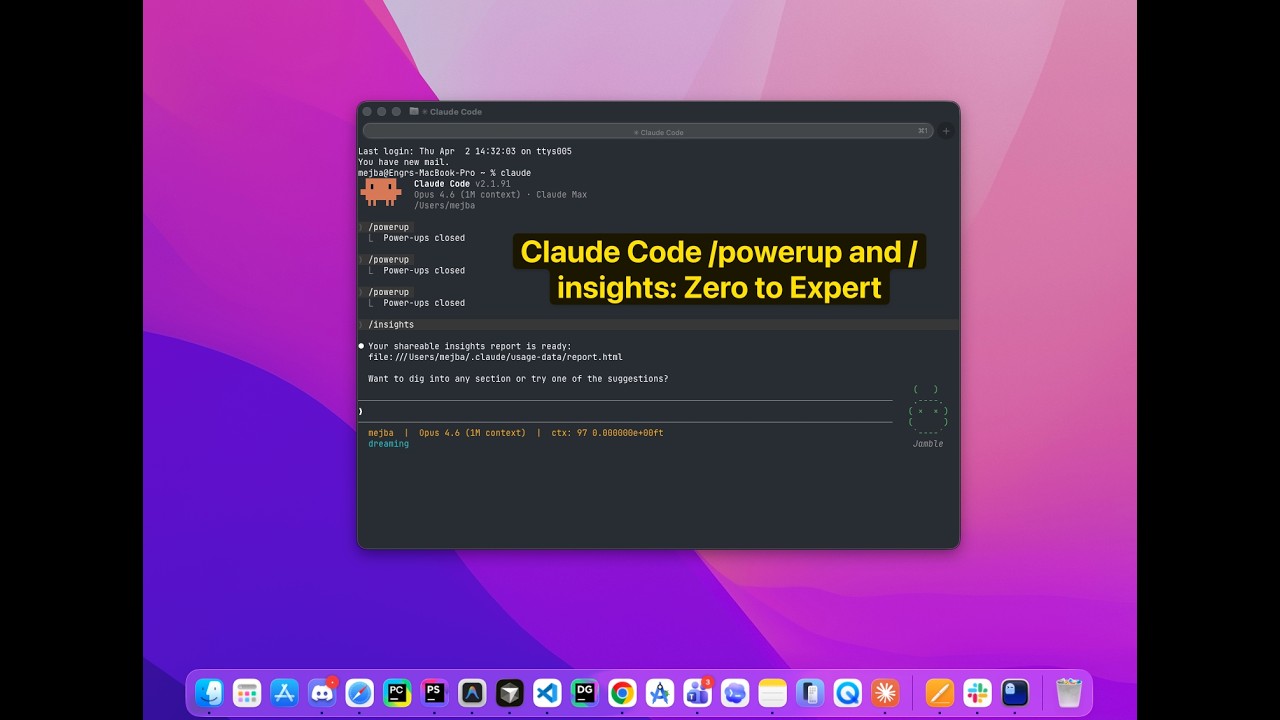
Claude Code ships with a tutor and a mirror, and most developers have opened neither. The tutor is /powerup, ten guided lessons that run inside your terminal. The mirror is /insights, a report generated from your last 30 days of actual sessions, showing what you do well, where you burn time, and which rules you should be writing down. My argument in this post is simple: either command alone is a nice feature, but running them as a loop, learn, work, measure, adjust, is the fastest route from competent to expert that exists in this tool, and I say that as someone who drives Claude Code across a production Laravel site every working day.
I first ran /insights when version 2.1.90 landed, on a friend's insistence, mid-project, coffee going cold. Thirty seconds later I was looking at a report card of my own last month: sessions grouped by project, the languages and tools I leaned on, and a ranked list of friction points I recognized instantly and had never once articulated. That recognition is the product. Here is how both commands work and how to wire them into something self-improving.

What /powerup Actually Is
Type /powerup and you get a menu of ten structured lessons, each targeting one Claude Code capability: planning mode, context management, CLAUDE.md, subagents and parallel work, hooks, skills, and so on. Each lesson follows the same shape: a plain-language concept, a hands-on exercise you perform in your real terminal, feedback on what you did, and a hook into the next lesson.
Two things most people miss about it. First, the lessons adapt to your project context; the context-management lesson behaves differently in a 200-file monorepo than in a single-script folder, which makes the exercises feel less like a tutorial and more like onboarding to your own repo. Second, /powerup has a deliberate ceiling. It teaches the tool's capabilities, roughly the 80 percent that everyone should know, things I otherwise had to collect the hard way into my plan-first strategy guide. What it cannot teach is your usage, your habits, your specific time sinks. That is the other command's job.
What /insights Actually Shows You
Run /insights and Claude Code reads your local session history, takes about half a minute, and writes an interactive HTML report to ~/.claude/usage-data/report.html, then opens it in your browser. Everything happens locally against logs already on your machine; nothing is sent anywhere to produce it, which matters if your sessions touch client code.
The report has four sections worth your attention:
- Usage breakdown. Sessions by project, languages, tools, time-of-day patterns. Mildly interesting, occasionally embarrassing.
- What's working. Patterns where you use the tool effectively. Mine credits CLAUDE.md discipline, which is fair; this site's CLAUDE.md is the most-edited file I own.
- Friction points, ranked by frequency. The valuable part. These are moments where sessions stalled, loops repeated, or you corrected the model the same way multiple times.
- Suggestions, including CLAUDE.md rules. Quick wins you can apply in minutes, plus more ambitious workflow changes, with concrete examples pulled from your own history.
The test of any analytics feature is whether it tells you things you half-knew but never acted on. When I ran mine, the friction section read like the "Quirks" block of this repo's CLAUDE.md, the museum of gotchas I had been assembling manually: environment quirks I kept re-explaining, verification steps I kept re-running because the first run used the wrong command. Some of its suggested CLAUDE.md rules were ones I had already written after paying for the lesson in lost time. The report would have handed them to me weeks earlier. That is the honest pitch: /insights industrializes the learn-from-your-own-sessions habit that experts do manually.
The Loop: Why the Two Commands Beat Either Alone
The flywheel looks like this:
/powerupteaches a capability, say, subagents.- You use it in real work for a few weeks.
/insightsshows whether you actually adopted it and what new friction it created.- The report's suggestions become CLAUDE.md rules or skills.
- Repeat next month, from a higher baseline.
Without step 3, learning plateaus at "I know the features." Without step 1, the report keeps flagging problems whose solutions you have not learned. Together they close the loop, and closed loops compound.
Automating the Loop
Because /insights is a command, you can schedule it. My recipe, condensed:
Generate monthly, programmatically. Claude Code runs non-interactively with the -p flag, so a scheduled job on the first of the month can produce the report without you remembering to ask.
Extract, don't archive. A second prompt reads the report and pulls only the ranked friction points and suggested rules into a dated markdown note. Reports you merely save are reports you never reread; mine land in the same markdown memory system every other part of my workflow writes to.
Gate the CLAUDE.md updates. The tempting final step is piping suggested rules straight into CLAUDE.md. Don't. That file is load-bearing; every rule in it spends context in every future session. I review the suggestions and promote the ones that earn permanent residence, the same weekly-audit muscle that runs my whole AI operating system. Automation generates the candidates; judgment still does the hiring.
If you use scheduled routines, the whole recipe is one recurring agent and one review reminder. If you don't, a calendar note on the first of the month gets you 90 percent of the value.
Who Should Run What, Today
If you are new to Claude Code: /powerup, lesson one, tonight. It is genuinely the best onboarding the tool has, better than most third-party tutorials including, frankly, some of mine.
If you have been driving it for months: /insights, right now, before you read another workflow article. You are past the point where generic advice moves the needle; what moves it is data about your usage. Pair the report's findings with the slash commands worth building and you will feel the difference within a week.
And when the report starts suggesting the same fix twice, that is your signal to encode it permanently, as a rule or as a skill. Turning repeated corrections into installable skills is exactly how my own collection grew; the ones that survived are published in my agent skills marketplace, and several of them started life as a line item in an /insights friction list.