Automated Creative Agency: Claude AI + Higgsfield
The Slack ping came in at 2:14 AM. I had set Claude Code to run a weekly creative routine before going to bed — fifty new ad variations for a fictional headphone brand I had been using as a test bed. Hypermotion product spins. Static carousel frames. Three short UGC-style clips. The kind of work I used to charge a client four figures for a single campaign cycle.
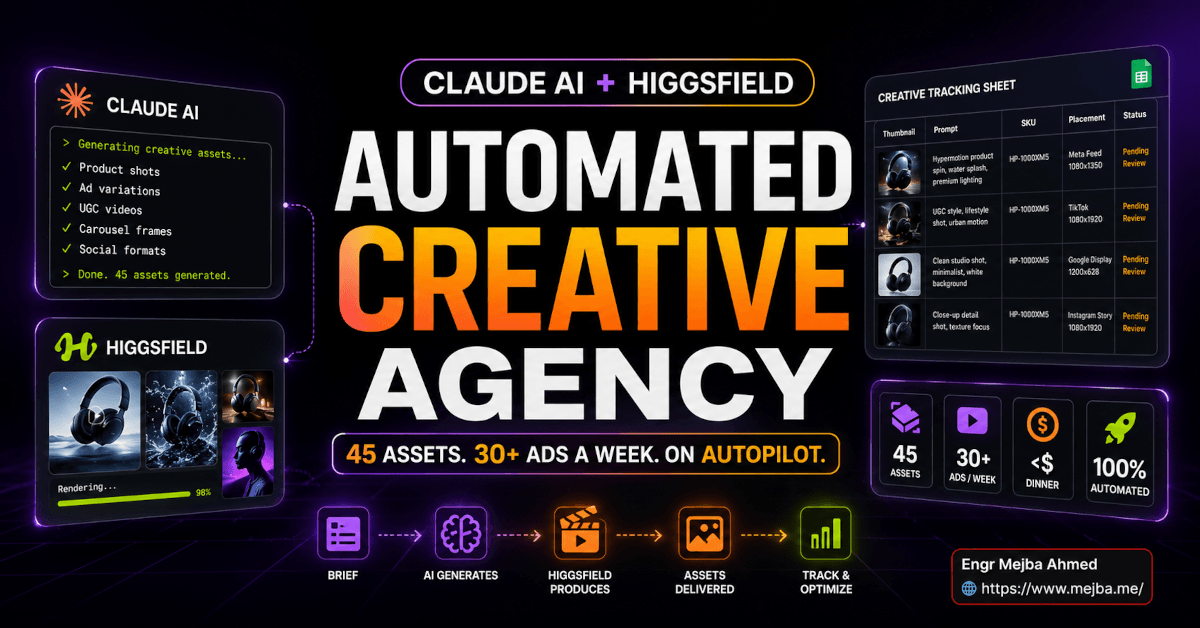
When I opened the laptop the next morning, the Google Sheet had forty-five new rows. Each row had a thumbnail, a Higgsfield job ID, the prompt that produced it, the SKU it belonged to, the placement it was sized for, and a "pending review" status. Six of them I would have rejected from a freelancer. The rest were honestly better than what I had been getting from the ad designer I worked with last year. The kicker: the entire batch cost me less than dinner.
I want to be clear about what this post is and what it is not. This is not a "AI is replacing agencies" hot take. I have run real creative work for paying clients for years. I know what an art director actually does and why a great brand photographer is worth their rate. What I am describing is something different — a working setup where Claude Code orchestrates Higgsfield's image and video models through a custom connector, runs ad strategy from a six-hundred-line ad masterclass document I wrote, tracks every output in a Google Sheet, and produces enough creative variants every week to keep a Meta Ads account fed without me touching a brief.
I built this around a fake brand called Murmur — three SKUs of headphones plus a sleep supplement — specifically so I could push it hard without burning a real client's budget. By the end of three weeks the system was generating roughly thirty to one hundred ads a week depending on how I tuned the routines. I am going to walk through the entire setup: the Higgsfield side, the Claude Code side, the connector wiring, the skills I installed, the tracking sheet, and the parts where the whole thing falls on its face if you do not handle them carefully.
If you have been waiting for the moment when Claude Code stops being a coding tool and starts being a small operating company, this is that moment. Let me show you what it looks like from the inside.
Why a Single Tool Was Never Going to Cut It
My first attempt at automating creative work used one tool. Pick any of the big AI image platforms. I tried four of them. Each one had the same problem: the model is amazing in isolation and useless inside a workflow.
Generating one beautiful image is solved. Generating fifty on-brand images that match a product's actual look, fit specific ad placements, and feed into a tracking system that shows you what worked — that is the job. And no single platform handles all of it.
Higgsfield handles one half of the problem extremely well. The platform aggregates more than fifteen video and image models under a single subscription, including Sora 2, Kling, Google Veo 3.1, and their own Soul and Cinema models, and wraps them in a Marketing Studio that exposes ad-shaped formats — Hypermotion product motion shots, unboxing reveals, UGC-style clips, talking-avatar lip-sync, cinematic camera moves that emulate ARRI, RED, and Sony bodies rather than generic "cinematic" filters. According to Higgsfield's 2026 pricing, plans run from a Starter tier at fifteen dollars to an Ultra tier at eighty-four dollars per month, with credit packs available for burst generation. That is the engine.
But the engine has no brain. It does not know your brand. It does not remember last week's ad. It will happily generate the same hero shot six times and never tell you. It does not write briefs. It does not do moderation. It does not pick which of fifty drafts is worth running on Meta. That is the second half of the problem.
The second half is what Claude Code is now extraordinarily good at. With custom connectors over remote MCP, agent skills, plugins, and routines, Claude Code can hold a brand in memory, talk to Higgsfield's API on your behalf, log every output to a sheet, score the results, and re-run the whole thing on a schedule. That is the brain.
Plug those two halves together correctly and you have something that genuinely behaves like a small creative agency. Skip the wiring and you have two impressive tools that ignore each other. Most of this post is the wiring.
The Setup at a Glance: Brand, Stack, and What Each Layer Owns
Before I get into the implementation, here is the full stack so you can see how the pieces fit. I will explain each part in detail in the sections below.
The fictional brand was Murmur. Three headphone SKUs — an over-ear, a wireless earbud, and an open-back wired model — plus a sleep supplement to test how the system handles a totally different category. Each SKU had a one-page brand brief, a hero product photo I generated once and locked in as the canonical reference, a target audience description, and a list of placements I wanted ads for: Instagram Reels, Stories, Feed, and Meta Feed for the supplement.
The stack underneath looked like this. Claude Code Desktop was the brain. Inside Claude Code I installed a Higgsfield connector through the custom-connector flow, two agent skills (one for image generation, one for Hypermotion video), a Google Workspace CLI for the tracking sheet, and a six-hundred-and-seventeen-line markdown file I wrote called the Advertising Masterclass that I treat as a permanent context reference. The Higgsfield side gave me the models, presets, and Marketing Studio formats. Google Sheets through the GWS CLI gave me persistent memory across sessions. And a routine — a scheduled Claude Code job — kicked the whole thing off on a cadence I controlled.
If that paragraph sounded dense, do not worry. We will build it back up one layer at a time.
The Higgsfield Layer: Picking the Right Surface, Not Just the Right Model
The mistake most people make with Higgsfield is treating it like a model picker. They open the app, look at fifteen video models, get overwhelmed, generate six things, and never log into the platform again.
The Marketing Studio is where you actually want to live. It is a layer above the raw models that exposes ad-shaped surfaces — formats designed to produce the kinds of clips and stills that brands actually run. A few of the formats I leaned on hardest for the Murmur build:
Hypermotion is the one I burned the most credits on. It is built for product motion — the headphone rotates, lights catch the metal cup, the cable swings, the case opens with a satisfying snap. According to the pricing pages, video generations cost roughly twenty to fifty credits each depending on length and complexity, and on the Ultra plan I was getting enough headroom to spit out a dozen Hypermotion clips a day without watching the meter. For a launch video on the over-ear SKU, this single format produced more shippable B-roll in an afternoon than I had gotten from a real product video shoot the year before.
Unboxing and UGC formats handled the social half. The unboxing format gave me first-person reveal shots — hands on a box, lift, foam pull, headphones rising into frame — that read as genuinely organic on Reels. The UGC preset goes further; it stages a creator-style clip with realistic motion and synced audio. A clean Reel-ready clip that would have cost me four figures to produce traditionally now cost a handful of credits.
The Cinema Studio is where I generated the brand hero stills. It emulates specific camera bodies — ARRI, RED, Sony — with lens characteristics tied to actual focal lengths rather than the soft "cinematic" aesthetic most platforms slap on. When I asked for a 50mm portrait of the open-back wired model, I got the depth-of-field falloff I would have gotten from a real lens at that focal length, not a generic shallow-focus blur.
This is where I planted the first open loop in my own head: the platform was good. Surprisingly good, actually. But picking which format to use for which placement, then writing a prompt that hit the brand, then doing that fifty times a week — that is the part a model alone cannot solve. That is the part the next layer handles.
The Claude Code Layer: Connector, Skills, and the Brain That Holds the Brand
Here is where Claude Code earns its keep. I want to walk through this in the order I built it, because the order matters. Skip a step and the next one will not work.
Step 1: Wire Up the Higgsfield Connector
Claude Code's custom-connector flow uses remote MCP under the hood. The official path is Settings, then Connectors, then Add custom connector, where you give the connector a name and an MCP server URL. If the connector accesses private user data — which Higgsfield does, since you are pulling jobs and account info — you go through standard OAuth 2.0. The two callback URLs you allowlist on the OAuth provider side are https://claude.ai/api/mcp/auth_callback and https://claude.com/api/mcp/auth_callback. Once that handshake completes, Claude Code can call Higgsfield's tools the same way it calls a local file system tool.
The reason this matters: I never have to leave Claude Code. I do not paste prompts into Higgsfield's web UI. I do not download files manually. Claude Code asks Higgsfield to generate a Hypermotion clip with a specific prompt and reference image, gets back a job ID, polls for completion, retrieves the asset URL, and writes the whole record to my Google Sheet. The connector turns Higgsfield from an app I visit into a tool Claude reaches for.
If you have wired up any custom connector before — for Linear, Notion, a private GitHub instance — the experience is identical. If you have not, the Claude Canva connector design workflow walk-through is the closest analog, since Canva and Higgsfield sit in the same "creative tool with API and OAuth" shape.
Step 2: Install the Higgsfield Agent Skills
Skills in Claude Code are reusable recipe files. They are how you teach Claude your version of a process rather than the generic one a model would do by default. A skill bundles a trigger ("when the user asks for product motion video"), a methodology ("here is the exact prompt structure that works for Hypermotion"), and references to brand and asset files.
For the Murmur build I installed two skills and wrote two more myself. The two installed ones came from the broader Claude Code skills marketplace, which according to public marketplace counts now hosts more than four thousand skills as of mid-2026. One was a Higgsfield image-generation skill that knew the prompt structure for Cinema and Soul. The other was a Hypermotion video skill that handled the prompt-and-reference pattern that gives you brand-consistent product motion. The two I wrote myself were a brand-style skill that loaded the Murmur brief into context every time, and a moderation pre-check skill that scrubbed prompts for trigger words that would otherwise trip Higgsfield's content moderation.
The reason skills matter here is brand consistency. Without them, every generation is a fresh roll of the dice. The over-ear cups change shape. The earbuds switch from black to silver. The background lighting flips warm to cool between two ads in the same campaign. With a skill that bakes in the brand brief, the canonical reference image, and the prompt structure I had tested, every output came out looking like it belonged to the same brand. Not perfect — I will get to where it breaks — but eighty to ninety percent on-brand without me reviewing the prompt.
If skills are new to you, the advanced agent skills walkthrough covers the structure of a skill file in depth and is worth reading before you write your own.
Step 3: Add a Persistent Memory Layer with the Google Sheets CLI
This is the piece nobody talks about and it is the difference between a toy and a system.
Claude Code is brilliant inside a session. It is amnesic across sessions. The model does not remember last Tuesday's batch unless you give it somewhere to look. Without persistent memory, you regenerate the same shot ten times and never notice. You cannot tell which prompt produced which clip. You cannot tell which ad your client actually approved. The whole creative agency idea collapses without a memory.
I solved this with Google Workspace CLI piped into a Sheets document I called the Murmur Asset Ledger. The CLI gives Claude Code read and write access to a single sheet over OAuth. The schema I landed on after a week of iteration looks like this:
| asset_id | created_at | sku | placement | format    | higgsfield_job_id | prompt_hash | thumb_url | full_url | status   | review_notes | spend_cents |
|----------|------------|-----|-----------|-----------|-------------------|-------------|-----------|----------|----------|--------------|-------------|
| 0001     | 2026-04-22 | OE1 | reels     | hypermotion | hf_8k2j...     | a3f9...     | ...       | ...      | approved | clean        | 38          |
| 0002     | 2026-04-22 | OE1 | reels     | hypermotion | hf_9p4r...     | a3f9...     | ...       | ...      | rejected | logo drift   | 38          |
Twelve columns, nothing fancy, but every column is load-bearing. The prompt_hash lets Claude Code spot when a prompt has been re-used so it does not waste credits regenerating the same shot. The status column lets me filter for a "pending review" pile each morning. The spend_cents column gives me a rolling cost dashboard. The review_notes column is where I record what failed and why — and that note feeds back into the brand-style skill the next week so the same mistake does not happen twice.
This sheet is the agency's institutional memory. Without it, you are running fifty disconnected experiments. With it, you are running one accumulating system.
Step 4: Drop In the Advertising Masterclass
I want to flag this part because it changed the quality of every output more than any other single decision. I wrote a six-hundred-and-seventeen-line markdown document called ads-masterclass.md and pinned it as a permanent reference in the Claude Code project. It is not a skill. It is a knowledge base.
The document covers the things every junior ad designer eventually learns and most never write down: how a hook works in the first second of a Reel, what makes a static ad scroll-stopping versus scroll-passing, how Meta's algorithm rewards thumb-stop ratio, why UGC outperforms polished ads on cold traffic and underperforms on warm, how to structure a three-second versus a fifteen-second versus a thirty-second video ad, the three-act ad structure I have seen work across categories, exactly how to brief a creative for a launch versus a sale versus a retargeting campaign. None of it is secret. All of it is hard-won.
The reason this works is that Claude does not need to be told to read it. The masterclass sits in the project's context folder and the brand-style skill references it explicitly. Every time the system writes a brief or critiques a generated ad, it is doing it through that lens. The output stops looking like generic AI ad slop and starts looking like work from someone who has actually run paid social.
If you have been doing ads for years, write your own masterclass. If you have not, find one written by someone who has. The point is to give the model a real reference, not to let it fall back to its training-data average.
The Murmur Build: Three Weeks, Three SKUs, Forty-Five Assets
Here is the part where I stop describing the architecture and tell you what actually happened when I ran it.
Week one was setup. I burned the first four days getting the connector clean, debugging an OAuth callback issue that turned out to be a copy-paste mistake on my end, writing the brand-style skill, and locking down the canonical hero image for each SKU. By Friday of week one I had generated my first Hypermotion clip — the over-ear SKU, slow rotation, warm rim light, on a charcoal background — and it took my breath away. I sent it to a designer friend and asked her to guess which agency made it. She named one I respect.
Week two was the build. I let Claude Code drive a campaign-prep routine I had written. The routine reads the Murmur brief, picks an SKU and a placement that needed assets, drafts five prompt variations through the brand-style skill, sends them to Higgsfield via the connector, polls until the jobs complete, writes everything to the Asset Ledger with status "pending review", and pings me on Slack when the batch is done. By the end of week two I had thirty-two assets in the ledger. Twenty of them I approved. Six I rejected for the kind of brand drift I will describe in the next section. Six I asked the system to regenerate with adjusted prompts.
Week three was the stress test. I cranked the routine to run twice a week and added the supplement SKU. The supplement is a different category, different look, different audience, and I wanted to see how badly the brand-style skill would generalize. The first batch was rough — the supplement bottle came out looking like a product from a stock-photo library. I rewrote the brand-style skill to handle category-specific reference images, re-ran the batch, and the second pass was solid. By the end of week three the ledger had forty-five approved assets across the four SKUs, plus a backlog of around fifteen pending-review items, and I was generating roughly thirty to one hundred ads a week depending on how aggressively I scheduled the routine.
A note on cost: at the volume I was running, the platform credits were materially cheaper than even one round of traditional photography for a single SKU. According to multiple 2026 industry benchmarks, brands using AI creative automation are reporting roughly sixty to seventy percent cost reduction versus traditional photo and design workflows, and a separate IAB-cited measurement put production cost reduction at around forty-two percent across formats. My Murmur numbers were on the higher end of that range, mostly because I was running pure synthetic generation rather than mixed AI and traditional production.
If you want a parallel reference for the multi-agent orchestration side of this, my earlier writeup on building a five-agent AI marketing team in Claude Code walks through the agent-and-skills design in depth and pairs naturally with what I am describing here.
The Mid-Article Reality Check
If you have made it this far, you are probably thinking one of two things. Either "I want to build this" or "this sounds too good." Both are correct. The system works. It also has real limits, and I am about to spend an entire section on them. Before I do, one note.
If you would rather have someone wire this entire stack up for your brand — connector, skills, masterclass, tracking sheet, routines — I take on engagements that look exactly like this. You can see what I have built at fiverr.com/s/EgxYmWD.
Now back to where the system breaks.
Where It Falls Apart: Text Rendering, Moderation, and Brand Drift
The honest section. Three failure modes hit me hard during the Murmur build, and I want to describe each one because if you build this system and ignore them, the work will look great in isolation and embarrassing in production.
Text rendering inside generated video is unreliable. This is the single most consistent failure across every video model in the Higgsfield aggregation. Static images with on-brand text — fine. Hypermotion clips with a price callout, a logo lock-up, a CTA pill — unreliable. The letters wobble. The kerning collapses on a frame. The brand mark mutates between frames in a way no client will sign off on. I solved this by separating concerns: Higgsfield generates the motion footage clean, with no text, and a downstream Claude Code routine composites the text overlay using an actual designer-defined typographic system. The text never goes through the model.
Content moderation will block legitimate prompts. Higgsfield, like every major platform, runs a moderation layer. It is conservative, and it should be. But it will reject a prompt that mentions "earbuds in the ear" because the word "in" plus "ear" plus a body-part reference triggers a heuristic the moderation system was not tuned for. It will reject "open-back wired" wording because it parses "open" plus "back" oddly. The moderation skill I wrote pre-scrubs prompts and substitutes neutral phrasing — "in-ear monitor" instead of "earbud in the ear" — and the rejection rate dropped from somewhere around fifteen percent on early batches to under two percent. If you skip this layer, you will burn an entire afternoon wondering why a clearly innocent ad keeps getting blocked.
Brand drift is real and gradual. Two ads from one batch will look perfect side by side. Twenty ads from a month of batches will show subtle drift — the headphone shape eases by a few degrees, the cup colour warms half a step, the cable shifts thickness, the supplement bottle's label evolves. The model is doing what models do. The fix is to lock down a canonical reference image per SKU and force every skill to load that reference as the primary visual anchor on every job. It does not eliminate drift entirely. It cuts the rate by something like eighty percent in my testing.
There is a fourth thing worth mentioning that is less of a failure and more of a temptation. The system can generate so much, so fast, that the bottleneck moves from production to selection. Picking the right ten ads out of a batch of fifty is now the hard part. I have started using a "pending ad picker" routine — a separate Claude Code job that scores each pending asset against the masterclass criteria and ranks them — but human review is still the final filter and you should keep it that way.
The Routine: Where the Whole Thing Becomes Hands-Free
Up to this point, everything I described still required me to start a session and tell Claude Code to run. Routines are what turn the system into something that runs without me.
A routine is a scheduled Claude Code job. You define a trigger — cron, an event, or a manual fire — and a prompt that gets executed at that trigger. For the Murmur build my main routine fired every Monday and Thursday at 6 AM. The prompt was three lines: pick the SKU and placement that has the fewest fresh approved assets in the Asset Ledger, generate ten new variations using the brand-style skill, and write everything to the ledger with "pending review" status.
That routine ran while I slept. By the time I had coffee Monday and Thursday morning, there were twenty new assets in the pending pile. I would spend twenty to thirty minutes scoring them, mark approvals and rejections, and the next routine cycle would learn from those review_notes and tilt prompts away from whatever had failed.
I have not yet wired in Meta Ads Manager directly, but the connector path exists. Once you can move approved assets from the ledger into Meta as actual ad drafts, the loop closes — you go from prompt to live ad with no manual steps in between, with a human still in the loop on the approval gate. That is the version I am building toward next.
If routines are new to you, the Claude Code routines for SEO automation walkthrough covers the routine structure in detail and applies cleanly to the creative-generation case.
FAQ
Frequently Asked Questions
Everything you need to know about this topic
Higgsfield AI is a video and image generation platform that aggregates more than fifteen models — including Sora 2, Kling, Veo 3.1, Soul, and Cinema — under a single subscription, with a Marketing Studio layer that exposes ad-shaped formats like Hypermotion product motion, unboxing, and UGC. For a hands-on review of how I used it inside a creative pipeline, see the Higgsfield Layer section above.
Higgsfield's 2026 pricing runs from a Starter plan at fifteen dollars per month to an Ultra plan at eighty-four dollars per month, with a Business tier at forty-nine dollars per seat. Credits are consumed per generation — roughly twenty to fifty credits per video — and credit packs expire after ninety days.
Yes. Claude Code's custom-connector flow uses remote MCP and standard OAuth 2.0 to authenticate with Higgsfield, after which Claude Code can generate, poll, and retrieve assets without leaving the desktop app. Both https://claude.ai/api/mcp/auth_callback and https://claude.com/api/mcp/auth_callback must be allowlisted on the OAuth provider side.
Not yet, and probably not in the way the headlines describe. AI handles the production layer extremely well, but creative direction, brand strategy, and the judgment to pick the right ten ads out of fifty still require a human. The realistic framing is automated production with human direction — which is what the Murmur build is.
At minimum: asset ID, timestamp, SKU, placement, format, the platform job ID, a prompt hash to spot duplicates, thumbnail and full asset URLs, status, review notes, and credit spend. The tracking sheet is the persistent memory that turns single-session generations into an accumulating system.
What This Actually Changes
If you have been treating AI image and video tools as a faster way to do single tasks, the shift I am pointing at is bigger than that. The shift is that the creative agency itself can now be encoded — brand, methodology, masterclass, ledger, routine — into a system that runs without you. You are not faster at the same job. You are doing a different job. You become a director, a reviewer, a strategist. The execution layer runs while you sleep.
The Murmur build is fictional. The architecture is not. The connector flow, the skills, the Google Sheets ledger, the routines, the masterclass — every piece of that is portable. Drop in your own brand brief, your own SKUs, your own reference imagery, your own ads doctrine, and the same system runs for a real client.
There is one open question worth sitting with tonight. If a single operator can run a creative agency at this volume and quality, what does that mean for the agency model itself? The answer is not "agencies die." The answer is closer to "agencies that learn to encode their craft win, and agencies that try to compete on raw production lose." The agencies I want to work with five years from now are the ones writing their own version of ads-masterclass.md this year.
That is the work worth doing. The forty-five assets in the Murmur ledger are interesting. The masterclass is the asset.
Let's Work Together
Looking to build AI systems, automate workflows, or scale your tech infrastructure? I'd love to help.
- Fiverr (custom builds & integrations): fiverr.com/s/EgxYmWD
- Portfolio: mejba.me
- Ramlit Limited (enterprise solutions): ramlit.com
- ColorPark (design & branding): colorpark.io
- xCyberSecurity (security services): xcybersecurity.io