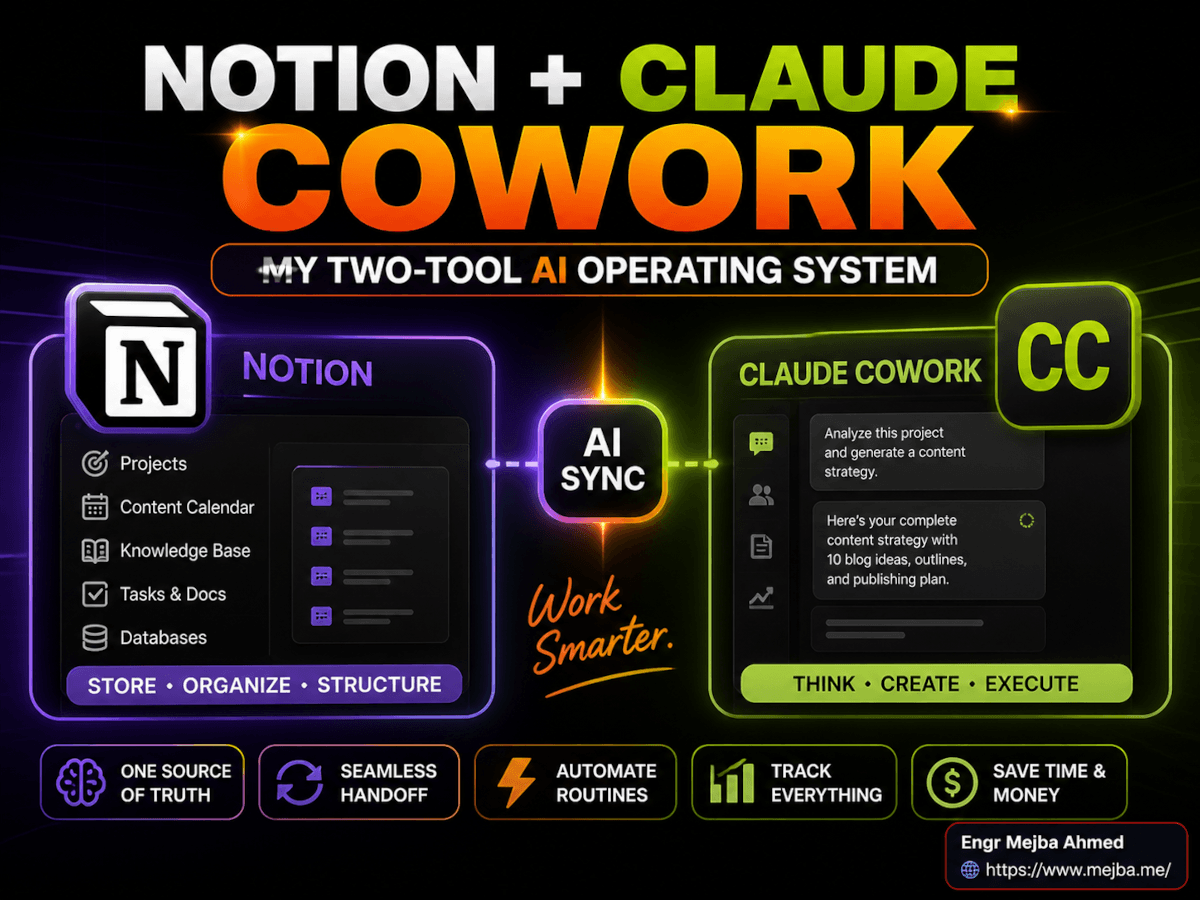
Notion + Claude Cowork: My Two-Tool AI Operating System
The deciding moment came on a Wednesday in March. I had two browser windows open on the same monitor — Notion 3.0 on the left, Claude Cowork on the right — and I caught myself doing something embarrassing. I was typing the same brief into both tools.
Top of the brief: "I'm Mejba. I run a small content operation. My voice is direct, first-person, allergic to corporate filler. The reader is usually a semi-technical founder. Optimize for clarity over cleverness."
I had pasted that paragraph into Claude four times that morning already. Twice into Notion's chat. The same context. The same setup tax. Six months into running both platforms in parallel, I was still re-briefing my AI assistants like they had amnesia, then wondering why my "AI productivity stack" felt like a part-time job.
That's the day the system clicked. Not because I picked a winner. Because I stopped trying to.
The advice you see everywhere — "Notion vs Claude," "the best AI productivity tool in 2026," "why I cancelled my Notion subscription" — treats these tools like they're competing for the same job. They aren't. After six months of running both daily across content production, client work, and personal strategy, the unlock wasn't choosing one. It was wiring them together so each handled the work it was actually built for.
This post is the playbook I wish someone had handed me on day one.
Why "Pick One AI Tool" Is Bad Advice
The single-tool framing made sense in early 2025. Most AI assistants were variations on the same thing — a chat box, a model, a context window. Choosing between them was choosing between flavors of vanilla.
That's no longer the world we live in.
Notion 3.0 launched in September 2025 with a real agent layer baked into the workspace. Then in February 2026 they shipped Custom Agents — autonomous teammates that run on schedules and triggers across Notion, Slack, Mail, Calendar, Figma, Linear, and MCP integrations. Anthropic shipped Claude Cowork as a research preview in January 2026, then took it generally available on macOS and Windows on April 9, 2026 with role-based access controls and OpenTelemetry support for enterprise teams.
These are not the same product trying to win the same buyer. Notion is a structured, multiplayer workspace where AI lives inside your databases and shared SOPs. Cowork is a desktop application where AI lives inside your local file system and operates on the actual files on your machine.
The reason most "AI productivity" advice falls apart in week three is that it ignores this split. You can't run a content team out of a folder of markdown files on your laptop — your editor needs to see the calendar. You can't run deep, file-heavy strategy work inside a database — your draft slide deck and your client's PDF source files don't belong in a Notion property.
I tried both for months. The single-tool approach broke in predictable places, and the dual-tool approach broke at exactly one seam: the seam between them. That seam is where this article lives. Stick around — by the time we get to the cost section, the math gets surprising.
The Six-Month Test: How I Actually Used Both
Before I get into structure, here's what I was running.
Mejba.me publishes a long-form post nearly every working day — currently 232 posts and climbing. I run client engagements through a separate brand. I have a content team across two time zones, three editorial pipelines, and a personal research habit that generates more screenshots than my hard drive can comfortably hold.
I'd been a Notion power user since 2022. Claude Cowork I started with the research preview in January, moved to daily use in February, and have been running as my primary desktop AI ever since. The first three months I treated them as alternatives and tried to push everything into whichever one I was logged into at the moment. The next three months I rebuilt deliberately, with each tool owning a clearly defined layer of the operation.
The deliberate version is faster, calmer, and roughly 40% cheaper to run per month than the way I started. Not because either tool got better. Because I stopped paying for both to do the same job.
Side note on naming: the creator I learned this from in a YouTube video calls Claude's product "Claude Co-work" with a hyphen. The actual product name is Claude Cowork, one word. Anthropic dropped the hyphen for the GA release. Same product, cleaner spelling. I'll use the official name throughout.
The Architectural Insight Most People Miss
When you strip away the marketing and look at what each platform actually is under the hood, something interesting shows up.
Notion and Claude Cowork share the same three-layer architecture.
- Specialist agents or sub-agents — bounded units of work with their own instructions
- A knowledge base — context the agents read from to make decisions
- A skills library — reusable procedures the agents call when they recognize a task
In Notion, those three layers are: Custom Agents, your workspace databases, and AgentOS-style mode protocols. In Cowork, those three layers are: plugins and sub-agents, your local PARA folder structure, and the Skills system surfaced through the new Customize section in Settings.
Different surfaces. Same primitives. That's the architectural insight that finally made the system in my head click.
Once you see the symmetry, the wiring problem becomes obvious. You don't have two AI tools. You have one architecture running on two substrates — and the question isn't "which tool wins" but "where does each layer of my work live?"
Layer One: Notion as the Business OS
Notion is where everything that needs to be shared, structured, and searchable by another human lives.
I'll be specific. Notion holds:
- The content calendar (every post, every status, every assigned editor)
- All client SOPs and handover documents
- Project trackers with linked databases — clients, deliverables, invoices
- AI-generated meeting notes that need to be findable across the team six months from now
- Team resources, brand guidelines, the shared style guide
- Goal tracking and quarterly OKRs
The defining property of everything in this list: it has at least two readers, and one of them isn't me. The structure itself — properties, filters, views, linked relations — is the value. A markdown file can't do this. A folder of markdown files can't either, no matter how cleverly you name them.
This is where the structured-database side of Notion earns its keep. Filtering my content calendar by "status = ready for editor" and "brand = ramlit.com" is a one-click view. Doing the same operation against a folder of files is a script, and a script is friction, and friction is where systems die.
The Personal Agent Mode Protocol
Inside the Business OS layer sits the most underrated feature in the whole stack: the Personal Agent.
The version I run is built on the AgentOS template approach — a single chat interface in the main Notion AI window with six pre-loaded specialist modes that the agent picks automatically based on the query. Coach, strategist, content writer, analyst, productivity assistant, decision coach. The mode selection happens through what I think of as a mode protocol — a set of instructions the agent reads first that tells it which specialist to delegate to.
Why this matters in practice: I no longer context-switch between custom GPTs or saved prompts. I open one chat. I type "help me decide whether to take on this client." It picks the decision coach. I type "draft the launch announcement." Same window, it routes to the writer. I type "audit my last week — what should I drop?" Same window, productivity coach.
That single-window-multiple-modes pattern is the closest thing to a real personal AI chief of staff I've found in any tool. It costs me 2-3 minutes a day in saved context-switching, which doesn't sound like much until you do the math: 12 hours a year of pure focused output recovered, just from not opening different chat windows.
Custom Agents for High-Leverage Repetition
The third Notion layer is Custom Agents — autonomous, scheduled or triggered, running 24/7 against your workspace and connected tools.
Pricing reality check, because this changed on May 4, 2026 and a lot of older posts are now wrong: Custom Agents are no longer free. They consume Notion credits at $10 per 1,000 credits, and a single agent run burns 30 to 60 credits depending on how much it reads, how many tools it touches, and how much it writes back into the workspace. Credits are pooled at the workspace level. Available as an add-on for Business and Enterprise plans.
That math means a single Custom Agent run costs you somewhere between thirty and sixty cents. Cheap when the work is high-leverage. Expensive when you're using it for things you should have built as a static template instead.
So I run exactly four Custom Agents, and I run them ruthlessly:
- Editorial Triage — fires every morning at 7am, reads new submissions, scores them against the brand voice rubric, posts a digest to the editorial channel
- Customer Support First-Response — triggered by new email tagged #support, drafts a reply for me to review
- Weekly Briefer — fires Sunday evening, reads my calendar, last week's notes, and project status, produces a one-page brief for Monday morning
- Database Autofill — triggered when a new client record is created, pulls public data and populates 80% of the fields
Total monthly Custom Agent spend: roughly $35-45 in credits depending on volume. That replaces what was previously about 4 hours a week of human admin time. The ROI is comfortable. But — and this is the part most "Notion AI is amazing" posts skip — every other repetitive task lives in Cowork instead, because Cowork's scheduled tasks don't burn Notion credits at all. We'll get to that.
Layer Two: Claude Cowork as the Personal Lab
Cowork is where everything that is mine, local, unstructured, or multi-modal lives.
The defining property: I'm the only reader, the work touches files on my actual machine, and the output isn't text in a database — it's a deliverable in a format. A slide deck. A redesigned PDF. A folder of generated images. A markdown research report that links to twelve other markdown files in a way Notion would butcher.
Cowork specifically holds:
- Local research projects — usually a folder per topic with PDFs, transcripts, my notes, and the working draft
- Strategy documents — quarterly planning, business-model sketches, things I want a real thinking partner for
- Multi-modal output work — slide decks, design exports, anything visual that ends up as a deliverable
- Personal data analysis — pointed at a CSV on my disk
- Local automation — scheduled tasks that run repeatable workflows without lighting up an API meter
The folder structure underneath all of this is the PARA Method by Tiago Forte — Projects, Areas, Resources, Archives. Not Power Method. Not Thiago. The transcript I worked from had it wrong. PARA, by Tiago Forte, is the canonical second-brain organizational system: Projects are short-term efforts with clear deadlines, Areas are ongoing responsibilities with standards to maintain, Resources are topics of ongoing interest, Archives hold inactive items.
I dropped the entire PARA structure into a single root folder on my disk and pointed Cowork at it. Now when I say "summarize the latest research in the Resources/AI-Agents folder," Cowork knows exactly where to look. When I say "draft the next post for the Projects/mejba-content-pipeline folder," it picks up the brand voice guide that lives in Areas/Brand-Voice/ and writes against it. The folder system is the knowledge base. The plugins are the agents. The Skills are the procedures. Same three-layer architecture as Notion. Different substrate.
The "About Me" File That Killed My Re-briefing Tax
The single highest-leverage thing I've done in the last six months took me forty minutes to set up.
I wrote one file. It lives at Areas/Identity/about-me.md. It contains:
- Who I am, what I do, the brands I run
- My voice profile — sentence patterns I like, phrases I refuse to use, the rhythm I write in
- My current quarter's goals
- The personas I write for, in order of priority
- A list of "if you're about to do X, do Y instead" rules I've learned the hard way
Cowork reads this file by default at the start of any session in any of my project folders. The result: I never paste "I'm Mejba, I run a small content operation, my voice is direct..." into a chat box again. Ever. The re-briefing tax is gone.
I synced a stripped-down version of the same content into Notion's AI instructions field for the Personal Agent. Now both platforms greet me with the same context. The seam between them got noticeably tighter the day I did this.
If you do nothing else from this article, do this one thing. Write your "About Me" file. Put it where both of your AI tools can read it. The compounding return on forty minutes of setup is genuinely absurd.
Scheduled Tasks That Don't Burn Notion Credits
Cowork added scheduled tasks that have access to the same capabilities as regular Cowork sessions — connected tools, skills, installed plugins. Mine run nightly:
- Inbox sweep at 6am — reads my Gmail through the connector, drafts replies for anything time-sensitive, leaves a one-screen summary of the rest in
Projects/Active/inbox-brief.md - Research roll-up at 9pm — reads any new PDFs or saved articles in
Resources/Inbox/and appends a summary to the topic's main file - Weekly cleanup every Sunday — sweeps
Projects/for anything inactive 30+ days and proposes a move to Archives
These would have cost me real money if I'd built them in Notion as Custom Agents. Running them locally through Cowork the cost is whatever fraction of my Max plan they consume — which, given that scheduled tasks run within the plan's existing usage limits, rounds to zero on top of what I'd already pay.
This is the cost arbitrage that makes the two-tool system actually work. Notion Custom Agents for things that need to live in the shared workspace and trigger off team activity. Cowork scheduled tasks for everything else.
Live Artifacts as the Morning Dashboard
Worth flagging this honestly: as of May 2026, full Projects support, chat sharing, and traditional artifacts don't all work in Cowork the same way they do in Claude.ai's chat interface yet. The feature parity is still being built out. What does work, and what I use daily, is the live scratchpad pattern — a single file Cowork updates each morning with my task summary, unread email count, scheduled meetings, and the day's top three priorities pulled from my Notion calendar through the connector.
It's not flashy. It's a markdown file. But it's the first thing I open every day, and it knows what's on my plate before I do.
The Seven-Dimension Comparison
I built this table after the third month of running both daily. It's the cleanest way I've found to explain to other founders where each platform actually wins.
| Dimension | Notion | Claude Cowork |
|---|---|---|
| Primary use | Teamwork, shared databases, structured collaboration | Individual strategy, local files, multi-modal deliverables |
| Architecture | Business OS + Personal Agent + Custom Agents | PARA folder structure + plugins/sub-agents + Skills library |
| AI specialization | Specialist coach modes via mode protocol, skills database | Plugins with customizable instructions and persistent memory |
| Data model | Structured databases — properties, filters, linked relations | Markdown file system with project briefs and folder context |
| Cost model | $10 per 1,000 credits, 30-60 credits per Custom Agent run | Included in Claude Max ($100 or $200/mo); scheduled tasks essentially free |
| Multi-modal | Limited — text and database outputs | Strong — design exports, PDFs, slide decks, file generation |
| External automation | Solid integrations with Slack, Linear, Figma; MCP support | Strong — pairs naturally with N8N and AI-native automation tools |
The pattern in this table, once you see it, is the whole game: every row where Notion wins involves more than one human or shared structure; every row where Cowork wins involves one operator, local files, or unstructured output.
The CASSA Framework (One Operator's Take, Not Holy Writ)
The deployment sequence I follow comes from a creator I've been learning from. He calls it the CASSA Framework — Consolidate, Architect, Systematize, Activate. Worth flagging honestly: this isn't an established industry framework you'll find in textbooks. I searched. The acronym doesn't show up in any canonical AI productivity literature. It's one operator's framing, and I'm calling it out as such instead of pretending it's a household standard. That said, the sequence is genuinely useful, and I've ripped it directly into my own deployment.
Consolidate. List every recurring workflow in your operation. Every newsletter, every weekly review, every client onboarding, every research habit. Don't skip the small ones. The list itself is the diagnostic.
Architect. Sort the list into two columns: "needs other humans or structured data" and "is mine alone, lives in files, or produces a deliverable." Column A goes to Notion. Column B goes to Cowork. Anything that genuinely belongs in both — like the brand voice profile — gets written once and synced.
Systematize. For each item in column A, decide whether it's a Personal Agent mode, a Custom Agent, or just a database template. For each item in column B, decide whether it's a Cowork plugin, a scheduled task, or a one-shot session. Most things are simpler than you expect.
Activate. Turn one item on per day. Watch it for a week before adding the next one. The temptation to deploy your entire stack on day one is what kills these systems. The ones that survive are the ones you tuned slowly enough to actually trust.
That last point is the one I wish someone had told me. I tried to systematize everything in week one. Half my agents fired wrong, half my scheduled tasks ran on stale context, and I spent the whole second week firefighting instead of working. Slow deployment is the only deployment that holds.
What This Actually Costs (The Real Math)
Here's the number nobody publishes, because it's slightly embarrassing.
My current monthly spend, running both platforms with the system above, settles around:
- Notion Business plan with credits: ~$50-65/month depending on Custom Agent volume
- Claude Max ($200/20x tier): $200/month
- N8N self-hosted on a $6 droplet for the cross-platform glue
- Total: roughly $260-275/month
Worth flagging: those are my numbers based on my workload — heavy daily content production, client work, multi-modal output. Verify the current pricing on Anthropic's and Notion's official pages before budgeting; both companies have repriced more than once this year.
For someone running a small content business or a solo founder shop, that's a reasonable line item. For comparison, it's less than a single contractor day per month, and it replaces what was previously 6-8 hours a week of admin and pipeline work I was doing manually.
The thing the cost framing usually misses: the alternative isn't "$0 — I'll do it myself." The alternative is your time, valued at whatever hour you're charging clients or shipping work for, multiplied by hours wasted on context switching, manual sorting, and re-briefing AI tools that have no memory of you.
There's a number I keep circling back to from a recent industry estimate: only about 0.3% of people are running bespoke AI systems tailored to their business context. That number is going to climb fast. The operators who get there first are buying themselves an asymmetric edge — and the gap between them and everyone else is going to widen quarter by quarter through the rest of 2026.
If you'd rather not build the cross-platform glue yourself, this is exactly the kind of system I help founders deploy through my Fiverr profile — the build is straightforward, but only if someone has already mapped the seams.
What I'd Build Differently If I Started Today
Six months in, here's the honest list of mistakes that cost me time.
I built the Notion side first and the Cowork side second, and that order was wrong for my workload. If your work is more solo and file-heavy than collaborative, build Cowork first. The PARA folder structure plus the "About Me" file plus two or three plugins gets you 70% of the leverage in one weekend. Notion is the second move once you actually need the shared workspace.
I also spent three weeks trying to make Notion replace Cowork for local file work. It cannot. The data model is wrong for it. Files belong on a file system, not in database properties. Stop trying.
The biggest win I almost missed: building the unified style guide once and syncing it across both platforms. The instinct is to write a Notion-flavored version and a Cowork-flavored version. Don't. Write one. Both platforms read the same source. Update it in one place. Drift between the two is what kills the system slowly over months.
And lastly — and this one is borderline embarrassing — I underused scheduled tasks for the first four months. I kept treating Cowork like a chat partner I needed to summon. The moment I started thinking of it as a teammate that runs while I sleep, the math on the Max plan changed entirely. 27% of one day's credit budget went to a single planning session in week one, before I learned to push the heavy lifting to overnight scheduled tasks. The same kind of work now runs while I'm asleep, on a schedule, and barely registers on the meter.
Where This Goes Next
The reason I'm bullish on this two-tool pattern outliving the next cycle of "the one AI tool that does everything" hype: every serious AI productivity product is converging on the same three-layer architecture. Specialist agents, knowledge base, skills library. Notion has it. Cowork has it. ChatGPT's Projects feature is heading there. Even smaller players like Granola and Mem are building toward it.
That convergence means the skill that compounds isn't loyalty to a single platform — it's the ability to wire the layers together regardless of which substrate they're sitting on. Your "About Me" file is portable. Your PARA structure is portable. Your mode protocol is portable. The tools will keep changing. The architecture is what stays.
The reader I had in mind through this whole post is the founder or solo operator who's been told by every newsletter that they need to pick a side. You don't. The split between teamwork and solo work, between structured data and local files, between shared SOPs and personal strategy — that split exists in your business whether you've named it or not. The two-tool system just gives each side a place to live.
If I rewound back to that Wednesday in March, the version of me staring at two browser windows and pasting the same brief into both, I'd hand him three sentences: stop picking. Write the "About Me" file. Build the structured side first only if you have a team — otherwise build the local side and grow into Notion when collaboration forces it.
Six months later, that's the whole game.
FAQ
Frequently Asked Questions
Everything you need to know about this topic
Claude Cowork is Anthropic's desktop product for non-developer knowledge work — it operates on your local files, runs scheduled tasks, and produces multi-modal deliverables. Claude Code is the terminal-based product for software development. Both run on Claude models, but they target different surfaces and workflows. For the deeper breakdown, see Layer Two above.
Not necessarily. Solo operators with no shared workspace can run Cowork alone with a PARA folder structure and get most of the leverage. Teams with collaborative workflows, shared SOPs, or external clients almost always need both — Notion for the shared layer, Cowork for the personal layer. Run the CASSA Consolidate step on your own workflows to find out which side you actually live on.
Realistic monthly cost for a solo operator with moderate Custom Agent usage: roughly $260-275 — Notion Business with credits at about $50-65, Claude Max 20x at $200, plus a small N8N hosting line. Verify current pricing on Anthropic and Notion's official pages before budgeting; both have repriced multiple times this year.
No. CASSA — Consolidate, Architect, Systematize, Activate — is one creator's framing of a deployment sequence I've found genuinely useful, not an industry-standard framework. I've attributed it as such throughout this post. The PARA Method by Tiago Forte, by contrast, is a well-documented second-brain organizational system that's been published in Forte Labs and Building a Second Brain since 2017.
Not anymore. Custom Agents were free to try through May 3, 2026. Starting May 4, 2026, they consume Notion credits at $10 per 1,000 credits, with each run using 30-60 credits depending on workload. Credits are available as an add-on for Business and Enterprise plans, pooled at the workspace level.
Let's Work Together
Looking to build AI systems, automate workflows, or scale your tech infrastructure? I'd love to help.
- Fiverr (custom builds & integrations): fiverr.com/s/EgxYmWD
- Portfolio: mejba.me
- Ramlit Limited (enterprise solutions): ramlit.com
- ColorPark (design & branding): colorpark.io
- xCyberSecurity (security services): xcybersecurity.io
Related posts on the AI productivity stack: