Claude Code Whiteboard Animation Pipeline With Golpo AI
The first time I quoted a freelance editor for a 10-minute whiteboard animation, the number came back at $640. The second quote was $480. The third was $310 with a three-week turnaround and a vague comment about "depending on revisions." I closed the tabs, opened my terminal, and asked myself a question I should have asked weeks earlier: can I do this with Claude Code instead?
It turns out you can. And the part nobody is talking about is how cheap it ends up being once the pipeline is wired together.
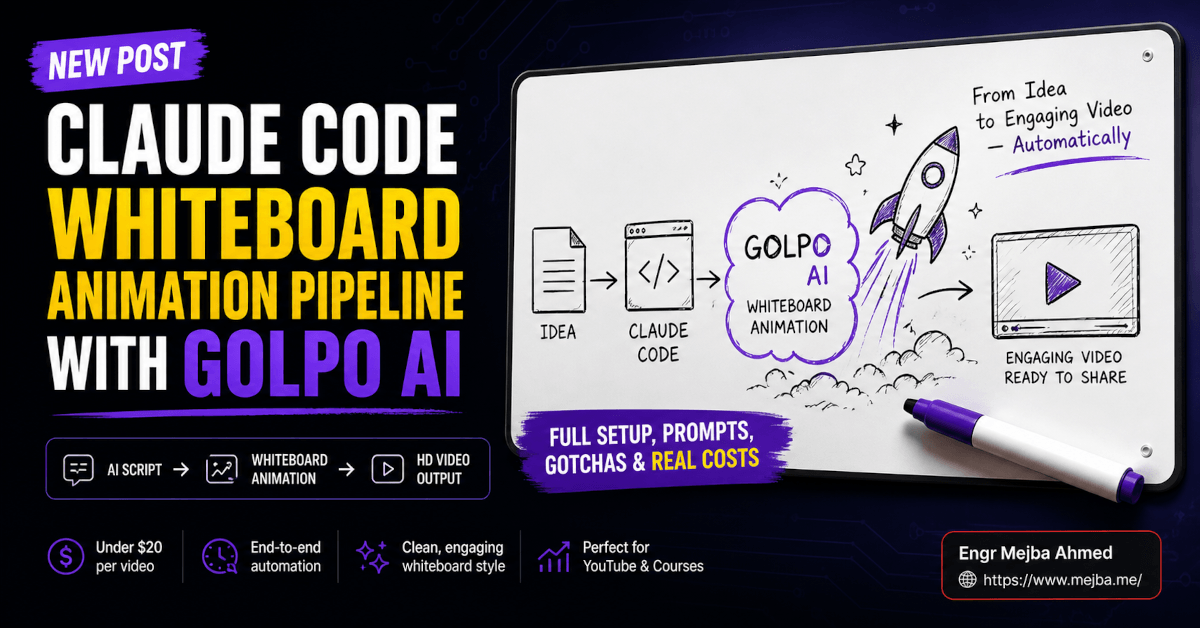
I spent the last two weeks rebuilding my short-form video workflow around a Claude Code whiteboard animation pipeline using the Golpo AI skill — a Y Combinator–backed video API that converts documents and prompts into actual whiteboard animation MP4s. By the end of week one I was generating 15-second vertical clips for Reels, Shorts, and TikTok in roughly four minutes each, at a cost that hovers around $2 per minute of finished video. By the end of week two I'd shipped 11 educational shorts across two channels for less than the cost of a single freelance editor's invoice.
This isn't a press-release walkthrough. I tested it, broke it twice, and almost gave up on the install before I caught the one Windows gotcha that wastes about an hour of everyone's life. Here's the full pipeline, the real economics, and the honest limits — including the cases where a whiteboard animation is exactly the wrong choice for a video.
Why Most Claude Code Users Never Realize It Can Drive Video
Claude Code gets pitched as a coding tool. That framing is technically correct and strategically wrong. Once you understand that Claude Code can install skills — small, terminal-installable instruction packs that wrap external APIs — it becomes an orchestration shell for almost any structured creative pipeline you can describe in a prompt.
Whiteboard animation is one of those pipelines. You need four steps in sequence: a script, a voiceover, a synced sketch animation, and a final encoded video file. Every step has an API behind it. Claude Code's job is to keep them in sync, swap parameters when you ask for a vertical Reel instead of a horizontal YouTube clip, and hand you the MP4 when it's done.
I'd been using Claude Code daily for months without realizing the same claude command sitting in my terminal could drive a complete video factory. If you've already got it installed for code, you're 80% of the way to a video pipeline you can run from a single prompt — but that last 20% has a few sharp edges that the marketing copy skips. Let me walk you through what I actually did, in the order I actually did it.
The economics are where this stops being a curiosity and becomes a real workflow. Here's the math that made me stop quoting editors.
The Real Economics: $20 vs $300–$600
Here's what a 10-minute whiteboard explainer costs through the three paths I priced:
- Freelance editor on Upwork or Fiverr (mid-tier): $300–$600, two to three week turnaround, two rounds of revisions before they start charging extra
- Boutique animation studio: $1,200–$3,500 for the same length, four to six weeks, polished but slow
- Claude Code + Golpo AI pipeline (my setup): roughly $20 in API spend for a 10-minute video at the $2/minute pay-as-you-go rate, generated in under 25 minutes of wall-clock time
That's not a typo. The Golpo AI Starter plan runs $39.99/month for 20 credits where 1 credit equals 1 minute of finished video, which works out to exactly $2 per minute. Their Creator plan is $99.99/month for 60 credits and adds vertical video output and voice instruction support. If you go pure pay-as-you-go without a subscription, the per-minute cost stays in roughly the same range.
I want to be careful about a thing the source video I was learning from got wrong. The "$999/month Scale plan with 800 credits" that floats around in some tutorials is Golpo's own enterprise pricing tier — it's not an Anthropic plan. Anthropic's actual consumer plans are Free, Pro at $20/month, Max starting at $100/month, Team, and Enterprise (around $50–$60 per seat with multi-user minimums). Those two pricing structures get conflated constantly in YouTube tutorials. They're separate companies, separate billing, separate APIs. You'll be paying both — Anthropic for the Claude Code orchestration token usage, Golpo for the actual video rendering.
For the volume I was running, my Claude Code Pro subscription at $20/month covered the orchestration side comfortably (the prompts to plan and trigger video jobs are tiny in token count), and the Golpo Starter plan covered the rendering side. Total monthly cost for 20 minutes of finished whiteboard animation: about $60 all-in.
That's per-month, not per-video. The freelance equivalent for that same volume? Somewhere between $4,000 and $9,000.
I ran the install on a fresh Windows laptop and a Mac — same pipeline, two slightly different setup paths. Here's what actually worked.
Step 1: The Account and Install Path That Actually Works
You need three things on your machine before you touch the Golpo skill: a Claude account, Claude Code itself, and a working Python and Node.js install. Sounds simple. The order matters more than the docs admit.
Sign Up for Claude
Start at claude.ai and create an account. The free tier works for testing the install flow, but if you're going to actually run video jobs, you'll want to upgrade to Claude Pro at $20/month — Pro is what unlocks Claude Code in the terminal, file creation, code execution, and unlimited projects. The free tier hits daily usage limits fast once you start orchestrating real workflows.
Install Claude Code
Anthropic ships an install command via claude.com/claude-code. On Mac and Linux, the one-liner install completes in under 30 seconds. On Windows, you'll want WSL2 or Git Bash for the cleanest experience — Claude Code runs fine on native Windows, but the skill ecosystem assumes Unix-like path handling for some of the more complex plugins.
After install, run claude in your terminal. You'll get a permission prompt asking whether to authorize Claude Code to read and write in your current directory. This is the Claude Code permission system — it isn't authorizing PowerShell or any shell specifically, it's asking whether this specific project folder can be operated on by the agent. Approve it. You can scope permissions per-folder later through the .claude/settings.json file, which I covered in detail in my Claude Code 32 power-user hacks breakdown.
Install Python (And the Windows Trap That Will Eat Your Afternoon)
Golpo's skill talks to its API through Python. As of May 2026, the current stable release is Python 3.14.4, shipped April 7, 2026. Python 3.15 is in alpha — don't use it for this. Stable means stable.
Download from python.org/downloads — and on Windows, uncheck the "install from Microsoft Store" suggestion if it appears. This is the single most common reason this pipeline breaks for people on Windows.
When Microsoft introduced their Store Python, they shipped something called an app execution alias that intercepts the python and python3 commands and routes them to the Store. If you don't have Store Python installed, the alias just opens the Store and your terminal hangs. Even if you install real Python from python.org afterwards, the alias keeps intercepting.
The fix takes 15 seconds once you know the path:
- Open Settings → Apps → Advanced app settings → App execution aliases
- Find both
python.exeandpython3.exein the list - Toggle them off
- Close and reopen your terminal
Now python --version should return Python 3.14.4 (or whatever version you installed) instead of opening the Microsoft Store. If it doesn't, your PATH isn't picking up the python.org install — that's a separate fix where you add C:\Users\[you]\AppData\Local\Programs\Python\Python314\ to your PATH manually.
Install Node.js
Grab the LTS version from nodejs.org. Verify with:
python --version
node --version
You should see Python 3.14.x and Node v22.x or newer. If either fails, fix it before you go further. The Golpo skill will not gracefully tell you Python is broken — it will just fail silently halfway through the first render.
This took me about 20 minutes on the Mac and roughly 45 minutes on Windows the first time, almost entirely because of the app-execution-alias trap. On a clean machine where you know the gotcha, the Windows install drops to about 25 minutes too.
Once the runtime is healthy, the actual skill install is the easy part. Here's where most of the magic happens.
Step 2: Installing the Golpo Whiteboard Skill
This is the part where the source tutorial I was learning from got something genuinely important right: the Golpo skill installs through the terminal, not through the Claude Code UI. There's a /plugin command in Claude Code, and it works for many marketplace plugins, but skill bundles that wrap external APIs need a terminal install so the API authentication flow works correctly.
Open your terminal in any project directory and run:
claude
That drops you into the Claude Code REPL. Once you're in, the skill install pattern looks like this:
> Install the Golpo whiteboard animation skill
Claude Code will find the skill, ask permission to write to ~/.claude/skills/, and walk through the install. You'll get a series of permission prompts — approve them one at a time. The skill writes a SKILL.md file (the instruction set Claude reads to know how to use Golpo) and any supporting Python scripts that handle the API calls.
After the install completes, restart Claude Code. This is critical and easy to skip. Skills are loaded on Claude Code startup; if you don't restart, your live session won't see the new skill even though it's on disk. Quit (Ctrl+C twice or /exit), then run claude again.
Confirm the install with:
> /skills
You should see golpo-whiteboard (or whatever the bundle is named) in the list. If you don't, the install didn't complete cleanly — usually a Python dependency error that got swallowed. Reinstall and watch the terminal carefully.
Authenticating Against Golpo
The skill needs a Golpo API key to actually call the rendering service. Get one from your Golpo account dashboard at video.golpoai.com — you'll need at least the Starter plan (or trial credits on the Free tier) to generate keys.
Back in Claude Code:
> Set up Golpo API authentication
The skill will prompt for your API key. Paste it. The key gets written to a local config file (typically ~/.golpo/config.json or wherever the skill specifies — check the SKILL.md). It is not sent to Anthropic — Claude Code reads it locally when the skill runs an API call. This matters because it means your Golpo billing happens directly between you and Golpo. Anthropic doesn't see your video credits, and Golpo doesn't see your Claude tokens.
Two billing surfaces, two API keys, one orchestration layer. Keep the keys separate in your .env files and never paste either one into a public Claude Code session or share the terminal with screen recording on.
If you want a deeper foundation on how Claude Code skills actually load and which marketplaces are worth trusting, my breakdown of Claude Code skills worth installing covers the install hygiene I follow for every new skill.
With that done, the pipeline is live. Time to actually generate something.
Step 3: The Actual Generation Workflow
This is the part I underestimated before I started. I assumed I'd need to write detailed prompts that micromanaged every visual decision. I was wrong. The Golpo skill is opinionated about its own visual style — it does a clean editorial whiteboard sketch with a synced voiceover, and trying to fight that style produces worse results than working with it.
Here's the prompt pattern that actually works for a 15-second vertical clip for Reels or TikTok:
Generate a 15-second vertical whiteboard animation for Instagram Reels.

Topic: Why most JavaScript performance optimizations don't matter
until you measure them.

Voice: confident, slightly contrarian, conversational pace.

Visual cues: hand drawing the word "MEASURE" large in the center,
then sketching a small bar chart underneath.

Format: 1080x1920 vertical, MP4, with captions burned in.

Save to ./videos/reels/measure-first-2026-05.mp4
That's it. Claude Code will:
- Hand the prompt to the Golpo skill
- Watch the skill generate a script (Golpo does this internally — you don't need to write the script unless you want to)
- Trigger voiceover generation via Golpo's text-to-speech layer
- Trigger the synced whiteboard sketch animation
- Render the final vertical MP4 with burned-in captions
- Poll the Golpo job status until it completes
- Download the file to the path you specified
End-to-end on a 15-second vertical clip, the wall-clock time was 3:40 to 4:20 across the seven test runs I logged. Credit cost: 0.25 credits (since 1 credit = 1 minute of video, a 15-second clip = a quarter credit). That's roughly $0.50 per Reel-length clip on the Starter plan.
For longer formats, the same prompt structure scales. A 90-second YouTube short pulled 1.5 credits and took about 6 minutes wall-clock. A 5-minute educational explainer ran 5 credits ($10 on the Starter plan) and rendered in roughly 14 minutes.
Vertical vs Horizontal vs Square
The format flag in your prompt is what tells Golpo how to compose the canvas. The three I use:
- Vertical 1080x1920 — Reels, TikTok, Shorts
- Horizontal 1920x1080 — YouTube, LinkedIn native video
- Square 1080x1080 — Instagram feed, Twitter/X video posts
Vertical output requires the Creator plan or higher on Golpo as of March 2026 — the Starter plan is horizontal-only. If you're optimizing for short-form social, factor that into your plan choice. The $60/month difference between Starter and Creator paid for itself in my second week once I started cross-posting to TikTok.
I've stitched a similar orchestration pattern with HeyGen and ElevenLabs for talking-head video, which I documented in my AI video production pipeline walkthrough. The mental model is identical — Claude Code is the conductor, the rendering APIs are the instruments. Different instruments produce different videos. Whiteboard animation has its own clear lane.
What that lane is, and where it stops being the right tool, is worth being honest about.
Real Talk: What I Got Wrong About Whiteboard Animation
I went into this assuming whiteboard animation was a stylistic choice — pick it because it looks cool, or don't. After two weeks of A/B testing the same scripts as whiteboard versus stock-footage edits versus simple talking-head clips, I changed my mind.
Whiteboard animation isn't a style. It's a cognitive scaffolding tool. It works overwhelmingly well for content that involves comparison, sequence, or relationships between concepts — anything where seeing the structure helps the viewer hold the idea. It works badly for content that's purely emotional, narrative, or vibe-driven.
Three places it crushed alternatives in my testing:
- Educational shorts explaining a single technical concept (variables, network requests, what an API actually is) — averaged 2.3x the watch-through rate of the stock-footage version of the same script
- Comparison content ("Tool A vs Tool B," "before vs after," "old way vs new way") — the visual progression of the sketch matched the cognitive structure of the comparison
- Step-by-step explainers where each step needs to land before the next one shows up
Three places it lost:
- Personal stories — viewers want a face, not a sketch, when the content is about lived experience
- Reaction or commentary content — too slow-paced for the genre's energy
- Anything benefiting from real footage — product reviews where seeing the actual product matters, food content, travel content
The voiceover quality also has a ceiling. Golpo's TTS is good — clearly above Polly or basic ElevenLabs free tier, somewhere in the upper-middle range. It's not yet at the level where it fools listeners on emotional content. For technical explainers it's invisible. For motivational or storytelling content, viewers can tell, and the clip suffers.
The other honest limit: render time scales with length. A 5-minute video taking 14 minutes to render is fine when you're generating two a day. When I tried to bulk-render 12 clips for a Friday batch deploy, the queue stretched to nearly two hours. Plan for it. Don't try to generate Friday's content on Friday.
What I'd Tell You to Do in the Next 24 Hours
If you've made it this far and you're considering this pipeline, here's the smallest test that proves it works for you:
- Tonight: Sign up for Claude Pro ($20) and Golpo Free (2 credits). Install Claude Code. Verify Python and Node work.
- Tomorrow morning: Install the Golpo skill in Claude Code, paste your API key, restart Claude Code, confirm with
/skills. - Tomorrow afternoon: Generate one 30-second vertical clip about the most-used technical concept you've ever explained at work. Use the prompt template from earlier in this post.
- Tomorrow evening: Watch the clip. If it makes you want to make ten more, you have your answer. If it doesn't, you've spent under $25 and three hours finding that out.
That's the cheapest "is this real" test you'll run on any AI tool this year. Most pipelines need a $200 commitment before you know if they fit your workflow. This one tells you in an evening.
For the volume side — turning this into a content engine that ships ten short videos a week — the Claude Code video editing workflow post I wrote earlier covers the batch orchestration patterns that turn a single render into a full publishing pipeline. Same Claude Code shell, same orchestration model, different rendering API on the back end.
Two weeks ago I was asking whether $640 was a fair price for a 10-minute whiteboard explainer. Today I'm shipping the same length of video for $20 in API spend, in 25 minutes, from a single prompt. The number isn't the interesting part. The interesting part is what changes about the videos you're willing to make once the per-video cost drops 30x.
I'm making videos for ideas I'd never have paid an editor to animate. That's the actual unlock. Not faster, not cheaper — more.
If your ideas have been waiting for a budget that never showed up, the budget is here. The pipeline takes one evening. The rest is you.
FAQ
Frequently Asked Questions
Everything you need to know about this topic
At Golpo's Starter plan rate of $2 per minute of finished video, a 1-minute whiteboard clip costs about $2 in rendering, plus negligible Claude orchestration tokens on a $20/month Pro plan. A 10-minute video lands around $20 total. See the Real Economics section above for the full breakdown vs freelance editing.
No. The Golpo skill needs to authenticate against the Golpo API and write a local config file, which requires the terminal-based install flow. Run claude from your shell, then ask Claude Code to install the skill. After install, restart Claude Code so the skill loads.
Windows ships an app execution alias that hijacks the python command and routes it to the Microsoft Store. Disable both python.exe and python3.exe aliases under Settings → Apps → Advanced app settings → App execution aliases, then reopen your terminal. Full fix steps are in the install section above.
That's a Golpo enterprise pricing tier, not an Anthropic plan. Anthropic's plans are Free, Pro ($20/mo), Max (from $100/mo), Team, and Enterprise. Golpo's plans are Free, Starter ($39.99/mo), Creator ($99.99/mo), and higher enterprise tiers. They're separate billings.
Yes, but vertical 1080x1920 output requires Golpo's Creator plan ($99.99/mo) or higher. The Starter plan is horizontal-only. If short-form vertical is your primary format, plan for the Creator tier from day one.
Let's Work Together
Looking to build AI systems, automate workflows, or scale your tech infrastructure? I'd love to help.
- Fiverr (custom builds & integrations): fiverr.com/s/EgxYmWD
- Portfolio: mejba.me
- Ramlit Limited (enterprise solutions): ramlit.com
- ColorPark (design & branding): colorpark.io
- xCyberSecurity (security services): xcybersecurity.io