I've been experimenting with AI productivity tools for years. ChatGPT for brainstorming. Claude for research. Claude Code for development. Each tool carved out its niche in my workflow, but I was always the orchestrator. I decided what to work on. I determined priorities. I assigned tasks to each tool manually.
Then I discovered a workflow pattern that flipped this relationship entirely. Instead of me telling Claude Co-work what to do, Claude Co-work tells me what needs attention — and then executes the work autonomously.
This isn't hypothetical productivity. Yesterday morning, I typed three words: "Let's start our day." Within the next hour, Claude Co-work had scripted a video, drafted a newsletter, researched investment opportunities, created a Twitter thread, and developed a strategy document. All coordinated. All saved to organized folders. All without me specifying each task individually.
The secret isn't Claude Co-work's capabilities alone. It's a structured system that transforms how AI and human collaborate on daily work.
Why Most People Underutilize AI Assistants
Here's the uncomfortable truth about AI productivity tools: most people don't know what to ask for.
We have access to unprecedented AI capabilities. Claude Co-work can research topics, write content, analyze data, create presentations, and manipulate files. But every session starts the same way — with a blinking cursor waiting for instructions.
That cursor is the problem. It puts cognitive load on you to decide what the AI should do. You need to identify tasks, formulate requests, and manage the workflow. The AI handles execution, but you handle everything else.
This creates a paradox. The people who could benefit most from AI assistance — those overwhelmed with tasks and decisions — are the same people who struggle to effectively deploy AI help. When you're already cognitively overloaded, figuring out what to delegate to AI becomes another burden.
I noticed this in my own work. I'd open Claude Co-work with vague intentions of being productive, stare at the interface, type something generic, get a generic response, and close the app feeling like I hadn't unlocked its potential.
The breakthrough came when I stopped thinking about AI as a tool I direct and started thinking about it as a colleague who could direct me.
The Reversal: AI-Driven Task Management
The workflow I'm about to share reverses the traditional AI interaction model.
Instead of you deciding what tasks to assign, Claude Co-work asks you three questions every morning:
- What is the number one thing that would make today a win?
- What's on your to-do list for today?
- Are there any urgent items I should be aware of?
These questions seem simple. They're not. They accomplish several things simultaneously.
First, they force you to articulate priorities. Answering "what would make today a win" clarifies your north star for the day. You can't delegate effectively without knowing what success looks like.
Second, they transfer cognitive load to the AI. Once you've provided the raw material — your priorities, tasks, and urgencies — Claude Co-work takes over. It decides which tasks to tackle first. It determines dependencies. It identifies what can run in parallel.
Third, they create accountability. By stating your priorities out loud to your AI assistant, you've made a small commitment. The AI will work toward those goals and check in on progress.
The interaction shifts from "What should I have the AI do?" to "What do I want to accomplish?" The AI figures out the how.
Building the System: Folder Architecture
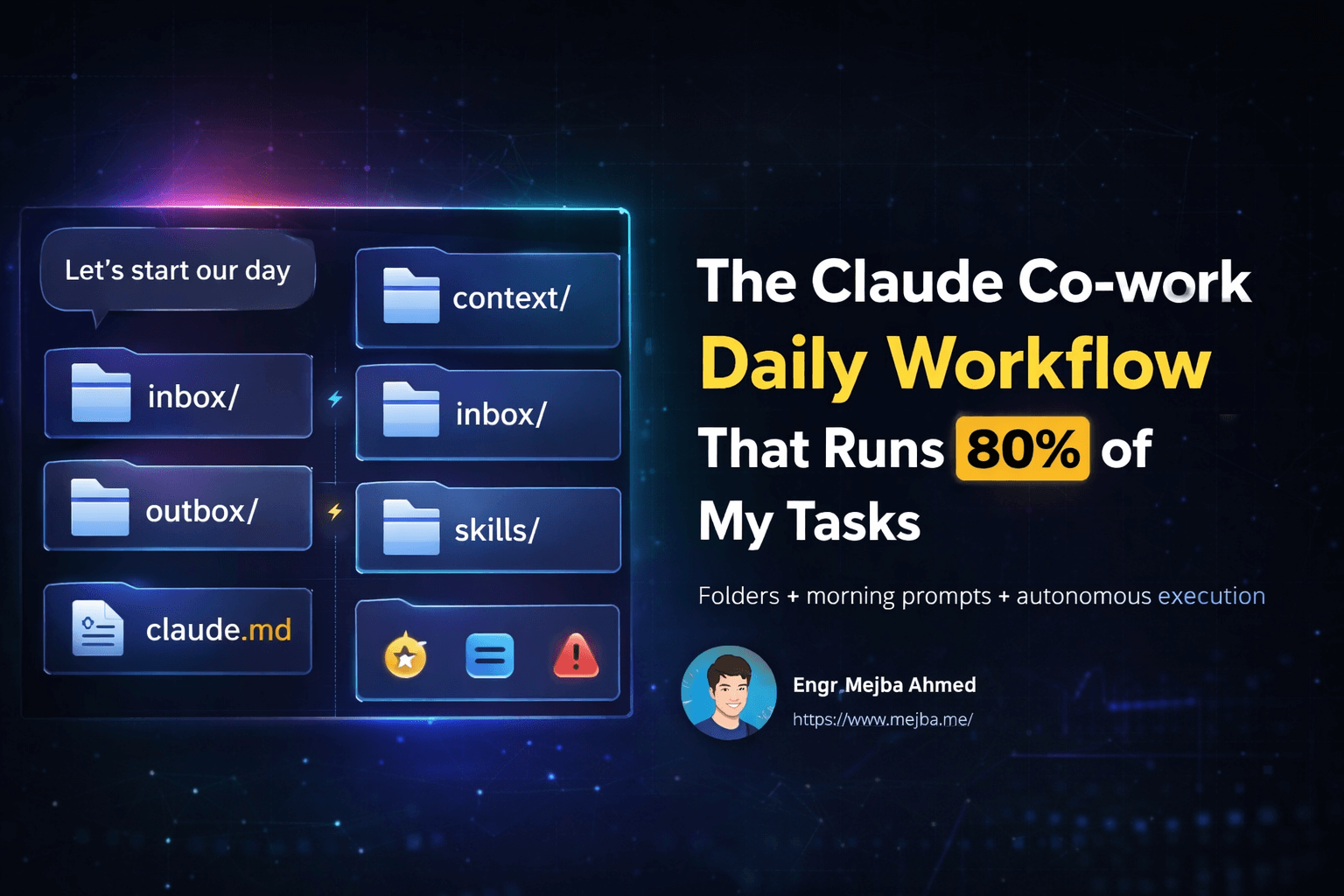
The workflow depends on a structured folder system that gives Claude Co-work context and organization. Here's the architecture I use:
Main Claude Folder This is the root directory where everything lives. I created mine in my Documents folder, but location doesn't matter as long as Claude Co-work has access.
claude.md (Rules File) This markdown file is the brain of the system. It contains instructions for how Claude Co-work should operate — your preferences, work style, recurring tasks, and behavioral guidelines. Think of it as onboarding documentation for your AI employee.
My rules file includes sections like:
- Communication preferences (how I like information presented)
- Writing style guidelines (voice, tone, formatting preferences)
- Recurring daily tasks (things to always consider)
- Project priorities (what matters most right now)
- Tools and accounts (services I use frequently)
context/ Folder This folder holds markdown files providing background about you and your work:
profile.md— Who you are, what you do, your goalsportfolio.md— Current projects and their statusschedule.md— Recurring commitments and availabilityprojects.md— Active initiatives and their requirements
Claude Co-work reads these files to understand your situation. When it suggests prioritizing newsletter work over video scripting, it's because your context files indicate newsletter deadlines are sooner.
inbox/ Folder Drop files here that you want Claude Co-work to review or process. A PDF you need summarized. Research you want analyzed. Screenshots of competitor products. The inbox becomes your AI's work queue.
outbox/ Folder This is where Claude Co-work saves completed work. Scripts, documents, research summaries, strategy plans — everything organized by date or project. You never lose output because it's systematically filed.
skills/ Folder This folder contains custom skill definitions. Since Anthropic doesn't yet have an official skill system, these are essentially detailed prompt templates for recurring task types. A "newsletter writing" skill. A "video scripting" skill. A "research synthesis" skill. Claude Co-work references these when executing familiar task types.
The Morning Ritual: "Let's Start Our Day"
With the folder system in place, the daily workflow becomes remarkably simple.
Each morning, I open Claude Co-work and type: "Let's start our day."
That's it. Three words.
Claude Co-work reads the rules file and context folder, then asks the three morning questions. I answer briefly:
- Today's win: Finish the YouTube video script
- To-do list: Newsletter draft, Twitter content, check portfolio performance
- Urgent items: Video needs to record by 2pm
From these answers, Claude Co-work builds an execution plan. It recognizes the video script is both the priority win and time-constrained, so it starts there. It sees newsletter draft as secondary but can run research in parallel. It notes portfolio check is informational and slots it appropriately.
Then it works.
Not with one task at a time waiting for approval. Claude Co-work coordinates multiple workstreams, updating me on progress while producing actual deliverables. The video script takes shape in one thread. Newsletter research compiles in another. Twitter content drafts appear alongside.
Within an hour, I have first drafts of everything. Not perfect drafts — that's not the point. Complete drafts that give me something to react to rather than create from scratch.
What Gets Produced: A Real Example
Let me walk through yesterday's output to make this concrete.
I answered the morning questions:
- Win: Script for Claude Co-work workflow video
- To-do: Twitter thread about X algorithm, newsletter about AI productivity, research AI energy stocks
- Urgent: Video recording scheduled for afternoon
Claude Co-work immediately identified the video script as primary and began researching the topic while simultaneously working on other items.
Here's what ended up in my outbox folder by lunch:
video-script-claude-workflow.md — A complete 12-minute video script covering the workflow system. It included hooks, key points, demonstration sequences, and calls to action. The AI had researched similar content to understand what resonated with audiences and incorporated those elements.
twitter-thread-x-algorithm.md — A 15-tweet thread explaining insights from the open-sourced X algorithm. Each tweet was under 280 characters. The thread had a clear narrative arc and ended with engagement prompts.
newsletter-ai-productivity.md — A 1,200-word newsletter draft about AI productivity frameworks. It referenced specific tools, included practical tips, and had my usual newsletter voice (because the rules file specified it).
research-ai-energy-stocks.md — A research brief on AI-related energy companies. Market caps, recent performance, key catalysts, risk factors. Not investment advice but enough information to inform my own analysis.
growth-strategy-100k-subs.md — Unprompted bonus: Claude Co-work noticed my context file mentioned a subscriber goal and produced a strategic plan for reaching 100,000 YouTube subscribers. Content pillars, posting cadence, collaboration opportunities.
Five substantial deliverables. All organized. All in my preferred formats. All produced while I handled other things.
The Rules File: Your AI's Operating System
The rules file deserves deeper exploration because it's where you customize everything.
Think of claude.md as programming your AI's behavior without writing code. Natural language instructions that shape how Claude Co-work approaches every task.
My rules file starts with identity context:
## About Me
I'm Mejba, a software engineer focused on AI development and cloud infrastructure.
My content spans AI tools, development workflows, and technical tutorials.
I value clarity over cleverness and practical advice over theory.
Then behavioral guidelines:
## How to Work With Me
- Default to action over asking permission
- Show your work: explain reasoning before presenting conclusions
- When uncertain, make your best guess and flag the assumption
- Proactive suggestions welcome — surface things I might have missed
Task-specific instructions:
## Writing Style
- First-person, conversational but authoritative
- Specific numbers and examples over generalizations
- Short paragraphs, scannable structure
- No corporate buzzwords or empty phrases
And recurring task definitions:
## Daily Tasks
- Morning: Review inbox folder for new items
- Check context/schedule.md for today's commitments
- Prioritize based on deadlines and stated importance
- Save all outputs to outbox/ with descriptive filenames
You can include anything relevant. Tools you prefer. File formats you want. Topics to avoid. The more specific your rules file, the better Claude Co-work aligns with your work style.
End of Day: Closing the Loop
The morning ritual has a companion: an end-of-day routine.
Before wrapping up, I ask Claude Co-work to summarize what was accomplished and suggest priorities for tomorrow. This closes the productivity loop and ensures momentum carries forward.
The summary typically includes:
- Tasks completed (with links to files in outbox)
- Tasks partially completed (with status notes)
- Items that emerged during the day (new opportunities or problems noticed)
- Suggested priorities for tomorrow
This documentation becomes valuable over time. It's a record of what you actually worked on — not what you planned to work on. Patterns emerge. You notice which tasks consistently get pushed to tomorrow. You see where your stated priorities don't match actual execution.
The AI becomes not just an executor but an accountability partner with perfect memory.
Why This Works: Cognitive Load Transfer
The psychology behind this workflow matters.
Decision fatigue is real. Every choice you make depletes a finite cognitive resource. By the time you've decided what to eat, what to wear, and how to respond to morning emails, your capacity for high-quality decisions is already diminished.
Traditional AI usage adds decisions: What should I ask the AI to do? How should I phrase this request? Is this task worth delegating?
The folder-based workflow front-loads decisions to a rules file and context documents. You make those decisions once, thoughtfully, when you're not under time pressure. Then the daily interaction requires minimal decision-making — just answering three questions about what matters today.
The cognitive load transfers to Claude Co-work. The AI decides how to prioritize within your guidelines. It determines execution order. It identifies parallel opportunities. You provide direction; it handles navigation.
This transfer doesn't mean losing control. Your rules file ensures alignment. Your morning answers set priorities. But the moment-to-moment choices about what to work on next become the AI's responsibility.
For people who struggle with task initiation — knowing something needs doing but not starting it — this workflow removes the starting friction entirely. You don't decide to start the newsletter; you just answer questions, and the newsletter happens.
Setting Up: The Practical Steps
Getting started requires about thirty minutes of setup.
Step 1: Create the Folder Structure Make a Claude folder in your Documents (or preferred location). Inside it, create: context/, inbox/, outbox/, and skills/ subfolders.
Step 2: Write Your Context Files Start simple. Create profile.md with basic information about who you are and what you do. Create projects.md listing what you're currently working on. You can expand these over time as you discover what context helps Claude Co-work perform better.
Step 3: Create Your Rules File Draft claude.md with sections for: who you are, how you like to work, your communication preferences, and any recurring tasks. Again, start simple and iterate. The rules file evolves as you learn what guidance Claude Co-work needs.
Step 4: Grant Folder Access In Claude Co-work, give the AI access to your Claude folder. This permissions step ensures it can read your rules and context while saving outputs appropriately.
Step 5: Upload and Initialize Start a Claude Co-work session, upload your claude.md rules file, and introduce the system. Explain the folder structure and the morning routine expectations.
Step 6: Start Your Day Type "Let's start our day" and answer the three questions. Watch Claude Co-work take over.
What This Changes About Human-AI Collaboration
This workflow represents something larger than personal productivity optimization.
We're accustomed to AI that responds. You ask, it answers. You instruct, it executes. The human remains the orchestrator, the AI the instrument.
The folder-based daily workflow points toward a different relationship. The AI becomes an active participant in planning, not just execution. It asks what matters. It decides how to prioritize within your parameters. It proactively identifies opportunities you might miss.
This isn't artificial general intelligence or autonomous agents running without oversight. Your rules file provides the guardrails. Your morning answers set direction. You review outputs and course-correct. But within those boundaries, Claude Co-work operates with genuine agency.
The mental model shifts from "tool I use" to "colleague I work with."
For those worried about AI replacing human judgment — this workflow demonstrates the opposite. Human judgment concentrates on what matters: defining values, setting priorities, evaluating outcomes. AI handles what doesn't require human uniqueness: research execution, draft creation, parallel coordination.
It's a division of labor that amplifies both.
The Future Is AI-Driven, Not AI-Commanded
I believe this workflow pattern will become standard within the next few years.
Right now, it requires manual setup because Anthropic hasn't built native support for rules files and skills. But the direction is clear. Future versions of Claude Co-work will likely include built-in folder systems, persistent context management, and morning routine features.
When that happens, the barrier to this workflow drops to zero. Anyone can have an AI that proactively manages their day without technical setup.
The question isn't whether AI will become more proactive in human workflows. The question is how quickly you adapt to working with AI this way.
Starting now — even with the manual setup required — builds the muscle memory for AI-driven productivity. You learn what context helps. You refine your rules through experience. You develop intuition for effective AI collaboration.
When native support arrives, you'll be ready to extract maximum value immediately.
Start Tomorrow
Here's my challenge: try this for one week.
Set aside thirty minutes today to create the folder structure and basic files. Tomorrow morning, open Claude Co-work, type "Let's start our day," and answer three questions.
See what happens.
You might discover tasks getting done that had been languishing. You might find cognitive load lifting as Claude Co-work handles prioritization. You might realize your stated priorities and actual behavior don't match.
Whatever you discover, you'll understand AI collaboration differently than before. Not as a question-answer tool but as a genuine work partner.
The cursor waiting for instructions becomes an AI asking what would make your day a win.
That reversal changes everything.
Copying the 80% Playbook
The Claude Co-work daily workflow works because every delegated task has a checkable output — copy the structure, not the task list. Your 80% will look different from mine. My my week-long test and the skills deep dive go deeper.
If you want your daily stack rebuilt around Co-work, that's something I do through Ramlit.