ChatGPT-5 Prompt Engineering: The Structured Frame
Introduction
The leap from GPT-4 to ChatGPT-5 isn’t only about improved intelligence—it’s about structured prompting. Engineers, prompt designers, and product teams building agentic workflows quickly realize that how you prompt GPT-5 determines both speed and quality.
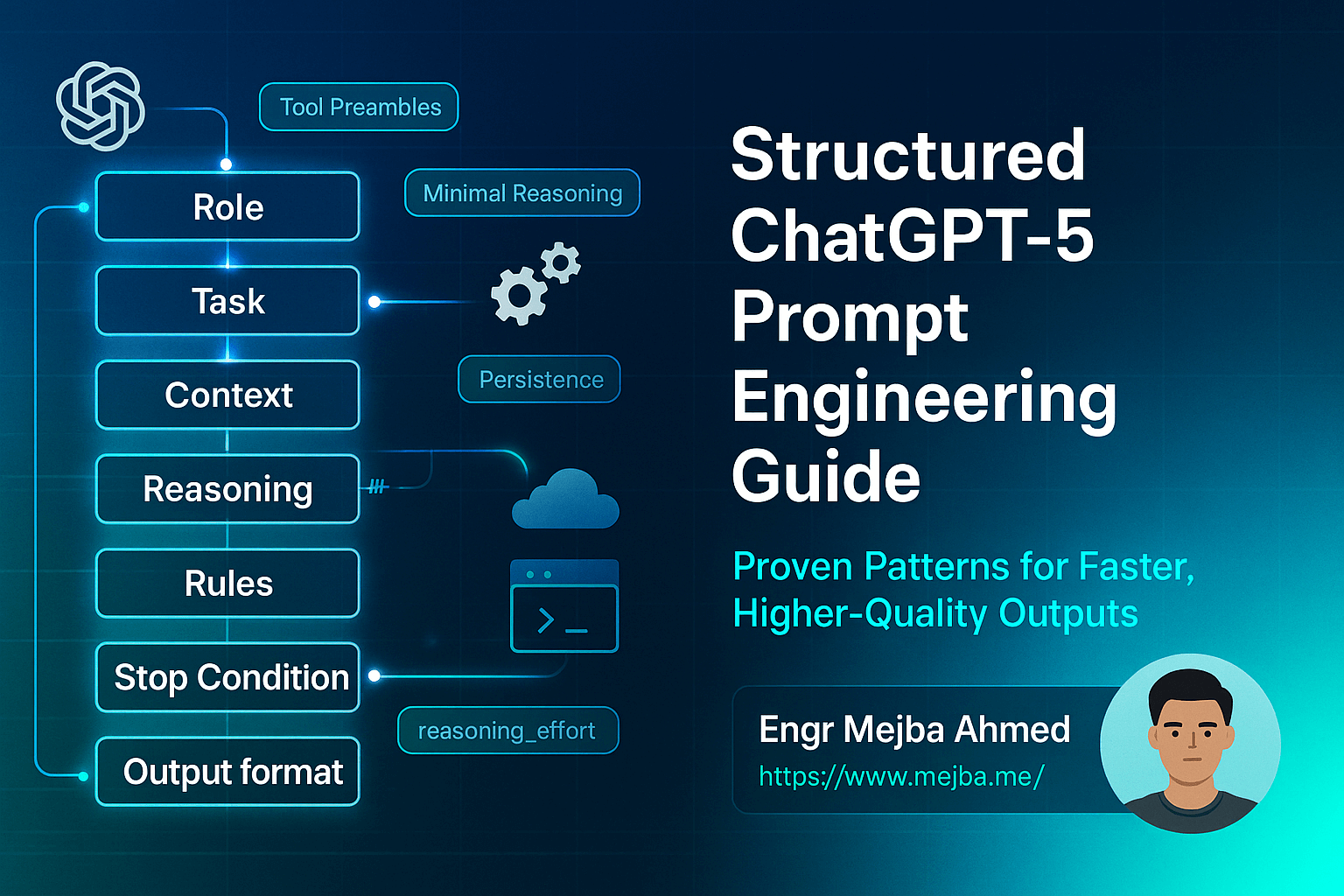
This structured ChatGPT-5 prompt engineering guide breaks down actionable patterns like minimal reasoning, persistence in agents, tool preambles, and reasoning_effort. We’ll also explore the Responses API, prompt optimizers, and a copy-pasteable Prompt Step Framework you can apply today.
By the end, you’ll have a clear prompting toolkit to unlock faster, more reliable workflows.
Why Structured Prompting Matters in GPT-5
With GPT-5, the difference between a vague prompt and a structured one is dramatic:
- Poor prompts → latency, tool misuse, and inconsistent outputs.
- Structured prompts → predictable, fast, high-quality outputs.
Structured prompt engineering enables:
- Scalability in team workflows.
- Consistency across API calls.
- Efficiency by balancing minimal reasoning with reasoning_effort.
Core Prompting Patterns in ChatGPT-5
1. Minimal Reasoning
- Use when tasks don’t require deep analysis.
- Speeds up execution and reduces costs.
- Example: Instead of “Explain your approach to sorting this JSON,” → “Sort this JSON alphabetically by keys. Output only JSON.”
2. Persistence in Agents
- Helps agents maintain context across steps.
- Store compact state (e.g., “User prefers Python outputs”) and pass it forward.
- Boosts workflow reliability.
3. Tool Preambles
-
Tools perform best with a consistent preamble.
-
Example:
You are a calculator. Input: [expression] Output: numeric result only. -
Reduces tool misuse and stabilizes outputs.
4. reasoning_effort
- A GPT-5 control parameter.
- Low effort → faster, shallow outputs.
- High effort → slower, more detailed reasoning.
- Best practice: Match effort level to task complexity.
Designing Agentic Workflows with GPT-5
Role of the Responses API
The Responses API enables structured multi-step execution. Combined with persistence and tool preambles, it builds agentic workflows that scale.
Using a Prompt Optimizer
Teams can A/B test prompts with a prompt optimizer to measure latency vs. quality. This ensures you always use the best-performing version.
Multi-Step Structuring
Plan workflows as Plan → Execute → Notes or with the more robust Prompt Step Framework below.
The Prompt Step Framework (Copy-Paste Template)
Here’s a structured GPT-5 prompting guide you can use right away:
## Structured ChatGPT-5 Prompt Engineering Framework

## Role
Define the AI’s role clearly.
Example: "You are an AI software engineering assistant."

## Task
Specify the exact task.
Example: "Refactor the given Python code for efficiency."

## Context
Provide necessary context or constraints.
Example: "The code must run on Python 3.10 and avoid external libraries."

## Reasoning
Set the level of reasoning required.
Example: "Apply minimal reasoning. Only explain if optimization is non-obvious."

## Rules
List rules to follow.
Example:
- Stick to Python 3.10
- Avoid third-party imports
- Keep comments concise

## Stop Conditions
Define when to stop.
Example: "Stop after producing the optimized code snippet."

## Output Format
Specify formatting.
Example: "Output code only in a fenced code block."
This framework aligns with structured prompt design, improving clarity and reproducibility.
Avoiding Common Pitfalls in GPT-5 Prompting
- ❌ Over-explaining tasks → slows down responses.
- ❌ No persistence → agents lose context.
- ❌ Vague tool usage → misinterpretation and errors.
Advanced Patterns for Product Teams
- Shared [Prompt Library]: Standardize prompts across workflows.
- Monitoring with [AI Dashboard]: Track latency, accuracy, and failures.
- Agent Scaling: Use structured templates to expand to multiple use cases.
FAQs
Q1: What makes structured prompting different from normal prompting? It enforces clarity with steps like Role, Task, and Output Format, reducing ambiguity.
Q2: How do I balance reasoning_effort? Use low effort for simple tasks, high effort for planning or critical decisions.
Q3: Why is persistence in agents important? It ensures context continuity, so agents don’t “forget” state across steps.
Q4: Can I combine tool preambles with persistence? Yes—together they reduce error rates and increase consistency.
Q5: What’s the fastest way to optimize my prompts? Run variations through a prompt optimizer and measure outcomes in [AI Dashboard].
Key Takeaways
- Structured prompting reduces latency and improves quality.
- Minimal reasoning prevents unnecessary delays.
- Persistence makes agents more reliable.
- Tool preambles and reasoning_effort are critical for precision.
- Prompt optimizers + Responses API = scalable agentic workflows.
Conclusion + CTA
The future of ChatGPT-5 prompt engineering is structured. By applying minimal reasoning, persistence, tool preambles, and reasoning_effort, you unlock faster, higher-quality agentic workflows.
👉 If you’re looking for expert help with AI, prompt engineering, or building agentic workflows, I offer professional services to bring your ideas to life.
🔗 Hire Me on Fiverr: AI Prompt Engineering & Automation Services
🔗 References
- OpenAI Documentation: GPT-5 Prompting Guide
- Anthropic Research
Applying the Structure to Real Work
Take one task you run weekly — a status summary, a code review request, an email draft — and rewrite it once using the full structure: role, context, task, format, constraints. Save it as a template with blanks for the parts that change. The first pass takes ten minutes; every run after takes thirty seconds and returns noticeably better output than an improvised prompt, because the model never has to guess what you meant by "make it good."
The Iteration Loop Most People Skip
Structured prompting isn't one-and-done. When an output misses, don't rewrite the whole prompt — identify which slot failed. Vague answer? Your task line was fuzzy. Wrong tone? The role or format slot needs work. Hallucinated details? Context was thin. Fixing the failing slot instead of starting over is what turns prompt engineering from a lottery into a craft, and it's the habit that separates people who complain about the model from people who ship with it.
Keeping a Prompt Changelog
The final habit: date your templates and note what you changed. Models drift between versions, and a prompt tuned for one release can quietly degrade on the next. When outputs slip, your changelog tells you whether the prompt changed or the model did — a distinction that saves hours of misdirected debugging. Three lines per revision is plenty; the value is in having any record at all.
Making Structure a Habit
ChatGPT-5 prompt engineering pays off when the structure becomes muscle memory — role, context, task, format, constraints. Five slots, filled every time. My the 5.1 guide and 30 productivity hacks go deeper.
If you want prompt systems built for your team, that's something I do through Ramlit.