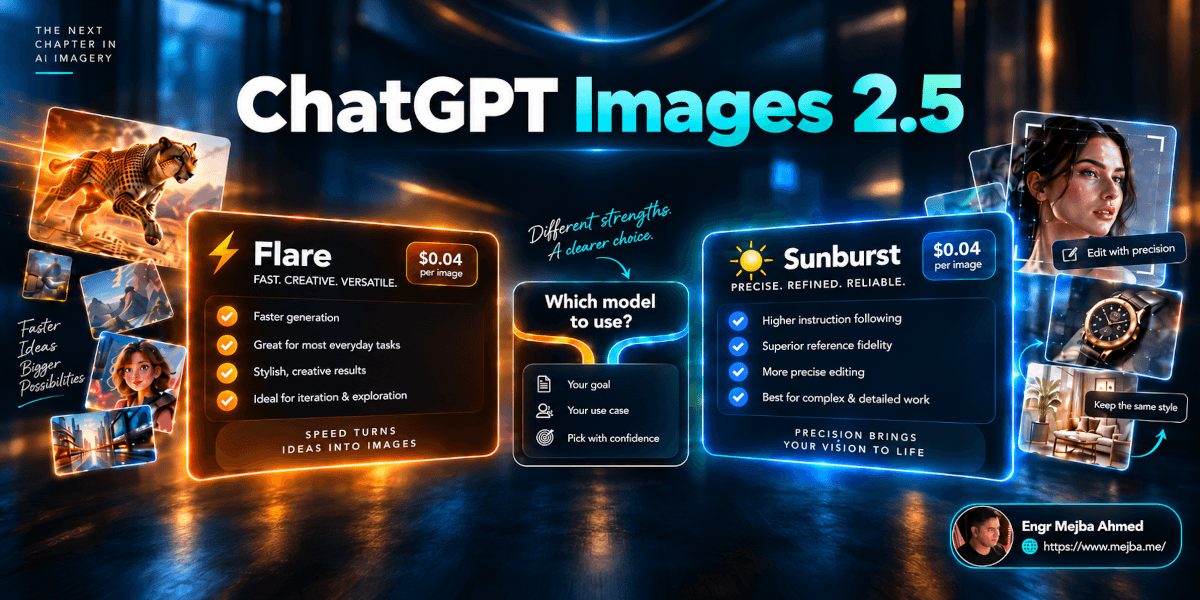
OpenAI released ChatGPT Images 2.5 on September 8, 2026, with a straightforward promise: better image fidelity, more precise editing, stronger consistency across revisions, and faster generation.
For developers, the release is more interesting because it introduces two API models:
gpt-image-2.5-flaregpt-image-2.5-sunburst
At first glance, the choice looks familiar.
Flare is the faster model.
Sunburst is the more capable model for precision editing and polished creative work.
Normally, that would imply a simple trade-off between quality and price.
Except both models currently use the same token rate card.
That makes choosing between them less obvious—and more useful to understand properly.
The important distinction is not simply "cheap model versus premium model." It is latency versus editing precision, while actual project cost depends on token consumption, quality settings, retries, references, and whether the work can run asynchronously through the Batch API.
This guide explains what actually changed in ChatGPT Images 2.5, how Flare and Sunburst differ, what the API costs, where Batch now fits, and which model makes sense for different production workflows.
What OpenAI Released With ChatGPT Images 2.5
OpenAI says people now create more than 3 billion images every week across ChatGPT Images and GPT-Image models in the API. Images 2.5 is the company's latest attempt to make those workflows less about regenerating from scratch and more about controlled iteration.
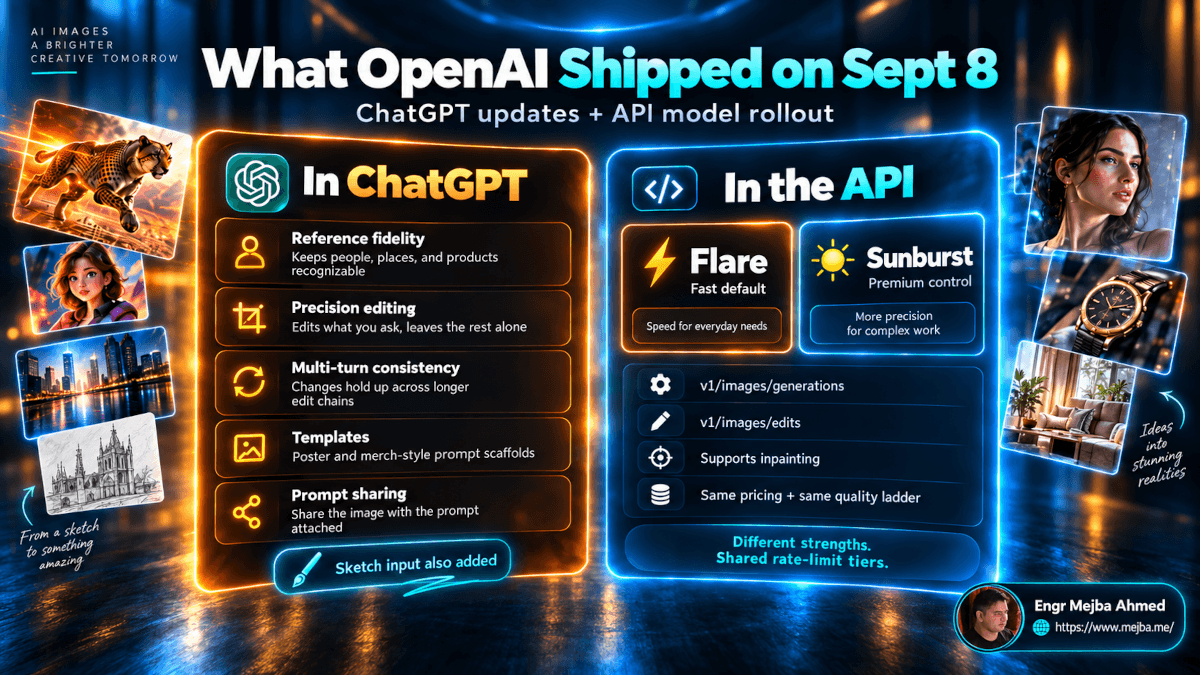
There are really two releases here:
- ChatGPT Images 2.5 for people creating and editing images inside ChatGPT
- GPT-Image-2.5 Flare and Sunburst for developers building image workflows through the API
They share the same underlying generation improvements, but the product experience is different.
What Changed Inside ChatGPT?
OpenAI highlights five improvements that matter most.
Better Reference-Image Fidelity
Images 2.5 is designed to preserve the recognizable characteristics of people, products, places, and other subjects supplied as references.
OpenAI says distinctive features are more likely to survive when the subject is moved into a new:
- setting;
- visual style;
- composition;
- lighting environment.
The company also says lighting and textures should appear more natural than before.
This is particularly important for commercial workflows.
Generating a beautiful image is not enough when a product has changed shape, a person's face no longer resembles the reference, or a brand asset drifts between versions.
Reference fidelity is what separates a useful creative pipeline from a one-off image generator.
More Precise Image Editing
The second improvement is edit isolation.
You may have a nearly finished image and ask:
Change the product color to black.
A frustrating image-editing model may change the product color while also altering the crop, lighting, typography, face, background, or composition.
Images 2.5 is designed to make the requested change while preserving more of what was already correct.
OpenAI specifically positions this for changes to elements such as:
- products;
- backgrounds;
- copy;
- subjects;
- composition details;
- brand treatments.
That makes the update more relevant to production work than another increase in raw image quality.
Better Multi-Turn Editing Consistency
This may be the most commercially useful improvement in the release.
AI-generated images often degrade during revision chains.
You approve version one.
Then you change the jacket.
The jacket is fixed, but the face changes.
You restore the face.
Now the background changes.
You correct the background.
The typography moves.
Images 2.5 is intended to preserve earlier changes more reliably as the conversation continues. OpenAI says successive edits should build on previous work with less degradation.
That matters for:
- campaign creative;
- ecommerce imagery;
- social assets;
- product mockups;
- advertising;
- branded content;
- client revision cycles.
It does not mean image drift has disappeared.
For important assets, compare later revisions against the approved original rather than assuming every previous detail has survived.
Sketch Input
Images 2.5 also adds Sketch.
Instead of explaining an exact composition entirely through text, you can draw the structure you want and use that sketch as a visual reference.
That solves a real prompting problem.
This:
Place the product in the lower-left quadrant, keep negative space on the upper-right, and position the headline approximately one-third from the top.
can often be communicated more efficiently by drawing three rough boxes.
For:
- ads;
- posters;
- landing-page heroes;
- packaging concepts;
- social graphics;
a rough spatial reference can be more useful than another paragraph of prompt engineering.
Templates, Comments, and Prompt Sharing
OpenAI is also making image creation less dependent on starting from an empty prompt.
Templates give users structured starting points for common creative formats.
You can also place comments directly on images to focus an edit on a specific area, and shared images can optionally include the prompt that generated them so another user can remix the concept.
These features do not necessarily make the underlying model smarter.
They make sophisticated image workflows easier to operate without sophisticated prompting skills.
Is ChatGPT Images 2.5 Available to Everyone?
OpenAI announced Images 2.5 as rolling out across all ChatGPT tiers, as well as ChatGPT Work and Codex, on desktop, mobile, and web.
That wording is important.
"Rolling out to all tiers" is more accurate than assuming every account received every feature at exactly the same moment on September 8.
API access is separate from ChatGPT plan access and is billed according to API usage.
GPT-Image-2.5 Flare vs Sunburst
The API model choice is easier to understand once the marketing labels are removed.
| GPT-Image-2.5 Flare | GPT-Image-2.5 Sunburst | |
|---|---|---|
| Best for | Fast everyday generation | Precision generation and editing |
| Speed | Faster | Longer generation time |
| Editing control | Strong | Highest-priority use case |
| Typical workloads | Social content, rapid prototyping, high-volume creation | Campaign creative, polished product imagery, detailed edits |
| Quality settings | low → max + auto | low → max + auto |
| Text input rate | $5/M tokens | $5/M tokens |
| Image input rate | $8/M tokens | $8/M tokens |
| Image output rate | $30/M tokens | $30/M tokens |
OpenAI calls Flare the default choice for most applications and says it provides higher-quality images than GPT-Image-2 at 50% lower latency.
Sunburst is described as the most capable Images 2.5 model and is specifically recommended when editing precision matters most.
The Surprising Part: Flare and Sunburst Have the Same Token Rates
As of September 11, OpenAI lists identical API token rates for both models.
Text Input
- Input: $5 per 1 million tokens
- Cached input: $1.25 per 1 million tokens
Image Tokens
- Input: $8 per 1 million tokens
- Cached input: $2 per 1 million tokens
- Output: $30 per 1 million tokens
Both models also expose the same quality choices:
low, medium, high, xhigh, max, and auto.
That is unusual enough to affect model selection.
But there is an important caveat.
Identical Token Rates Do Not Guarantee Identical Per-Image Cost
This is where launch-day comparisons can become misleading.
Seeing the same $30/M image output tokens on both model cards does not prove that every equivalent Flare and Sunburst image costs exactly the same amount.
The final bill depends on how many tokens the request actually consumes.
OpenAI explicitly states that although the token rates match GPT Image 2, its GPT Image 2 calculator does not estimate GPT Image 2.5 token consumption.
So this conclusion is too strong:
A high-quality 1024×1024 image must cost exactly the same on Flare and Sunburst.
The rate is the same.
Actual token consumption still needs to be measured.
For production budgeting, the right process is:
- choose your real production resolution;
- choose your intended quality level;
- generate representative samples using Flare;
- repeat with Sunburst;
- record actual usage;
- include your expected retry rate;
- calculate cost from those numbers.
Do that before quoting a thousand-image project.
Which Model Should You Use?
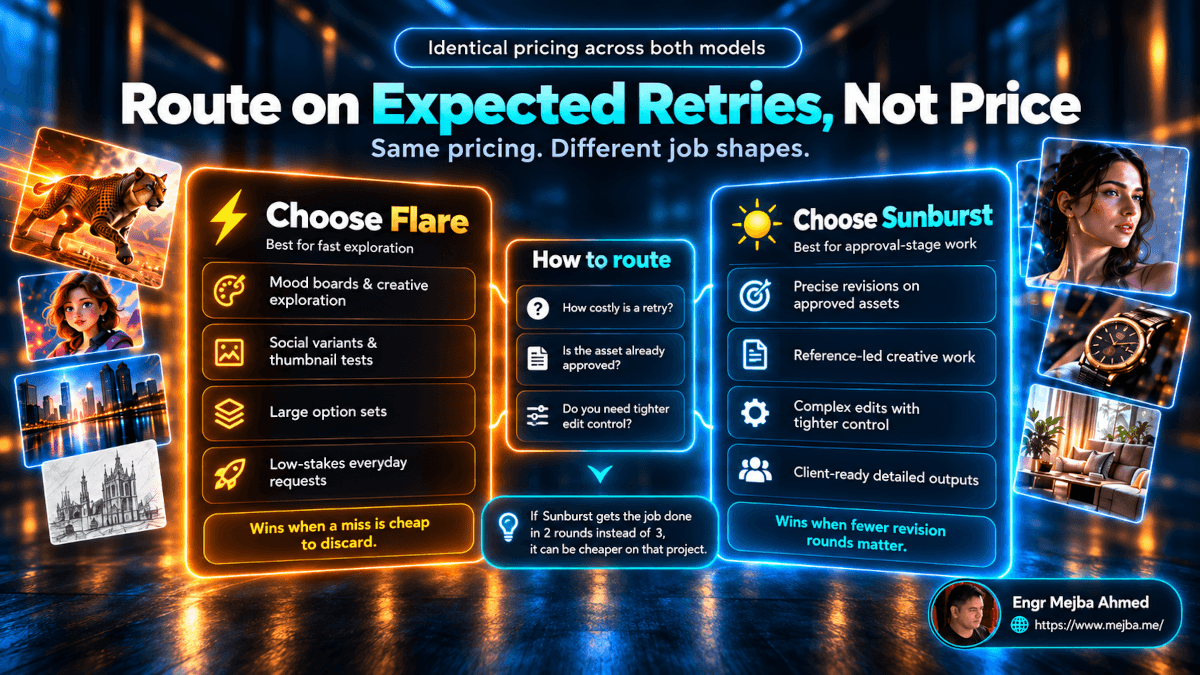
A simple routing rule works well.
Use Flare When Speed and Iteration Matter Most
Start with Flare for:
- concept exploration;
- social graphics;
- thumbnails;
- mood boards;
- creative variations;
- visual prototyping;
- large numbers of first-pass assets;
- applications where generation latency matters.
OpenAI itself describes Flare as the default for most applications.
That makes it the sensible starting point unless the task gives you a reason to move up.
Use Sunburst When Preserving an Approved Asset Matters More
Sunburst makes more sense for:
- detailed edits;
- approved campaign assets;
- polished product imagery;
- high-fidelity reference workflows;
- revisions where surrounding details must remain stable;
- creative production where another failed revision has meaningful cost.
The important concept is cost of failure.
A bad mood-board image costs almost nothing. Discard it.
A bad edit to an already approved campaign visual can trigger another:
- generation;
- QA pass;
- design review;
- client email;
- approval cycle.
That is where the slower precision-oriented model becomes easier to justify.
Do Not Route on Price Alone
Because the listed token rates are identical, the decision is not the traditional:
Cheap model vs expensive model.
A better routing framework is:
How expensive is an incorrect output at this stage of the workflow?
If failure means pressing Generate again, start with Flare.
If failure means destroying details that have already been approved, Sunburst deserves stronger consideration.
But measure both.
Until you have workload-specific token consumption and success-rate data, nobody can honestly tell you that one is always cheaper per finished asset.
Why Retry Rate Matters More Than Most Price Comparisons
Suppose one workflow requires three attempts before approval while another consistently gets there in two.
That difference matters.
The API does not care whether a render was useful.
Every call still consumes resources.
So a useful internal metric is not merely:
Cost per generation
but:
Cost per approved asset
For example, record:
- total generations;
- approved outputs;
- average generation time;
- average token cost;
- percentage requiring edits;
- number of revision turns;
- manual design time after generation.
That gives you something model launch pages cannot: the cost of the model inside your workflow.
This is the same principle I use when thinking about broader AI agent cost optimization: provider pricing matters, but workflow architecture often matters more.
What About Cached Image Input?
Both Flare and Sunburst list cached image input at $2 per million tokens, compared with $8 per million for uncached image input.
A 75% lower token rate is meaningful when the same reference context can actually be reused.
Potential examples include workflows repeatedly using:
- a product reference;
- a brand asset;
- a character reference;
- a campaign reference set;
- a fixed visual brief.
However, do not make the mistake of assuming:
I generated twelve images using the same photo, therefore every repeat automatically qualifies for cached pricing.
The model pricing page tells us that cached image-input pricing exists.
That alone does not prove a particular request pattern will produce a cache hit.
For a production application, inspect actual usage rather than building financial projections around an assumed caching behavior.
In other words:
Optimize around measured cache hits, not theoretical ones.
Batch API Changes the High-Volume Picture
This is one area where information published on launch day became outdated almost immediately.
The current OpenAI Batch API documentation lists:
/v1/images/generations/v1/images/edits
among the endpoints available for batch processing.
OpenAI also says Batch API requests receive a 50% cost discount compared with synchronous APIs, use a separate pool of higher rate limits, and complete within a 24-hour window.
That means the statement:
GPT-Image-2.5 does not support Batch API.
is no longer safe to publish.
For asynchronous image jobs, Batch changes the economics considerably.
Use Synchronous Generation When:
- a user is waiting for the image;
- you are editing interactively;
- you need immediate feedback;
- generation is part of a live product experience.
Consider Batch When:
- generating a product catalog;
- producing hundreds of variants;
- pre-generating campaign assets;
- processing overnight creative jobs;
- immediate results are unnecessary.
The important production decision therefore becomes:
interactive vs asynchronous
in addition to:
Flare vs Sunburst.
Synchronous Rate Limits Still Matter
For normal synchronous requests, both Flare and Sunburst currently publish the same rate-limit ladder.
| API Tier | Tokens/minute | Images/minute |
|---|---|---|
| Tier 1 | 100,000 | 5 |
| Tier 2 | 250,000 | 20 |
| Tier 3 | 800,000 | 50 |
| Tier 4 | 3,000,000 | 150 |
| Tier 5 | 8,000,000 | 250 |
Free API usage is listed as unsupported for these models.
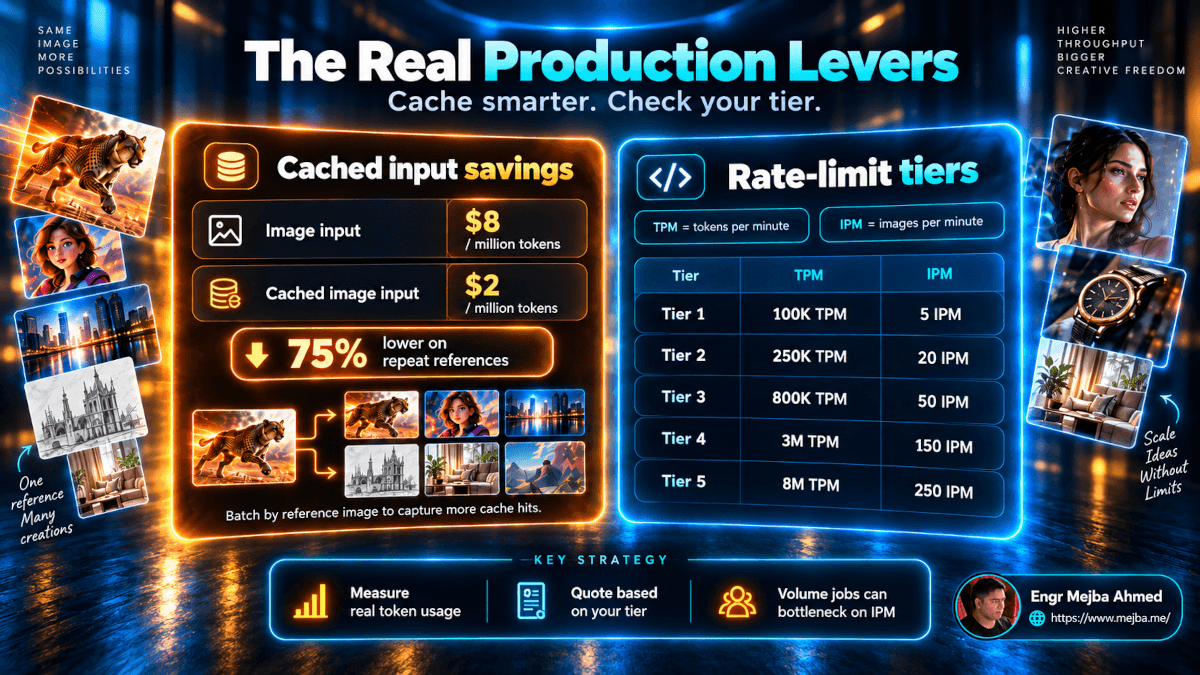
Consider a synchronous 200-image generation job with no retries.
At the image-per-minute ceiling alone:
- Tier 1: minimum 40 minutes
- Tier 2: minimum 10 minutes
- Tier 3: minimum 4 minutes
Those are theoretical floors.
Actual completion time also depends on:
- token limits;
- generation latency;
- image quality;
- request scheduling;
- retries;
- errors;
- workload concurrency.
For bulk work that does not need to finish interactively, the Batch API may now be a better architecture than trying to maximize synchronous concurrency.
The Most Important Workflow Improvement Is Still Editing Consistency
The pricing discussion is interesting.
The production improvement may matter more.
Image generation was already good enough to produce impressive first drafts.
The harder problem has been getting from:
"This looks good."
to:
"Change only this one thing."
without rebuilding everything else.
That is why improved multi-turn editing matters.
A real client workflow might look like this:
- Generate the campaign concept.
- Approve the composition.
- Replace the product.
- Correct the headline.
- Adjust a person's clothing.
- Produce a second aspect ratio.
- Make a final background change.
If each step introduces unrelated drift, the AI model stops being useful somewhere around step three and the file moves to Photoshop or another manual design tool.
If Images 2.5 can preserve more approved details through that chain, AI image generation moves further downstream into actual production.
That is a more important improvement than generating a prettier first image.
But "More Consistent" Does Not Mean Perfectly Consistent
OpenAI describes the model as preserving previous changes more reliably.
That wording matters.
Do not turn it into:
Image drift has been solved.
It has not been demonstrated that every long edit chain will maintain:
- exact facial identity;
- precise brand colors;
- typography;
- product geometry;
- small logos;
- fine packaging text;
- object placement;
indefinitely.
For high-stakes creative work, build verification into the pipeline.
After a multi-turn edit chain, compare the final image against both:
- the latest requested change;
- the last approved version.
The first catches instruction failure.
The second catches regression.
Templates and Sketch Are More Important Than They Look
Experienced prompt writers may look at templates and think they are merely convenience features.
That misses the target audience.
A marketing manager may not know how to specify:
- focal hierarchy;
- composition;
- negative space;
- camera framing;
- lighting direction;
- typography placement.
They may know exactly what they want when they see it.
Templates reduce the amount of prompt structure they need to invent.
Sketch solves another problem: spatial instruction.
Visual composition is difficult to explain in text because words describe relationships less efficiently than a quick drawing.
For design teams, this can shorten the path from:
idea → composition → generation
without requiring everyone to become an expert prompt engineer.
Comments Make Editing More Local
Comment-based image editing deserves attention for the same reason.
A user can indicate where a change should happen rather than writing a paragraph trying to disambiguate the target.
That can make requests such as:
- change this label;
- remove this object;
- adjust this area;
- replace this product;
- correct this piece of copy;
less ambiguous.
Again, the improvement is not merely image quality.
It is reducing communication overhead between the user and the model.
Prompt Sharing Changes Reusability
ChatGPT can now let users include the generating prompt when sharing an image.
That turns a finished visual into something closer to a reusable creative recipe.
For teams, that can be useful for:
- building internal prompt libraries;
- repeating successful formats;
- onboarding marketers;
- remixing campaign ideas;
- standardizing creative experiments.
It also reinforces an uncomfortable truth for anyone trying to build a business purely around secret prompts:
the prompt itself is rarely a durable moat.
The stronger asset is the system around it:
- brand context;
- references;
- workflow;
- approvals;
- automation;
- distribution;
- data;
- creative judgment.
How I Would Route GPT-Image-2.5 in a Production Workflow
Here is the decision framework I would use.
1. Start With Flare
Use Flare as the default for new generations and exploratory work.
That aligns with OpenAI's own recommendation and gives you the faster option while the creative direction is still flexible.
2. Move Precision-Sensitive Work to Sunburst
When the cost of changing unrelated details becomes meaningful, test Sunburst.
Typical point:
after composition or subject identity has already been approved.
3. Measure Cost Per Accepted Asset
Do not optimize around a model card alone.
Record how many generations each model requires before the asset is usable.
4. Measure Real Token Consumption
The published rate is not enough to estimate final Images 2.5 cost precisely.
Run representative production requests before creating customer pricing.
5. Use Batch for Offline Volume
If nobody is sitting in front of the screen waiting for the image, evaluate Batch before building a large synchronous queue.
OpenAI now documents a 50% Batch discount and supports image-generation and edit endpoints through the Batch API.
6. Check Rate Limits Before Promising Throughput
A model capable of generating excellent images does not mean your API account can produce 10,000 of them in an hour.
Tier limits are part of production architecture.
7. Keep Human QA for Final Assets
Use the model for generation and controlled editing.
Still inspect:
- faces;
- hands;
- product details;
- logos;
- text;
- pricing;
- legal copy;
- packaging;
- brand consistency.
"Production-ready" should describe your workflow, not your confidence in one generation.
ChatGPT Images 2.5 vs Nano Banana 2: Do You Still Need Both?
Google's Gemini 3.1 Flash Image, commonly called Nano Banana 2, remains relevant for high-volume image systems.
Google currently lists standard image-output pricing from approximately:
- $0.045 for 0.5K;
- $0.067 for 1K;
- $0.101 for 2K;
- $0.151 for 4K;
with roughly half those output prices through its Batch API.
But OpenAI now also supports batch processing for image generation and editing, so the comparison is no longer:
Google has batch; OpenAI doesn't.
The better comparison is workload-specific:
- generation quality;
- edit reliability;
- reference fidelity;
- typography;
- latency;
- resolution;
- token consumption;
- batch pricing;
- ecosystem integration.
If image generation is a meaningful production cost, benchmark both providers using the same real assets instead of choosing from a launch demo.
What OpenAI Has Not Proven Yet
A useful review should separate documented improvements from unanswered questions.
How Much Better Is Long-Chain Editing?
OpenAI says multi-turn consistency improved.
The launch material does not give us a universal number for how well identity, layout, typography, and brand details survive a 10-, 15-, or 20-edit production chain.
Test that on your own assets.
What Is the Actual Per-Image Cost?
The rates are public.
The GPT Image 2 calculator does not estimate GPT Image 2.5 consumption.
So precise universal claims such as:
A 1024×1024 max-quality Images 2.5 image costs exactly $X.
need evidence from measured 2.5 usage.
Does Cached Image Input Automatically Save 75%?
The cached rate is 75% below the normal image-input token rate.
Whether your actual workload receives those cached tokens depends on real cache behavior.
Measure it.
Is Flare Always the Better First Model?
For general use, OpenAI says yes: it is the default.
That does not mean it will win every workload.
If nearly every generation immediately enters a precision-edit chain, beginning with Sunburst may prove more efficient for your application.
Again, benchmark accepted outputs, not model names.
What Should You Test This Week?
If you are considering Images 2.5 for production, do three tests.
Test 1: Five-Turn Edit Consistency
Take an asset you already trust.
Make one isolated edit at a time.
After five edits, compare the final output with the original.
Check what changed that you did not request.
Test 2: Flare vs Sunburst
Give both models the same:
- prompt;
- reference images;
- quality;
- target dimensions.
Track:
- latency;
- output token usage;
- successful generations;
- required retries;
- editing accuracy.
Repeat enough times that one lucky generation does not decide your architecture.
Test 3: Synchronous vs Batch
Take a representative bulk job.
Calculate:
- interactive cost;
- Batch cost;
- delivery requirement;
- rate-limit constraints.
If the assets can arrive hours later rather than seconds later, Batch may materially change the economics.
FAQ
Frequently Asked Questions
Everything you need to know about this topic
ChatGPT Images 2.5 is OpenAI's image-generation and editing update released on September 8, 2026. It improves reference fidelity, precise editing, multi-turn consistency, generation speed, and image-creation tools inside ChatGPT.
Flare is OpenAI's faster Images 2.5 API model and the recommended default for most applications. Sunburst is the more capable model for workflows where precise generation and editing matter most, but it takes longer to generate.
Start with Flare for fast generation, exploration, social content, prototypes, and high-volume first passes.
Use or test Sunburst when editing precision and preservation of an already approved asset are more important than generation speed.
The published token rates are currently identical.
Both list $5/M text input tokens, $8/M image input tokens, and $30/M image output tokens, with discounted cached-input rates. However, equal token rates do not prove equal total cost per image because actual token consumption may differ.
There is no reliable universal figure from the rate card alone.
OpenAI states that the GPT Image 2 calculator does not estimate GPT Image 2.5 token consumption. Measure representative calls at your intended size and quality before budgeting production usage.
Current OpenAI documentation lists both /v1/images/generations and /v1/images/edits among supported Batch API endpoints.
OpenAI says Batch API usage receives a 50% discount compared with synchronous APIs and runs through separate rate-limit capacity, with jobs completing within 24 hours.
Both Flare and Sunburst currently support:
low, medium, high, xhigh, max, and auto.
OpenAI announced Images 2.5 as rolling out to ChatGPT users across all tiers, as well as ChatGPT Work and Codex, on desktop, mobile, and web. API usage is separate and billed through the OpenAI API.
Yes. OpenAI's model documentation says both Flare and Sunburst can be selected directly through the Image API or used as the model behind the Responses API image-generation tool.
The Bottom Line
ChatGPT Images 2.5 is not simply another "better image quality" release.
The meaningful changes are operational:
References survive better.
Edits are more targeted.
Multi-turn revisions are designed to drift less.
Flare gives developers a faster default.
Sunburst prioritizes precision.
Both currently share the same token rate card.
Batch processing now gives offline image workloads a 50% discounted path.
That leads to a much better model-selection rule than "always use the premium model."
Use Flare when speed and inexpensive iteration matter.
Use Sunburst when the asset has details worth protecting.
Use Batch when the customer does not need the output immediately.
And measure actual token use, retry rate, and approval rate before deciding which option is truly cheaper.
The winning model is not the one that produces the cheapest render.
It is the one that gets you to an approved asset with the least total cost and friction.
Build AI Image Workflows That Go Beyond a Demo
If you are building AI-powered applications, creative automation, image-generation pipelines, or API integrations, you can explore my work and development services here:
- Portfolio: mejba.me
- Fiverr — custom AI development & integrations: fiverr.com/s/EgxYmWD
For a deeper look at production AI workflows, you may also find these useful: