Building AI-Powered SaaS Apps
Completed
VendorShield AI Mobile Application
Solo Project
Hover to explore
2026
Delivered
Code
Status
Solo
Developer
Building AI-Powered
Domain
Project Gallery
7 images
Visual Showcase
Click any image to explore the gallery in full screen
Overview
About This Project
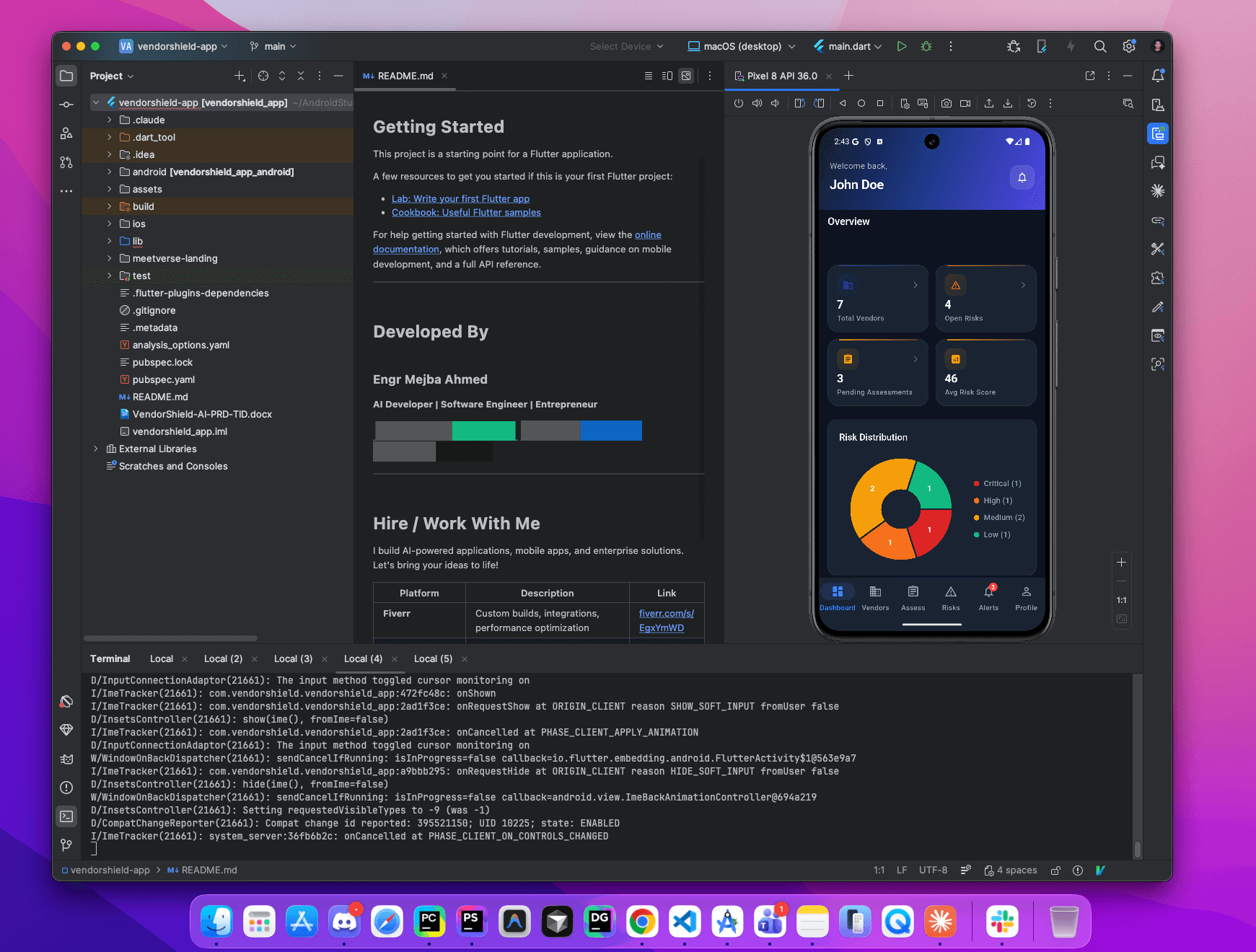
VendorShield AI is a cross-platform mobile application that helps organizations manage, assess, and monitor third-party vendor risks. It provides real-time dashboards, vendor assessments, risk tracking, and automated alerts — all in a sleek, dark-themed glassmorphic UI.
Key Features
Dashboard & Analytics
- Real-time metrics: total vendors, open risks, pending assessments, average risk score
- Interactive risk distribution pie chart (Critical / High / Medium / Low)
- 30-day risk trend line chart with severity breakdown
- Quick-action buttons for adding vendors and launching assessments
- Pull-to-refresh with staggered fade-in animations
- Stat cards with dynamic color coding based on values
Vendor Management
- Full CRUD operations for vendor profiles
- Search by name with real-time filtering
- Filter by status (Active, Pending, Inactive, Offboarded) and criticality
- Track risk scores, data classification, and assessment schedules
- Overdue assessment detection with visual indicators
- Vendor contact information management
Risk Tracking
- Create and monitor risks with severity levels: Critical, High, Medium, Low
- Risk lifecycle: Open → In Review → Mitigated → Accepted → Closed
- Impact, likelihood, and mitigation tracking
- Color-coded severity badges throughout the app
- Due date monitoring with overdue warnings
- Category and source attribution
Security Assessments
- Questionnaire-based vendor assessments with progress tracking
- Assessment statuses: Pending, In Progress, Completed, Expired
- Completion percentage with visual progress bars
- Due date monitoring and team member assignment
- Template-based assessment support
Alerts & Notifications
- Push notifications via Firebase Cloud Messaging
- In-app alert system with severity levels (Info, Warning, Critical, Success)
- Read/unread tracking with unread count badge
- Filter toggle for unread-only view with "Mark all read" action
- Deep-link navigation from alerts to related vendors, risks, or assessments
Authentication & Security
- Email/password authentication with form validation
- Biometric login (fingerprint / Face ID) on supported devices
- Secure token storage with
FlutterSecureStorage - Session persistence across app restarts
- Auth guards on all protected routes
- Password recovery flow with animated success state
Offline Support
- Connectivity detection with offline banner
- Local data caching via Hive (6 dedicated boxes)
- Background sync service for data reconciliation
- Intelligent cache duration management (15 min / 1 hour)
Project Details
Team Size
Solo Developer
Category
Building AI-Powered SaaS Apps
Completed
Feb 2026

Enjoyed this project breakdown?
A coffee fuels more open-source work, tutorials, and detailed case studies like this one.
Available for Projects
Like What You See?
Check out more projects or let's discuss how I can bring your vision to life with the same attention to detail.