
Presso — Cold-Pressed Juice Landing Page Case Study
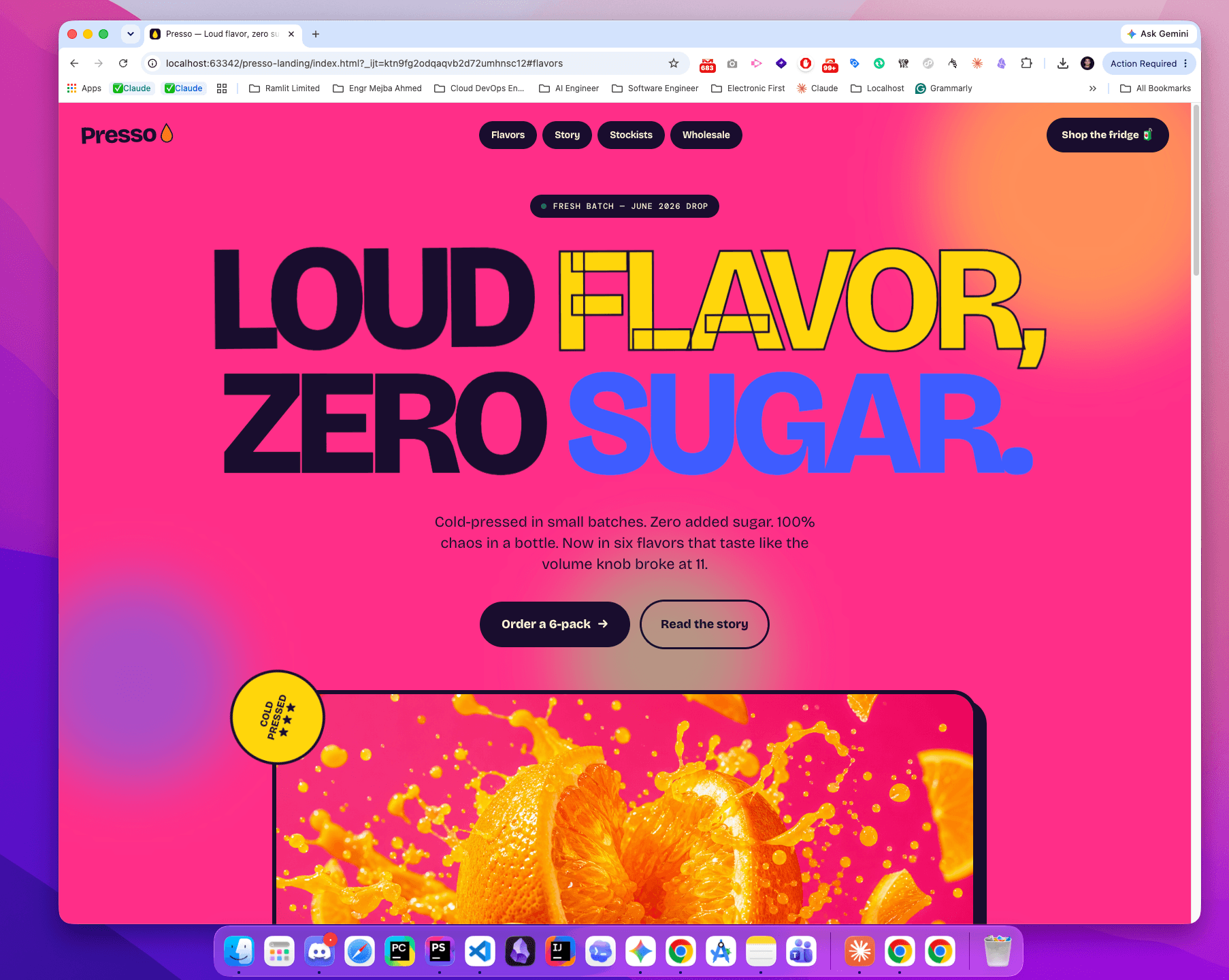
Visual Showcase
Click any image to explore the gallery in full screen
About This Project
Presso is a cold-pressed juice landing-page concept built with HTML, CSS, and JavaScript. It demonstrates a fictional brand’s product presentation and an AI-assisted development workflow with browser-based visual review.
Purpose and project scope
The implementation combines a distinctive single-page marketing design with source code that is straightforward to inspect. The result uses a hot-magenta background, large multicolour headlines, hard offset shadows, tilted frames, and numbered product cards. Presso is a fictional brand created for portfolio purposes; the page is a frontend demonstration.
The visitor journey moves from the hero and its product-section link through a brand film, three flavour cards, a juice-making visual, and a short brand story. Product names, prices, review counts, press mentions, and distribution claims shown in the demo are illustrative content, not verified business results or endorsements.
Implementation decisions
The public source repository contains a single index.html file with the page markup, inline CSS, and JavaScript. Images, video, and favicon files are stored separately. There is no JavaScript framework or build step; typography uses Google Fonts.
- Reusable styling: CSS custom properties define the palette and fonts; grid layouts organise the flavour cards and footer.
- Motion: IntersectionObserver reveals sections as they enter the viewport. CSS provides the moving marquee and decorative animations.
- Brand film: a muted, looping video has a sound-toggle button and a poster image.
- Keyboard and motion preferences: visible focus styles are defined for links and buttons. A reduced-motion rule disables animations and transitions, and the script pauses the film when that preference is detected.
- Smaller screens: a 780px breakpoint stacks the product cards and changes navigation and footer layouts.
These are identifiable features in the source, rather than a claim of complete accessibility compliance.
AI-assisted visual review
The repository describes an iterative workflow: propose a change, implement it, render it in a browser, capture a screenshot, compare it with the design intent, and correct visible issues. The design specification and gallery make that process inspectable. This case study documents the workflow and interface choices without claiming measured conversion gains.
Demo limits and next steps
The “Order a 6-pack” link scrolls to the flavour section. “Add to fridge” buttons have no purchasing handler, and several navigation links use placeholder destinations. Mobile navigation, commerce integration, real product imagery, and replacing illustrative reviews remain items in the repository’s roadmap.
For a real launch, those items would need completion alongside verified product information and end-to-end purchase testing. Explore the other project case studies, review development services, or discuss a landing-page build.
Project Details

Enjoyed this project breakdown?
A coffee fuels more open-source work, tutorials, and detailed case studies like this one.
Like What You See?
Check out more projects or let's discuss how I can bring your vision to life with the same attention to detail.


