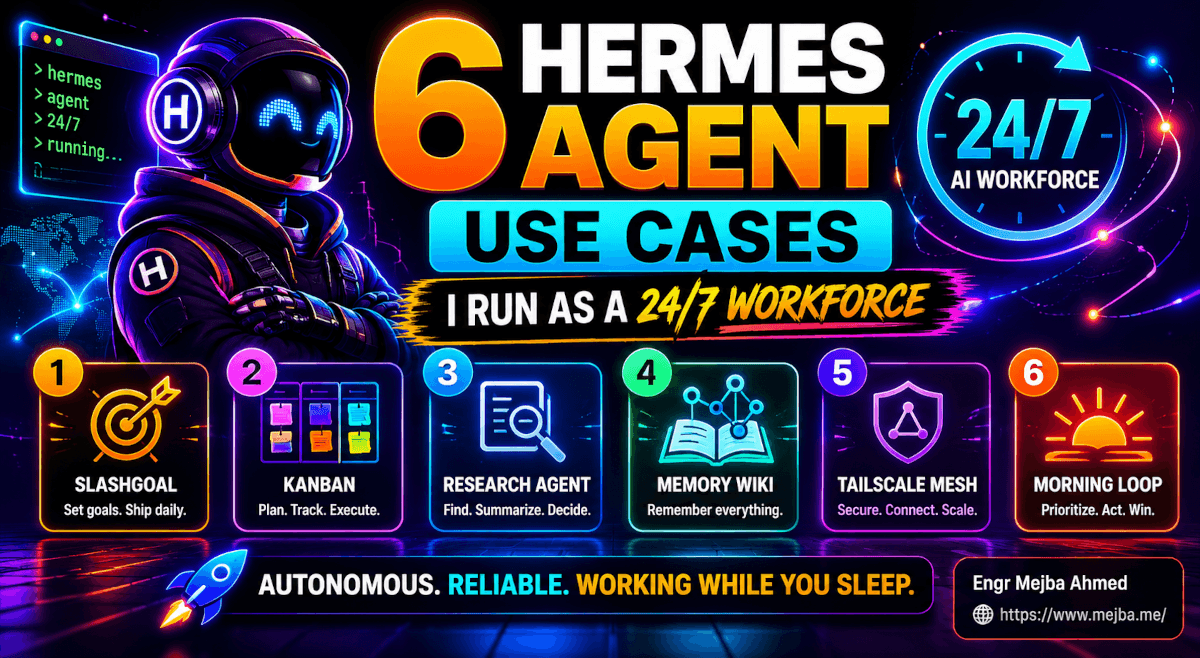
6 Hermes Agent Use Cases I Run as a 24/7 Workforce
The Godot project finished compiling at 4:42 AM. I wasn't awake to see it. What I saw, when I rolled over and unlocked my phone at 8:11, was a Telegram message from my Hermes Agent: "Build complete. Stealth shooter playable from ~/projects/godot-tps. Loot pickups working (ammo, bandages). Wall-vision toggle on enemies. Basic patrol AI on three guards. Last commit 04:42:13. No errors in the editor. Want me to draft the next iteration brief?"
I had given it one prompt the night before. I had gone to bed. While I slept, it shipped a third-person shooter in Godot 4.
I want to be clear about something before this turns into a hype paragraph. The shooter is not a finished game. The enemy AI is dumb. The textures are placeholder. The animation rig is half-rigged. But the thing is playable. You can walk a character through a level, pick up ammunition, take a bandage to heal, see enemies glowing through walls in a stealth-vision mode, and fire a weapon that does damage. The scaffolding is real. The next iteration, with AI-generated assets dropped in and a few more passes through the same agent, will be a real game.
The bigger point is what the slashgoal proved. I went from "vague idea" to "compiled, playable Godot project" without sitting at the keyboard. The agent wasn't summarizing what I should do. It was doing it. For twenty-three hours. Continuously. While I cooked dinner, watched a movie, slept, and made coffee.
This is the post I've been wanting to write for months. Not the "Hermes Agent is amazing" post — I've already written the one about wiring Hermes into Claude Code as a shared AI OS and the one about pairing it with OpenClaw for redundancy. This is the post about what Hermes Agent actually does for me every day. Six specific use cases. Real workflows. The ones that turned a "self-improving agent" buzzword into a 24/7 AI workforce I'd genuinely struggle to give back.
If you've been Hermes-curious but unsure what to actually point it at, this is your manual.
Why "AI workforce" is the right frame, not "AI assistant"
Most people install Hermes and try to use it like ChatGPT with extra steps. Type a prompt. Get an answer. Close the window. Repeat.
That's the wrong mental model. It wastes 90% of what makes Hermes interesting.
The Hermes Agent (Nous Research, currently on v0.13 as of May 2026) was built around three architectural decisions that change everything about how you use it:
- It persists. Hermes runs on a server, a VPS, or a long-lived local process. You can talk to it from Telegram, WhatsApp, Slack, or the terminal — but the agent itself doesn't end when you close the window. It keeps running, keeps remembering, keeps executing tasks you delegated hours or days ago.
- It self-improves. Every successful task gets extracted into a skill. Every skill gets refined as you use it more. That means a research pipeline you set up in February is measurably better at research in May than it was the day you built it. The agent compounds.
- It's multi-instance. You can run several Hermes profiles in parallel — an orchestrator, a researcher, a coder, a writer — and they hand work to each other through a built-in Kanban board. That's not a metaphor. There is a literal Kanban dashboard. Cards move between columns. Profiles get assigned. Work happens.
Put those three properties together and "AI assistant" stops being the right word. What you actually have is a small workforce. Always on. Always learning. Coordinated through a board. That reframing is what unlocks the use cases below.
Here's what mine does for me, in the order I built them out.
Use case 1: Slashgoal for tasks that take 24+ hours
The slashgoal — /goal in the Hermes CLI — is the single feature that made me stop treating Hermes like a chatbot. According to the official Hermes docs, /goal sets a standing goal that the agent will keep working toward across turns until it's done, using what Nous calls a Ralph loop. In practical terms: you give it a target, and it grinds.
The first time I tried it, I did what every developer does. I typed /goal build me an app and went to bed feeling clever.
I woke up to a half-broken Express server, three contradictory readme files, and a token bill that made me wince. The agent had genuinely tried. It just had no idea what I wanted.
That failure taught me the lesson I now teach every Hermes user I meet: the slashgoal is not a wish. It's a contract. And contracts work when both parties are specific.
The fix was metaprompting. Instead of typing my goal blind, I started co-writing the goal with an AI first. I'd sit with Claude or Codex and answer questions like:
- What is the target deliverable, described as if I were handing it to a developer?
- What are the hard constraints (language, framework, dependencies, file structure)?
- What are the soft preferences (style, naming conventions, libraries to avoid)?
- What does "done" look like? What's the minimum viable proof of completion?
- What does the agent get to decide? What must it ask me about?
- What's the budget — token, time, scope?
By the time I'm done, I have a slashgoal that's two or three pages long. Painful to write. Magical to run.
The Godot project that opened this post came from one of those long slashgoals. The prompt specified Godot 4 as the engine, a third-person camera rigged to a CharacterBody3D, two consumable pickups (ammo and bandages), a stealth mechanic where enemies become visible through walls when the player crouches, and patrol-style AI for three enemy NPCs. It listed the exact directory structure. It told the agent which Godot APIs to use and which to avoid. It gave the agent permission to commit to a local git repo at any milestone and ping me on Telegram when blocked.
The agent ran for 23 hours. It hit the budget limit I'd set for max iterations. It checked in with me twice, both times because it correctly identified an ambiguity in my spec. The result was the playable prototype I described in the opening.
That same pattern works for things that aren't games. I've slashgoaled:
- A long-form technical document (a 60-page playbook for a client). Agent drafted, self-reviewed against a rubric, and iterated until every section passed the rubric. Total time: ~14 hours.
- A migration from a legacy Laravel app to a fresh Laravel 13 codebase. Agent read the old code, mapped routes and models, generated the new structure, and produced a diff for me to review. Total time: ~11 hours.
- An entire static documentation site for an open-source project I maintain. Hermes wrote the content, generated the Astro config, set up deployment to a VPS, and pinged me when DNS needed manual intervention. Total time: ~6 hours.
There's a pattern in those examples worth naming. The slashgoal is best for bounded, verifiable, long-tailed work. Bounded because vague goals fail. Verifiable because the agent needs to know when it's done. Long-tailed because if a task takes 15 minutes, you should just do it.
The honest tradeoff: slashgoal runs are expensive when you misjudge them. A 23-hour run on Opus 4.7 through OpenRouter cost me roughly $38 for the Godot project. Worth it for a real prototype. Painful if the prompt was bad and the output is unusable. Always cap your max-iterations setting in hermes init before you delegate something ambitious.
Before we move on, here's the open loop I'll close later: a great slashgoal still needs a great place to land its output. That's where Kanban comes in.
Use case 2: The Kanban board as my human-AI traffic controller
The Hermes Kanban is the second feature that changed how I work. It ships as a bundled dashboard plugin at plugins/kanban/, runs locally, and exposes columns for triage, todo, ready, running, blocked, done, and archived. You spin it up with hermes dashboard from the terminal, and a browser tab pops up at the kanban URL.
That sentence undersells what's actually happening. The Kanban isn't a to-do list. It's a delegation queue with built-in routing.
Here's the daily flow I run.
Morning, around 8:30 AM. I write my to-do list for the day. Pen and paper, usually. About a dozen items: client work, code reviews, two articles to write, three calls to take, a billing thing my accountant needs, errands.
I sort the list into two piles. Pile A is work only I can do. Pile B is work an agent can plausibly start. The split is usually 60/40 some days, 30/70 on others. Anything that involves a phone call, a creative decision, a face-to-face meeting, or judgment that depends on context the agent doesn't have — that's pile A. Anything that's research, drafting, code scaffolding, refactoring, data gathering, or routine documentation — pile B.
Pile B goes onto the Kanban. I open hermes dashboard, hit the Triage column's inline create button, and drop in short cards. "Research three competitors to product X, output a markdown report." "Refactor the auth module in repo Y to use the new middleware pattern." "Draft the first 1,500 words of next week's article on topic Z."
The dispatcher takes over. By default, Hermes runs with kanban.auto_decompose: true. The dispatcher reads each card in the Triage column, looks at my profile roster, and routes the task. A research card goes to my Researcher profile. A code card goes to my Coder profile. A writing card goes to my Writer profile. Long cards get fanned out into a graph of child tasks via the Decompose action. Short cards get a single-task spec rewrite via Specify.
Cards flow. Triage → todo → ready → running → done. I don't move them. The agents do. I watch the board change throughout the day the way I used to watch CI pipelines run.
The first time this clicked for me was a Tuesday in March. I'd dropped seven cards on the board at 9 AM. By noon I'd worked through three of my human-only tasks. When I checked the dashboard, four of the seven cards had moved to done. One was blocked — the agent had hit a wall and dropped a comment asking me a question. Two were still running. I answered the blocked card's question in fifteen seconds. The agent unblocked itself and resumed.
That's the moment I stopped feeling like I was managing tasks. I was reviewing the work of a team that I was, technically, the only human member of.
A few details that matter once you actually use it:
- Cards take comments. I leave context in card comments instead of stuffing it into the title. The agent reads them. Long context belongs in comments, not titles.
- Cards take links. You can attach a file path, a URL, or a reference to another card. Hermes uses those as inputs.
- The triage auto-decomposer is opinionated. If you don't like how it broke a task down, hit the Decompose button again with a clearer prompt in a comment first. It'll re-route based on the comment.
- Use profile descriptions. The dispatcher routes based on profile descriptions, not profile names. A profile called
coderwith no description gets generic routing. A profile calledcoderdescribed as "TypeScript / Next.js / Tailwind specialist, lives in~/projects/web" gets exactly the work it should.
The Kanban is what turns Hermes from "one agent doing one thing" into "a workforce doing many things." Once you're running it, you'll stop opening it to check progress and start opening it to delegate.
But the most counterintuitive part of how I use Hermes isn't the goal command or the Kanban. It's the autonomous research engine I'll get to next — which produces output so detailed it makes Claude Code's job easier.
Use case 3: Technical research and competitive analysis that hands off cleanly
I run a competitive analysis on every product I evaluate. I used to do that manually. Open a tab. Read marketing copy. Open another tab. Click around the product. Open dev tools. Look at the bundle size. Note the pricing page. Note the analytics scripts. Note the payment processor. Type up findings.
That used to be an hour, minimum, per product. Sometimes a half day if the product was deep.
Now it's a Kanban card.
The card looks like this: "Analyze competitor product Creator Buddy (creatorbuddy.ai). Produce a markdown report covering tech stack, feature list, pricing tiers, analytics setup, payment processor, key positioning claims, and gaps versus comparable tools. Output to ~/research/competitors/creator-buddy-2026-05.md."
The agent does this work the way I would, except faster and more thoroughly. It opens the site. It reads every page. It inspects network requests. It looks at the loaded JavaScript bundles and notes what frameworks are visible. It reads the page source for analytics tags. It checks the pricing page. It compares positioning language across pages. It produces a markdown report — usually 1,500 to 2,500 words — that I can drop directly into Claude Code or Codex as the input to a build task.
The Creator Buddy analysis ran for about 40 minutes. The output contained:
- Tech stack identification. Next.js 14, Tailwind, deployed on Vercel, using Stripe for payments, Mixpanel for product analytics, Intercom for support. All inferred from the headers, the loaded scripts, and the page source.
- Feature inventory. Twenty-three features, each described in one sentence, organized by the four product surfaces (dashboard, editor, library, settings).
- Pricing matrix. Three tiers, with the feature differences highlighted. Pulled directly from the pricing page and a few support documents linked in the footer.
- Positioning claims. Six core claims the marketing makes, ranked by how prominently they're featured.
- Gaps. The agent's own assessment — based on comparison to two reference tools I'd told it about — of what Creator Buddy doesn't do that comparable tools do.
That last section was the kicker. The agent didn't just describe the product. It analyzed it. The gaps section gave me three concrete opportunities a tool in the same space could pursue.
What makes this use case especially valuable: the output is structured for downstream agents. Because the report is a clean markdown file in a known location, I can drop it as context into Claude Code with a follow-up slashgoal: "Read ~/research/competitors/creator-buddy-2026-05.md. Build a Next.js 15 prototype that addresses the three gaps identified in the report. Use the same tech stack. Output to ~/projects/prototype-x."
That's two Hermes operations chained. Research → prototype. Both autonomous. Both producing real artifacts I can review. The same handoff pattern works for any research-then-build workflow.
A note on the ethics, because I take this seriously: the agent only inspects publicly available pages. No scraping behind a paywall. No bypassing authentication. No simulating users. The agent reads what a logged-out browser would see and reports on what's visible. That's a constraint I set in the profile description and reinforce in every research card.
If you write a lot of practical-value AI content like I do, the research-then-build chain pays for the Hermes subscription on its own. The hours I used to spend gathering context are now hours I spend on the writing itself.
Use case 4: A personal memory wiki that gets smarter as I live
There's a category of Hermes use case that doesn't show up in any "10 use cases" post I've read, and it's the one I'd most struggle to lose.
I have a personal memory wiki. It's a private website, hosted on a domain only I can reach, automatically maintained by Hermes. Every conversation we have, every decision I make in a daily log, every research artifact, every project milestone — it all lands as a clickable, searchable, cross-linked entry on that wiki.
Setting it up was one prompt and about 25 minutes.
I asked Hermes to build me a static site with three things: a homepage listing my active projects with status badges, a daily log section with one entry per day, and a topics section where each topic is a markdown page that auto-updates whenever a relevant conversation happens. I told it where to host it (a private subdomain on my VPS), gave it write access to the Obsidian vault where my notes live, and pointed it at the conversation log directory.
That was the install. Now the wiki maintains itself.
Every night around midnight, a scheduled task runs on Hermes. It pulls the day's conversations, extracts the substantive points (decisions, lessons, useful references, things I said I'd remember), and writes them to the appropriate topic pages. It updates the daily log with a clean summary. It cross-links new entries to existing topics where the content overlaps. By morning, the wiki has grown a day's worth of accurate, browsable memory — without me touching anything.
Why does this matter? Two reasons.
It reinforces my own memory. I used to forget things. Decisions made three weeks ago. Conversations with clients about scope changes. The specific reason I picked one library over another in a project last month. Now I just open the wiki and search. The act of writing things down — even when the agent does the writing — pulls them back into accessible short-term recall.
It gives the agent better long-term context. This is the part I didn't see coming. Because the wiki is also the agent's source of truth, every conversation I have with Hermes is informed by every conversation I've already had. Ask Hermes about a project from last quarter and it doesn't fumble — it opens the topic page, reads its own notes, and responds with full context. The wiki is, effectively, the agent's externalized long-term memory in a form I can browse and audit.
A specific example. Two weeks ago I was on a call with a client about a Laravel project. They referenced a decision we'd made in February about authentication. I had no recollection. I opened the wiki on my second monitor, typed "auth" into search, and the entry popped up: "2026-02-14 — Client X auth decision. Chose Laravel Sanctum over Passport because their mobile app team is using token-based auth and Sanctum's API token model maps cleaner. Mejba flagged the migration cost. Client accepted." I read that to the client. They confirmed. The call moved on.
Without the wiki, that's a fifteen-minute "let me get back to you on that" awkwardness. With the wiki, it's six seconds. Multiply that by every conversation that depends on prior context — which is, eventually, every conversation — and you understand why I'd fight to keep this setup.
The setup is simpler than it sounds. Hermes builds the site with whatever stack you want (mine is Astro because it builds fast and looks decent with minimal styling). The scheduled job is a single cron entry in the Hermes config. The cross-linking happens through a small skill the agent learned over time — and which is now in my skills library, ready to share if you ask.
Build this. Seriously. It's the use case that pays back the most over the longest time.
Use case 5: One Tailscale mesh that makes every device a Hermes terminal
Here's the use case that turned my collection of devices into one functioning system.
I have a MacBook Pro on the desk. A Mac Mini on a shelf running long jobs. An iPhone in my pocket. An iPad in a bag. A spare Linux box I keep for testing. Before this setup, each device was its own island. Files on the Mac Mini were on the Mac Mini. Models running on the Linux box ran on the Linux box. To move a file or query a service across devices, I'd cobble together Dropbox, SSH, or a USB cable.
Tailscale ate all of that.
Tailscale is a mesh VPN. You install it on every device you own. They authenticate to your tailnet. They form encrypted peer-to-peer connections using WireGuard. Every device gets a stable name (via MagicDNS) and an IP address that's reachable only from inside your private mesh. Phones, laptops, servers, tablets — all on one network, all addressable by hostname, all secured by SSO at the edge.
The setup is twenty minutes and free for personal use up to 100 devices. Install the app. Sign in with Google or GitHub. Done. Every device shows up in the Tailscale admin console with a name and an IP. From any device on the mesh, you can reach any other device by hostname.
What that unlocks for Hermes is unreasonable.
File access across devices. A Hermes process running on my Mac Mini can read files on my MacBook Pro by referencing them at macbook-pro:/Users/mejba/projects/... over the mesh. I don't have to sync, copy, or upload. The agent reads files where they live.
Localhost-style services from anywhere. I run a local LLM (a quantized Llama model) on the Linux box. From my MacBook, I can hit it at linux-box:11434 — Ollama's port — as if it were on localhost. From Hermes on the Mac Mini, same thing. The whole mesh treats every device like one logical machine.
Cross-device test execution. If Hermes is building a web app on my MacBook and wants to test it from a "different network," it can run a curl from the iPhone (yes, with iSH or a-Shell) or from the Linux box. Same code, different network path, real-world test.
Phone as a remote control for the Mac Mini. This one is mildly absurd but useful. The Hermes dashboard on the Mac Mini is reachable from my iPhone's browser at the Mac Mini's MagicDNS name. I can be at the coffee shop, see my Kanban board update in real time on my phone, and drag cards across columns from the iPhone screen. The Mac Mini grinds. The phone is the steering wheel.
The video that inspired part of this writeup spelled the product "Tailcale." It's actually Tailscale, with the S. Same product, real spelling, available at tailscale.com. Free for personal use. Worth installing today even if you never run Hermes — but if you do run Hermes, it transforms what one agent on one machine can reach.
A safety note: when you put devices on a tailnet, they become reachable from every other tailnet device you own. That's the whole point. But it means a compromise on one device potentially exposes services on others. Use Tailscale ACLs to scope what each device can touch. Don't run unauthenticated services on a tailnet IP just because the mesh feels private. The mesh is private. The services should still authenticate.
If this kind of distributed setup interests you, I've written before about deploying autonomous agents on a VPS with Discord notifications — same philosophy, different mesh.
Use case 6: The 9 AM morning priority prompt that runs my day
The last use case is the smallest one in the post, and the one I'd defend hardest.
Every morning at 9:00 AM, Hermes pings me on Telegram with one question: "What is your number one priority today?"
That's it. That's the whole prompt.
I type back a sentence. Sometimes two. Usually something like "ship the redesign of the agency landing page" or "finish the second draft of the Hermes article" or "call my accountant and clear last week's invoicing."
Hermes does three things with my answer.
It updates the wiki. A new entry lands in my daily log: today's date, the priority, my exact words. By the end of the week, there's a column I can scan to see what I told myself mattered each day. Patterns emerge that I can't see in real time.
It generates supporting tasks. If I said "ship the redesign," Hermes drops cards into the Kanban: research what's currently on the page, gather brand assets, draft three hero variations, write three meta description options, prep a deploy checklist. I can keep, kill, or edit any of them. The first time I tried this I deleted half of them. By week two, I was keeping most of them. The agent learned what supporting tasks I value and what I don't.
It adapts its behavior. Over weeks, the agent builds a model of what I prioritize, when, and why. Mondays trend toward writing tasks. Wednesdays trend toward client work. Fridays trend toward shipping or finishing. The agent uses that pattern to bias the supporting tasks it generates. Ask me my Monday priority and the supporting tasks lean toward research and outline. Ask me my Friday priority and they lean toward ship-checks and review.
The self-improvement loop is the whole point. The morning prompt is the smallest possible feedback signal you can give an agent that wants to learn your workflow, and it produces the largest possible behavior change over time. After three months, my Hermes profile knows me in a way that the first week of using it could not have predicted.
You can build this prompt in five minutes. Set up a cron job inside Hermes (hermes cron create --time "09:00" --message "What is your number one priority today?"), point it at your Telegram bot, give it a small skill called daily-priority-handler that does the three things above, and let it run.
The first week, it's a question that interrupts your coffee. The third week, it's a small ritual you look forward to. By the third month, it's the most important habit in your day.
What ties these six use cases together
Six use cases. One pattern.
Every one of them takes the same primitive — a Hermes Agent that can persist, learn, and execute — and turns it into a different production function. The slashgoal is the long-shift worker. The Kanban is the dispatcher. The research engine is the analyst. The memory wiki is the institutional memory. The Tailscale mesh is the office network. The morning prompt is the standup meeting.
Run them together and you don't have an AI assistant. You have an organization. Of one human and however many Hermes profiles you spin up.
There's a real downside to be honest about. Maintenance cost is non-zero. Hermes ships updates frequently. The Kanban dispatcher's auto-decomposer gets opinionated in ways that occasionally annoy. The slashgoal sometimes hits walls and burns budget before failing usefully. The wiki cron job needs occasional pruning when topic pages get unwieldy. None of these are dealbreakers. All of them are real.
But the question isn't "is Hermes perfect?" It's "does the workforce produce more than it costs?" For me, easily yes. I shipped more code, wrote more articles, ran more research, and remembered more decisions in the last six months of Hermes than the previous twelve months without it.
The night the Godot project finished compiling at 4:42 AM is the night I stopped asking whether to keep this setup.
Here's the only question worth sitting with tonight: if you had a workforce on standby right now — one that never slept, never forgot, never lost context — what would you have already delegated?
That's the slashgoal you should type next.
FAQ
Frequently Asked Questions
Everything you need to know about this topic
The slashgoal (/goal) is a Hermes Agent command that sets a standing goal the agent will keep working on across turns until it's done, using what Nous Research calls a Ralph loop. It's designed for long-running autonomous tasks — anything from a few hours to several days — that have a clear deliverable. For the full slashgoal workflow and metaprompting pattern I use, see the slashgoal section above.
The Hermes Kanban ships as a bundled dashboard plugin and exposes columns for triage, todo, ready, running, blocked, and done. Cards dropped into the Triage column are auto-routed by a dispatcher to the right agent profile based on the profile descriptions you've configured. You launch it with hermes dashboard from the terminal.
Yes — that's the core design. Hermes runs as a persistent process on a server, VPS, or long-lived local machine, and continues executing slashgoals or Kanban tasks even when you're offline. You can reach it from Telegram, WhatsApp, or the web dashboard whenever you want a status check.
No. Tailscale is optional, but it dramatically expands what one Hermes process can reach. Tailscale's mesh VPN lets your Hermes agent access files and services on every device you own — phone, tablet, laptop, server — as if they were one machine. See the Tailscale use case above for the setup.
Costs depend on which model you route each profile to. A Hermes profile running on Anthropic's Claude Sonnet 4.7 is dramatically cheaper than one on Opus 4.7. My setup blends Opus for orchestration and review with cheaper models for routine execution, and runs comfortably for under $200/month across multiple profiles and a 23-hour slashgoal or two per week.
Let's Work Together
Looking to build AI systems, automate workflows, or scale your tech infrastructure? I'd love to help.
- Fiverr (custom builds & integrations): fiverr.com/s/EgxYmWD
- Portfolio: mejba.me
- Ramlit Limited (enterprise solutions): ramlit.com
- ColorPark (design & branding): colorpark.io
- xCyberSecurity (security services): xcybersecurity.io