Codeex Review: I Built a YouTube Comment AI System
I almost ignored Codeex. Another desktop AI app, another set of bold claims about "automating your entire workflow," another GPT wrapper pretending to be a platform. I had Claude Code humming along just fine, agents doing real work, and I was deep into a Vercel deploy when a friend dropped a single line into Slack: "this thing just built me a working app from a spreadsheet, opened my browser, deployed it, and scheduled a weekly cron — in one chat."
I closed the deploy tab and downloaded the Codeex AI super app that night.
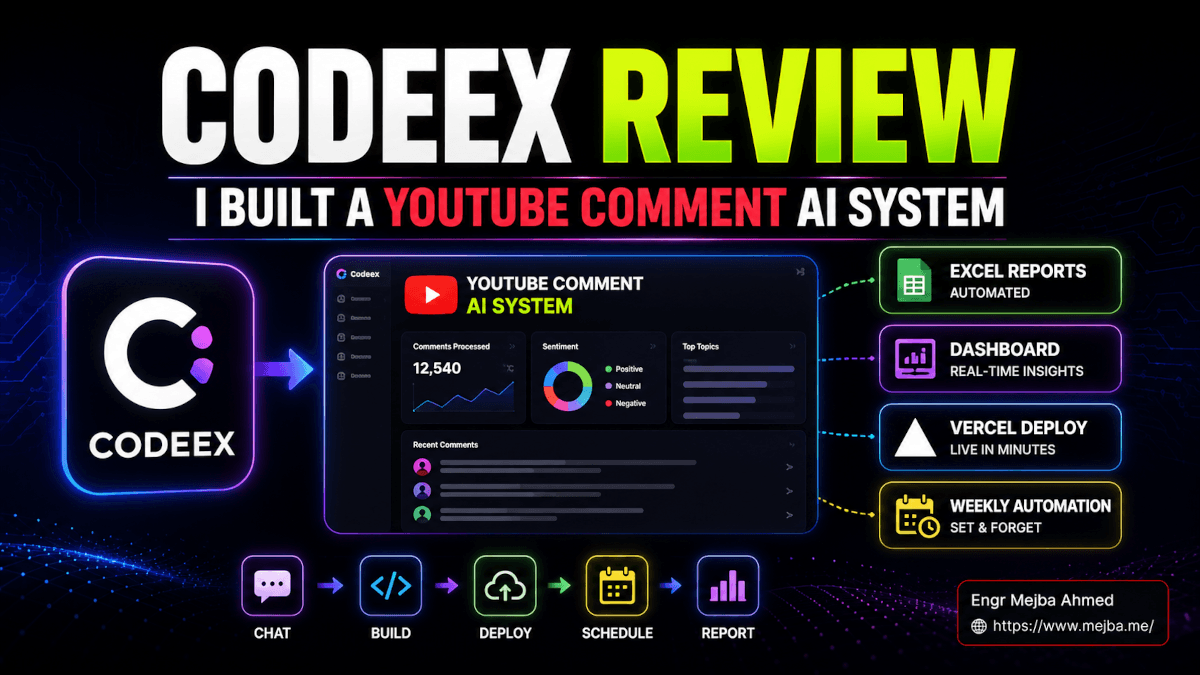
Eleven days later, I had built something I'd been pushing off for six months: a YouTube Comment Intelligence System that pulls the last 200 comments from my channel, ranks them by signal, generates a multi-tab Excel workbook with charts, ships a localhost dashboard, deploys it to a public Vercel URL, and refreshes the whole thing every Monday morning while I'm still asleep. No glue scripts. No copy-pasting between five tools. One conversation, one project folder, and a pet animation in the corner of the window telling me what was running in the background.
This is the post I wish someone had handed me before I started. It's a real build log, an honest review, and a side-by-side with Claude Code — because the question I kept getting from readers in my inbox wasn't "is Codeex good?" It was "do I drop Claude Code for this?" The answer is more interesting than either yes or no.
Why Codeex Got My Attention When I Wasn't Looking
The pitch on every AI desktop app sounds the same. They all promise to read your files, click your buttons, write your code, and generally replace fifteen of your tools with one chat window. Most of them collapse on contact with a real workflow.
What pulled me toward the Codeex AI super app was a specific demo a builder I trust posted. He pointed Codeex at a folder of CSVs, asked it to "build me a dashboard, deploy it, and email me a weekly digest." The video was eighteen minutes long and uncut. By minute fourteen, the dashboard was live on a public URL and a cron job was scheduled. He didn't touch his keyboard for the last six minutes — Codeex was running browser actions on its own, navigating GitHub, Vercel, and Gmail like a junior dev who'd been at the company for six months.
That kind of unbroken-loop autonomy is rare. Cursor's good at code. Claude Code is great at thinking. Most "agent" apps fall apart the second they have to leave the IDE and touch a real browser or a real spreadsheet. Codeex didn't. So I cleared a weekend and tested it the way I test every tool I cover here — by building something I actually needed, from scratch, with no bailout to other tools allowed.
That something was the YouTube comment system. Here's the catch I'll spoil up front: by hour three, I broke the rule and opened Claude Code anyway. I'll explain why later — and why I now keep both running side by side instead of choosing.
What Codeex Actually Is When You Open It
Codeex is a desktop chat app that wraps an OpenAI-powered agent (it currently exposes GPT 5.4 and GPT 5.5 in the model toggle) with a set of capabilities most chat apps don't have: real local file access, mouse and keyboard automation, browser navigation, app control, and a recipe system called Skills that you can invoke with slash commands. The interface is straightforward — left sidebar holds your projects and chats, the right panel is the conversation, and a top bar gives you the model toggle plus two sliders.
Those two sliders matter more than most reviews mention. The first is speed, the second is intelligence. Intelligence has four named levels — low, medium, high, and extra high. They map to how much chain-of-thought the model burns before acting. Low is fast and dumb. Extra high will sit and think for two minutes before writing a single file. I'll get to when each one is correct in the build walkthrough, because picking the wrong level is the single biggest reason people post "Codeex is too slow" or "Codeex over-engineered my project" complaints in the Discord.
The thing that surprised me on day one was the breadth. Codeex doesn't just edit files. It will:
- Open Excel and write to specific cells, generate charts, manage multiple tabs
- Drive your browser end-to-end — fill forms, click buttons, scrape a page, verify a deploy
- Read and write any file on your machine your user has access to
- Call external APIs and plugins (some require you to drop your own API key into the project's
.env.local) - Run actual GUI apps — including, hilariously, video games during one of my stress tests
- Run a pet feature in the corner that animates while background tasks are working, so you actually know if it's still alive
That last one sounds gimmicky until you've sat watching a chat window for ninety seconds wondering if the agent crashed. The animated pet is the "tasks running" indicator I didn't know I needed. It's small, but it's the kind of detail that tells you the team understands what it feels like to use this tool for real work.
The other piece worth understanding before we build anything is the Skill system. A Skill in Codeex is a markdown recipe — literally a .md file that describes a multi-step workflow, what tools it needs, and what shape the output should take. You can save them as global Skills (available across every project) or local Skills (scoped to one project). You invoke them with a slash command in chat. This sounds familiar if you've used agent skills in Claude Code, and it should — the pattern is the same, the implementation is just OpenAI-flavored.
That convergence is one of the most interesting things happening in agent tooling right now: every serious player is landing on the same primitive, which is "small markdown recipe that tells the model how to behave for a specific task." It's becoming a standard whether anyone admits it.
Codeex vs Claude Code vs Cloud Code: The Honest Comparison
Three tools, three philosophies. Before I show you the build, here's the breakdown I'd give a friend over coffee:
Cloud Code (Anthropic's hosted, managed agent product) runs on Opus and Sonnet, lives in the cloud, and is built around long-running, supervised work. You give it a goal, it goes off, comes back with a result. Best for tasks where you want hands-off execution on a remote box.
Claude Code is the local CLI most readers here already know — Opus or Sonnet, terminal-driven, plugged into your repo, with hooks, skills, and the agent SDK. It's the one I run all day for code-heavy work, and the one I default to when the thinking matters more than the doing.
Codeex is a desktop GUI app on OpenAI's chat models, optimized for hands-on, multi-tool execution with a strong bias toward pragmatic, get-it-done behavior. It's the closest thing I've used to "an OS layer for AI work" — meaning it doesn't just edit code, it operates your machine.
After eleven days, here's the pattern I landed on:
| Job | Best tool | Why |
|---|---|---|
| Brainstorming, architectural decisions, "what should I build" | Claude Code | Opus reasoning depth is still ahead for ambiguous design questions |
| Long-form content, complex prompt design, SEO writing | Claude Code | Better instruction-following on subtle voice and structural rules |
| Multi-step execution that touches files, browsers, APIs, deploys | Codeex | Tighter loops, less hand-holding, browser automation actually works |
| Debugging a stuck pipeline, "why won't this run" | Codeex | Pragmatic, will just try things and report back |
| Code review and refactor of an existing codebase | Claude Code | Repo context awareness is sharper |
| Building a new project from a blank folder to a deployed URL | Codeex | The end-to-end orchestration is where it shines |
They're complementary, not competitors. I now keep Claude Code open in iTerm and Codeex open on the second monitor. Claude Code thinks, Codeex does. When I tried to make either one do both jobs, I lost time both directions. If you want a deeper sense of where Claude Code's strengths still dominate, my Claude Code 32 power user hacks post covers the moves Codeex genuinely can't replicate.
Now let's build.
The Build: A YouTube Comment Intelligence System, From Empty Folder to Live URL
The goal: pull the last ~200 comments from my channel, analyze them, output a structured Excel report with charts and tabs, build a localhost dashboard for live exploration, deploy that dashboard to a public Vercel URL, and schedule a weekly auto-refresh that re-runs the entire pipeline.
In Claude Code, I'd plan this as roughly twelve sub-tasks across four agents. In Codeex, I did it in one chat with eight prompts. Here's exactly how.
Step 1: Project Setup and the agents.mmd Onboarding File
I made an empty folder on my desktop called youtube-comment-intel and dragged it into Codeex as a new project. The first thing Codeex looks for in any project root is an onboarding markdown file. The convention is agents.mmd — a small file that tells the agent who it is, what the project does, what conventions to follow, and where the important files live.
Mine started as five lines:
# YouTube Comment Intelligence

Goal: pull recent comments from YouTube channel UC..., analyze sentiment
and topics, output Excel report + dashboard, deploy weekly.

API keys live in .env.local
Source code lives in /src
Output reports live in /reports
Codeex read it before doing anything else. That's worth pausing on — most desktop AI apps will plow ahead with their own assumptions. Codeex actively looks for the agents.mmd file the way Claude Code looks for CLAUDE.md. If you treat your project files as the AI operating system — meaning the markdown, the env files, the folder structure are the source of truth that any AI tool can read — your work becomes portable across tools instead of locked into one.
This is the most underrated best practice I've internalized in the last six months. My YouTube project's agents.mmd was readable by Claude Code without modification when I later opened the same folder in iTerm. The Skill files I wrote in Codeex were 90% reusable in Claude Code with minor format tweaks. That portability only happens if you commit to project-files-as-OS from day one.
Step 2: Data Acquisition With YouTube Data API v3
Next prompt: "Set up YouTube Data API v3 access. We need to pull the latest 200 comments from my channel. Walk me through getting the key, then write the fetch script."
Intelligence level on this one: medium. Planning work doesn't need extra-high — it needs the model to think clearly, not exhaustively.
Codeex walked me through the Google Cloud Console flow step by step — create a project, enable YouTube Data API v3, generate an API key, restrict it to that API. It opened the browser tabs for me using its browser automation. I clicked through, copied the key, and Codeex wrote it directly into .env.local without ever displaying the raw value back in chat (a small security touch I noticed and appreciated).
Then it wrote the fetch script. Node, axios, paginated calls to commentThreads.list with part=snippet,replies&maxResults=100, two passes to hit ~200, raw JSON dumped to /data/comments-raw.json. First run pulled 197 comments. Done in under three minutes from "let's set up the API" to "we have data."
This is where Codeex starts pulling ahead of pure-chat tools. The browser automation isn't a demo — it's load-bearing. The agent navigated console.cloud.google.com, clicked through three modal dialogs, and verified the key was active by hitting the API once before dropping it into .env.local. I've watched Cursor try this and fail. I've watched Claude Code try this and ask me to do it manually. Codeex just did it.
Step 3: Picking the Right Intelligence Level for the Right Job
Before the next step, I want to slow down on the slider settings, because this is where most Codeex reviews go wrong.
Higher intelligence is not always better. At extra-high, the agent will spend more tokens, take more time, and — this is the key — sometimes over-engineer. I asked it once at extra-high to "write a quick script to deduplicate this comment list." It gave me a 180-line module with custom error classes, a logger, retry logic, and a CLI interface. For a thirty-line script.
The pattern that works:
- Low / medium for planning, brainstorming, simple file edits, "what should I name this column"
- High for actual builds where correctness matters
- Extra high for debugging weird failures, complex refactors, anything where you want the model to genuinely think hard
I switched between these constantly during the build. Plan at medium, build at high, debug at extra-high. If you leave the slider at extra-high all day, you'll burn tokens, hit context limits faster, and watch the agent gold-plate work that didn't need it.
Token and context window management is the other piece nobody mentions. GPT 5.5 has a generous context window, but it's not infinite, and once you're three thousand lines deep in a single chat, retrieval starts to slip. I learned to start a fresh chat for each major phase of the project (data, analysis, dashboard, deploy) while keeping the same project folder. Codeex retains project context — file contents, the agents.mmd, prior Skills — across chats. The chat history is just the working memory for one phase, not the source of truth.
Step 4: The Excel Deliverable That Made Me a Believer
The fun part. Prompt: "Take the raw comments, run sentiment + topic clustering on them, and build me an Excel workbook with these tabs: Creator Insights, Frequent Questions, Content Ideas, Raw Data. Add a pie chart for sentiment and a bar chart for topic frequency on the Insights tab."
Intelligence: high.
Codeex went to work. It wrote a Python script using pandas and openpyxl, classified each comment into a topic bucket (it picked seven clusters automatically — "tutorial requests," "tool questions," "debate," "appreciation," "complaints," "off-topic," "spam"), assigned a sentiment score, and generated the workbook.
Then it did something I didn't ask for and was happy about: it opened the Excel file using GUI automation, verified each tab rendered correctly, screenshotted the pie chart, and dropped the screenshot into chat as a sanity check. "Here's what the Insights tab looks like — confirm this matches your expectation before we move on." That's the kind of self-verification step Claude Code can do but usually has to be told to do. Codeex defaulted to it.
The workbook had real signal. The Frequent Questions tab surfaced three questions I'd been getting repeatedly that I'd never noticed because they were buried in a comment stream I rarely scroll. The Content Ideas tab pulled out twelve genuine video topics from "I wish you'd cover X" comments. The Creator Insights tab showed sentiment had ticked up 14% in the last thirty days vs the prior thirty.
This is the moment I stopped thinking of Codeex as "another GPT wrapper" and started thinking of it as a real tool. It didn't just process data — it produced something I would have paid a freelancer $300 to build, in eleven minutes, and I owned every line of the code.
Step 5: Turning the Workflow Into a Reusable Skill
Once the workbook generation worked, I wanted to turn the whole pipeline into a reusable Skill so I could trigger the same analysis next month with one slash command.
Prompt: "Convert this workflow — fetch comments, run analysis, generate Excel — into a Codeex Skill called /analyze-channel. Save it as a global Skill so I can use it on other channels too."
Codeex generated a markdown Skill file that captured the entire flow: required inputs (channel ID, API key location), tool dependencies (axios, pandas, openpyxl), the prompt template that drives the agent, and the expected output shape. Saved it to the global Skills directory.
I tested it on a different channel — typed /analyze-channel UC... with a friend's channel ID — and the entire pipeline ran from scratch in eight minutes. No re-prompting, no debugging, no copy-pasting code from one chat to another.
The Skill system is what makes Codeex compound over time. The first build is slow because you're discovering the workflow. The second time, it's a slash command. By the tenth project you've built, you have a personal toolkit of /analyze-channel, /deploy-to-vercel, /refresh-dashboard, /audit-seo that you invoke without thinking. This is the same compounding effect that made Claude Code's skill system such a productivity unlock for me last year.
Global vs local matters more than people realize. Global Skills are universal helpers — /deploy-to-vercel, /init-nextjs-project, /clean-csv. Local Skills are project-specific — /refresh-youtube-comments lives only in this project because the channel ID, API key, and output format are project-shaped. Don't put project-specific Skills in the global folder. They'll pollute every chat and confuse the agent into trying to use them where they don't apply.
Step 6: Building the Dashboard With GPT Image 2 for the UI Concepts
Next prompt: "Build me a dashboard that visualizes this data live. Run it on localhost. Use Next.js. Generate a logo and a hero illustration with GPT Image 2 for the UI."
Intelligence: high with a brief bump to extra high when it had to debug a Tailwind config issue.
Codeex spun up a Next.js 15 project, generated the layout, used its GPT Image 2 plugin to create a logo (a stylized comment-bubble crossed with a chart icon — surprisingly clean) and a hero illustration. Wrote the data-loading hooks that read from the same /data/comments-raw.json the analysis script writes. Built four chart components — sentiment pie, topic bar, time-series line for comment volume, top-questions table — and wired them up.
Then it did the QA pass with browser automation. Opened localhost:3000, scrolled, clicked each chart's filter, verified hover states, took screenshots, dropped them into chat. "Dashboard renders correctly. One bug: the topic filter dropdown is overflowing on mobile widths below 375px. Want me to fix?"
Yes I did. It fixed it. Verified again. Done.
The browser automation here is genuinely better than every other tool I've tested. I've used Playwright. I've used Browser Use. I've used the headless setups Claude Code can drive through MCP. Codeex's browser layer is faster, more reliable on flaky pages, and — this is the killer — recovers from errors. When a page didn't load on the first try, it didn't crash the whole chain. It retried, waited longer, and continued.
Step 7: GitHub Private Repo to Vercel Auto-Deploy
Prompt: "Push this to a new private GitHub repo, then deploy it to Vercel."
I had not configured a single thing in GitHub or Vercel for this project. Codeex did the whole flow:
- Initialized git, made the first commit with a clean conventional-commits message
- Used the GitHub plugin (I had to drop a personal access token into
.env.localonce — first time only) to create a new private repo - Pushed the code, set up the remote
- Used the Vercel plugin to import the repo, configured the build (it auto-detected Next.js), set environment variables from
.env.local - Triggered the first deploy
- Monitored the deploy logs in real time, posted the live URL when it finished
Total time from "push this to GitHub" to "here's your live URL": four minutes and twelve seconds. The dashboard was live. The repo was private. The env vars were set correctly.
This is the workflow I used to do manually for every side project, and it cost me forty-five minutes of clicking through tabs every time. Now it's one prompt.
Step 8: The Weekly Automation That Closes the Loop
The final piece: schedule a weekly refresh that pulls new comments, regenerates the Excel report, redeploys the dashboard with fresh data, and commits everything to GitHub.
Prompt: "Schedule a job to run this entire pipeline every Monday at 6am. Pull new comments, update the Excel, refresh the dashboard data, commit changes to GitHub, trigger a Vercel redeploy. Notify me when it finishes."
Intelligence: extra high for this one, because scheduling is the kind of thing where one mistake means a silently broken pipeline.
Codeex set up a local cron entry that wakes Codeex itself at 6am Monday, opens the project, runs the /analyze-channel Skill, then chains into a /refresh-dashboard Skill it generated on the fly, commits the data files with a timestamped message, pushes to GitHub (which auto-triggers a Vercel redeploy because of the GitHub integration), and sends me a Slack notification when complete.
It also asked me a question I appreciated: "Should this run in auto-review mode — where each step pauses for your approval — or full-access mode, where it runs end-to-end without confirmation?" I picked auto-review for the first three weeks, full-access after that.
This permission model is one of the parts of Codeex I trust most. Default permissions require approval for anything destructive — file writes, network calls, git commits, deploys. Full-access mode skips that check. Use full access carefully. I only enable it on workflows I've already supervised through three or four cycles. The first time you give an agent unrestricted access to your machine, you find out fast whether you trust your prompts as much as you think you do.
What Codeex Gets Wrong
I owe you the honest part of this review.
Codeex over-engineers when you don't manage the intelligence slider. I mentioned this earlier. Leave it at extra-high all day and the agent will write you a microservice when you asked for a function. Pay attention to the slider.
The chat context window is generous but not infinite. On long sessions, retrieval starts slipping past the 200K-token mark. The fix is to start fresh chats per phase and rely on the project files as the source of truth. If you treat the chat as your memory, you'll get bitten.
Some plugins need manual API keys. The first GitHub action, the first Vercel deploy, the first OpenAI Image generation — each required me to drop a key into .env.local. This is correct security hygiene but the onboarding could surface it more clearly. I lost twenty minutes on the first GitHub push because I missed the prompt asking for the token.
The pet animation is genuinely useful, but I'd kill for a "what is the agent doing right now" log panel. The pet tells me something is happening. It doesn't tell me which step of the chain. For long-running pipelines, I want a visible task tree. Closest workaround: ask Codeex to print step-by-step status to chat. Works but adds noise.
Pricing is currently OpenAI-economics. GPT 5.4 and 5.5 token costs at extra-high intelligence add up if you run dozens of sessions a day. A heavy day for me on Codeex burns more than a heavy day on Claude Code under my Anthropic plan. Worth knowing if you're cost-sensitive.
It is not a Claude Code replacement for code-heavy reasoning work. I tried. I lost. The two are complementary. Don't pick one and abandon the other.
The Best Practices I Wish I'd Started With
Eleven days in, here's the operating manual I'd hand my past self.
Treat your project files as the AI operating system. The agents.mmd, the folder structure, the .env.local, the Skills — these are portable across tools. Build them right and you can swap between Codeex, Claude Code, and whatever comes next without losing work.
Always plan in plan mode first. Codeex has an explicit plan mode where the agent will outline the full work before touching anything. Use it. Brainstorm before execute. Skipping plan mode is how you end up with a 180-line dedupe script.
Pick the intelligence level deliberately. Medium for planning, high for builds, extra-high for debugging. Don't park it.
Keep default permissions on until you've supervised the workflow three times. Then graduate to full-access mode for that specific workflow only. Never globally.
Write Skills for anything you'll do twice. The compounding payoff is enormous. The second time you need a workflow, it should be a slash command.
Run Codeex and Claude Code on different monitors. Use Claude Code for thinking and architecture. Use Codeex for executing and orchestrating. They are different tools with different strengths.
Use the AI to analyze its own workflows. Once a Skill is running smoothly, ask Codeex itself to review the Skill markdown and suggest improvements. It's surprisingly good at finding redundant steps and edge cases it had to handle ad-hoc.
FAQ
Frequently Asked Questions
Everything you need to know about this topic
Neither is strictly better — they're built for different jobs. Codeex wins on hands-on multi-tool execution (browsers, deploys, file pipelines). Claude Code wins on deep reasoning, code review, and complex prompt design. I run both daily. For the full side-by-side, see "Codeex vs Claude Code vs Cloud Code" above.
agents.mmd is the onboarding markdown file Codeex reads from your project root. It tells the agent the project's goal, conventions, file locations, and constraints. It's the Codeex equivalent of CLAUDE.md and should be the first file you write in any new project.
Codeex uses OpenAI's GPT 5.4 and 5.5 models through its own subscription, so you don't need a personal OpenAI key for the core chat. You will need separate API keys for plugins like GitHub, Vercel, or YouTube Data API — those go in your project's .env.local.
Auto-review mode pauses before each destructive action (writes, deploys, commits) for your approval. Full-access mode runs the entire workflow without confirmation. Start in auto-review for any new automation. Graduate to full-access only after supervising three successful runs.
Yes — its browser automation is the most reliable I've tested in agent tools, including Playwright-based setups and Browser Use. It recovers from failed page loads, retries on flaky selectors, and verifies actions visually. Detail in the dashboard build section above.
What I'm Doing Next
The YouTube comment system runs every Monday at 6am. The dashboard at the public Vercel URL refreshes itself before I'm awake. The Excel report sits in my Drive with new tabs each week. I haven't touched any of it in nine days.
That's the test I run on every tool I cover here: did it stay built? Or did I have to keep rescuing it? Codeex passed. The pipeline is still running cleanly, the data is still fresh, and the cost of one of my higher-leverage workflows just dropped to zero ongoing maintenance.
Here's the part I want you to sit with. The thing that made this project work wasn't Codeex on its own. It was Codeex plus a project folder I treated as the operating system, plus Skills I built deliberately, plus a discipline around intelligence levels and permissions that took me four broken attempts to learn.
If you're going to try Codeex this week — and you should — pick one workflow you've been pushing off for months because the glue was too tedious. Open an empty folder. Write a five-line agents.mmd. Plan in medium, build in high, debug in extra-high. Stay in auto-review until you trust it. Save the workflow as a Skill. Then go pick the next one.
The pet animation will let you know it's working. The live URL will let you know it's done.
Let's Work Together
Looking to build AI systems, automate workflows, or scale your tech infrastructure? I'd love to help.
- Fiverr (custom builds & integrations): fiverr.com/s/EgxYmWD
- Portfolio: mejba.me
- Ramlit Limited (enterprise solutions): ramlit.com
- ColorPark (design & branding): colorpark.io
- xCyberSecurity (security services): xcybersecurity.io