Ich habe zugesehen, wie ein KI-Agent elf Sub-Agents parallel hochgefahren hat, gleichzeitig Wettbewerber in drei Märkten recherchiert und ein interaktives HTML-Dashboard geliefert hat — während ich Kaffee gekocht habe.
Das ist kein hypothetisches Szenario. Das ist am zweiten Tag meiner Tests mit Perplexity Computer passiert, und ehrlich gesagt hat es mich etwas aus der Fassung gebracht. Nicht weil die Ausgabe perfekt war (war sie nicht), sondern weil die Geschwindigkeit der Orchestrierung sich anfühlte wie ein Blick darauf, wie Arbeit in achtzehn Monaten funktionieren wird. Mehrere KI-Modelle, koordiniert von einem einzigen Dirigenten, die Aufgaben ausführen, die sonst meinen halben Nachmittag aufgefressen hätten.
Jack Roberts — Unternehmer, KI-Automatisierungsentwickler, die Art Mensch, der Tools einem Stresstest unterzieht statt sie nur vorzuführen — hat Perplexity Computer kürzlich durch eine Reihe realer Geschäftsszenarien geschickt. Sein Review hat meine Aufmerksamkeit erregt, weil er nicht nur kurz reingeschaut hat. Er hat den Laster voll beladen. Partnerrecherche. Wettbewerbsintelligenz-Dashboards. Reddit nach Geschäftsideen durchforsten. Die Aufgaben, die für jemanden, der ein Unternehmen führt, wirklich zählen — nicht die "schreib mir ein Gedicht über eine Katze"-Benchmarks, die dir nichts sagen.
Ich habe die vergangene Woche damit verbracht, parallel zu Jacks Erkenntnissen eigene Tests durchzuführen, und was ich gefunden habe, ist ein Produkt, das gleichzeitig beeindruckend und frustrierend ist — manchmal innerhalb derselben Aufgabe. Die Orchestrierung ist wirklich neuartig. Die Lücken sind wirklich ärgerlich. Und das Preismodell wird entweder vollkommen Sinn ergeben oder unverschämt wirken, abhängig von genau einer Sache, auf die ich später eingehe.
Hier ist alles, was du wissen musst, bevor du entscheidest, ob Perplexity Computer einen Platz in deinem Workflow verdient.
Was Perplexity Computer eigentlich ist (denn der Name ist verwirrend)
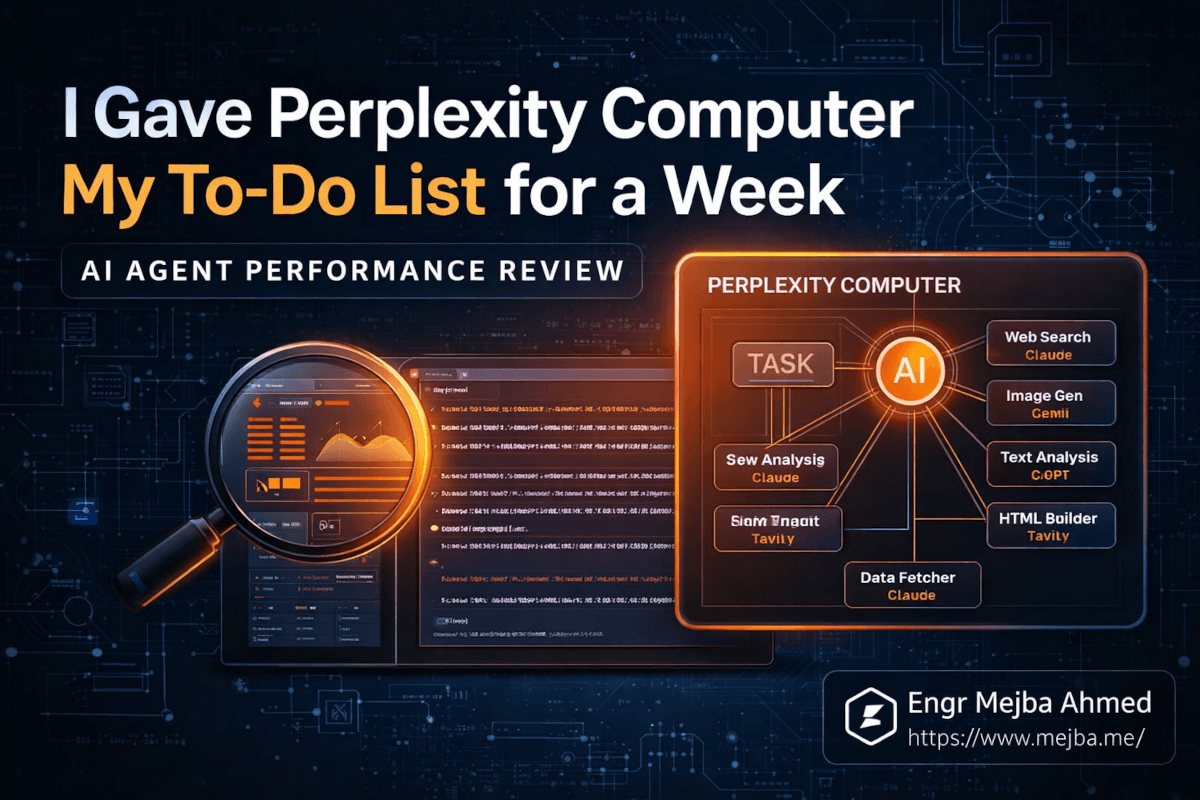
Der Name "Perplexity Computer" tut diesem Produkt keinen Gefallen. Er klingt nach einem Hardwareprodukt oder vielleicht einem umbenannten Laptop. Es ist keines von beidem. Perplexity Computer ist eine KI-Agenten-Plattform — stell es dir als eine Kommandozentrale vor, in der du eine komplexe Aufgabe beschreibst und ein KI-System sie zerlegt, Teilaufgaben an spezialisierte Modelle delegiert und die Ergebnisse zusammenfügt.
Die darunterliegende Architektur macht es interessant. Claude sitzt im Zentrum als Orchestrator. Wenn du Perplexity Computer eine Aufgabe gibst, analysiert Claude, was passieren muss, und startet dann spezialisierte Sub-Agents — jeder potenziell mit einem anderen KI-Modell — um einzelne Teile zu bearbeiten. Ein Sub-Agent könnte Unternehmen über Websuche recherchieren. Ein anderer generiert Bilder. Ein dritter entwirft E-Mail-Texte. Ein vierter baut eine HTML-Präsentation aus den gesammelten Daten.
Zwanzig-plus Modelle, die parallel arbeiten, koordiniert von einem Dirigenten. Das ist das Versprechen. Und fairerweise ist das ungefähr das, was in der Praxis passiert.
Die Integrationsschicht ist das zweite Stück, das es wert ist, verstanden zu werden. Perplexity Computer verbindet sich über sogenannte "Connectors" mit Gmail, Google Drive, Notion und anderen Produktivitätstools. Du autorisierst den Zugriff — mit granularen Berechtigungen, was ich zu schätzen wusste — und der Agent kann dann deine E-Mails lesen, Notion-Seiten erstellen, Nachrichten entwerfen und Dokumente im Rahmen der Aufgabenausführung abrufen.
Wenn du Zapier oder Make benutzt hast, ist das Connector-Konzept vertraut. Der Unterschied ist, dass hier die KI entscheidet, wann und wie diese Connectors basierend auf deinen Anweisungen verwendet werden. Du baust keinen Workflow. Du beschreibst, was du willst, und das System kümmert sich um die technischen Verbindungen.
Das klingt auf dem Papier magisch. In der Praxis ist das "Herausfinden" der Teil, bei dem es sowohl aufregend als auch kompliziert wird.
Wie bewältigt Perplexity Computer echte Geschäftsaufgaben?
Jack Roberts hat drei spezifische Szenarien getestet, die widerspiegeln, was ein Unternehmer tatsächlich von einem KI-Assistenten braucht. Ich habe ähnliche Tests durchgeführt. Hier ist, was passiert ist.
Test 1: Strategische Partnerrecherche
Die Aufgabe war einfach: identifiziere fünf potenzielle strategische Partner für ein KI-Automatisierungsunternehmen, recherchiere jeden einzelnen und liefere die Ergebnisse als HTML/CSS-Präsentation.
Perplexity Computer zerlegte dies in parallele Recherchestränge. Mehrere Sub-Agents gingen gleichzeitig los — suchten nach Unternehmen, holten Umsatzdaten, identifizierten Partnerschaftsstrukturen, fanden Provisionsdetails. Die Ergebnisse kamen als gestyltes HTML-Dokument mit Unternehmensprofilen, geschätztem Partnerwert und Kontaktinformationen zurück.
Das Gute: Die Parallelisierung war wirklich schnell. Was einen menschlichen Rechercheur zwei bis drei Stunden Tab-Wechsel und Notizen machen kosten würde, passierte in Minuten. Die Präsentationsformatierung war sauber genug, um sie mit einem Team zu teilen.
Das weniger Gute: Die Kriterien für die Partnerauswahl waren... breit. Der Agent warf ein weites Netz aus, anstatt klärende Fragen zu stellen, welche Art von Partnerschaften am wichtigsten waren. Wenn du eine KI-Beratung betreibst, gibt es einen gewaltigen Unterschied zwischen "Unternehmen, die Affiliate-Programme anbieten" und "Unternehmen, deren Kundenbasis sich mit deiner überschneidet und deren Produkt deinen Service ergänzt." Perplexity Computer entschied sich standardmäßig für die erste Interpretation.
Das ist ein Muster, das ich wiederholt bemerkt habe, und ich werde gleich erklären, warum es wichtig ist.
Test 2: Wettbewerbsintelligenz-Dashboard
Dieser Test hat mich am meisten beeindruckt. Die Aufgabe: recherchiere zehn Speech-to-Text-Unternehmen, sammle Nutzerzahlen, Bewertungen und Preise und baue dann ein interaktives Dashboard.
Der Agent produzierte ein tatsächlich funktionierendes HTML-Dashboard mit Wettbewerberprofilen, Preisvergleichstabellen, Sentimentanalyse aus Nutzerbewertungen und filterbaren Daten. Mehrere Modelle übernahmen verschiedene Aspekte — eines scrapte Preisseiten, ein anderes analysierte Review-Sentiment, ein weiteres baute die Visualisierungsschicht.
Ich muss ehrlich sein: Die Dashboard-Qualität übertraf meine Erwartungen. Es war kein Tableau. Aber als schneller Wettbewerbs-Snapshot, den du in ein Strategiemeeting einbringen kannst? Absolut brauchbar. Die Sentimentanalyse holte echte Nutzerbeschwerden und Lob heraus, keine generischen Zusammenfassungen.
Die Token-Kosten für diese Aufgabe lagen bei etwa 400-500 Credits von den monatlichen 10.000 im Max-Tarif. Angemessen für die Ausgabequalität.
Test 3: Reddit nach KI-Geschäftsideen durchforsten
Das war der kreativste Anwendungsfall. Die Anweisung: scanne Reddit nach Posts mit hohem Engagement über KI-Schmerzpunkte und identifiziere dann tragfähige Geschäftsmöglichkeiten.
Der Agent durchsuchte mehrere Subreddits, identifizierte wiederkehrende Themen und kam mit einer strukturierten Analyse zurück. Die interessanteste Erkenntnis — die sowohl Jack als auch ich wirklich aufschlussreich fanden — drehte sich um KI-Halluzinationsangst. Menschen sind nicht nur genervt von Halluzinationen. Es entsteht ein Markt rund um "Vertrauensinfrastruktur" für KI-Ausgaben. Verifizierungsschichten, Konfidenz-Scoring, Human-in-the-Loop-Checkpoints.
Das ist die Art von Erkenntnis, für die ein menschlicher Analyst stundenlang Reddit durchscrollen muss. Der Agent kam in Minuten dorthin, indem er Mengen verarbeitete, die keine einzelne Person bewältigen kann.
Aber hier wird es interessant — und hier zeigt sich die größte Einschränkung von Perplexity Computer.
Das fehlende Gespräch: Warum keine Rückfragen alles verändert
Über alle drei Tests hinweg, und bei jeder Aufgabe, die ich während meiner Woche mit dem Tool ausgeführt habe, hat Perplexity Computer mir kein einziges Mal eine klärende Frage gestellt, bevor es loslegte.
Denk darüber nach, was passiert, wenn du eine Aufgabe an einen schlauen Junior-Mitarbeiter gibst. Der kommt mit Fragen zurück. "Wenn du 'strategische Partner' sagst, meinst du dann Technologieintegrationen, Empfehlungspartnerschaften oder Co-Marketing-Vereinbarungen?" Dieser Austausch dauert fünf Minuten und spart fünf Stunden verschwendete Arbeit.
Perplexity Computer überspringt diesen Schritt komplett. Du gibst Anweisungen, und es sprintet los. Der Agent interpretiert deinen Prompt, trifft Annahmen über Mehrdeutigkeiten und führt mit voller Geschwindigkeit aus. Manchmal stimmen diese Annahmen mit dem überein, was du wolltest. Manchmal nicht, und du hast Credits für eine Ausgabe verbrannt, die am Ziel vorbeigeht.
Jack bezeichnete dies als seine Hauptfrustration, und nach einer Woche Testen stimme ich vollkommen zu. Das Fehlen einer interaktiven Planungsphase vor der Ausführung ist die größte Schwäche von Perplexity Computer.
Hier ist, warum es in der Praxis wichtig ist: Wenn du pro Credit bezahlst und der Agent 300-500 Credits pro komplexer Aufgabe verbraucht, ist eine falsche Interpretation nicht nur ärgerlich — sie ist teuer. Ich habe ungefähr 200 Credits für eine Rechercheaufgabe verbrannt, die in die falsche Richtung ging, weil der Agent "schnell wachsende SaaS-Unternehmen" als "Unternehmen mit den meisten Mitarbeitern" interpretierte statt "Unternehmen mit der schnellsten Umsatzwachstumsrate." Eine zehn Sekunden lange Rückfrage hätte das verhindert.
Die Lösung scheint offensichtlich: Füge einen Planungsschritt hinzu, in dem der Agent seinen Ansatz skizziert und um Bestätigung bittet, bevor er ausführt. Claude macht das in anderen Kontexten bereits gut. Das Fehlen hier fühlt sich wie ein bewusster Kompromiss zugunsten von Geschwindigkeit über Genauigkeit an, und ich denke, es ist der falsche für Aufgaben, die echtes Geld kosten.
Das gesagt — und das ist die Nuance, die die meisten Reviews übersehen — der Mangel an Rückfragen ist nur dann ein Problem, wenn deine Prompts mehrdeutig sind. Wenn ich extrem spezifische Anweisungen mit expliziten Kriterien, Anforderungen an das Ausgabeformat und Scope-Grenzen schrieb, waren die Ergebnisse durchgehend stark. Das Tool belohnt Präzision. Vage Prompts ergeben vage Ergebnisse. Detaillierte Prompts ergeben detaillierte Ergebnisse.
Was uns zu der Fähigkeit bringt, die tatsächlich bestimmt, ob Perplexity Computer $200 pro Monat für dich wert ist.
Die Prompt-Engineering-Steuer: Was dir niemand über KI-Agenten erzählt
Es gibt eine unbequeme Wahrheit über jedes KI-Agenten-Tool, das derzeit auf dem Markt ist, und Perplexity Computer ist keine Ausnahme: Die Zeit, die du bei der Ausführung sparst, zahlst du teilweise beim Prompt Engineering zurück.
Einen guten Prompt für Perplexity Computer zu schreiben ist nicht wie einen ChatGPT-Prompt zu schreiben. Du führst kein Gespräch. Du schreibst ein Briefing. Eine Projektspezifikation. Je präziser du Erfolgskriterien, Ausgabeformat, Scope-Grenzen und Qualitätsschwellen definierst, desto besser die Ergebnisse.
Hier ist ein Beispiel. Dieser Prompt liefert mittelmäßige Ergebnisse:
Research my competitors in the AI automation space and create a summary.
Dieser Prompt liefert wirklich nützliche Ausgaben:
Research 8 companies that offer AI workflow automation for small businesses
(under 500 employees). For each company, find:
- Founding year and total funding raised
- Primary product offering and pricing tiers
- Number of integrations supported
- G2 or Capterra rating (most recent)
- One specific customer complaint from reviews

Output as an HTML table with sortable columns. Include a 2-paragraph
executive summary at the top highlighting the biggest gap in the market
that none of these companies adequately address.
Der zweite Prompt hat mich drei Minuten gekostet. Die Ausgabe, die er generierte, hätte mich vier bis fünf Stunden manueller Arbeit gekostet. Das ist immer noch eine massive Netto-Zeitersparnis. Aber die drei Minuten Prompt-Erstellung zählen, und wenn du der Typ bist, der "mach meine Recherche" tippen und genau das bekommen will, was er braucht, wirst du enttäuscht sein.
Ich habe angefangen, eine Prompt-Vorlagenbibliothek für wiederkehrende Perplexity Computer-Aufgaben zu führen. Partnerrecherche. Wettbewerbsanalyse. Content-Chancen-Identifikation. Jede Vorlage brauchte fünfzehn bis zwanzig Minuten zum Verfeinern durch Iteration. Jetzt tausche ich die Details aus und führe sie aus. Die anfängliche Investition amortisiert sich innerhalb von zwei bis drei Nutzungen.
Wenn du lieber jemanden hättest, der diese Art von KI-Automatisierungs-Workflow von Grund auf aufbaut — Prompt-Vorlagen, Connector-Einrichtung, das gesamte System — dann übernehme ich genau diese Art von Projekten. Du kannst sehen, was ich gebaut habe unter fiverr.com/s/EgxYmWD.
Aber die Vorlagen lösen das Problem nur teilweise. Die eigentliche Frage ist, ob die Ausführungsqualität von Perplexity Computer die Premium-Preisgestaltung rechtfertigt.
Die $200-Frage aufgeschlüsselt
Die Preisgestaltung von Perplexity Computer ist binär. Der kostenlose Tarif gibt dir die Standard-Perplexity-Suche — keinen Computer-Zugang, keine Agenten-Funktionen. Um irgendetwas zu nutzen, was ich in diesem Artikel beschrieben habe, brauchst du den Max-Tarif für $200 pro Monat.
Diese $200 geben dir 35.000 Bonuscredits (einmalig) plus 10.000 monatliche Credits. Basierend auf meinen Tests verbraucht eine mäßig komplexe Aufgabe — Wettbewerbsrecherche, Content-Generierung, E-Mail-Entwurf — zwischen 200 und 500 Credits. Einfache Aufgaben wie Zusammenfassungen oder Einzelabfragen kosten 50-100 Credits.
Lass mich die Rechnung aufmachen, die zählt. Jacks drei Testaufgaben verbrauchten insgesamt etwa 1.300 Credits, rund 13% des monatlichen Kontingents. Das bedeutet, du könntest ungefähr 20-25 ähnlich komplexe Aufgaben pro Monat ausführen, bevor du an die Credit-Grenze stößt.
Ist das $200 wert? Es hängt komplett davon ab, was deine Zeit wert ist und was du ersetzt.
Szenario A: Du ersetzt manuelle Recherche. Wenn du derzeit 3-4 Stunden pro Woche für Wettbewerbsrecherche, Marktanalyse oder Kundenidentifikation aufwendest und Perplexity Computer das auf 30 Minuten Prompt-Schreiben plus Prüfung reduziert, gewinnst du 10-14 Stunden pro Monat zurück. Bei jedem vernünftigen Stundensatz sind $200 ein Schnäppchen.
Szenario B: Du ersetzt vorhandene KI-Tools. Wenn du bereits ChatGPT Pro ($20/Monat) und ein separates Recherche-Tool wie Tavily oder SerpAPI nutzt, wird der Vergleich enger. Die Orchestrierung von Perplexity Computer bietet echten Mehrwert gegenüber Single-Model-Tools für mehrstufige Aufgaben. Aber für einfache Anfragen ist es überdimensioniert.
Szenario C: Du erkundest aus Neugier. Tu es nicht. Der kostenlose Tarif reicht für einfache Suche. Der Sprung auf $200 ergibt nur Sinn, wenn du spezifische, wiederkehrende mehrstufige Aufgaben hast, die derzeit deine Zeit auffressen.
Die 35.000 Bonuscredits bei der Anmeldung sind ein kluger Schachzug von Perplexity. Sie geben dir genug Spielraum, um komplexe Workflows zu testen, ohne in deinem ersten Monat Credit-Angst zu haben. Nachdem dieser Bonus aufgebraucht ist, erfordern die 10.000 monatlichen Credits sorgfältigeres Budgetieren.
Eine Sache, die ich mir wünschen würde: einen mittleren Tarif. Etwas um die $50-80/Monat mit 3.000-4.000 Credits für Leute, die gelegentlich Computer-Zugang brauchen, aber nicht genug komplexe Aufgaben ausführen, um den vollen Max-Tarif zu rechtfertigen. Der Sprung von kostenlos auf $200 ist steil genug, um viele potenzielle Nutzer abzuschrecken, die gerne $75 zahlen würden.
Das Sicherheitsmodell, das tatsächlich Sinn ergibt
Ich hätte diesen Abschnitt fast übersprungen, was ein Fehler gewesen wäre. Der Sicherheitsansatz von Perplexity Computer ist eines seiner stärksten — und am meisten unterschätzten — Features.
Wenn du Gmail, Notion oder Google Drive verbindest, folgt das System dem, was Sicherheitsexperten das "Prinzip der minimalen Berechtigung" nennen. Der Agent fordert nur die minimalen Berechtigungen an, die für die spezifische Aufgabe benötigt werden. Gmail zum E-Mail-Verfassen verbinden? Es bekommt Schreibzugriff, keinen vollen Postfach-Lesezugriff. Notion zur Seitenerstellung verknüpfen? Es bekommt keinen Zugriff auf deinen gesamten Workspace.
Als jemand, der in der Cybersicherheit arbeitet, ist das enorm wichtig. Die meisten KI-Agenten-Plattformen fordern breite OAuth-Scopes an, weil es für Entwickler einfacher ist. Der Ansatz von Perplexity deutet darauf hin, dass ihr Sicherheitsteam tatsächlich über Bedrohungsmodelle nachgedacht hat, anstatt einfach die schnellste Integration auszuliefern.
Das Feld für benutzerdefinierte Anweisungen — auf 1.500 Zeichen begrenzt — ist ein weiteres subtiles Sicherheitsmerkmal. Es beschränkt, was der Agent ohne explizite aufgabenspezifische Prompts tun kann. Du kannst Leitplanken setzen wie "sende niemals E-Mails, ohne mir vorher einen Entwurf zu zeigen" oder "greife nicht auf Google Drive-Dateien im Ordner Finanzen zu." Diese persistenten Anweisungen fungieren als Policy-Schicht zwischen dir und der autonomen Ausführung des Agenten.
Ist es kugelsicher? Nein. Jedes Tool mit Zugriff auf deine E-Mails und Dokumente birgt ein inhärentes Risiko. Aber die Implementierung von Perplexity ist durchdachter als die meisten Konkurrenten, die ich evaluiert habe. Sie bauen Vertrauen durch Einschränkung auf, was der richtige Instinkt ist.
Was Claudes Orchestrierungsrolle für die KI-Agenten-Landschaft bedeutet
Hier ist die Sache, die mich an Perplexity Computer am meisten fasziniert, und sie hat nichts mit Features oder Preisen zu tun.
Claude — Anthropics Modell — dient als Orchestrator. Das Gehirn, das Aufgaben zerlegt, Sub-Agents zuweist und Ergebnisse zusammenführt. Nicht GPT. Nicht Gemini. Claude. Das ist eine bedeutende architektonische Entscheidung mit Implikationen, über die es sich nachzudenken lohnt.
Claudes Stärke lag schon immer im strukturierten Denken und der Instruktionsbefolgung. Es ist das Modell, zu dem ich greife, wenn ich etwas brauche, das ein komplexes Briefing sorgfältig analysiert und methodisch ausführt, anstatt kreativ zu improvisieren. Das macht es zu einer ausgezeichneten Wahl für Orchestrierung, wo die Hauptaufgabe Zerlegung und Delegation ist und nicht Generierung.
Was darunter passiert, ist eine Art KI-Teamstruktur. Claude fungiert als Projektmanager. Spezialisierte Modelle fungieren als einzelne Mitwirkende — eines übernimmt Webrecherche, ein anderes Bildgenerierung, ein weiteres Datenvisualisierung. Der Projektmanager muss nicht der Beste in jeder einzelnen Fähigkeit sein. Er muss der Beste darin sein zu verstehen, welche Fähigkeiten benötigt werden und diese zu koordinieren.
Ich habe ähnliche Multi-Agenten-Architekturen mit Claude Code und Agenten-Teams gebaut, und das Muster funktioniert. Das Orchestrator-Modell ist weniger wegen seiner rohen Leistungsfähigkeit relevant als wegen seiner Zuverlässigkeit bei der Befolgung komplexer Anweisungen ohne Abdriften. Claude ist im Moment wohl das beste verfügbare Modell für genau diesen Job.
Diese Architektur bedeutet auch, dass Perplexity Computer sich verbessert, wann immer sich eines seiner Komponenten-Modelle verbessert. Ein besseres Bildgenerierungsmodell erscheint? Der Agent wird bei visuellen Aufgaben besser, ohne dass Perplexity eine Zeile Code ändert. Ein schnelleres Recherche-Modell wird gelauncht? Die Integration verbessert die Recherchegeschwindigkeit. Die Plattform wird zum Nutznießer des Fortschritts des gesamten KI-Ökosystems, nicht nur der Roadmap eines einzelnen Modellanbieters.
Das ist eine kluge Wette. Und deshalb denke ich, dass Perplexity Computer — oder etwas sehr Ähnliches — repräsentiert, wohin KI-Tools 2026 und darüber hinaus gehen.
Das "KI-Mitarbeiter"-Denkmodell: Nützlich oder gefährlich?
Jack Roberts beschreibt Perplexity Computer als einen "KI-Mitarbeiter", bei dem du den CEO spielst. Strategische Richtung vorgeben, Ausführung delegieren, Ergebnisse prüfen. Es ist eine überzeugende Metapher, und ich habe mich nach einer Woche Nutzung dabei ertappt, in diesen Begriffen zu denken. Aber ich möchte leicht widersprechen, denn die Metapher hat einen Fehlermodus.
Echte Mitarbeiter lernen. Sie bauen im Laufe der Zeit Kontext auf. Sie erinnern sich, dass die Partnerschaftsinitiative letztes Quartal mit Unternehmen X wegen Preisdifferenzen gescheitert ist, also passen sie ihren Ansatz dieses Quartal an. Sie bemerken Muster über Aufgaben hinweg und weisen proaktiv auf Dinge hin.
Perplexity Computer tut nichts davon. Jede Aufgabe ist zustandslos. Der Agent erinnert sich nicht, was er gestern getan hat. Er lernt deine Präferenzen nicht über Sitzungen hinweg (abgesehen von den 1.500 Zeichen benutzerdefinierter Anweisungen). Er schlägt nicht proaktiv Aufgaben basierend auf beobachteten Mustern vor.
Das macht die "Mitarbeiter"-Rahmung auf eine bestimmte Weise irreführend: Sie weckt Erwartungen an kontextuelle Intelligenz, die das Tool nicht liefern kann. Ein besseres Denkmodell ist "KI-Freelancer." Du schreibst ein detailliertes Briefing. Der Freelancer führt es gekonnt aus. Er liefert Ergebnisse und geht. Beim nächsten Mal schreibst du wieder ein neues Briefing von Grund auf.
Diese Neuausrichtung verändert, wie du das Tool benutzt. Du hörst auf zu erwarten, dass es Dinge "weiß", und fängst an, in bessere Briefings zu investieren. Du baust dein eigenes institutionelles Gedächtnis auf (in Prompt-Vorlagen, in gespeicherten Outputs, in Notion-Wikis), anstatt zu erwarten, dass das Tool es für dich pflegt.
Ich finde das eigentlich in Ordnung. Ein zuverlässiger Freelancer, der aus einem klaren Briefing heraus gut ausführt, ist enorm wertvoll. Aber so zu tun, als wäre es ein Mitarbeiter, erzeugt Frustration, wenn er zwischen Sitzungen alles vergisst.
Die benutzerdefinierten Anweisungen helfen, diese Lücke teilweise zu überbrücken. Ich habe meine verwendet, um Präferenzen festzuhalten: "Formatiere Wettbewerbsrecherche immer als Tabellen. Gib Preisdaten immer in USD an. Markiere immer, wenn eine Quelle älter als 6 Monate ist." Diese persistenten Anweisungen schaffen eine dünne Schicht von "Gedächtnis", und ich empfehle, alle 1.500 Zeichen durchdacht zu nutzen.
Was ich nach einer Woche anders machen würde
Wenn ich heute mit Perplexity Computer von vorne anfangen würde, mit dem Wissen, das ich jetzt habe, ist hier genau, was ich an meinem Ansatz ändern würde.
Erstens würde ich Tag eins für Prompt-Vorlagen verwenden, nicht für Aufgaben. Mein erster Tag war verstreut — zufällige Funktionen testen, Credits für Erkundung verbrauchen. Das ist natürlich, aber teuer. Identifiziere stattdessen deine drei bis fünf häufigsten Recherche- oder Analyseaufgaben und verbringe die erste Sitzung damit, Prompts für jede zu verfeinern. Testen, anpassen, erneut testen. Diese Vorlagen werden dein ROI-Multiplikator für jede zukünftige Sitzung.
Zweitens würde ich Connectors am ersten Tag einrichten, aber erst am dritten Tag nutzen. Die Gmail- und Notion-Integrationen sind leistungsstark, aber ich stellte fest, dass Aufgaben, die Recherche und Tool-Aktionen kombinieren (wie "recherchiere Wettbewerber und schicke mir eine Zusammenfassung per E-Mail"), mehr Credits verbrauchten und schlechtere Ergebnisse lieferten als Aufgaben, die eine Sache gut machten. Beginne mit reinen Recherche- und Generierungsaufgaben. Füge Connector-basierte Aktionen hinzu, sobald du verstehst, wie der Agent deine Anweisungen interpretiert.
Drittens würde ich sofort benutzerdefinierte Anweisungen schreiben. Lass diese 1.500 Zeichen nicht leer. Meine enthalten jetzt Ausgabeformat-Präferenzen, Qualitätsschwellen, Quellenanforderungen und explizite Anweisungen, niemals E-Mails zu senden, ohne mir den Entwurf zu zeigen. Diese kleine Investition verbesserte die Ausgabequalität bei jeder nachfolgenden Aufgabe.
Viertens würde ich ein Credit-Budget-Spreadsheet führen. Es klingt mühsam. Es hat mich zehn Minuten gekostet, es einzurichten. Aber die Verfolgung des Credit-Verbrauchs pro Aufgabentyp offenbarte, dass manche Aufgaben dramatisch credit-effizienter waren als andere. Wettbewerbsrecherche: hoher Wert pro Credit. E-Mail-Entwurf: niedriger Wert pro Credit (ich kann E-Mails schneller selbst schreiben). Diese Transparenz veränderte, wie ich mein Monatsbudget verteilte.
Fünftens würde ich es mit einem menschlichen Prüfschritt koppeln und ihn niemals überspringen. Die Ausgaben des Agenten sind gute Ausgangspunkte. Sie sind selten fertige Produkte. Jedes Dashboard, jede Recherchezusammenfassung, jeder E-Mail-Entwurf brauchte menschliche Bearbeitung — Analyse schärfen, subtile Fehler in Unternehmensdaten korrigieren, Tonfall anpassen. Plane fünfzehn bis zwanzig Minuten Prüfung pro komplexer Aufgabenausgabe ein.
Wohin das führt (und warum ich genau hinsehe)
Perplexity Computer, wie es im März 2026 existiert, ist ein Version-1.0-Produkt mit einem Version-2.0-Preisschild. Die Kern-Orchestrierungstechnologie ist wirklich beeindruckend. Die Ausführungsqualität bei gut formulierten Aufgaben ist hoch. Das Sicherheitsmodell ist durchdacht. Die Integrationen funktionieren.
Aber die fehlenden Teile sind erheblich. Keine interaktive Planung. Kein sitzungsübergreifendes Gedächtnis. Kein Präferenzlernen. Keine Möglichkeit zu fragen "Hey, meintest du X oder Y?", bevor Credits für eine Aufgabe verbrannt werden. Das sind keine Randfälle — es sind die Features, die ein leistungsfähiges Tool von einem zuverlässigen Teammitglied trennen.
Hier ist meine Vorhersage: Innerhalb von sechs Monaten wird Perplexity einen Planungsschritt hinzufügen. Eine Form von "hier ist mein Verständnis deiner Aufgabe, hier ist mein Plan, bestätige bevor ich ausführe." Die Credit-Verlust-Feedbackschleife ist für genug Nutzer zu schmerzhaft, als dass die Feature-Anforderung vermeidbar wäre. Wenn das kommt, steigt das Wertversprechen deutlich.
Der breitere Trend zählt mehr als jedes einzelne Produkt. KI-Agenten, die mehrere Modelle parallel orchestrieren, mit deinen echten Produktivitätstools verbunden, mehrstufige Aufgaben autonom ausführen — das ist die Richtung. Perplexity Computer ist eine Implementierung dieser Vision. Googles Project Mariner ist eine andere. OpenAIs Agenten-Framework ist eine dritte. Das Konzept konvergiert branchenübergreifend.
Was Gewinner von Auch-Rans in diesem Bereich trennen wird, ist nicht die reine Leistungsfähigkeit. Es wird die Benutzererfahrung rund um diese Leistungsfähigkeit sein. Wie gut kommuniziert der Agent, was er tut? Wie elegant geht er mit Mehrdeutigkeit um? Wie effizient nutzt er Credits? Wie vertrauenswürdig fühlt er sich mit Zugriff auf deine E-Mails?
Auf diesen Dimensionen schneidet Perplexity Computer uneinheitlich ab. Stark bei Vertrauen und Transparenz. Schwach bei Kommunikation und Umgang mit Mehrdeutigkeit. Solide bei Leistungsfähigkeit. Teuer, aber vertretbar bei der Preisgestaltung.
Solltest du dich tatsächlich anmelden?
Ich mache es konkret.
Melde dich an, wenn du ein Unternehmen oder eine Freelance-Praxis betreibst, in der du regelmäßig Wettbewerbsrecherche, Marktanalyse, Kundenidentifikation oder Content-Generierung über mehrere Quellen brauchst. Wenn du fünf oder mehr Stunden pro Woche für mehrstufige Rechercheaufgaben aufwendest, die in einem schriftlichen Briefing beschrieben werden könnten, wird sich Perplexity Computer innerhalb des ersten Monats bezahlt machen.
Melde dich nicht an, wenn du hauptsächlich Antworten auf einzelne Fragen, konversationelle KI oder Schreibhilfe brauchst. ChatGPT, Claude oder Perplexitys kostenloser Suchtarif decken diese Anwendungsfälle zu einem Bruchteil der Kosten ab. Die monatliche Verpflichtung von $200 ergibt nur Sinn, wenn du durchgehend komplexe, mehrstufige Agenten-Aufgaben ausführst.
Warte, wenn du fasziniert bist, aber keinen unmittelbaren Anwendungsfall hast. Das Produkt wird in sechs Monaten deutlich besser sein. Der Planungsschritt wird kommen. Die Credit-Effizienz wird sich verbessern. Early Adopter zahlen eine Prämie, um den Workflow zu betatesten — und das ist in Ordnung, wenn du die Funktionalität jetzt brauchst, aber unnötig, wenn du nur erkundest.
Nach einer Woche Testen verlängere ich mein Abo für einen weiteren Monat. Die Wettbewerbsintelligenz-Workflows allein haben mir genug Zeit gespart, um die Kosten zu rechtfertigen. Aber ich halte es an der kurzen Leine. Wenn meine Prompt-Vorlagen sich nicht mehr weiterentwickeln — wenn ich keine neuen wertvollen Anwendungsfälle mehr finde — wechsle ich ohne zu zögern zurück zum kostenlosen Tarif.
Die technologische Richtung ist aufregend. Das aktuelle Produkt ist nützlich, aber unvollständig. Und die Frage, die bestimmen wird, ob Perplexity Computer ein unverzichtbares Tool oder eine Fußnote wird, dreht sich nicht um KI-Leistungsfähigkeit. Es geht darum, ob Perplexity die Mensch-KI-Kommunikationsschicht baut, die einen leistungsstarken Motor in einen vertrauenswürdigen Mitarbeiter verwandelt.
Sie sind noch nicht da. Aber sie sind näher dran als alle anderen, die ich getestet habe.
Häufig gestellte Fragen
Was ist Perplexity Computer und wie funktioniert es?
Perplexity Computer ist eine KI-Agenten-Plattform, die Claude als zentralen Orchestrator nutzt, um 20+ spezialisierte KI-Modelle parallel zu koordinieren. Du beschreibst eine komplexe Aufgabe, und das System zerlegt sie in Teilaufgaben, die von verschiedenen Modellen bearbeitet werden, und fügt dann die Ergebnisse zusammen. Die vollständige Architektur-Aufschlüsselung findest du im Abschnitt oben darüber, was Perplexity Computer eigentlich ist.
Wie viel kostet Perplexity Computer pro Monat?
Der Max-Tarif kostet $200/Monat und beinhaltet 35.000 einmalige Bonuscredits plus 10.000 monatliche Credits. Eine mäßig komplexe Aufgabe verbraucht 200-500 Credits, was bedeutet, dass du ungefähr 20-25 komplexe Aufgaben pro Monat ausführen kannst. Es gibt keinen mittleren Preistarif — der kostenlose Tarif schließt Computer-Zugang vollständig aus.
Kann Perplexity Computer sicher auf meine E-Mails und Dokumente zugreifen?
Perplexity Computer verwendet ein Sicherheitsmodell mit minimalen Berechtigungen und fordert nur die Mindestberechtigungen an, die für jeden verbundenen Dienst benötigt werden. Die Gmail-Integration gewährt Schreibzugriff ohne volle Postfach-Leseberechtigungen. Du kannst persistente benutzerdefinierte Anweisungen setzen, um Leitplanken wie die Pflicht zur Entwurfsprüfung vor dem Senden hinzuzufügen.
Ist Perplexity Computer besser als ChatGPT für Rechercheaufgaben?
Für mehrstufige Recherche, die parallele Ausführung über mehrere Quellen erfordert, übertrifft Perplexity Computer Single-Model-Tools wie ChatGPT. Für einfache Fragen, konversationelle KI oder Schreibhilfe ist ChatGPT für $20/Monat kosteneffektiver. Der Wertunterschied wächst mit zunehmender Aufgabenkomplexität.
Erinnert sich Perplexity Computer an frühere Aufgaben?
Nein. Jede Aufgabe ist zustandslos — der Agent behält keinen Kontext zwischen Sitzungen. Du kannst dies teilweise umgehen mit dem 1.500-Zeichen-Feld für benutzerdefinierte Anweisungen, das über Aufgaben hinweg persistent ist. Für tiefere Kontextpersistenz pflege deine eigene Prompt-Vorlagenbibliothek und Referenzdokumentation extern.
Let's Work Together
Looking to build AI systems, automate workflows, or scale your tech infrastructure? I'd love to help.
- Fiverr (custom builds & integrations): fiverr.com/s/EgxYmWD
- Portfolio: mejba.me
- Ramlit Limited (enterprise solutions): ramlit.com
- ColorPark (design & branding): colorpark.io
- xCyberSecurity (security services): xcybersecurity.io