"You need to learn Python. And TensorFlow. And deploy on AWS. And manage databases. And..."
I've heard this advice a thousand times from AI influencers who seem more interested in gatekeeping than actually helping people build useful things. Here's the truth they won't tell you: 80% of AI system results come from 20% of the complexity. The rest? Noise that keeps you stuck in tutorial hell instead of shipping real products.
I spent months drowning in that noise. Learning frameworks I'd never use. Watching courses that promised mastery but delivered confusion. Then I discovered an approach that changed everything: focus on practical AI systems that solve real problems, skip the unnecessary complexity, and use tools that handle the heavy lifting.
This isn't another "AI will change the world" fluff piece. This is the playbook for building production-ready AI automation systems that actually work—the same systems entrepreneurs are using to automate lead generation, content analysis, and business intelligence right now.
The Problem with Most AI Tutorials
Let's be honest about something. Most AI tutorials are built backwards.
They start with the technology—"Here's how to use this API"—instead of starting with the problem. They teach you to build hammers when you don't even know what nails look like. The result? Developers and entrepreneurs who know a lot of disconnected facts but can't actually ship anything useful.
I was stuck in this loop. I could explain how large language models worked. I could debate the merits of different AI providers. But when a client asked me to build them an AI system that would analyze their competitors' content and generate insights?
Blank stare.
Not because I lacked knowledge—I had plenty of that. I lacked a framework for turning knowledge into working systems.
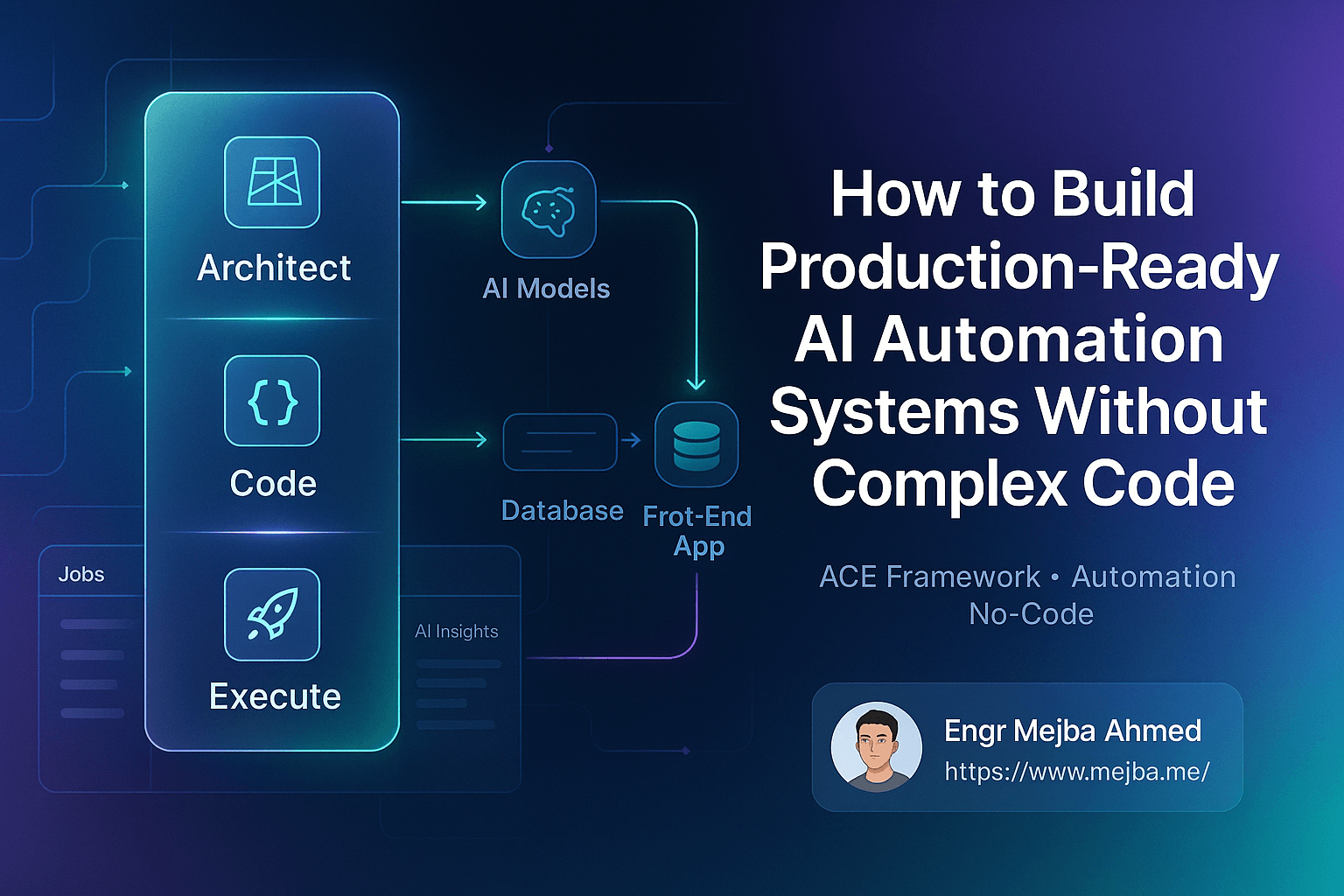
The ACE Framework: Architect, Code, Execute
The breakthrough came from a simple three-step framework that flips the script on how we build AI systems:
Architect (A): Design the system by focusing on the core problem and solution. No code yet. Just clarity.
Code (C): Develop the AI system using APIs, automation, and databases. But here's the key—use tools that handle the complexity for you.
Execute (E): Deploy, publish, and maintain the system for real-world use.
Sounds simple, right? That's the point. Einstein supposedly said something like "If I had an hour to solve a problem, I'd spend 55 minutes thinking about the problem and 5 minutes on the solution." The ACE framework forces you to front-load that thinking.
Most people skip straight to "Code" and wonder why their AI projects fail. They build solutions for problems they haven't properly defined. They automate processes they don't understand. They integrate tools without knowing why.
The Four Components of Every AI System
Before diving into the build, let's understand what we're actually creating. Every practical AI automation system has four components:
1. Automation — The workflows that move data and trigger actions. This is where tools like N8N shine. Think of it as the nervous system of your AI project.
2. Artificial Intelligence — The brain that processes information and generates insights. Google Gemini, Claude, or other AI models handle this.
3. Data — The information collected from platforms and stored in databases. Without data, your AI has nothing to think about.
4. Front-end Interface — The user interaction layer where people actually use your system. This is where Lovable changes the game.
Miss any one of these components and your system falls apart. But here's what most tutorials get wrong: you don't need to build each component from scratch.
Level 1: Building a Basic YouTube Growth Agent
Let me show you what's possible by walking through a real example—a YouTube growth agent that analyzes videos, extracts transcripts, and generates actionable insights for channel growth.
Why YouTube? Because the principles apply everywhere. Swap "YouTube videos" for "competitor websites" or "customer support tickets" and you've got a lead generation system or customer intelligence platform. The architecture stays the same.
Setting Up the Front-End with Lovable
Lovable is a no-code/low-code platform that handles the integration nightmares most developers dread. It connects your front-end to automation workflows, AI models, and databases without requiring you to manage APIs, webhooks, or authentication flows.
The basic prototype lets users:
- Input a YouTube video URL
- Instantly retrieve video metrics (views, likes, comments)
- Get video transcripts extracted automatically
- Generate AI-powered intros and content summaries
- Save videos and data for later analysis
In traditional development, this would require:
- Building a React or Next.js front-end
- Setting up API routes for YouTube data
- Managing authentication for the YouTube API
- Creating database schemas and queries
- Handling errors, loading states, and edge cases
With Lovable? You describe what you want and it handles the plumbing.
Connecting Automation with N8N
N8N automates the data scraping and extraction from YouTube. But here's what makes the modern approach different: the Model Context Protocol (MCP).
MCP simplifies webhook and API integrations in ways that weren't possible even a year ago. Instead of manually configuring endpoints, handling authentication, and parsing responses, you connect tools through a standardized protocol.
The N8N workflow:
- Receives a video URL from your Lovable front-end
- Scrapes video metadata from YouTube
- Extracts the transcript
- Sends data to your AI model for analysis
- Returns results to be stored and displayed
What used to take days of debugging webhook configurations now takes an afternoon of connecting blocks.
Storing Data with Supabase
Supabase serves as the scalable, cloud-based database for storing video data. It's accessible via SQL but abstracted by Lovable for ease of use—meaning you don't need to write database queries unless you want to.
The database stores:
- Video metadata (title, views, likes, publish date)
- Extracted transcripts
- AI-generated summaries and insights
- User-saved videos and notes
For quick prototyping, Lovable provides its own backend storage. But Supabase gives you the power to scale and the flexibility to access your data directly when needed.
Level 2: Advanced AI System with Deep Customization
The basic version works. But what if you want more control? What if you need features that no-code tools can't handle?
This is where the ACE framework's "Architect" phase becomes critical. Before writing a single line of code, you need absolute clarity on what you're building and why.
Defining the Problem (Spend Time Here)
For the advanced YouTube growth agent, the problem statement looks like this:
Problem: Content creators struggle to identify what makes certain videos outperform others. They make decisions based on gut feeling rather than data.
Solution: A dashboard that tracks channel growth, identifies outlier videos (content performing significantly above average), analyzes thumbnails and titles, and provides AI-powered strategy suggestions.
Features:
- Outlier video identification (videos with 2x, 5x, 10x average views)
- Sentiment analysis on comments
- Thumbnail and title effectiveness scoring
- AI sparring partner for refining content strategies
- Idea management and tracking queue
Notice how specific this is. Not "an AI dashboard for YouTube." A dashboard with defined features solving a defined problem for defined users.
Architecture and Design
With the problem defined, the architecture emerges naturally. We need:
- YouTube API connection via Google Cloud Console to retrieve channel and video data
- Supabase backend to store ideas, outliers, and analytics
- AI integration with Gemini or Claude for analysis and suggestions
- Dashboard interface for visualization and interaction
For the visual design, reference dashboards from Dribbble can be fed into AI models to ensure consistency and usability. The AI doesn't just generate code—it generates code that looks good.
Dynamic Outlier Calculations
One of the more interesting features is the outlier scoring system. The logic:
A video with twice the average views for your channel is marked as a 2x outlier. Three times average? 3x outlier. This immediately tells you which content resonated and deserves deeper analysis.
The calculation happens dynamically:
- Pull all videos from a channel
- Calculate average views across videos
- Compare each video against that average
- Flag outliers with their multiplier score
- Store for trend analysis over time
This isn't complex machine learning. It's basic math applied strategically to surface insights that would take hours to identify manually.
Taking Your Project Local
For serious customization, you'll want to download your project to a local environment. This is where tools like Anti-gravity, Node.js, and code editors like Cursor or VS Code come in.
Setting Up Your Local Environment
- Install Node.js from nodejs.org — this runs JavaScript outside the browser
- Download your project from Lovable or export from your no-code tool
- Open in Cursor or VS Code for editing
- Run locally with
npm installfollowed bynpm run dev
With the project running locally, you can:
- Make code changes and see results instantly
- Test AI integrations without deployment delays
- Debug issues with proper developer tools
- Add features that require custom code
AI-Assisted Local Development
Here's where it gets interesting. Tools like Cursor and Claude can perform interactive testing and UI adjustments within your local environment.
Need to change the dashboard layout? Describe what you want. Want to add a new data visualization? Ask the AI to implement it. The AI models handle the translation from intention to code.
This isn't replacing developers—it's amplifying them. The AI handles boilerplate and syntax; you handle strategy and decisions.
Deployment and Publishing
A system only matters if people can use it. Here's how to take your AI automation from local development to live production.
Pushing to GitHub
GitHub stores your code and enables collaboration. The process:
- Create a new repository on GitHub
- Initialize git in your local project (
git init) - Add your files (
git add .) - Commit your changes (
git commit -m "Initial commit") - Push to GitHub (
git push origin main)
If you're using Anti-gravity or Cursor, these tools often have built-in terminal access for running git commands directly.
Deploying to Vercel
Vercel connects directly to GitHub for continuous deployment. Once connected:
- Every push to your repository triggers a new deployment
- Custom domains are supported
- Automatic HTTPS and CDN distribution
- Environment variables for API keys and secrets
The live dashboard then provides:
- Real-time video engagement scores
- Market outlier tracking
- Idea management queue
- Competitor analysis (if you've built that feature)
Your AI system is now live, updating automatically with each code change, and accessible to anyone with the URL.
Adapting This for Your Business
The YouTube growth agent is an example. The architecture works for countless applications:
Lead Generation: Replace YouTube videos with LinkedIn profiles or company websites. Scrape public data, analyze with AI, score leads based on fit criteria.
Customer Intelligence: Analyze support tickets or reviews. Identify sentiment trends. Surface common complaints before they become crises.
Content Research: Track competitor blogs or social media. Identify what topics get engagement. Generate content briefs based on gaps.
Market Analysis: Monitor news sources or regulatory filings. Summarize key developments. Alert when relevant changes occur.
The four components remain constant: automation, AI, data, and interface. The specific implementation adapts to your problem.
Tools Referenced in This Guide
Here's the complete toolkit for building practical AI automation systems:
| Tool | Purpose | Link |
|---|---|---|
| Lovable | No-code front-end and integration platform | lovable.dev |
| N8N | Automation workflows and data scraping | n8n.io |
| Supabase | Cloud database for storing and querying data | supabase.com |
| Google Gemini | AI model for design, coding, and architecture | aistudio.google.com |
| Claude | AI model for analysis and coding | claude.ai |
| Anti-gravity | Local app environment for code editing | antigravity.google |
| Cursor | AI-powered code editor | cursor.com |
| Google Cloud Console | YouTube API keys and project management | console.cloud.google.com |
| GitHub | Version control and code repository | github.com |
| Vercel | Cloud hosting and deployment platform | vercel.com |
| Node.js | JavaScript runtime for local development | nodejs.org |
| Dribbble | Design inspiration and references | dribbble.com |
Common Mistakes and How to Avoid Them
After building (and watching others build) dozens of these systems, patterns emerge:
Mistake 1: Starting with tools instead of problems The fix: Write a one-paragraph problem statement before touching any software. If you can't explain the problem clearly, you're not ready to solve it.
Mistake 2: Over-engineering the first version The fix: Build the simplest thing that could possibly work. Ship it. Learn what users actually need. Then add complexity where it matters.
Mistake 3: Ignoring data quality The fix: Garbage in, garbage out applies doubly to AI systems. Spend time understanding your data sources and their limitations before building analysis on top of them.
Mistake 4: Building without feedback loops The fix: Include logging and metrics from day one. You need to know if your AI system is actually helping or just generating confident-sounding nonsense.
Mistake 5: Treating AI outputs as truth The fix: AI models hallucinate. They make confident mistakes. Build verification steps into your workflows and set appropriate expectations with users.
What's Actually Possible Now
I want to be clear about what this guide promises and what it doesn't.
You can build production-ready AI automation systems without being a senior developer. The tools have matured enough that the hard parts—authentication, database management, deployment—are largely handled for you.
But "no-code" doesn't mean "no thinking." The ACE framework works because it forces you to think clearly about problems before implementing solutions. Skip that thinking and you'll build beautiful systems that solve the wrong problems.
The 80/20 rule applies here too. You can get 80% of the results from AI automation by mastering these fundamentals:
- Clear problem definition
- Component-based architecture
- Modern no-code/low-code tools
- Basic deployment pipelines
The remaining 20% of results require the other 80% of complexity—custom models, advanced data pipelines, enterprise security requirements. Most projects never need that complexity.
Moving Forward
Here's what I'd do if I were starting from zero today:
Week one: Pick a specific problem in your work or business. Write the clearest problem statement you can. List what data you'd need and what insights would be valuable.
Week two: Build a basic prototype in Lovable. Connect it to one data source. Get AI analysis working on real data. It won't be pretty. That's fine.
Week three: Show it to someone who has the problem you're solving. Watch them use it. Note what confuses them, what excites them, what they wish it did differently.
Week four: Iterate based on feedback. Add the features that matter. Remove the ones that don't. Consider whether you need to go local for advanced customization.
Somewhere in that process, you'll shift from "learning about AI" to "building with AI." That shift is the whole point.
The tools are ready. The frameworks exist. The only question is whether you'll spend your time consuming more tutorials or shipping something real.
I know which one I'd choose.
Your First ACE Build
ACE Framework AI automation works because it forces outcomes before tools — define the checkable result, then let the system assemble. Skip that order and you get demos. My n8n in 5 steps and 8 business automations go deeper.
If you want production automation built no-code-first, that's work I take on through Ramlit.